
Server data from the Official MCP Registry
Strava MCP tools for AI: athletes, stats, segments, clubs, and routes. Powered by HAPI MCP server.
About
Strava MCP tools for AI: athletes, stats, segments, clubs, and routes. Powered by HAPI MCP server.
Remote endpoints: streamable-http: https://strava.run.mcp.com.ai/mcp
Security Report
Valid MCP server (1 strong, 0 medium validity signals). No known CVEs in dependencies. Imported from the Official MCP Registry. 1 finding(s) downgraded by scanner intelligence.
Endpoint verified · Open access · 1 issue found
Security scores are indicators to help you make informed decisions, not guarantees. Always review permissions before connecting any MCP server.
Permissions Found in Source Code
Found by scanning the linked source code. This listing connects to a hosted endpoint, so none of this runs on your machine: it describes what the server software does where it is hosted.
How to Connect
Remote Plugin
No local installation needed. Your AI client connects to the remote endpoint directly.
Add this to your MCP configuration to connect:
{
  "mcpServers": {
    "ai-com-mcp-strava": {
      "url": "https://strava.run.mcp.com.ai/mcp"
    }
  }
}Documentation
View on GitHubFrom the project's GitHub README.
HAPI MCP
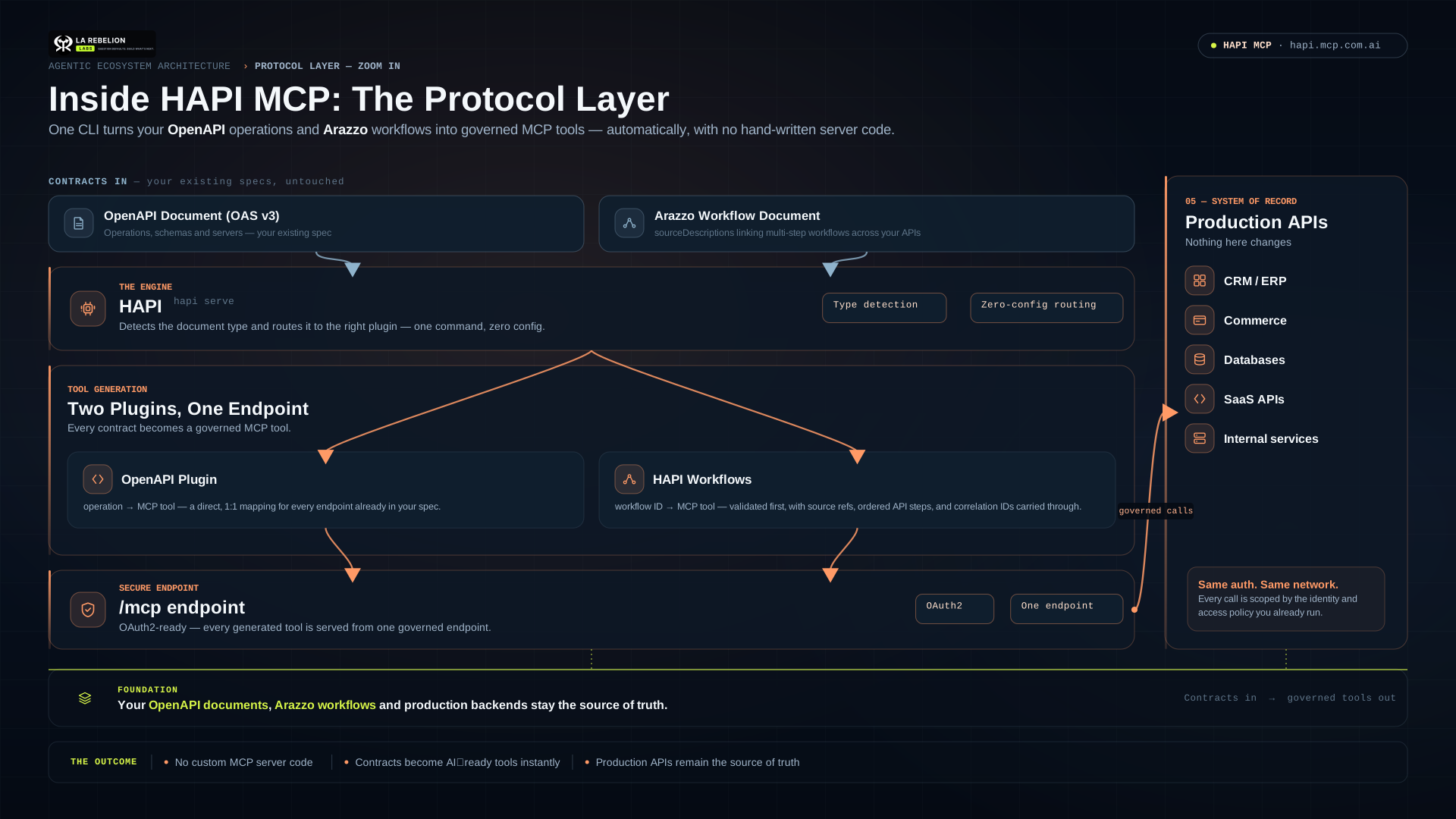
Turn an OpenAPI-described API into an MCP server, or expose an Arazzo workflow as a higher-level MCP tool.
This is the public distribution repository for HAPI binaries, packages, and end-user release artifacts. HAPI is a La Rebelion Labs product, alongside mcp.com.ai, clawne.me, and rebelion.la.
HAPI v1 beta
HAPI v1 is a major upgrade from the production-ready HAPI MCP 0.x release line, which remains available in the legacy repository. Version 1 adds a plugin-based CLI and introduces HAPI Workflows: Arazzo workflows served as MCP tools.
Use v1 beta releases for evaluation and integration testing. Keep using the
0.x latest Docker tag for production workloads until v1 reaches stable
release. Pin a 1.0.0-beta.* version whenever repeatability matters.
| Need | HAPI v1 capability |
|---|---|
| Expose API operations as MCP tools | OpenAPI / HAPI MCP |
| Expose a business outcome as one MCP tool | Arazzo / HAPI Workflows |
| Use either document type from one entry command | hapi serve document detection |
How it works
OpenAPI document ──> HAPI ──> one MCP tool per API operation

Arazzo document ───> HAPI ──> one MCP tool per workflowId
                                └─ workflow steps call their documented APIs
With OpenAPI, an operation such as getPet becomes an MCP tool. HAPI can
proxy to an existing backend, so your API remains the source of truth for its
business logic, authentication, and data.
With HAPI Workflows, an Arazzo workflowId becomes an MCP tool. A workflow
can coordinate multiple documented OpenAPI operations—such as finding a
provider, checking availability, and booking an appointment—behind one
intentional tool call.
Choose an installation
Docker — recommended for trying HAPI v1
The workflows and arazzo tags point to the same HAPI v1 beta image.
docker pull hapimcp/hapi-cli:workflows
docker run --rm hapimcp/hapi-cli:workflows version
Use a pinned version instead of a moving tag in CI or shared environments:
docker pull hapimcp/hapi-cli:1.0.0-beta.0823
Packages
Install the CLI and the document plugins you want to use:
bun add -g @mcp-com-ai/hapi @mcp-com-ai/plugin-openapi @mcp-com-ai/plugin-arazzo

# npm also works
npm install -g @mcp-com-ai/hapi @mcp-com-ai/plugin-openapi @mcp-com-ai/plugin-arazzo
Confirm the installed capabilities:
hapi version
hapi plugins list
hapi doctor
Native binaries
Install the HAPI MCP CLI in one line, try MCP for your APIs in 5 seconds
Linux / macOS
curl -fsSL https://get.mcp.com.ai/hapi.sh | bash -s -- --version v1
Windows
irm https://get.mcp.com.ai/hapi.ps1 | iex -Version v1
Manual installation
Download the binary for your operating system from
Releases, make it executable,
and place it on your PATH. Linux releases include portable baseline and musl
variants; prefer the baseline or musl-baseline variant when CPU compatibility
is more important than maximum optimization.
Verify the accompanying checksum before executing a downloaded binary:
sha256sum -c <artifact>.sha256
Quick start: OpenAPI to MCP
Serve a local OpenAPI document and proxy MCP tool calls to its backend:
hapi openapi serve --specs ./openapi.yaml \
  --url https://api.example.com \
  --headless \
  --port 3000
The MCP endpoint is http://localhost:3000/mcp.
--specs accepts a local path, a file: or path: URL, an HTTP(S) URL, or a
document stored under $HAPI_HOME/specs. If --url is omitted, HAPI uses the
server URL declared in the OpenAPI document.
# Let HAPI detect an OpenAPI document automatically
hapi serve --specs https://api.example.com/openapi.yaml --port 3000
Quick start: HAPI Workflows (Arazzo)
Validate first, then serve an Arazzo document:
hapi workflows validate --specs ./workflow.yaml

hapi workflows serve --specs ./workflow.yaml \
  --port 3000 \
  --host 0.0.0.0 \
  --public-host http://localhost:3000
hapi arazzo serve and hapi workflows serve are exact aliases. The general
hapi serve command also detects an Arazzo document automatically.
By default, each workflow step uses the server URL from the OpenAPI document
referenced by its Arazzo sourceDescription. This supports workflows that
coordinate multiple APIs. Use --url https://staging.example.com only when
every step should use the same replacement backend.
Run a workflow with Docker
docker run --name hapi-workflows --rm -d \
  -p 3000:3000 \
  -v "$PWD:/specs:ro" \
  hapimcp/hapi-cli:workflows \
  workflows serve --specs /specs/workflow.yaml \
  --port 3000 \
  --host 0.0.0.0 \
  --public-host http://localhost:3000
--host 0.0.0.0 is required for a server that must be reached through Docker
port publishing.
Useful commands
| Command | Purpose |
|---|---|
hapi serve | Detect and serve an OpenAPI or Arazzo document. |
hapi openapi serve | Explicitly serve an OpenAPI API as MCP tools. |
hapi arazzo serve | Explicitly serve Arazzo workflows as MCP tools. |
hapi workflows serve | Alias for hapi arazzo serve. |
hapi workflows validate | Validate an Arazzo document before serving it. |
hapi plugins list | List installed or bundled plugins. |
hapi doctor | Check the local HAPI configuration and plugin compatibility. |
Run hapi help or append --help to a command to see every option.
Documentation and support
- HAPI documentation
- HAPI Workflows guide
- Docker deployment guide
- Report an issue or start a discussion
License
HAPI MCP is distributed under the La Rebelion Labs Community License.
Reviews
No reviews yet
Be the first to review this server!
More Developer Tools MCP Servers
Rea
Freeby Morluto · Developer Tools
Reverse engineer anything from your terminal or agent with one CLI and MCP server.
Fetch
Freeby Modelcontextprotocol · Developer Tools
Web content fetching and conversion for efficient LLM usage
Git
Freeby Modelcontextprotocol · Developer Tools
Read, search, and manipulate Git repositories programmatically
Toleno
Freeby Toleno · Developer Tools
Toleno Network MCP Server — Manage your Toleno mining account with Claude AI using natural language.
mcp-creator-python
Freeby mcp-marketplace · Developer Tools
Create, build, and publish Python MCP servers to PyPI — conversationally.
MCP Marketplace
Freeby mcp-marketplace · Developer Tools
Search and install MCP servers from inside your AI client.