
Server data from the Official MCP Registry
Create, review and schedule social content from your AI agent. Approval-first.
About
Create, review and schedule social content from your AI agent. Approval-first.
Remote endpoints: streamable-http: https://mcp.genfeed.ai/mcp
Security Report
Valid MCP server (4 strong, 1 medium validity signals). No known CVEs in dependencies. Imported from the Official MCP Registry.
Endpoint verified · Requires authentication · 1 issue found
Security scores are indicators to help you make informed decisions, not guarantees. Always review permissions before connecting any MCP server.
Permissions Found in Source Code
Found by scanning the linked source code. This listing connects to a hosted endpoint, so none of this runs on your machine: it describes what the server software does where it is hosted.
How to Connect
Remote Plugin
No local installation needed. Your AI client connects to the remote endpoint directly.
Add this to your MCP configuration to connect:
{
  "mcpServers": {
    "ai-genfeed-genfeed": {
      "url": "https://mcp.genfeed.ai/mcp"
    }
  }
}Documentation
View on GitHubFrom the project's GitHub README.
Genfeed.ai
The open-source content agent.
Create on-brand videos, images and posts, then review and publish to your connected channels. Work in Genfeed or connect the AI agent you already use.



[!WARNING] Genfeed is
0.xand under active development. Breaking changes ship with an Upgrade note in the release body; semver becomes strict atv1.0.0.
Self-host it (Community), run it on your Mac (Desktop), or use the hosted product at genfeed.ai (SaaS). Same code, three deployment modes.
Requirements (Community)
- Docker Engine with the Docker Compose v2 plugin (
docker compose version), or Docker Desktop. Both the 3-command block below andnpx @genfeedai/createneed it. - Node.js 24 (
>=24 <25), only fornpx @genfeedai/create. - Free host ports 3000 (web), 3010 (API) and 3014 (MCP).
- About 10 GB of free disk (15 GB recommended); a fresh install measured about 9.5 GB.
- RAM: no minimum is published. Tested on 8 CPU / 15 GiB.
- Debian 13 provides Compose v2 in its
docker-composepackage. With Docker CE, installdocker-compose-pluginfrom Docker's apt repository.
See troubleshooting if the app logs
P1001: Can't reach database server at postgres:5432.
Quick start (Community)
curl -fLO https://github.com/genfeedai/genfeed.ai/releases/latest/download/genfeed-selfhosted.tar.gz
tar -xzf genfeed-selfhosted.tar.gz && cd genfeed-selfhosted-v*
cp .env.example .env && docker compose --env-file .env -f compose.yml up -d
| Surface | Local URL |
|---|---|
| Web UI | http://localhost:3000 |
| REST API | http://localhost:3010 |
| MCP server | http://localhost:3014 |
The bundle pins the image for its release, applies Prisma migrations, and seeds one local workspace. No Genfeed Cloud account is required.
For a first generation, do these in order:
- Set
OPENROUTER_API_KEYin.envto a real key from openrouter.ai/keys. Text generation and the agent need it. Without it the install-readiness check reports text generation as not ready. Then restart with the samedocker compose up -dcommand so the container reads the new value. - Open
http://localhost:3000and create your account. Sign-up is on by default (BETTER_AUTH_ENABLED=truein.env), so the first visitor can register. No email provider is needed for email/password. - Complete onboarding, then start a task or generation.
Keys are checked for real. Settings → API Keys validates each provider key
against the provider before saving, so placeholder text is rejected there.
Keys in .env are never accepted as placeholders either: an empty or
template value counts as not configured.
npx @genfeedai/create my-genfeed downloads, checksums, and starts the same
bundle. Checksums, auth, providers, and upgrades:
self-hosting guide.
Let your coding agent install it
Genfeed is driven by agents, so installing it is a task you can hand to one. Paste this into Claude Code, Codex, Cursor, or any agent with shell access:
Install Genfeed — the open-source content agent — on this machine, then connect
it to yourself over MCP.

1. Check Docker Engine with Compose v2 is available.
2. Start the Community bundle:
   curl -fLO https://github.com/genfeedai/genfeed.ai/releases/latest/download/genfeed-selfhosted.tar.gz
   tar -xzf genfeed-selfhosted.tar.gz && cd genfeed-selfhosted-v*
   cp .env.example .env && docker compose --env-file .env -f compose.yml up -d
3. Wait for http://localhost:3000 to answer. Sign-up is open by default; the
   seed also creates one organization (slug `default`) and brand. Put a real
   OpenRouter key in `.env` as `OPENROUTER_API_KEY` and restart before
   generating.
4. For Claude Code, register its dedicated content connector:
   claude mcp add --transport http genfeed --scope user http://localhost:3014/mcp/claude
5. Open /mcp, select genfeed and complete browser OAuth. For other clients,
   configure the standard http://localhost:3014/mcp endpoint and authorize in
   the browser; a scoped API-key fallback is available for those clients.
6. List the Genfeed tools to confirm the connection, then stop.

Reference: https://github.com/genfeedai/genfeed.ai/blob/master/docs/self-hosting.md
Docs index for agents: https://docs.genfeed.ai/llms.txt
Already on the hosted product? Skip installation and authorize with browser OAuth.
Claude uses https://mcp.genfeed.ai/mcp/claude for brands, drafts, existing assets, scheduling and analytics; create media in Genfeed Playground. Other clients use https://mcp.genfeed.ai/mcp for the full toolset.
The standard MCP preset is approval-first: an agent can generate, draft, and schedule, but publishing waits for a human. What each surface exposes and why is in Agent Surface.
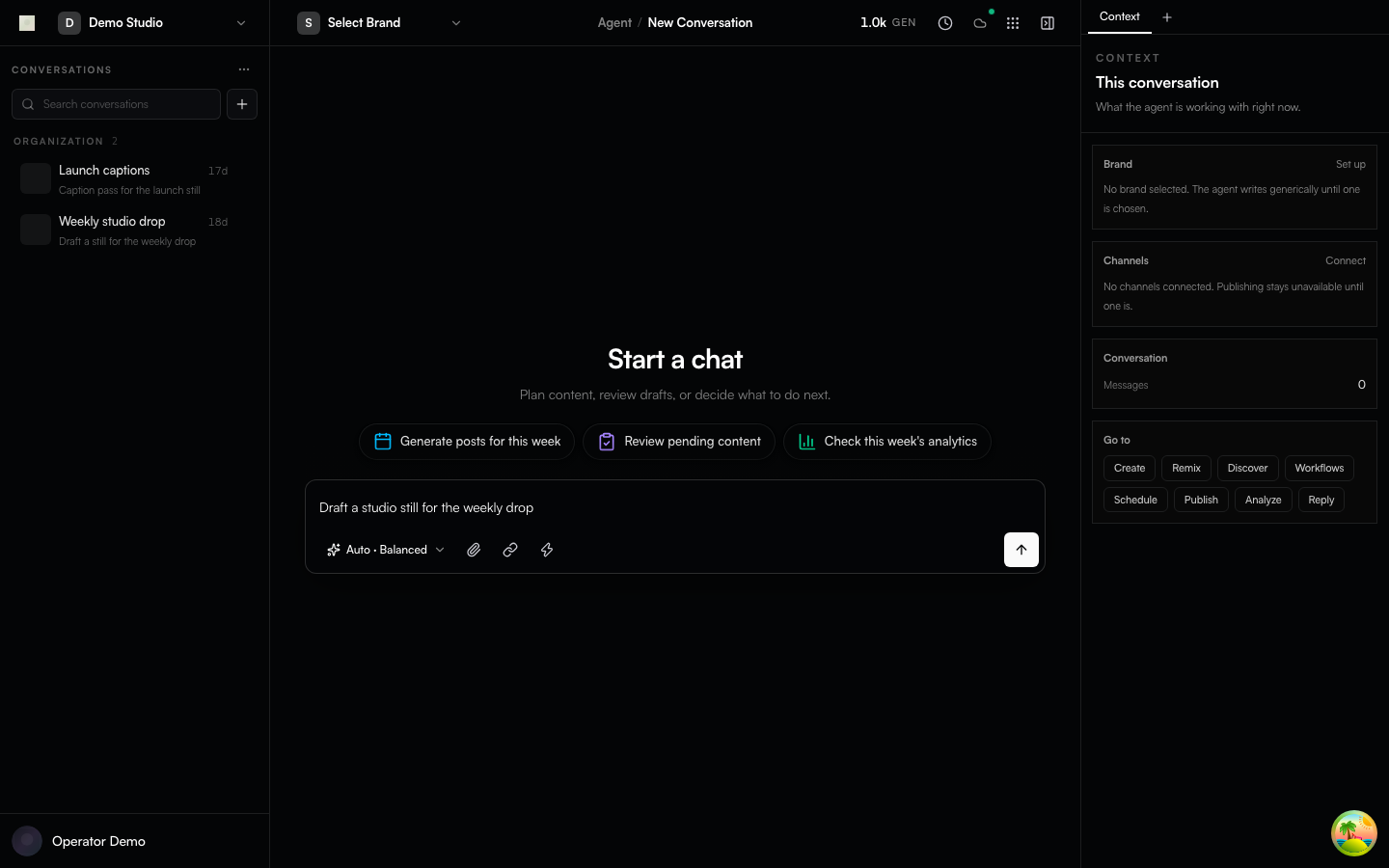
Mocked Playwright capture of the agent conversation shell. Fixture data, not a live generation.
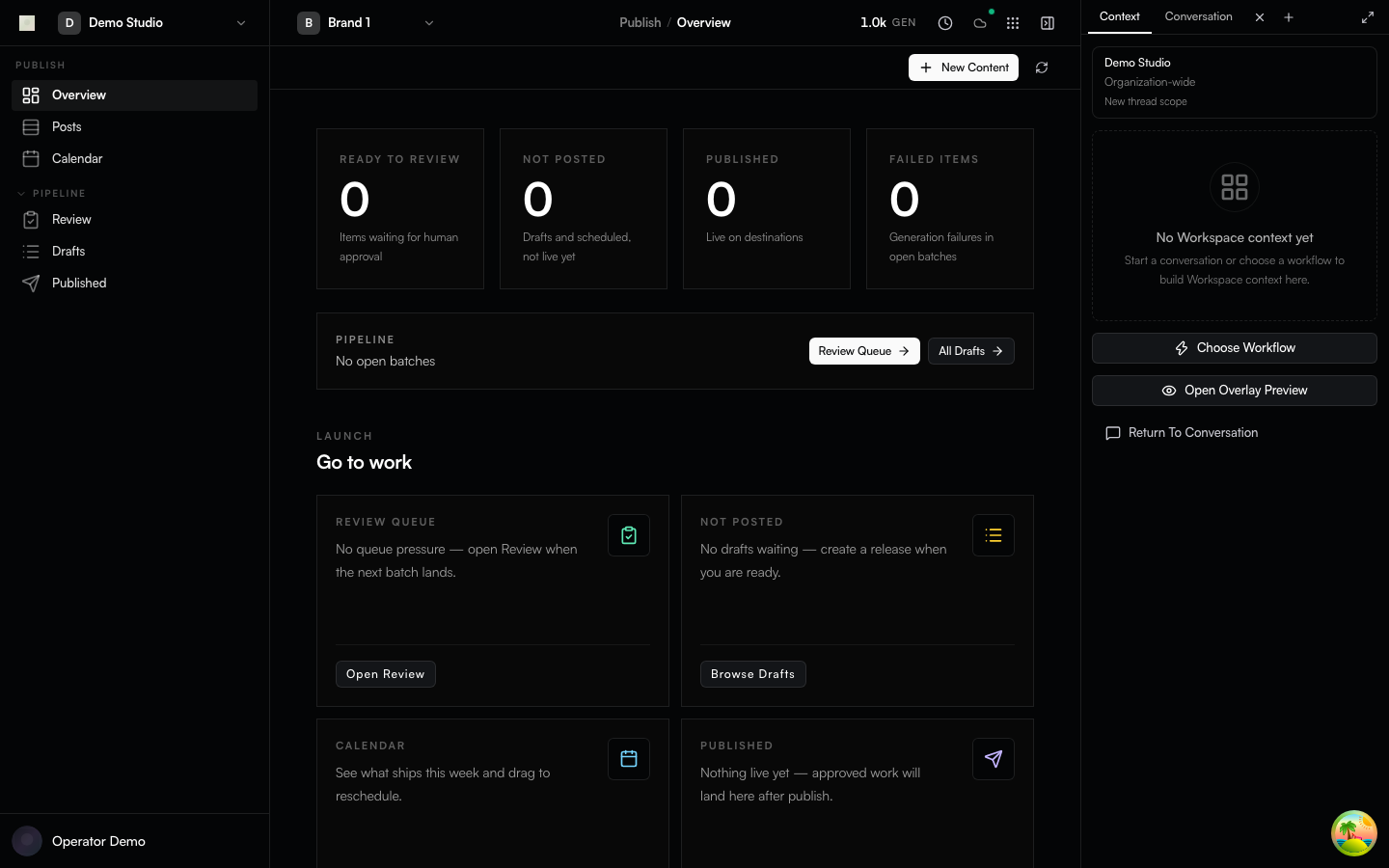
Mocked Playwright capture of the Publish desk.
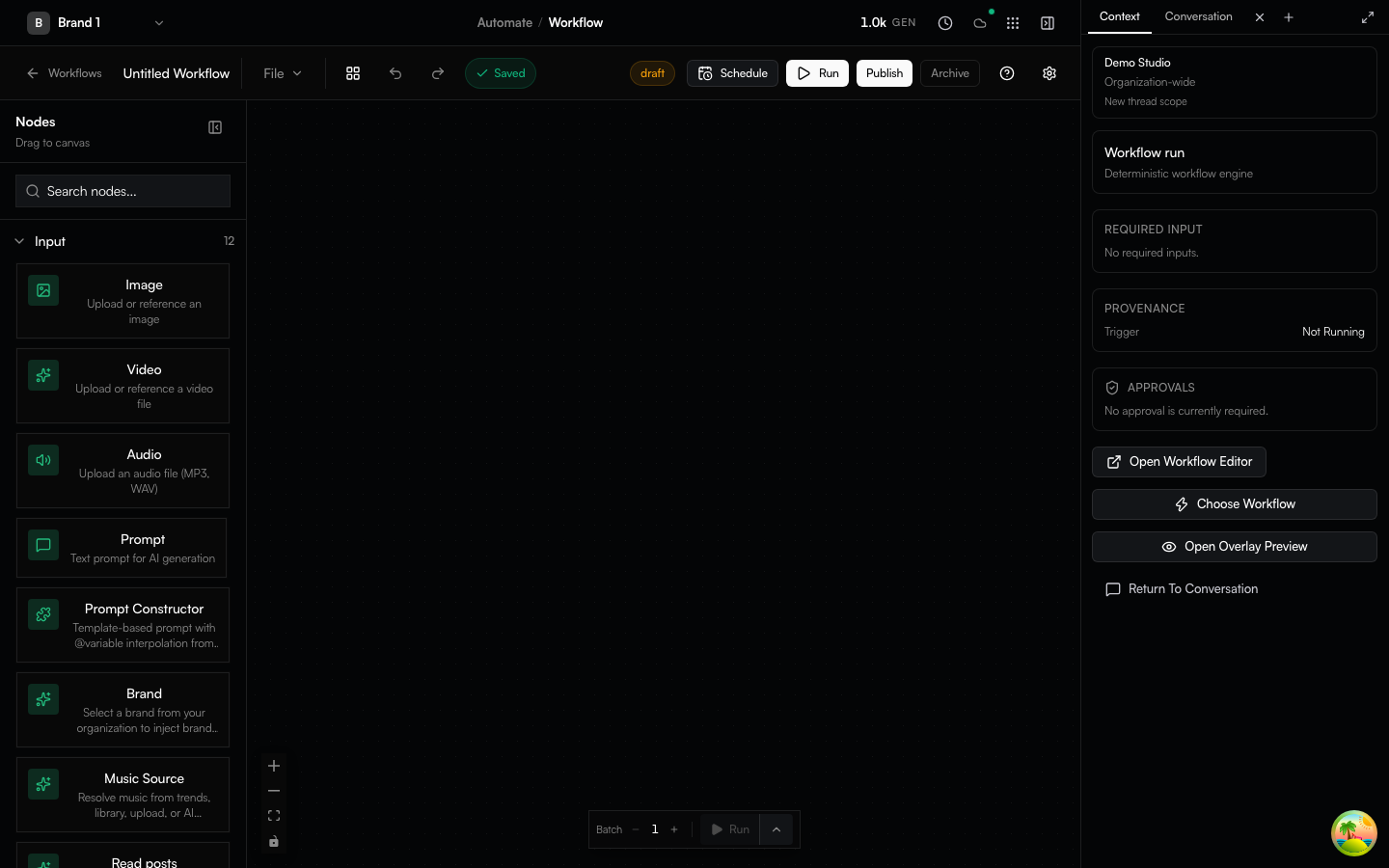
Mocked Playwright capture of Automate workflow authoring.
Capabilities
- Generate images, video, text, voice, and audio with local or bring-your-own-key execution
- Visual workflow authoring; content library, brand, scheduling, and publishing
- Drive the same loop from the web app, the
genfeedCLI, the REST API, or any AI agent over MCP - PostgreSQL via Prisma; Redis/BullMQ background work
- A Community Docker distribution built from the same AGPL source as the hosted image
Availability differs by deployment mode and configured provider. Read Deployment Modes and Execution Boundaries before relying on a feature for a specific distribution.
Deployment modes
| Mode | Who it is for | How you get it |
|---|---|---|
| SaaS | Hosted multi-tenant product | app.genfeed.ai |
| Community | Self-hosters, one organization | Checksummed GitHub release bundle (quick start above) |
| Desktop | Solo creators on their own Mac | Signed macOS artifacts from desktop-v* tags |
Organization billing ships in every image and is gated at runtime
(GENFEED_CLOUD / self-host licence) — see the
billing section.
Managed inference infrastructure and Fleet/LoRA operations live outside this
public repository.
Desktop is macOS-first. Mobile and browser/IDE extension sources live in the tree; this repository does not claim a public store listing for them.
How agents work in this repo
This repository is agent-native: most of its code is written by AI agents under human direction, and the tree is laid out so an agent can be productive from a cold clone.
- AGENTS.md and CLAUDE.md — operating rules every agent (and human) follows: type safety, UI primitives, serializers, tenancy filters, commit conventions.
- CONTEXT.md — the glossary. One spelling per concept, used in code, issues, docs, and PRs.
.agents/— durable project memory (rules, ADRs underarchitecture/ADR-*.md, specs) plus build/dev skills for working on the app.MEMORY.mdis the index.skills/at the repo root is different: those are product/content skills the app ships.- Issues carry EARS acceptance criteria (
WHEN … THE SYSTEM SHALL …) so an agent can pick one up and know what "done" means. Triage rewrites weak criteria; it never bounces. shipcode:*labels are internal automation. They are visible on issues and PRs; contributors never apply them.- Agent-authored PRs are welcome when disclosed in the PR body and a named human is accountable for the description and verification. Undisclosed agent-authored PRs are closed. See CONTRIBUTING.md.
PRs are reviewed by an automated pipeline first, then by the maintainer, who alone merges.
Architecture
Genfeed is a Bun/Turborepo monorepo with Next.js clients, NestJS server workspaces, PostgreSQL/Prisma persistence, and Redis/BullMQ queues. The Community image bundles the web app, API, workers, files, notifications, and MCP runtimes into one container and embeds Redis.
apps/
  app/                    Next.js product UI
  server/                 NestJS services and shared server library
  desktop/app/            Electron client (macOS-first release path)
  mobile/app/             Expo/React Native client source
  extensions/browser/app/ Chrome extension source
  extensions/ide/app/     VS Code extension source
packages/                 Shared @genfeedai/* packages
docker/                   Community and hosted image definitions
The public API is REST/OpenAPI. GraphQL appears only in outbound integrations such as Shopify.
The stack is declared, not debated per-PR. Replacing an item requires an accepted ADR before code lands (see GOVERNANCE.md).
| Layer | Choice | Why |
|---|---|---|
| Runtime + PM | Bun + Turborepo | One toolchain for install, scripts, tests, and bundling |
| Web | Next.js 16 + React 19 | App Router, RSC, and the same client for SaaS, Community, and Desktop |
| API | NestJS 11 | DI, guards, and tenancy/auth enforcement across services |
| Data | Prisma 7 + PostgreSQL | One schema, typed queries, migrations shipped with every release |
| Queues | Redis + BullMQ | Generation, publishing, and scheduling are background work |
| Auth | Better Auth | Self-hostable, org-aware, no vendor account required for Community |
| Quality | Biome, Vitest, Playwright | Format+lint in one pass; colocated unit tests; E2E tiers per distribution |
| Distribution | Docker Compose + GHCR | Checksummed bundle pinned to an image |
More: Architecture · Deployment Modes · Execution Boundaries · Agent Surface.
Contributing
Contributions are voluntary and unpaid. Genfeed has no paid contribution program; see the contribution policy.
Audience order for this repository is self-hosters, then agent contributors,
then human contributors. Development is supported on macOS and Linux (Windows
via WSL2). Prerequisites: Node 24, Bun, Docker with Compose v2, a C/C++
toolchain plus python3 (sudo apt-get install -y build-essential python3 on
Debian/Ubuntu, xcode-select --install on macOS), and systemd on Linux for
dev:setup. Details are in
CONTRIBUTING.md.
bun install && cp .env.example .env.local
bun run env:sync local
docker compose -f docker/local/docker-compose.yml up -d postgres redis
bun run dev:setup                  # once per machine
bun run dev:backend:min            # then, in a second terminal:
bun run dev:app                    # → https://app.genfeed.localhost/
Portless HTTPS is the default contributor dev path. Fixed-port dev:debug*
commands remain an optional debugging path when Portless cannot be used.
Everything else — issue forms and EARS criteria, the PR contract (squash +
conventional title + linked issue), the CLA (once per GitHub account per
CLA version), agent-authored PR disclosure, and focused verification — is in
CONTRIBUTING.md.
Governance is one maintainer plus an AI review pipeline: GOVERNANCE.md. Help and questions: SUPPORT.md. Security reports follow SECURITY.md, never a public issue.
Licence and trademark
- Code: GNU Affero General Public License v3.0 or later — the whole repository
- Contributions: Contributor License Agreement (FSFE FLA 2.1: ICLA.md / CCLA.md), signed once per GitHub account per CLA version via CLA Assistant. A newer CLA version applies to future contributions; prior contributions keep prior rights.
- Name and logo: TRADEMARK.md — the licence covers the code, not the brand
Independently published packages and skills may declare their own license in their package metadata.
Links
Repository docs (docs/ in this tree) are for contributors and
self-hosters: self-hosting,
deployment modes,
architecture, agent surface,
and native referral credits.
docs.genfeed.ai is the product and API
documentation for people using Genfeed. Each side links the other; neither
duplicates the other.
Reviews
No reviews yet
Be the first to review this server!
More Developer Tools MCP Servers
Rea
Freeby Morluto · Developer Tools
Reverse engineer anything from your terminal or agent with one CLI and MCP server.
Paperclip
Freeby Paperclipai · Developer Tools
Trending hip-hop artist momentum scores across four cultural dimensions.
Git
Freeby Modelcontextprotocol · Developer Tools
Read, search, and manipulate Git repositories programmatically
Fetch
Freeby Modelcontextprotocol · Developer Tools
Web content fetching and conversion for efficient LLM usage
Toleno
Freeby Toleno · Developer Tools
Toleno Network MCP Server — Manage your Toleno mining account with Claude AI using natural language.
MCP Marketplace
Freeby mcp-marketplace · Developer Tools
Search and install MCP servers from inside your AI client.