
Server data from the Official MCP Registry
An agent on call for the things nobody watches. Checks run free; your agent wakes only on a change.
About
An agent on call for the things nobody watches. Checks run free; your agent wakes only on a change.
Security Report
Valid MCP server (5 strong, 3 medium validity signals). No known CVEs in dependencies. Package registry verified. Imported from the Official MCP Registry. Trust signals: 5 highly-trusted packages.
6 files analyzed · 1 issue found
Security scores are indicators to help you make informed decisions, not guarantees. Always review permissions before connecting any MCP server.
Permissions Required
This plugin requests these system permissions. Most are normal for its category.
How to Install
Add this to your MCP configuration file:
{
  "mcpServers": {
    "ai-lfglabs-t3-watch": {
      "args": [
        "-y",
        "@lfg-labs/t3-watch"
      ],
      "command": "npx"
    }
  }
}Documentation
View on GitHubFrom the project's GitHub README.
t3-watch
An agent on call for the things nobody watches. Checks run free; your agent wakes only when something changes.
Watch keeps an eye on the systems you run: CI, cloud accounts, API keys, URLs and scheduled jobs. It sets itself up from the projects and logins already on your machine, and runs its checks as plain code on its own clock, so they spend no model tokens.
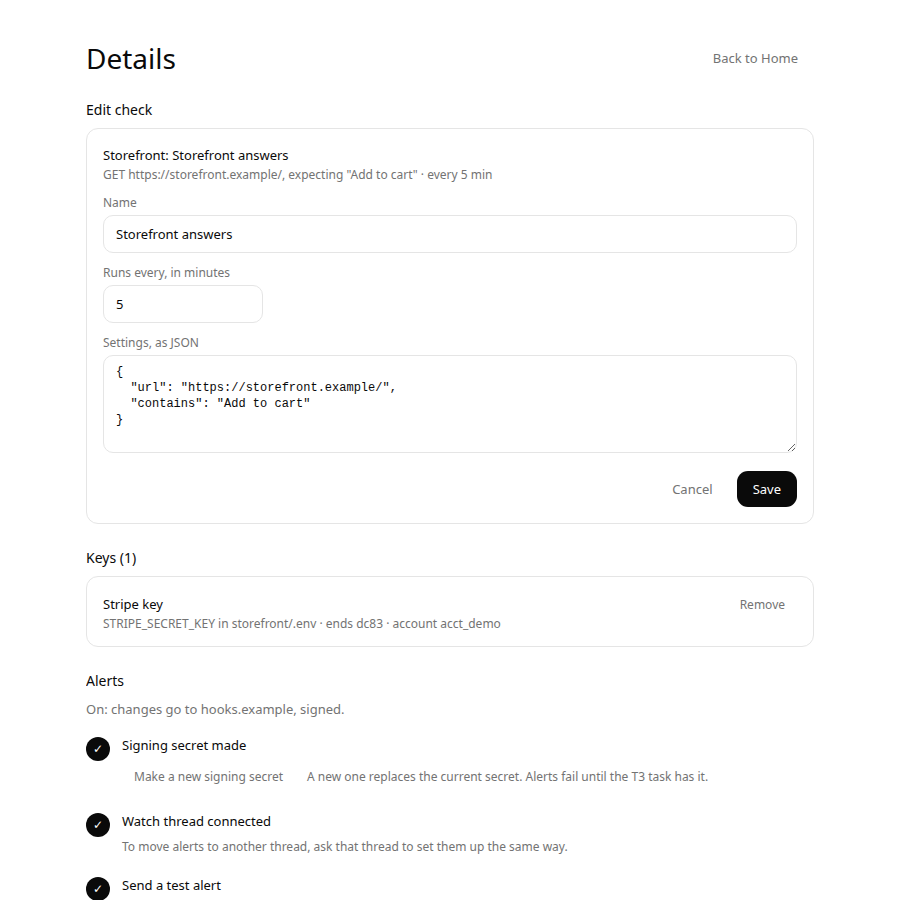
- The page is for knowing and deciding: what's broken, what's waiting for you, and one-click Turn on, Pause and Add key. Keys are pasted here, never in chat. Details edits a check's name, how often it runs and its settings, and deletes one; a deleted check keeps its history and can be restored.
- The chat is for understanding and authoring. A "Watch" thread in T3 Code (or any MCP client) investigates failures, writes new checks and shows the page inline.
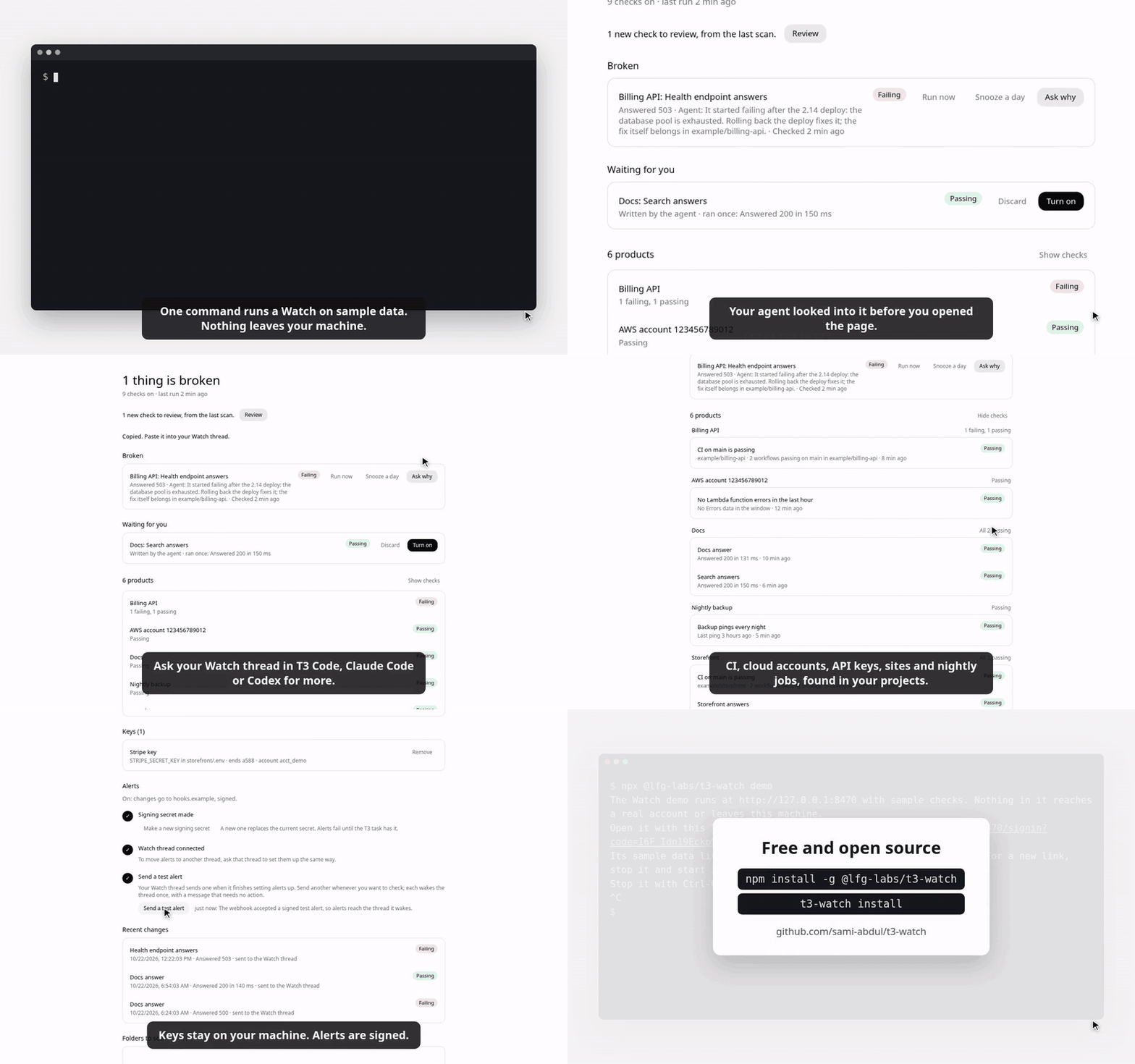
The demo in 60 seconds, recorded from npx @lfg-labs/t3-watch demo with its sample data. Click it
for the sharper MP4, which GitHub hands over as a download.
Try it first
npx @lfg-labs/t3-watch demo
With Node 24 or newer, the demo runs a Watch with sample checks on this machine and prints a sign-in link for its page. Every check and alert in it gets a canned answer, and it neither scans nor takes keys, so it reaches none of your accounts and sends nothing off the machine. Signing in to it leaves your own Watch signed in. Ctrl-C stops it and removes it. The video and the screenshots here come from it.
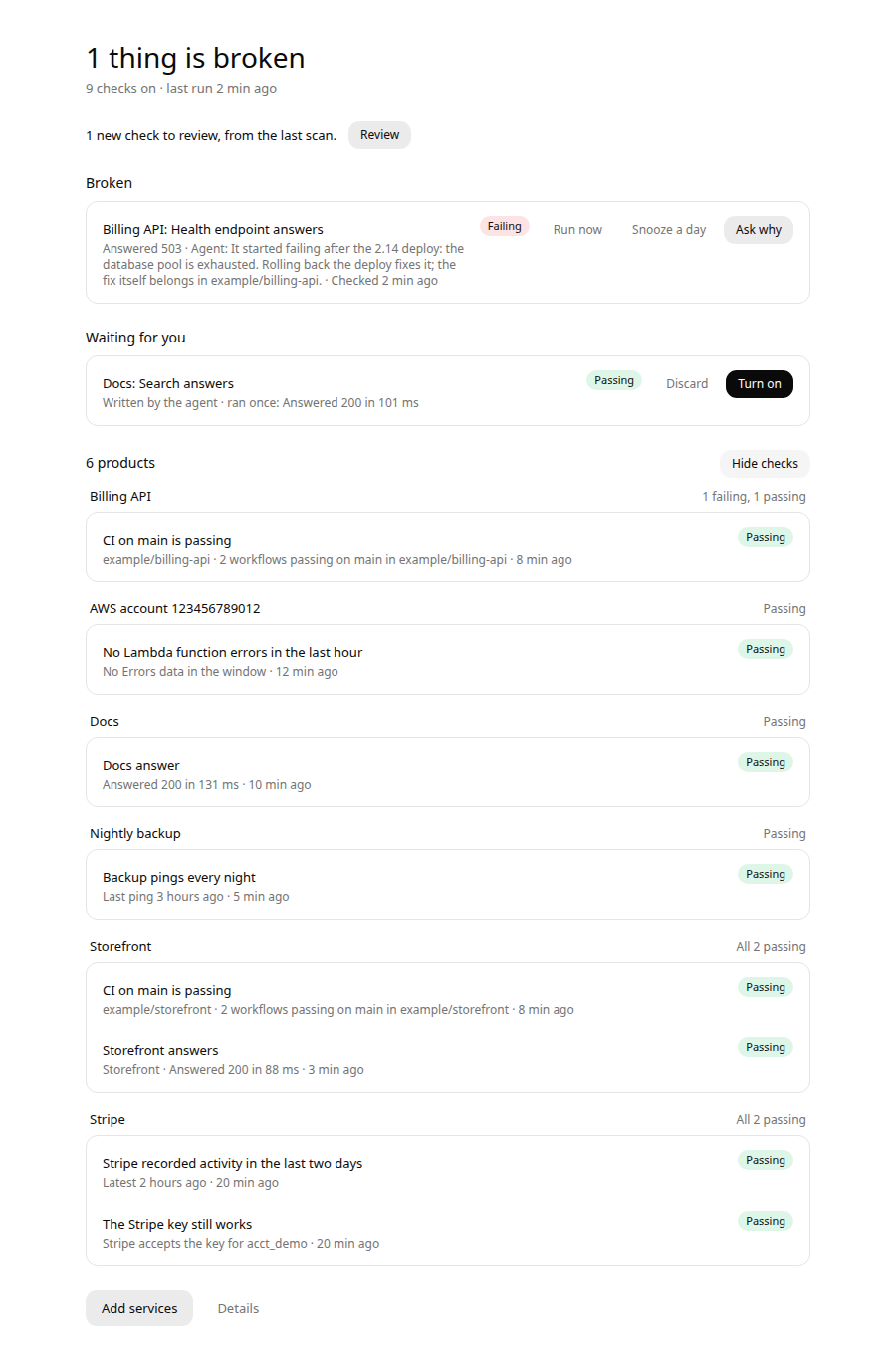
| Each product with its checks | Editing a check in Details |
|---|---|
 |  |
Install
Watch needs Node 24 or newer, on a machine that stays on.
npm install -g @lfg-labs/t3-watch
t3-watch install
install runs Watch in the background at login (systemd on Linux, launchd on macOS), adds its MCP
server to Codex and Claude Code, and prints a sign-in link for the page. A sign-in link works
once, within 10 minutes, so a copy left in a terminal, a log or a chat is useless after use. For
each other browser, t3-watch url prints a new one, or ask your Watch thread for the page. A
browser gets its own session, never the access token agents use, and t3-watch signout signs
every browser out while agents keep working.
T3 Code can run several accounts for one provider, each in its own home. t3-watch install --all
also adds Watch's MCP server to every enabled Claude Code and Codex home in T3's settings, so a
Watch thread works on any account, and t3-watch uninstall --all takes it out of them again.
To run from a checkout instead, clone this repository, run pnpm install && pnpm build, then
node bin/t3-watch.js install.
On Linux, loginctl enable-linger $USER keeps it running while you're logged out.
If Tailscale runs on the machine, install serves the page on your tailnet over HTTPS with
tailscale serve, never funnel, on port 8461 or the next free one, and sign-in links point
there. It opens on your own devices and nowhere else. Tailscale lets only its operator do this:
if install says so, run sudo tailscale set --operator=$USER once and install again.
--no-tailscale keeps the page on this machine, a publicUrl you set in
~/.t3-watch/config.json is left as it is, and uninstall stops the route install made. If host
there is a tailnet address, Watch listens on 127.0.0.1 as well, so tailscale serve can front it.
First run
Open the page. It first shows what Watch may read: the folders it would look in, ~/Projects
and any of ~/code, ~/src and ~/dev that exist, each with how many git repositories it
holds, and three logins: the GitHub CLI, AWS CLI profiles, and vendor keys in .env files.
Untick what Watch should leave alone, add a folder if you like, and press Scan these. Watch
reads only what is ticked: it finds the vendors your code uses, tests the logins you allowed, and
runs every suggested check once. Untick the checks you don't want and press Watch these.
Add services shows the same choice before each later scan, and an agent can read it with
watch_sources.
Watch only reads. Keys it finds are stored encrypted in ~/.t3-watch, and their values never
reach the page, a log or an agent.
The Watch thread
install adds a project named Watch to T3 Code, in a folder of its own with no code, so a thread
there starts without any repository's hooks, skills or memory. Start a thread in it and say "Show
me Watch". The agent calls watch_home. On Codex threads the page appears inline and its buttons
work; on other providers you get the same state as text. install --no-project skips the
project, and uninstall leaves it with its threads.
Things to ask:
- "What's broken?" or "Why did CI fail on api?"
- "Pause the Stripe checks until Monday."
- "Make sure the nightly import ran." The agent drafts a check, runs it once, and leaves it for you to turn on.
- "Watch Missive too." The agent writes a vendor description and tests it with your key.
- "Put shop.example under Storefront." Home groups checks by product, guessed from names; when a site's repository has another name, the agent names the product, and the repository follows.
- "Set up alerts." Alerts in the page's Details walks you through three steps. Press Make a
signing secret, which the page shows once. Say "Set up alerts" here: the agent creates a T3
webhook task bound to the thread that checks Watch's signature, asks you to paste the secret
into a private T3 card, gives Watch the task's address, and sends a test alert. The task
accepts it only when it holds Watch's secret. Send a test alert on the page, or
t3-watch alerts testin a terminal, sends another whenever you want to check, andt3-watch alertssays how the last one went. The secret never passes through the chat, Watch refuses one sent over MCP, and only the webhook's host shows on the page. From then on, a check that starts failing, recovers or can't run wakes the thread, and the agent looks into it before you open it. Checks that keep passing send nothing. A check that was passing counts as failing only when two runs in a row do not pass; Watch runs it again within a minute of the first, so one dropped request wakes nobody. A recovery counts at once.
When Watch's own connection drops
When a check that needs the internet stops passing, Watch first asks whether it can reach the
internet at all. If neither https://www.gstatic.com/generate_204 nor
https://one.one.one.one/cdn-cgi/trace answers within 5 seconds, it holds the result: the run
shows in the check's history as held, the check keeps its last result, and nothing alerts. Home
and the Watch thread's status say when Watch lost its connection. Heartbeats and checks on this
machine are never held, and a check's failures are held for at most an hour of its runs in a row,
in case the probe addresses are what is blocked.
A slow link gets the same care. When a web or vendor check's connection to a public site times out, drops or cannot finish its name lookup, Watch times its probe. One that takes a second or more, or 400 ms or more while two or more sites newly fail that way within two minutes, means Watch's own link is slow, and the failure is held like an offline one. A refused connection, a bad certificate, an HTTP answer, GitHub and AWS checks, and checks on your own network, by address or by a name such as nas or fritz.box, still count. A check's next run after a held one waits 45 seconds for an answer instead of 15. Home and the Watch thread's status say when the connection turned slow; the spell ends when a probe or a request answers within 400 ms, or a probe no longer shows it slow.
If your network blocks those two addresses, list ones it allows as probeUrls in
~/.t3-watch/config.json and restart Watch. An empty list turns holding off. Watch notices a
blocked list on its own: when the addresses fail twice in an hour right after a check reached the
internet, it stops holding and says so on Home until one of them answers or Watch restarts. A
web request that had just taken longer than the probes wait is the exception: then the link is
slow, not the list blocked.
Vendors
Each vendor is a JSON file in catalog/: how to spot it in a project, which variable
holds its key, how to send the key, which read-only call proves the key works, and which checks
to offer. Adding a vendor is a file, not a release. Watch only sends GET requests to the API
origin a description names.
Shipped: Stripe, Pipedrive, Missive, Asana, Airtable, Jotform, Calendly, Vimeo, Sentry, OpenAI, Anthropic. Xero is recognised, but sign-in vendors aren't supported yet.
Check kinds that need no vendor file: http, github (through gh; for a scheduled workflow, name
it in workflow and add maxAgeSeconds, so a schedule GitHub skipped or disabled fails instead of
staying green),
aws_metric (through the AWS CLI) and heartbeat (a job pings a URL; add ?status=fail when it
fails).
GitHub's runs API sometimes answers, for a while, with no runs at all for a repository that has them. A GitHub check that has listed runs for its repository, branch and workflow holds such an empty list as Watch holds a failure while it is offline: for up to an hour of its runs, and without a probe, since GitHub answered. If the list stays empty past that, the check says so, as in "GitHub listed no runs for main in owner/repo, though it had them before", or "for refresh.yml on owner/repo" when it reads one workflow on any branch. "No finished runs yet" stays for a list with nothing finished in it, and an edit to another branch or workflow starts the check's memory over.
Development
pnpm dev          # the service from source, on 127.0.0.1:8460
pnpm test         # unit and integration tests
pnpm typecheck
pnpm build        # server, page and the inline view
node scripts/record-demo.ts   # the README's demo video again, with Chrome and ffmpeg
Design and requirements live in openspec/.
License
Free and open source under the MIT license.
Reviews
No reviews yet
Be the first to review this server!
More Developer Tools MCP Servers
Rea
Freeby Morluto · Developer Tools
Reverse engineer anything from your terminal or agent with one CLI and MCP server.
Paperclip
Freeby Paperclipai · Developer Tools
Trending hip-hop artist momentum scores across four cultural dimensions.
Git
Freeby Modelcontextprotocol · Developer Tools
Read, search, and manipulate Git repositories programmatically
Fetch
Freeby Modelcontextprotocol · Developer Tools
Web content fetching and conversion for efficient LLM usage
Toleno
Freeby Toleno · Developer Tools
Toleno Network MCP Server — Manage your Toleno mining account with Claude AI using natural language.
MCP Marketplace
Freeby mcp-marketplace · Developer Tools
Search and install MCP servers from inside your AI client.