
Server data from the Official MCP Registry
Check if your exit IP works for ChatGPT, Claude, Gemini: ASN, proxy/IDC type, risk, AI availability
About
Check if your exit IP works for ChatGPT, Claude, Gemini: ASN, proxy/IDC type, risk, AI availability
Security Report
Valid MCP server (2 strong, 3 medium validity signals). No known CVEs in dependencies. Package registry verified. Imported from the Official MCP Registry.
4 files analyzed · 1 issue found
Security scores are indicators to help you make informed decisions, not guarantees. Always review permissions before connecting any MCP server.
Permissions Required
This plugin requests these system permissions. Most are normal for its category.
How to Install
Add this to your MCP configuration file:
{
  "mcpServers": {
    "cc-ipforai-ipforai": {
      "args": [
        "-y",
        "ipforai-mcp"
      ],
      "command": "npx"
    }
  }
}Documentation
View on GitHubFrom the project's GitHub README.
ipforai 网络检测
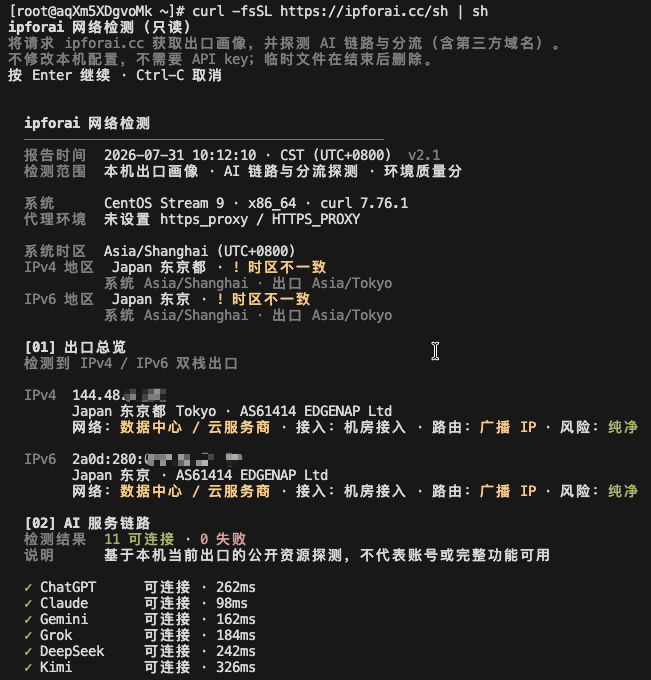
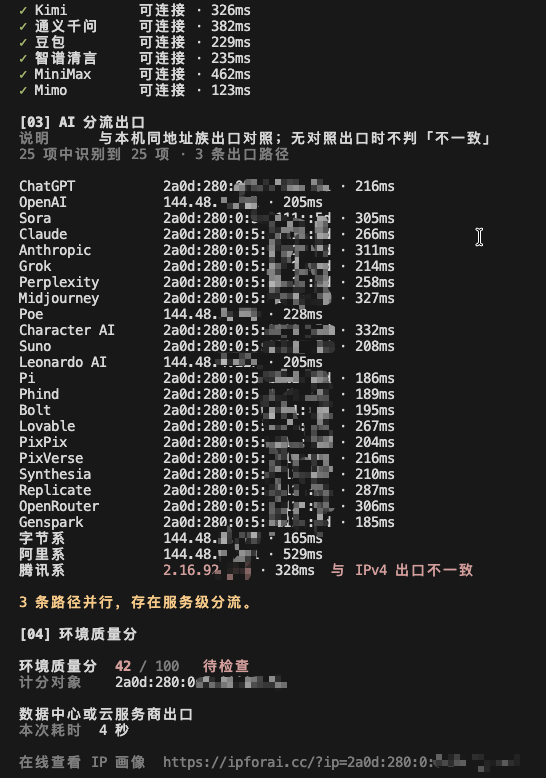
面向 AI 访问场景 的网络环境检测:当前出口画像、网络/接入/路由属性、风险信号、环境质量分,以及对 ChatGPT / Claude / Gemini 等服务的可用性参考(可用 / 受限 / 不可用 / 待确认)。
结果只描述网络环境,不代表账号登录、订阅资格或平台风控结论。
一行命令
终端检测
快捷执行(sh 和 bash 均可):
curl -fsSL https://ipforai.cc/sh | sh
curl -fsSL https://ipforai.cc/sh | bash
先审阅再执行(推荐):
curl -fsSL https://ipforai.cc/sh -o /tmp/ipforai-check.sh
less /tmp/ipforai-check.sh
sh /tmp/ipforai-check.sh -y
# 也可以用 bash 执行:bash /tmp/ipforai-check.sh -y
常用参数:
# 跳过确认
curl -fsSL https://ipforai.cc/sh | sh -s -- -y

# 指定 IP(仅画像与环境质量分,不含本机 AI 链路探测)
curl -fsSL https://ipforai.cc/sh | sh -s -- -y 8.8.8.8

# 详细输出
curl -fsSL https://ipforai.cc/sh | sh -s -- -y -d
以上命令中的 sh 均可替换为 bash;两者执行同一份 POSIX 兼容脚本。
权威脚本地址始终是官网
https://ipforai.cc/sh。本仓库中的check.sh为审阅镜像;请以官网版本为准。
完整参数、探测范围和结果解读见命令行检测指南。
检测效果
以下为脱敏的双栈终端检测示例。IP、时区、耗时和服务结果会随实际网络环境变化。
开发者 JSON(GET)
# GET /json:查看服务端看到的本次请求源 IP
curl -fsSL 'https://ipforai.cc/json'

# GET /json?ip=:服务端查询指定 IPv4 或 IPv6
curl -fsSL 'https://ipforai.cc/json?ip=8.8.8.8'
curl -fsSL 'https://ipforai.cc/json?ip=2001:4860:4860::8888'

# 强制分别查看请求的 IPv4 / IPv6 出口
curl -4 -fsSL 'https://ipforai.cc/json'
curl -6 -fsSL 'https://ipforai.cc/json'

# 使用 GET 参数编码传入 ip
curl --get -fsSL --data-urlencode 'ip=8.8.8.8' 'https://ipforai.cc/json'
ip 是唯一可选查询参数:省略或留空时查询本次请求源 IP;填入地址时只做服务端画像查询,不会从该 IP 发起实时连接,也不会读取调用方本机系统或浏览器数据。非法 IP 返回 HTTP 400。合法 ?ip= 响应带 Cache-Control: public, max-age=600,允许 CDN 缓存;无参响应始终 private, no-store。
字段说明见 docs/api.zh.md(English),示例响应见 examples/sample.json。
README 徽章(GET)
给任意项目 README 挂一张「AI 网络评分」徽章,点击回到官网结果页:
[](https://ipforai.cc/?ip=8.8.8.8)
自托管 SVG(不依赖 Shields.io,任意网页 <img> 可直接嵌入):
[](https://ipforai.cc/?ip=8.8.8.8)
实际效果(8.8.8.8 查询时的快照):

README 徽章必须带 ?ip=:GitHub 的 README 图片由 camo 代理抓取并缓存,不带参数显示的是抓图方的分数,不是读者的。接口细节与颜色档位见 docs/badge.zh.md(English)。
MCP(AI 客户端)
在 Claude、Cursor 等支持 MCP 的客户端里直接问「我现在的 IP 能不能用 Claude」:
claude mcp add ipforai -- npx -y ipforai-mcp
提供 check_my_ip(本机出口)和 lookup_ip(指定 IP)两个工具,支持 HTTPS_PROXY。其他客户端的配置见 mcp/README.md。
能做什么
| 能力 | 说明 |
|---|---|
| 出口画像 | 地理位置、ASN、网络类型、接入形态、路由属性 |
| 风险信号 | 代理相关风险档位、Tor 出口等(有数据时) |
| 环境质量分 | 网络环境参考分,不是 AI 账号分 |
| AI 可用性参考 | 与官网底部一致:可用 / 受限 / 不可用 / 待确认 |
| 终端链路探测 | CLI 在本机出口下探测公开入口与分流(指定 IP 时不跑链路) |
明确不做什么
- 不判断账号是否会被封、能否登录、订阅是否有效
- 不提供「纯净度 / 防封 / 解锁」承诺
- 不把任意 IP 的字符串当成「从该 IP 真实访问 AI」的连通探测(指定 IP 只查画像)
依赖与边界
- CLI:POSIX
sh、curl和系统常用命令;只读检测,不写系统配置、不安装软件、不需要 API Key - 网络请求:CLI 会向 ipforai.cc、IPv4 探测域名及脚本列出的 AI/厂商公开域名发起探测;JSON 只请求官网后端画像接口
- 数据来源:离线库与规则由官网维护,仓库中的
check.sh只是审阅镜像 - 会创建临时目录并在退出时删除
- 一次 TCP 请求只能看到一个源地址族;双栈请
-4/-6各查一次
仓库结构
.
├── README.md / README_EN.md
├── LICENSE
├── check.sh                 # /sh 的审阅镜像,以官网为准
├── docs/api.zh.md / api.md  # /json 说明
├── docs/badge.zh.md / badge.md  # /badge.json、/badge.svg 说明
├── mcp/                     # MCP 服务(npm 包 ipforai-mcp)
└── examples/sample.json     # 示例响应(单次请求仅一侧有值)
更新
- 脚本版本以运行输出中的版本号及响应头
X-IP-for-AI-Check-Version为准(当前镜像:v2.1) - JSON 模式:
X-IP-for-AI-Schema: json-v1;单次/json只填一个地址族,dualStack多为false - 更新镜像:
curl -fsSL https://ipforai.cc/sh -o check.sh
谁在用(Used by)
如果你的项目把 ipforai 接进来了——README 徽章、/json?ip= 接口或 CLI 检测——欢迎开一个 issue 告知,我们会把你列在这里:
暂无。欢迎成为第一个。
集成前请阅读 JSON 接口说明 中的「稳定性承诺」与「跨域(CORS)」:?ip= 对任意来源开放,无参形式不对第三方站点开放跨域。
License
Reviews
No reviews yet
Be the first to review this server!
More Developer Tools MCP Servers
Fetch
Freeby Modelcontextprotocol · Developer Tools
Web content fetching and conversion for efficient LLM usage
Git
Freeby Modelcontextprotocol · Developer Tools
Read, search, and manipulate Git repositories programmatically
Toleno
Freeby Toleno · Developer Tools
Toleno Network MCP Server — Manage your Toleno mining account with Claude AI using natural language.
MCP Marketplace
Freeby mcp-marketplace · Developer Tools
Search and install MCP servers from inside your AI client.
mcp-creator-python
Freeby mcp-marketplace · Developer Tools
Create, build, and publish Python MCP servers to PyPI — conversationally.
FinAgent
Freeby mcp-marketplace · Finance
Free stock data and market news for any MCP-compatible AI assistant.