
Server data from the Official MCP Registry
Work Arbituro jobs from a coding agent: read the done-when, link the PR, claim what you checked.
About
Work Arbituro jobs from a coding agent: read the done-when, link the PR, claim what you checked.
Remote endpoints: streamable-http: https://app.arbituro.com/mcp
Security Report
Valid MCP server (1 strong, 1 medium validity signals). No known CVEs in dependencies. Imported from the Official MCP Registry.
Endpoint verified · Requires authentication · 1 issue found
Security scores are indicators to help you make informed decisions, not guarantees. Always review permissions before connecting any MCP server.
Permissions Found in Source Code
Found by scanning the linked source code. This listing connects to a hosted endpoint, so none of this runs on your machine: it describes what the server software does where it is hosted.
How to Connect
Remote Plugin
No local installation needed. Your AI client connects to the remote endpoint directly.
Add this to your MCP configuration to connect:
{
  "mcpServers": {
    "com-arbituro-arbituro": {
      "url": "https://app.arbituro.com/mcp"
    }
  }
}Documentation
View on GitHubFrom the project's GitHub README.
Arbituro for coding agents
Arbituro is work management where every job says what finished means. This repository connects your coding agent to it: the MCP server's address, a plugin for each major harness, and four skills that teach an agent to work a job the way its done-when asks.
Your coding agent does the work and asks. The decision stays with a person.
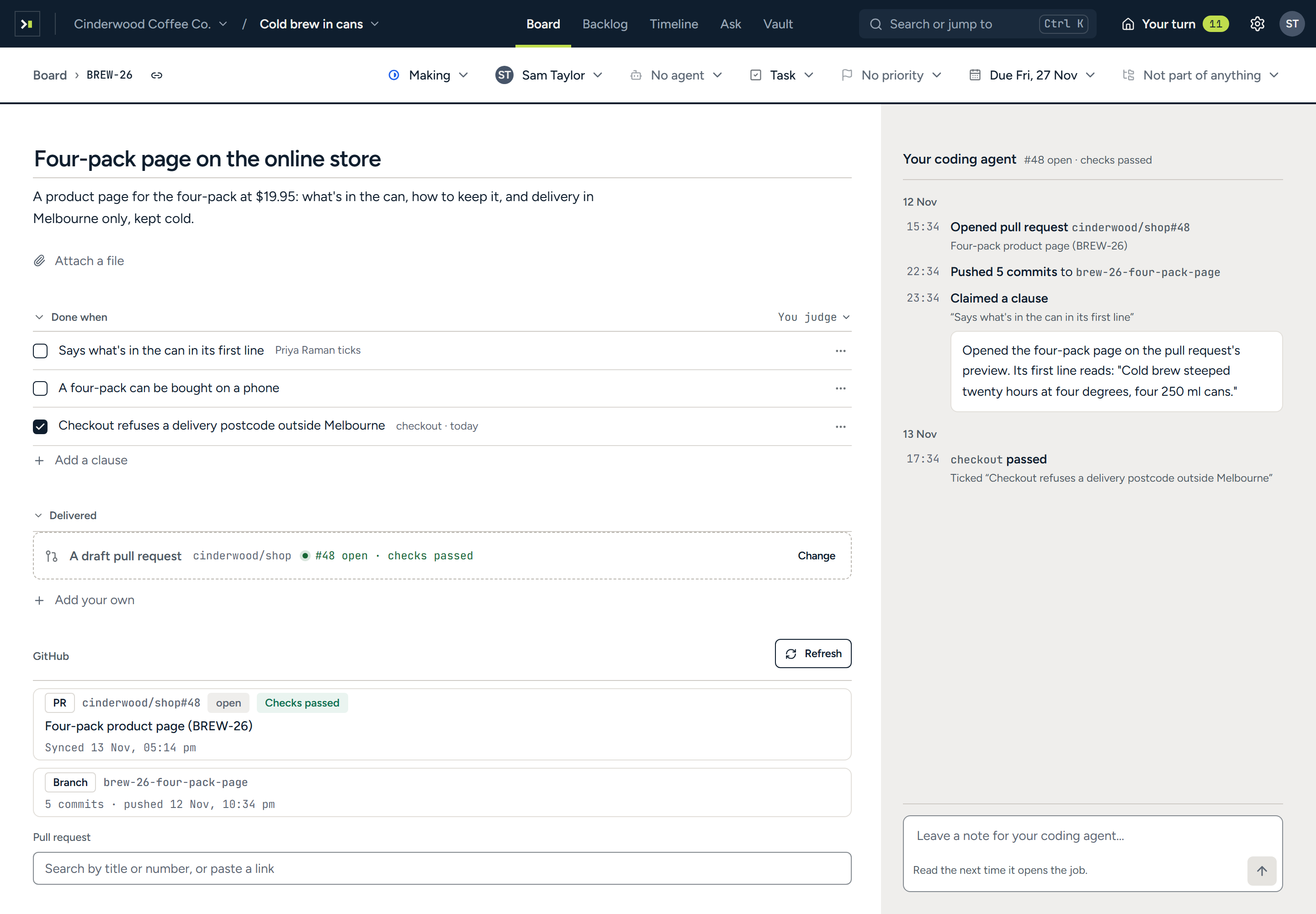
What your agent can do
- Read the contract before writing.
get_jobgives the job in full: the description, the plan a person approved, and every done-when clause with who or what decides it. - Work where the job says. The job names a branch. Commits that carry the job's key appear on the job as they are pushed, and the pull request links itself.
- Let CI decide what CI can. A clause "decided by the
testcheck" is ticked by that check on the linked pull request, and by nothing else. - Ask a person for the rest.
claim_donerecords what the agent checked against a clause, and the person who decides it is asked in one press. - File a document. Where a job asks for a document, a memo or a slide deck,
file_resultfiles it as Markdown. - Leave a trail. Notes, proposals and new jobs are written under your name, and every call is on the record.
It cannot tick a clause, change one, finish a job, approve, merge, send, spend or delete. There is no tool for any of those. The full list is in docs/tools.md.
Install
You need an Arbituro workspace: sign up at app.arbituro.com. There is no key to make. Your agent opens a browser, you sign in, and it acts as you.
The server's address is https://app.arbituro.com/mcp.
Claude Code
claude plugin marketplace add writan-labs/arbituro-mcp
claude plugin install arbituro@writan-labs
The plugin adds the server and the skills. For the server alone:
claude mcp add --transport http arbituro https://app.arbituro.com/mcp
Codex
codex mcp add arbituro --url https://app.arbituro.com/mcp
codex mcp login arbituro
For the plugin, add this repository as a marketplace and install Arbituro from the Plugins directory:
codex plugin marketplace add writan-labs/arbituro-mcp
Gemini CLI
gemini extensions install https://github.com/writan-labs/arbituro-mcp
Cursor
Add the server to ~/.cursor/mcp.json, or to .cursor/mcp.json in a project:
{
  "mcpServers": {
    "arbituro": { "url": "https://app.arbituro.com/mcp" }
  }
}
This repository is also a Cursor plugin (.cursor-plugin/plugin.json), carrying the server and the
skills together.
VS Code and GitHub Copilot
Add the server to .vscode/mcp.json:
{
  "servers": {
    "arbituro": { "type": "http", "url": "https://app.arbituro.com/mcp" }
  }
}
Everything else
Any client that speaks MCP over streamable HTTP with OAuth can connect to
https://app.arbituro.com/mcp. docs/install.md has the configuration for
Windsurf, OpenCode and others.
The skills, in any harness
The skills are plain Agent Skills and install into Claude Code, Codex, Cursor, GitHub Copilot, Gemini CLI, OpenCode and the rest with one command:
npx skills add writan-labs/arbituro-mcp
The skills
| Skill | Use it to |
|---|---|
arbituro-work-job | Work one job to its done-when: read it, branch, commit with its key, link the pull request, claim what you checked, leave a note. |
arbituro-catch-up | See what is yours, what waits on you, and what happened in a project since you last looked. |
arbituro-file-job | File work you found as a new job, after checking nobody already has. |
arbituro-file-result | Write and file the document, memo or slide deck a job asks for. |
Then say it the way the job page does:
Work ARB-12 in Arbituro.
One workspace, or all of yours
https://app.arbituro.com/mcp reaches every workspace you are in, and the project you name chooses
the workspace. To give an agent one workspace and no other, connect that workspace's own address
instead, which Settings → Keys and coding agent shows:
https://app.arbituro.com/mcp/<workspace>
Somebody in two clients' workspaces should connect each one separately, so what one client wrote never steers an agent working in the other's.
How sign-in works
- OAuth, in your browser. Your agent discovers the authorization server from the address, sends you to sign in, and keeps the token it is given. Arbituro has no personal access tokens for MCP.
- The agent is you. Everything it writes is under your name, and it can open only the projects you can.
- A token opens one door. A token for one address is refused at every other, and at the web app's own API.
- Every call is recorded, reads included, naming the client that made it.
More in docs/security.md. To report a vulnerability, see SECURITY.md.
For programs
The same operations are a JSON API at https://app.arbituro.com/api/v1, described by one OpenAPI
document at /api/v1/openapi.json. It takes an API
key made in your settings, for one workspace.
What is in this repository
| Path | What it is |
|---|---|
server.json | The server's entry for the MCP Registry |
skills/ | The four skills, shared by every plugin below |
.claude-plugin/ | The Claude Code plugin and its marketplace |
.codex-plugin/, .agents/plugins/ | The Codex plugin and its marketplace |
.cursor-plugin/ | The Cursor plugin |
gemini-extension.json, GEMINI.md | The Gemini CLI extension |
mcp/ | The server's configuration in each harness's own format |
snippets/AGENTS.md | A paragraph for your own repository's AGENTS.md |
docs/ | The tools, the install steps for every client, and how access works |
The server itself is hosted by Arbituro and is not in this repository.
Licence
MIT. Arbituro is made by Writan Labs.
Reviews
No reviews yet
Be the first to review this server!
More Developer Tools MCP Servers
Rea
Freeby Morluto · Developer Tools
Reverse engineer anything from your terminal or agent with one CLI and MCP server.
Paperclip
Freeby Paperclipai · Developer Tools
Trending hip-hop artist momentum scores across four cultural dimensions.
Scrapling
Freeby D4Vinci · Developer Tools
Web scraping with stealth HTTP, real browsers, and Cloudflare bypass. CSS selectors supported.
Git
Freeby Modelcontextprotocol · Developer Tools
Read, search, and manipulate Git repositories programmatically
Toleno
Freeby Toleno · Developer Tools
Toleno Network MCP Server — Manage your Toleno mining account with Claude AI using natural language.
MCP Marketplace
Freeby mcp-marketplace · Developer Tools
Search and install MCP servers from inside your AI client.