
Server data from the Official MCP Registry
Search Korean cosmetics from Olive Young, Daiso, Naver, Coupang, 11st with EWG ingredient analysis.
About
Search Korean cosmetics from Olive Young, Daiso, Naver, Coupang, 11st with EWG ingredient analysis.
Remote endpoints: streamable-http: https://mcp.beauticslab.com/mcp
Security Report
Valid MCP server (1 strong, 1 medium validity signals). No known CVEs in dependencies. Imported from the Official MCP Registry.
Endpoint verified · Requires authentication · 1 issue found
Security scores are indicators to help you make informed decisions, not guarantees. Always review permissions before connecting any MCP server.
Permissions Required
This plugin requests these system permissions. Most are normal for its category.
How to Connect
Remote Plugin
No local installation needed. Your AI client connects to the remote endpoint directly.
Add this to your MCP configuration to connect:
{
  "mcpServers": {
    "com-beauticslab-mcp": {
      "url": "https://mcp.beauticslab.com/mcp"
    }
  }
}Documentation
View on GitHubFrom the project's GitHub README.
BeauticsLab MCP
"내 루틴에 자극 성분 있어?" Claude한테 물어보세요.
올리브영·다이소·이커머스(네이버, 쿠팡, 11번가 등) 카탈로그와 BeauticsLab에 등록한 내 루틴을, 내가 쓰는 AI 안에서 그대로 분석합니다. 제품 검색, 루틴 조회, 전성분 분석까지.
서비스: beauticslab.com · English · Smithery
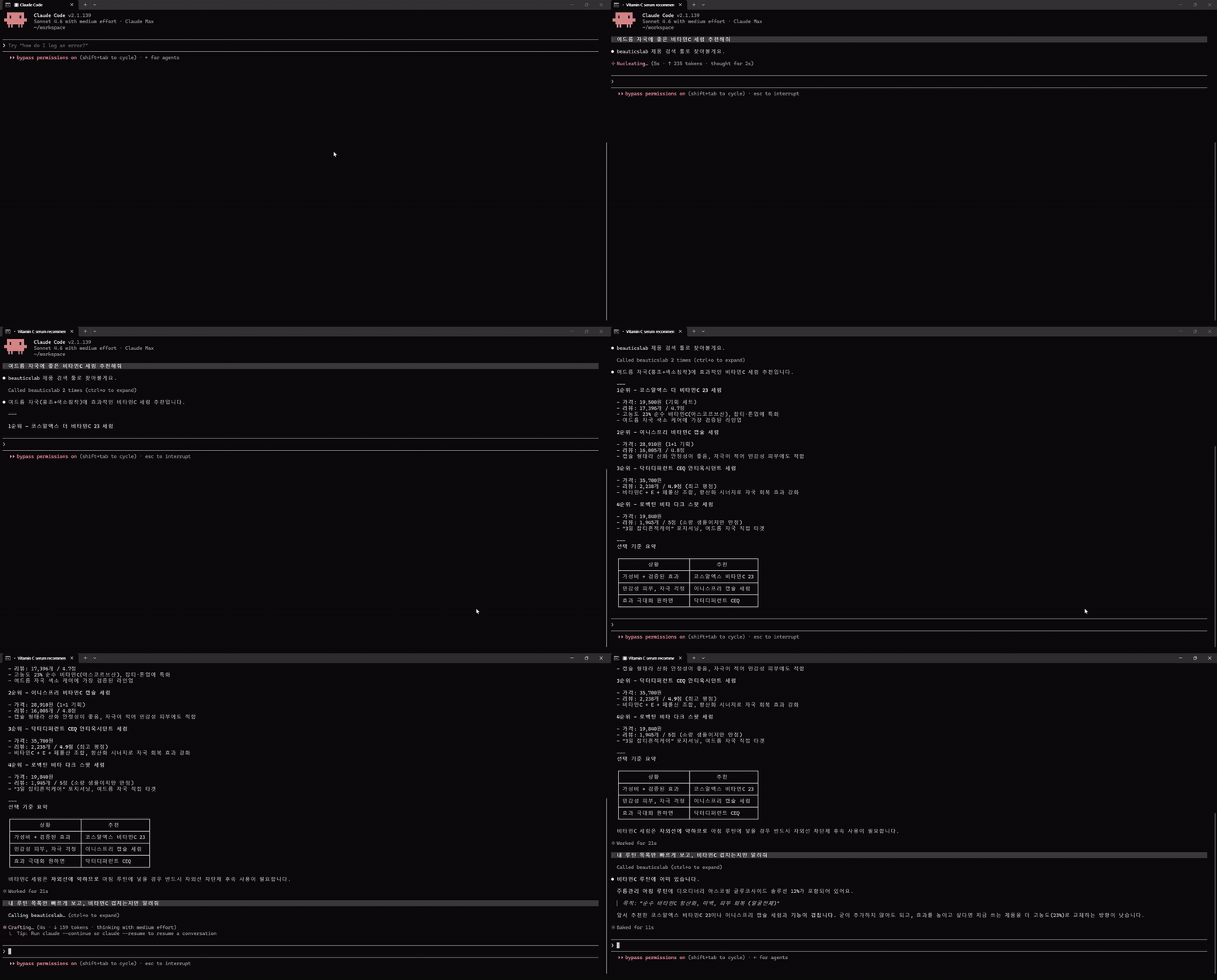
Claude Code에서 비타민C 세럼 추천 → 내 루틴 조회 → 겹치는 제품 확인까지 한 대화로. (고화질 영상)
한눈에
- 서버 주소:
https://mcp.beauticslab.com/mcp - 연결: AI 도구의 "Custom Connector / MCP Server 추가"에 위 주소 입력 → BeauticsLab 계정 로그인 → 권한 허용
- 계정: beauticslab.com Google / Kakao 로그인 계정 그대로
- 상태: 베타 (무료)
무엇을 할 수 있나
내가 쓰는 AI한테 그냥 말 걸면 됩니다.
- 🔍 "건성인데 알코올 없는 토너 추천해줘" → 올리브영·다이소·이커머스(네이버, 쿠팡, 11번가 등) + BeauticsLab 검증 카탈로그에서 검색
- 📋 "내 저녁 루틴 보여줘" → BeauticsLab에 저장한 내 스킨케어 루틴 조회
- 🧪 "닥터디퍼런트 비타리프트 전성분에 자극 성분 있어?" → 전성분(국문/영문) + EWG 등급 조회
AI가 위 결과를 받아서 비교·추천·답변까지 한 번에 만들어 줍니다.
읽기만 합니다. 데이터를 바꾸거나 새로 만들지 않습니다.
쓸 수 있는 도구
| 도구 | 설명 |
|---|---|
search_product | 키워드로 제품 검색 (한국어 권장). 올리브영, 다이소, 이커머스(네이버·쿠팡·11번가 등), 검증 커스텀 4개 소스 |
get_my_routine | 내 BeauticsLab 계정의 루틴 + 들어있는 제품 + (선택) 핵심 성분 요약 |
get_product_ingredients | 한 제품의 전성분 + EWG 등급. 앞 두 도구가 돌려준 goodsNo를 그대로 넘기면 됩니다 |
검색이나 루틴 조회로 제품을 찾고, 그 중 궁금한 제품의 전성분을 get_product_ingredients로 파고드는 흐름입니다.
남의 데이터는 못 봅니다. 내 계정 안에서만 동작합니다.
연결하기
AI 도구마다 연결 방법이 다릅니다. 본인이 쓰는 도구 섹션만 읽으면 됩니다.
아래 가이드는 2026-05-13 기준. 각 AI 도구의 UI 위치나 메뉴명은 바뀔 수 있습니다.
Claude Desktop · claude.ai
Claude Desktop
Settings → Connectors(한글:설정 → 커넥터) 진입- 화면 하단 "커스텀 커넥터 추가" (Add custom connector) 클릭
- "원격 MCP 서버 URL" 필드에
https://mcp.beauticslab.com/mcp입력 후 추가 - 목록에 항목이 뜨면 "연결" 버튼 클릭 ("아직 beauticslab에 연결되지 않았습니다" 안내가 함께 보임)
- 새 브라우저 창에서 BeauticsLab 로그인(Google/Kakao) → "허용" → Claude로 돌아옴
- 새 채팅에서 "내 BeauticsLab 루틴 보여줘" 시도
claude.ai 웹 (Pro/Max)
Customize → Connectors → +(Add custom connector)- URL 입력 → 이하 동일
claude.ai Team / Enterprise
- 조직 오너가
Organization settings → Connectors → Add → Custom → Web에서 등록 - 멤버는
Customize → Connectors에서 활성화
Advanced settings의 Client ID/Secret 필드는 비워 두세요. 서버가 동적 클라이언트 등록(DCR)을 처리합니다.
출처: Anthropic: Custom connectors with remote MCP
Claude Code (CLI)
CLI 한 줄로 등록:
claude mcp add --transport http beauticslab https://mcp.beauticslab.com/mcp
또는 프로젝트 루트의 .mcp.json을 직접 편집:
{
  "mcpServers": {
    "beauticslab": {
      "type": "http",
      "url": "https://mcp.beauticslab.com/mcp"
    }
  }
}
처음 호출 시 브라우저 OAuth 창이 열립니다. BeauticsLab 로그인 → "허용" → 이후 claude mcp list에서 beauticslab ... ✓ Connected 확인.
출처: Anthropic: Claude Code MCP
ChatGPT
ChatGPT는 2025-12-17부터 "Connectors"를 공식적으로 **"Apps"**로 표기합니다.
전제: ChatGPT Plus 이상 + Developer Mode 노출 가능한 계정
Settings → Apps → Advanced settings(한글:설정 → 앱 → 고급 설정) 진입- "개발자 모드" (Developer Mode) 토글 ON
- 뒤로 돌아가면 "고급 설정" 옆에 "앱 만들기" (Create app) 버튼 노출 → 클릭
- 입력값
- MCP 서버 URL:
https://mcp.beauticslab.com/mcp - 인증:
OAuth선택
- MCP 서버 URL:
- "만들기" 클릭 → 새 브라우저 창에서 BeauticsLab 로그인(Google/Kakao) → "허용"
- "뷰틱스랩이(가) 연결되었습니다" 표시되면 완료
- 새 대화에서 BeauticsLab 도구 호출 (예: "내 BeauticsLab 루틴 보여줘")
ChatGPT는 등록 시 "OpenAI가 검증하지 않은 커스텀 MCP 서버" 경고 배너를 표시할 수 있습니다. 정상입니다.
출처: OpenAI: Connect from ChatGPT (Apps SDK)
Cursor
설정 파일 위치 (둘 중 하나):
- 전체 적용:
~/.cursor/mcp.json - 프로젝트 한정:
<프로젝트>/.cursor/mcp.json
내용:
{
  "mcpServers": {
    "beauticslab": {
      "url": "https://mcp.beauticslab.com/mcp"
    }
  }
}
UI에서 추가하려면 Cursor Settings → Tools & MCP → New MCP Server.
저장 후 Cursor가 자동으로 브라우저 OAuth 팝업을 띄웁니다. BeauticsLab 로그인 → 허용 → 자격증명은 Cursor가 보관합니다 (JSON에 노출되지 않습니다).
출처: Cursor: Model Context Protocol
VS Code (GitHub Copilot Chat)
설정 파일 위치:
- 워크스페이스:
.vscode/mcp.json - 사용자 전역: 커맨드 팔레트 →
MCP: Open User Configuration
내용:
{
  "servers": {
    "beauticslab": {
      "type": "http",
      "url": "https://mcp.beauticslab.com/mcp"
    }
  }
}
출처: VS Code: MCP configuration reference
Cline (VS Code 확장)
OAuth + DCR 흐름이 가장 매끄럽게 검증됨.
- Cline 사이드바 → Remote Servers 탭
- URL 입력:
https://mcp.beauticslab.com/mcp - Authenticate 버튼 → 브라우저 OAuth → 자격증명 영구 저장
또는 config 직접 편집:
{
  "mcpServers": {
    "beauticslab": {
      "url": "https://mcp.beauticslab.com/mcp",
      "type": "streamableHttp",
      "disabled": false,
      "autoApprove": [],
      "timeout": 60
    }
  }
}
출처: Cline: Connecting to a Remote Server
Zed
settings.json의 context_servers 항목에 추가:
{
  "context_servers": {
    "beauticslab": {
      "url": "https://mcp.beauticslab.com/mcp"
    }
  }
}
Authorization 헤더 없이 저장하면 Zed가 표준 MCP OAuth 흐름으로 자동 안내합니다.
출처: Zed: Model Context Protocol
기타 MCP 호환 클라이언트
위에 없는 클라이언트라도 다음 조건을 만족하면 동작합니다.
- MCP Streamable HTTP transport 지원
- OAuth 2.1 + PKCE(S256) 지원
- 가급적 Dynamic Client Registration(DCR) 지원 (없으면 사전 등록 client 필요)
Endpoint만 알면 됩니다: https://mcp.beauticslab.com/mcp
클라이언트별 호환성은 modelcontextprotocol.io/clients 참고.
인증 / 권한
- 프로토콜: OAuth 2.1 + PKCE(S256) + Dynamic Client Registration
- 스코프:
mcp:read(읽기 전용) - 로그인 주체: BeauticsLab 계정 (Google / Kakao 소셜 로그인)
- 익명 모드 없음: 모든 호출은 사용자 컨텍스트가 필요합니다
서버 메타데이터 (확인용):
https://mcp.beauticslab.com/.well-known/oauth-protected-resourcehttps://mcp.beauticslab.com/.well-known/oauth-authorization-server
FAQ
Q. 내 루틴이 외부로 유출되나요? 아니오. 내가 로그인한 AI 세션에서만 내 데이터에 접근합니다. 응답은 그 AI 클라이언트로만 갑니다. 남의 데이터는 못 봅니다.
Q. 어떤 AI 도구가 지원되나요? 검증된 도구는 Claude Desktop, claude.ai, ChatGPT, Cursor, Cline, Zed, VS Code(Copilot Chat). 그 외에도 MCP 표준(Streamable HTTP + OAuth 2.1, 2025-11-25)을 지원하는 클라이언트면 다 됩니다.
Q. 데이터 출처는 어디인가요? 올리브영, 다이소, 이커머스(네이버·쿠팡·11번가 등) 공개 카탈로그와 BeauticsLab에서 검증한 커스텀 제품입니다.
Q. 한국어/영어 어느 쪽이 잘 검색되나요? 한국어가 잘 잡힙니다. 영어도 되긴 하는데 정확도가 떨어집니다.
Q. 연결 끊거나 권한 회수하려면? 쓰던 AI 도구의 Connectors / MCP 설정에서 BeauticsLab 항목을 지우면 됩니다. 토큰은 클라이언트에 보관되고 만료되면 자동 폐기됩니다.
Q. 사용량 제한이 있나요? 베타라 SLA는 없습니다. 비정상 트래픽 패턴은 차단될 수 있습니다.
지원
- 문의 / 이슈 신고: BeauticsLab 사이트의 카카오톡 문의하기
라이선스
Proprietary. All rights reserved. © BeauticsLab.
Reviews
No reviews yet
Be the first to review this server!
More Developer Tools MCP Servers
Git
Freeby Modelcontextprotocol · Developer Tools
Read, search, and manipulate Git repositories programmatically
Fetch
Freeby Modelcontextprotocol · Developer Tools
Web content fetching and conversion for efficient LLM usage
Worldmonitor
Freeby Koala73 · Developer Tools
Live markets, conflicts, country risk, chokepoints, energy, and China decision signals. 86 tools.
Toleno
Freeby Toleno · Developer Tools
Toleno Network MCP Server — Manage your Toleno mining account with Claude AI using natural language.
mcp-creator-python
Freeby mcp-marketplace · Developer Tools
Create, build, and publish Python MCP servers to PyPI — conversationally.
MCP Marketplace
Freeby mcp-marketplace · Developer Tools
Search and install MCP servers from inside your AI client.