
Server data from the Official MCP Registry
Semantic search over free-to-use stock photos from 9 libraries: by words, image, or similar.
About
Semantic search over free-to-use stock photos from 9 libraries: by words, image, or similar.
Remote endpoints: streamable-http: https://mcp.pexafy.com/mcp
Security Report
Valid MCP server (1 strong, 0 medium validity signals). 1 code issue detected. 1 known CVE in dependencies Imported from the Official MCP Registry. 1 finding(s) downgraded by scanner intelligence.
Endpoint verified · Requires authentication · 3 issues found
Security scores are indicators to help you make informed decisions, not guarantees. Always review permissions before connecting any MCP server.
Permissions Required
This plugin requests these system permissions. Most are normal for its category.
How to Connect
Remote Plugin
No local installation needed. Your AI client connects to the remote endpoint directly.
Add this to your MCP configuration to connect:
{
  "mcpServers": {
    "com-pexafy-pexafy-mcp": {
      "url": "https://mcp.pexafy.com/mcp"
    }
  }
}Documentation
View on GitHubFrom the project's GitHub README.
pexafy-mcp


Stock photo search for AI assistants. An MCP server that lets Claude, ChatGPT or any MCP client search a library of royalty-free images — by describing a scene in plain language, from an example image, or "more like this" — and render the results as a thumbnail grid inside the conversation.
Remote MCP, OAuth, no API key to paste, 3 tools, images rendered inline.
The product page, with the same steps in twenty-three languages, is at pexafy.com/mcp.
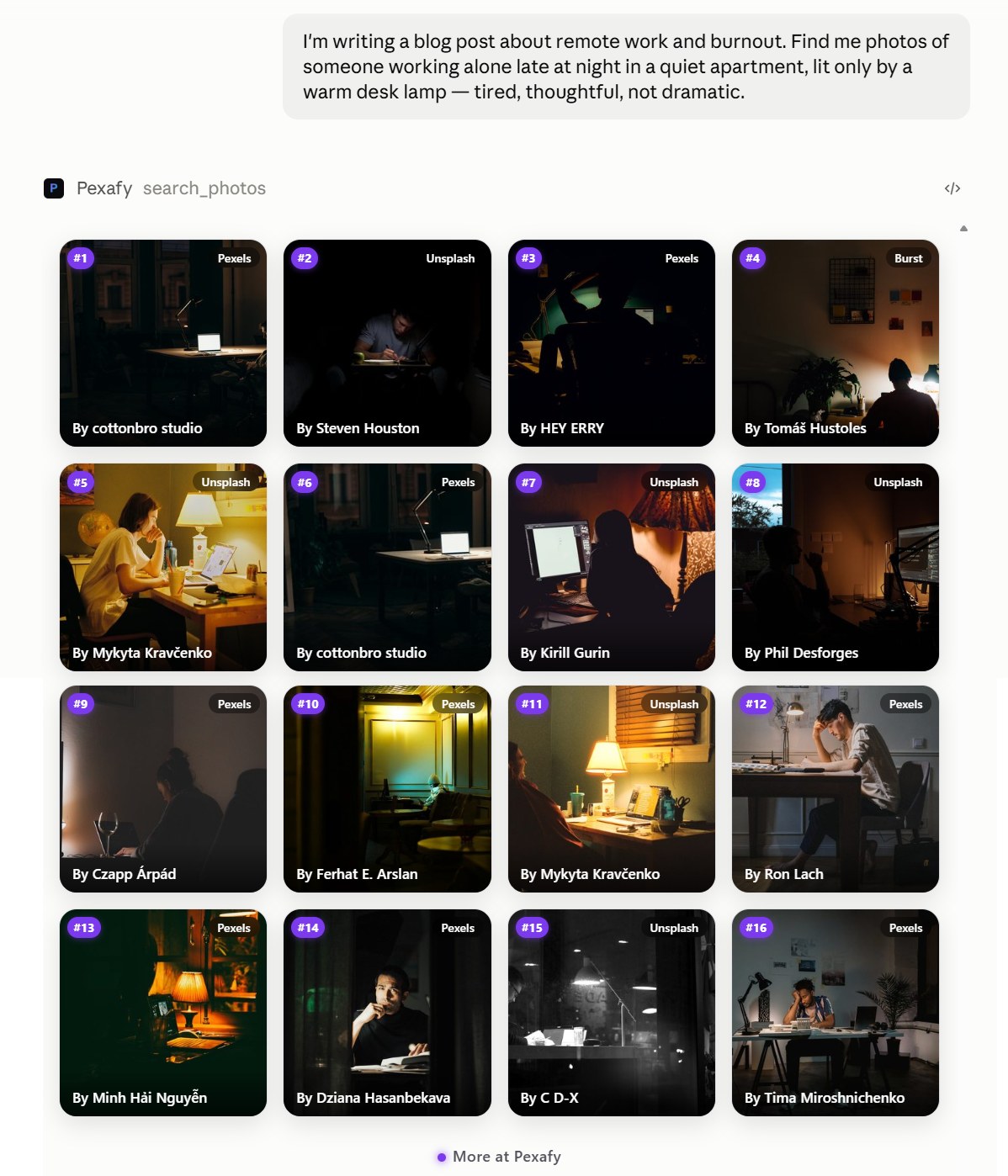
Use it (nothing to install)
A hosted server runs at:
https://mcp.pexafy.com/mcp
It speaks Streamable HTTP and authenticates with OAuth 2.1 — you sign in to Pexafy in a browser window and the connector receives its own credentials. There is no API key to generate, paste into a JSON file, or rotate later.
Claude (web and desktop)
- Open Settings → Connectors (on Team/Enterprise, an owner adds it once under Organization settings → Connectors).
- Click Add custom connector.
- Paste
https://mcp.pexafy.com/mcpand confirm. - Sign in to Pexafy in the window that opens. Done — ask Claude for a photo.
Claude Code
claude mcp add --transport http pexafy https://mcp.pexafy.com/mcp
Any other MCP client
Point it at the same URL with the streamable-http transport. Clients that don't
implement OAuth can authenticate instead with a Pexafy API key sent as
Authorization: Bearer <key> or x-api-key: <key> — get one from the
dashboard.
Liveness: GET /health (public, no auth).
Also listed in the official MCP registry
as com.pexafy/pexafy-mcp, and on
Smithery — where a hosted
gateway URL is available for clients that prefer it.
What it costs
The Free plan covers 5,000 searches a month with one connector — enough for regular use, no card required. Higher tiers are on the pricing page. When you hit a limit, the assistant tells you in-chat instead of failing with an opaque error.
Tools
Three read-only tools. No write scope, no account mutation.
search_photos — semantic text search
Describe the scene in a full sentence; Pexafy is semantic, so sentences beat
keywords. All parameters are optional, but pass either q or at least one filter.
| Parameter | Type | Notes |
|---|---|---|
q | string | The scene, in natural language. Max 500 characters. |
color_name | string | One of: red, orange, yellow, green, blue, purple, pink, brown, black, white, gray, teal, beige, gold, navy. Excludes color_hex. |
color_hex | string | e.g. #1E90FF. Excludes color_name. |
color_tolerance | integer | 0 (exact) to 255 (loose). Default 20. Only with color_hex. |
orientation | string[] | landscape, portrait, square. |
source | string[] | Unsplash, Pexels, Pixabay, Kaboompics, Burst, StockSnap, Picjumbo, Skitterphoto, NegativeSpace. |
license_type | string[] | free, cc0. |
photographer | string | Exact username. |
after_date | string | YYYY-MM-DD. Published on or after. |
cursor | string | pagination.next_cursor from a previous response. |
search_photos_by_image — visual search from an example
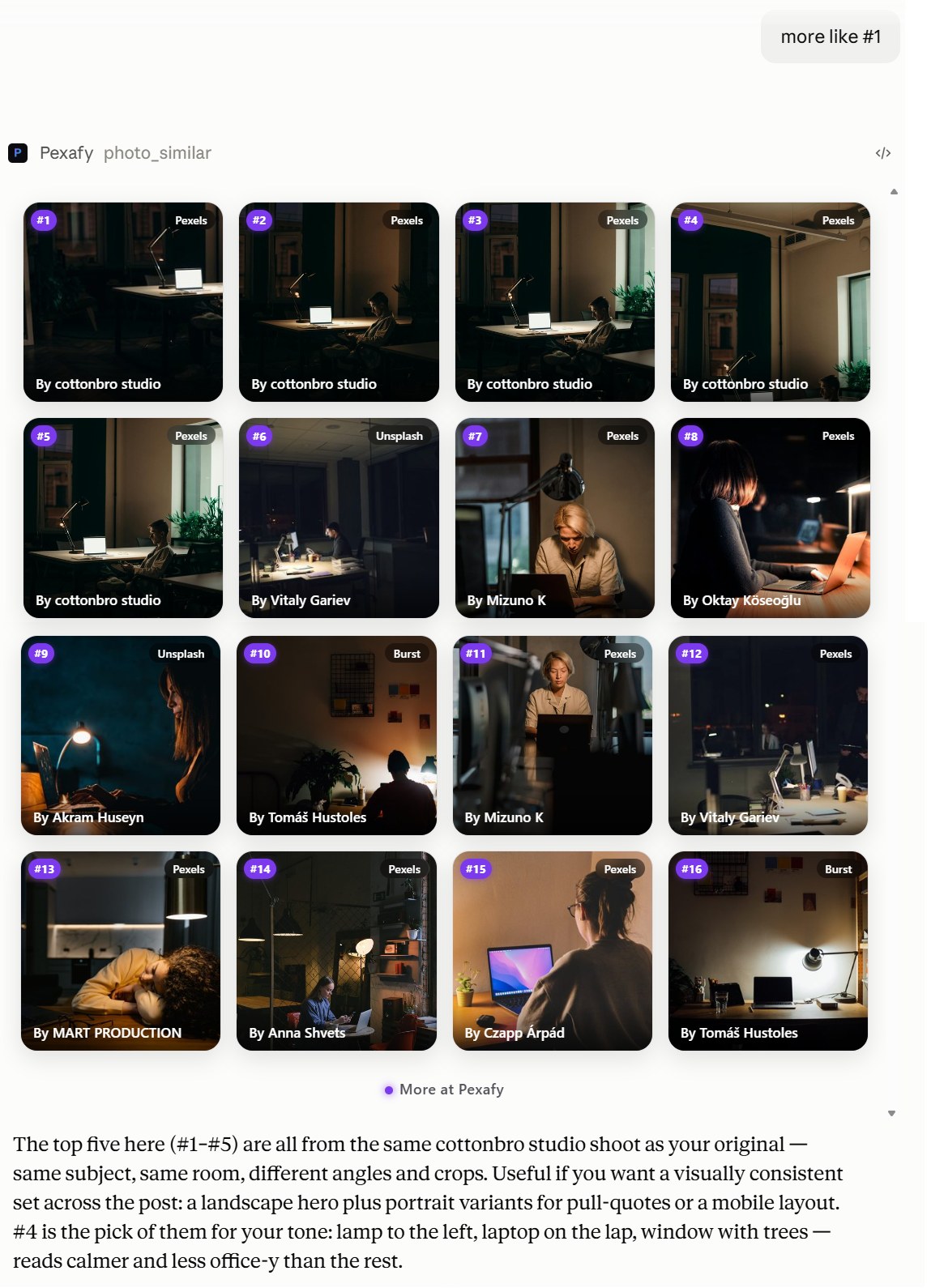
Finds photos that look like a reference image, optionally tweaked in words ("like this, but at night").
| Parameter | Type | Notes |
|---|---|---|
image_url | string | Public http(s) URL of the reference image. |
image_file | object | Auto-filled by hosts that support uploads (e.g. ChatGPT). |
image_base64 | string | Raw base64 bytes, for programmatic clients. |
q | string | Text to combine with the image ("but with hands raised"). |
text_alpha | number | Weight of q against the image. |
orientation, source, color_name, license_type, photographer, after_date | string | Same filters as above. |
cursor | string | Pagination token. |
One of image_url, image_file or image_base64 is required. Images are fetched
server-side; max 20 MB.
get_similar_photos — more like this
| Parameter | Type | Notes |
|---|---|---|
photo_id | string | Required. A photo's UUID, taken from a previous result. |
cursor | string | Pagination token. |
What comes back
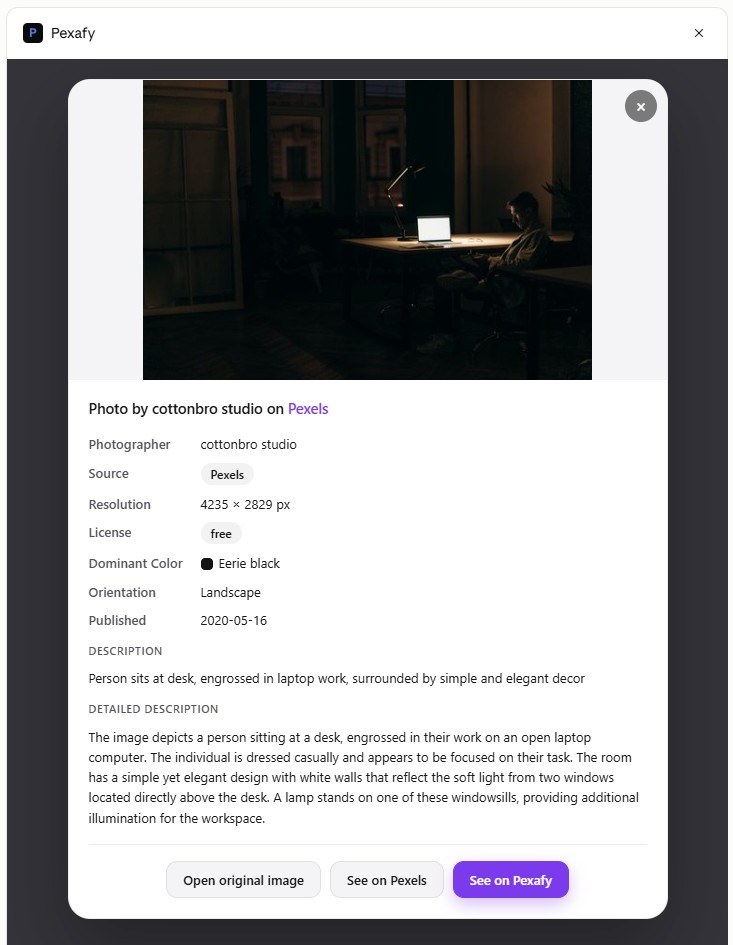
Every photo carries its id, URLs at several sizes, dimensions, dominant colour,
orientation, source, licence, photographer, and an attribution string to display
as credit — enough for the assistant to reason about the results rather than just
list them.
Results are numbered #1, #2, …, so you refer to a photo the way you would in
conversation. No ids to copy around:
In clients that support MCP Apps, clicking a thumbnail opens a detail panel with the full metadata — no extra call, it is all in the tool result already:
Self-host
You don't need to — the hosted server above is the intended way in. But the server is a thin, plain client of the Pexafy API, so you can run your own against your own key.
Requires Python 3.12+.
git clone https://github.com/Pexafy/pexafy-mcp.git && cd pexafy-mcp
./run.sh setup        # venv + editable install + seed .env
# edit .env — set PEXAFY_API_KEY
./run.sh dev          # stdio, for Claude Desktop / Claude Code
With the installed console script (pip install .):
pexafy-mcp                             # stdio (default)
PEXAFY_MCP_TRANSPORT=http pexafy-mcp   # remote Streamable HTTP
Claude Desktop / Claude Code, over stdio:
{
  "mcpServers": {
    "pexafy": {
      "command": "pexafy-mcp",
      "env": { "PEXAFY_API_KEY": "pexafy_api_…" }
    }
  }
}
Docker, over HTTP — see docker-compose.example.yml:
docker compose -f docker-compose.example.yml up -d
curl localhost:8765/health
The image itself defaults to stdio, the transport an MCP client uses to drive a container, so it also works directly:
docker run -i --rm pexafy-mcp
That answers initialize and tools/list with no API key and no network — the
tools come from the vendored OpenAPI snapshot. A key is only needed to run a search.
Serving over HTTP is a matter of setting the transport, which both compose files do.
Configuration
Every setting is an environment variable, and every one of them is optional: with
none set, pexafy-mcp starts on stdio and answers initialize and tools/list
offline. Two are worth knowing about.
| Variable | Default | Purpose |
|---|---|---|
PEXAFY_MCP_TRANSPORT | stdio | stdio for a local client, http to serve remotely |
PEXAFY_API_BASE_URL | http://localhost:8000 | Pexafy API root — point it at https://api.pexafy.com, or at your own deployment |
The rest belongs to a deployment rather than to someone running the container, and
lives in .env.example: a fallback PEXAFY_API_KEY for stdio use
when the client sends no key of its own, PEXAFY_THUMB_BASE_URL and
PEXAFY_THUMB_HMAC_SECRET to sign the thumbnails behind the inline grid, and
PEXAFY_OAUTH_* with MCP_RESOLVE_SECRET to run the HTTP transport as an OAuth
resource server. None of them is needed to start the server.
How it works
src/pexafy_mcp/
├── server.py     # entry point: builds the server, wires hooks, custom tools, /health
├── tooling.py    # tunes the OpenAPI-derived tools for an LLM (descriptions, value sets)
├── widget.py     # MCP Apps UI resource — the inline result grid (self-contained HTML)
├── previews.py   # signs the thumbnail URLs injected into each result
├── limits.py     # turns plan-limit (429) responses into in-chat upgrade nudges
├── auth.py       # per-user auth: OAuth Resource Server or forwarded API key
└── assets/       # vendored, shipped with the package:
    ├── openapi.json          # OpenAPI snapshot the tools are generated from
    ├── facets.json           # evolving source/license value sets
    └── ext_apps_bundle.js    # @modelcontextprotocol/ext-apps SDK (inlined in the widget)
- The tools are generated from the Pexafy OpenAPI spec via
FastMCP.from_openapi(), so the API stays the single source of truth;tooling.pythen reshapes them for an LLM — narrowing the surface to the search core, dropping parameters that mislead a model, and inlining the closed value sets so no facet lookup is ever needed. build_server()assembles everything. Importing the package has no side effects and does no network I/O: it reads the vendoredassets/openapi.jsonandassets/facets.json.prepare.shregenerates those.search_photos_by_imageis hand-written: a chat assistant cannot upload a binary file to an MCP tool, so the tool takes an image URL and fetches it server-side.- The inline grid is an MCP Apps UI resource. The ext-apps client is bundled and inlined, because the host's sandboxed iframe cannot fetch external scripts at runtime.
Development
./run.sh test         # offline test suite (pytest)
./run.sh inspect      # MCP Inspector
./prepare.sh          # maintainers: regenerate the vendored assets/
Contributions welcome — see CONTRIBUTING.md.
License
MIT — see LICENSE.
The package also redistributes third-party assets (the Inter typeface, the
@modelcontextprotocol/ext-apps browser bundle and the libraries bundled into it),
each under its own licence — see THIRD_PARTY_NOTICES.md.
Reviews
No reviews yet
Be the first to review this server!
More Developer Tools MCP Servers
Fetch
Freeby Modelcontextprotocol · Developer Tools
Web content fetching and conversion for efficient LLM usage
Git
Freeby Modelcontextprotocol · Developer Tools
Read, search, and manipulate Git repositories programmatically
Worldmonitor
Freeby Koala73 · Developer Tools
Live markets, conflicts, country risk, chokepoints, energy, and China decision signals. 84 tools.
Toleno
Freeby Toleno · Developer Tools
Toleno Network MCP Server — Manage your Toleno mining account with Claude AI using natural language.
mcp-creator-python
Freeby mcp-marketplace · Developer Tools
Create, build, and publish Python MCP servers to PyPI — conversationally.
MCP Marketplace
Freeby mcp-marketplace · Developer Tools
Search and install MCP servers from inside your AI client.