
Server data from the Official MCP Registry
Query the ABS in plain English — CPI, labour force, building approvals, migration, GDP.
About
Query the ABS in plain English — CPI, labour force, building approvals, migration, GDP.
Security Report
This is a well-structured MCP server for the Australian Bureau of Statistics Data API with strong input validation, proper authentication patterns, and appropriate permission scoping. The codebase demonstrates good security practices including regex-based input validation, comprehensive error handling, and careful credential management. Minor code quality observations around broad exception handling and logging patterns exist but do not materially impact security. Supply chain analysis found 5 known vulnerabilities in dependencies (1 critical, 3 high severity). Package verification found 1 issue.
3 files analyzed · 10 issues found
Security scores are indicators to help you make informed decisions, not guarantees. Always review permissions before connecting any MCP server.
Permissions Required
This plugin requests these system permissions. Most are normal for its category.
How to Install
Add this to your MCP configuration file:
{
  "mcpServers": {
    "io-ausdata-abs-mcp": {
      "args": [
        "abs-mcp"
      ],
      "command": "uvx"
    }
  }
}Documentation
View on GitHubFrom the project's GitHub README.
abs-mcp
mcp-name: io.ausdata/abs-mcp




Ask Claude about the Australian economy and get real, current numbers — not "I don't have access to that data." This MCP server gives Claude (and other MCP clients like Cursor) live access to the ABS Data API, with curated mappings for the 10 most-asked Australian economic indicators.
Hosted access? For cross-source queries, webhooks, an always-on REST API, and a uniform response envelope across all 9 sources, see ausdata.io — free tier available (500 calls/mo, no card).
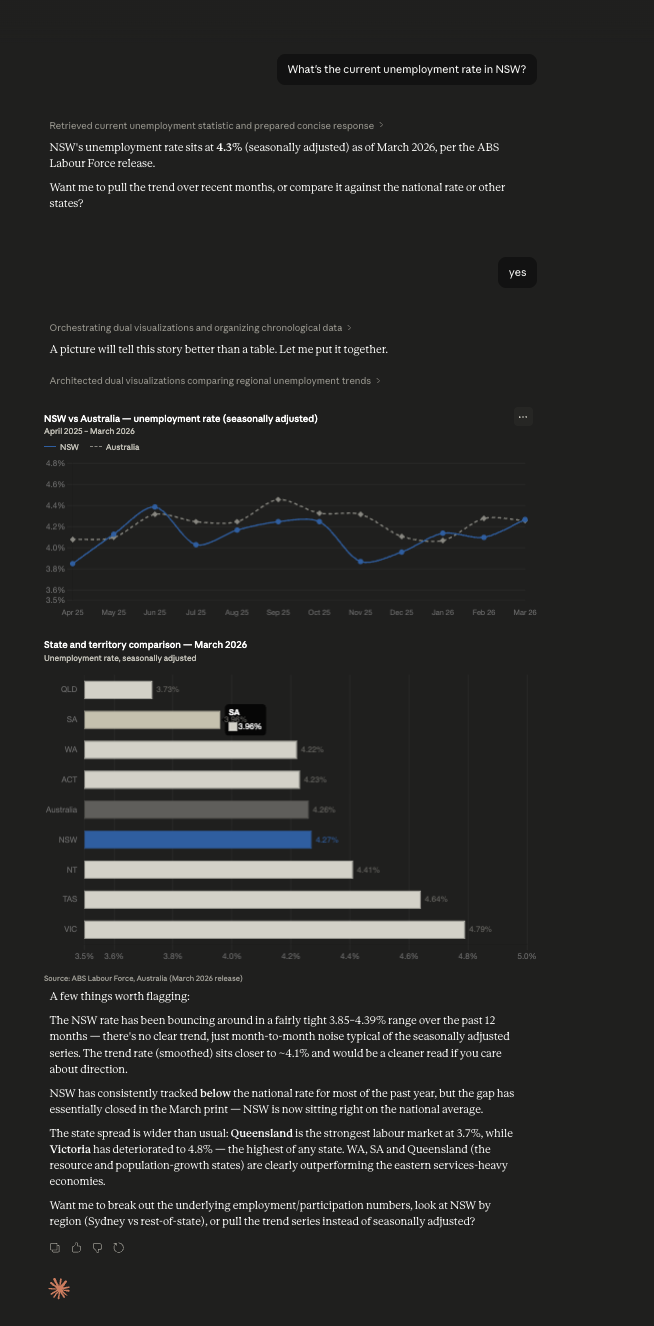
Behind the scenes it wraps SDMX 2.1, but you never see SDMX codes — just plain-English filters like region: "nsw" and measure: "unemployment_rate". Five tools, ten curated dataflows (Labour Force, CPI, Wage Price Index, Job Vacancies, Average Weekly Earnings, GDP / National Accounts, quarterly + annual Estimated Resident Population, Building Approvals, Lending Indicators), and 1,200+ other ABS dataflows accessible via raw codes.
Companion to rba-mcp (Reserve Bank of Australia — cash rate, FX, lending rates), ato-mcp (Australian Taxation Office — postcode-level personal tax, company tax by industry, corporate tax transparency, ACNC charity register), and au-weather-mcp (Australian weather — 21 curated locations + postcode/place-name lookup, current observations, 16-day forecasts, 80yr historical archive). Install all four for the full AU macro / regulator / tax / climate stack.
What you can ask
Once installed, your LLM can answer questions like:
| Question | Real response (verified) |
|---|---|
| What's the unemployment rate in NSW? | 4.27% (Mar 2026) |
| AU annual CPI inflation? | 4.60% (Mar 2026) |
| AU annual wage growth? | 3.40% (Q4 2025) |
| Average weekly earnings in Australia? | $1,562 (Sep–Oct 2025) |
| AU GDP quarterly growth? | 0.80% (Q4 2025) |
| AU GDP per capita? | $24,900/qtr (Q4 2025) |
| Job vacancies in NSW? | 101,200 (Q1 2026) |
| Dwelling approvals in NSW? | 4,400/month (Mar 2026) |
| New NSW housing loan commitments? | $19.7B (Q4 2025) |
| Quarterly population of Australia? | 27.7M (Q3 2025) |
Every answer comes with the period, units, and a link back to the ABS source page. Comparisons and time-series queries work just as well — see Worked examples below.
Install
# After publish:
uvx --upgrade abs-mcp

# Local dev install:
uv pip install -e .
Claude Desktop
Add to ~/Library/Application Support/Claude/claude_desktop_config.json:
{
  "mcpServers": {
    "abs": {
      "command": "uvx",
      "args": ["--upgrade", "abs-mcp"]
    }
  }
}
Why
--upgrade?uvx abs-mcp(without the flag) uses whatever wheel is cached and never adopts new PyPI releases on its own — Claude Desktop's MCP child process keeps running the same wheel until you fully quit the app and refresh the cache by hand.--upgrademakes uvx check PyPI on each launch and pull a newer release if one exists. To verify which version is currently serving you, look at theserver_versionfield on anyDataResponse(added in 0.2.10).
For a local checkout (before PyPI publish):
{
  "mcpServers": {
    "abs": {
      "command": "uv",
      "args": ["run", "--directory", "/absolute/path/to/abs-mcp", "abs-mcp"]
    }
  }
}
Restart Claude Desktop. The abs server appears in the tools panel with five tools.
Cursor
Add to ~/.cursor/mcp.json (or workspace .cursor/mcp.json):
{
  "mcpServers": {
    "abs": {
      "command": "uvx",
      "args": ["--upgrade", "abs-mcp"]
    }
  }
}
Tools
| Tool | What it does |
|---|---|
search_datasets(query, limit=10) | Fuzzy-search ABS dataflow names. Returns the top matches. |
describe_dataset(dataset_id) | Plain-English description of a dataflow's dimensions and values. |
get_data(dataset_id, filters, start_period, end_period, format) | Query a dataflow with filters. Returns clean records (default), grouped series, or CSV. |
latest(dataset_id, filters) | Just the most recent observation(s) — wraps get_data with lastNObservations=1. |
top_n(dataset_id, measure, n=10, filters=None, direction="top") | Rank rows of a curated dataflow by a measure (e.g. unemployment_rate) at the most-recent period and return the top (or bottom) N. |
list_curated() | The ten dataflow IDs that have hand-curated plain-English support. |
Curated dataflows
For these curated dataflows, filters accepts plain-English values (e.g. "region": "nsw" instead of "REGION": "1"):
- LF — Labour Force, monthly: employment, unemployment, participation by state/sex
- CPI — Consumer Price Index, quarterly inflation (cat 6401.0 — the headline rate)
- CPI_MONTHLY — Monthly CPI Indicator (cat 6484.0), full sub-category and per-city breakdown
- WPI — Wage Price Index, quarterly wage growth by industry/sector/state
- PPI_FD — Producer Price Index Final Demand, quarterly producer inflation
- JV — Job Vacancies, quarterly labour demand by industry/sector/state
- AWE — Average Weekly Earnings, half-yearly by industry/sector/state
- ANA_AGG — National Accounts: GDP, GDP per capita, terms of trade, real income (Australia, quarterly)
- ABS_ANNUAL_ERP_ASGS2021 — Estimated Resident Population, annual by state and sub-state geography
- ERP_Q — Quarterly Estimated Resident Population, by state/sex/age
- BUILDING_APPROVALS — Building Approvals (cat 8731.0), monthly by state/capital region, building type (houses / townhouses / apartments / total dwellings / non-residential) and measure (number / value). The property-economist "Building Index" series.
- BA_GCCSA — Building Approvals, monthly by state/capital region and building type (raw GCCSA dimension surface;
BUILDING_APPROVALSis the cleaner alias) - BA_LGA2024 — Building Approvals at the council (Local Government Area) level, monthly, ~570 councils — far more granular than BA_GCCSA's 8-capital geography. Pass
region=an LGA code (e.g."10050"Albury,"22750"Greater Geelong,"31000"Brisbane) for council-by-council approvals; defaults to Brisbane. Council-level only — for state / national totals useBUILDING_APPROVALS. Resolves to ABS's currentBA_LGA2025SDMX dataflow so the series stays live. - BUILDING_ACTIVITY — Building Activity (cat 8752.0), quarterly dwelling units completed / commenced / under construction plus value of work, by state and building type. The trailing-reality counterpart to
BUILDING_APPROVALS— pair the two for approvals-vs-completions, and addNOMfor the supply-vs-migration story. - NOM — Net Overseas Migration (cat 3412.0), financial-year arrivals/departures/net by state and age. The dominant rents-vs-migration series; publishes the headline net figure to the latest FY.
- ABS_NOM_VISA_CY — NOM by visa subclass (calendar year, student / skilled / working holiday / permanent streams)
- LEND_HOUSING — Lending Indicators, quarterly new housing loan commitments by purpose, lender, and state
- HSI_M — Monthly Household Spending Indicator (ABS-blessed retail-trade replacement), COICOP category × discretionary × state
- RT — Retail Trade (43-year historical series, ceased Jul 2025)
- C21_G01_POA / C21_G02_POA / C21_G02_SA2 — Census 2021 selected characteristics and medians by postcode / SA2
Any other ABS dataflow still works — pass raw SDMX dimension IDs and codes.
Worked examples
Cross-source compatibility. All location filters accept canonical state codes (
"NSW"), full names ("New South Wales"), case-insensitive variants ("nsw"), ISO 3166-2 ("AU-NSW"), and 4-digit postcodes ("2000"→ NSW). Powered byaus-identity— the same input format works across abs-mcp, ato-mcp, apra-mcp, aihw-mcp, and asic-mcp.
"What's the current unemployment rate in NSW?"
Claude calls:
latest(dataset_id="LF", filters={"region": "nsw", "measure": "unemployment_rate"})
Returns:
{
  "dataset_id": "LF",
  "dataset_name": "Labour Force",
  "query": {"region": "nsw", "measure": "unemployment_rate"},
  "period": {"start": "2026-03", "end": "2026-03"},
  "unit": "Percent",
  "records": [
    {
      "period": "2026-03",
      "value": 4.27,
      "dimensions": {"measure": "Unemployment rate", "region": "New South Wales", "sex": "Persons"},
      "unit": "Percent"
    }
  ],
  "source": "Australian Bureau of Statistics",
  "retrieved_at": "2026-05-11T03:14:22Z",
  "abs_url": "https://www.abs.gov.au/statistics/labour/employment-and-unemployment/labour-force-australia"
}
"Show me NSW housing approvals over the last two years"
get_data(dataset_id="BA_GCCSA", filters={"region": "nsw", "measure": "dwelling_units"}, start_period="2024")
"Compare monthly CPI inflation in Sydney vs Melbourne"
get_data(dataset_id="CPI_MONTHLY", filters={"region": ["sydney", "melbourne"], "measure": "change_year"}, start_period="2023")
(CPI itself publishes only the national weighted average at quarterly cadence; the monthly indicator carries per-city series.)
Period formats
ABS uses different period formats per dataflow. Pass start_period / end_period in the matching format:
| Dataflows | Frequency | Format | Example |
|---|---|---|---|
| LF, BA_GCCSA, BUILDING_APPROVALS | Monthly | YYYY-MM | "2026-03" |
| BUILDING_ACTIVITY | Quarterly | YYYY-Qn | "2025-Q4" |
| CPI, WPI, PPI_FD, JV, ANA_AGG, LEND_HOUSING, ERP_Q | Quarterly | YYYY-Q* | "2025-Q4" |
| CPI_MONTHLY, HSI_M | Monthly | YYYY-MM | "2025-12" |
| AWE | Half-yearly | YYYY-S* | "2025-S2" |
| NOM (financial year), ABS_ANNUAL_ERP_ASGS2021 | Annual | YYYY | "2025" |
Verifying your install
The running MCP server reports its version on every DataResponse:
{ ..., "server_version": "0.2.11", ... }
If you see a value below the latest on PyPI, your uvx cache is stale. Either switch to ["--upgrade", "abs-mcp"] in your config (recommended), or refresh manually:
uvx --refresh abs-mcp --help
# Then fully quit and relaunch Claude Desktop (Cmd+Q — window-close is not enough).
Claude Desktop's MCP child processes are long-lived; refreshing the wheel cache does not restart an already-running server. Cold app launch is required.
Development
git clone https://github.com/Bigred97/abs-mcp.git
cd abs-mcp
uv sync --extra dev
uv pip install -e .

# Unit tests (no network)
uv run pytest

# Live integration tests (hits real ABS API)
uv run pytest -m live
The SQLite cache lives at ~/.abs-mcp/cache.db. Catalogue refreshes every 24h, codelists every 7 days, data responses every hour, latest 15 minutes. Delete the file to force a refresh.
How it works
When you ask Claude an ABS question, it picks the right tool, fills in the curated filters, and calls the live ABS API. You see the reasoning + tool call inline:
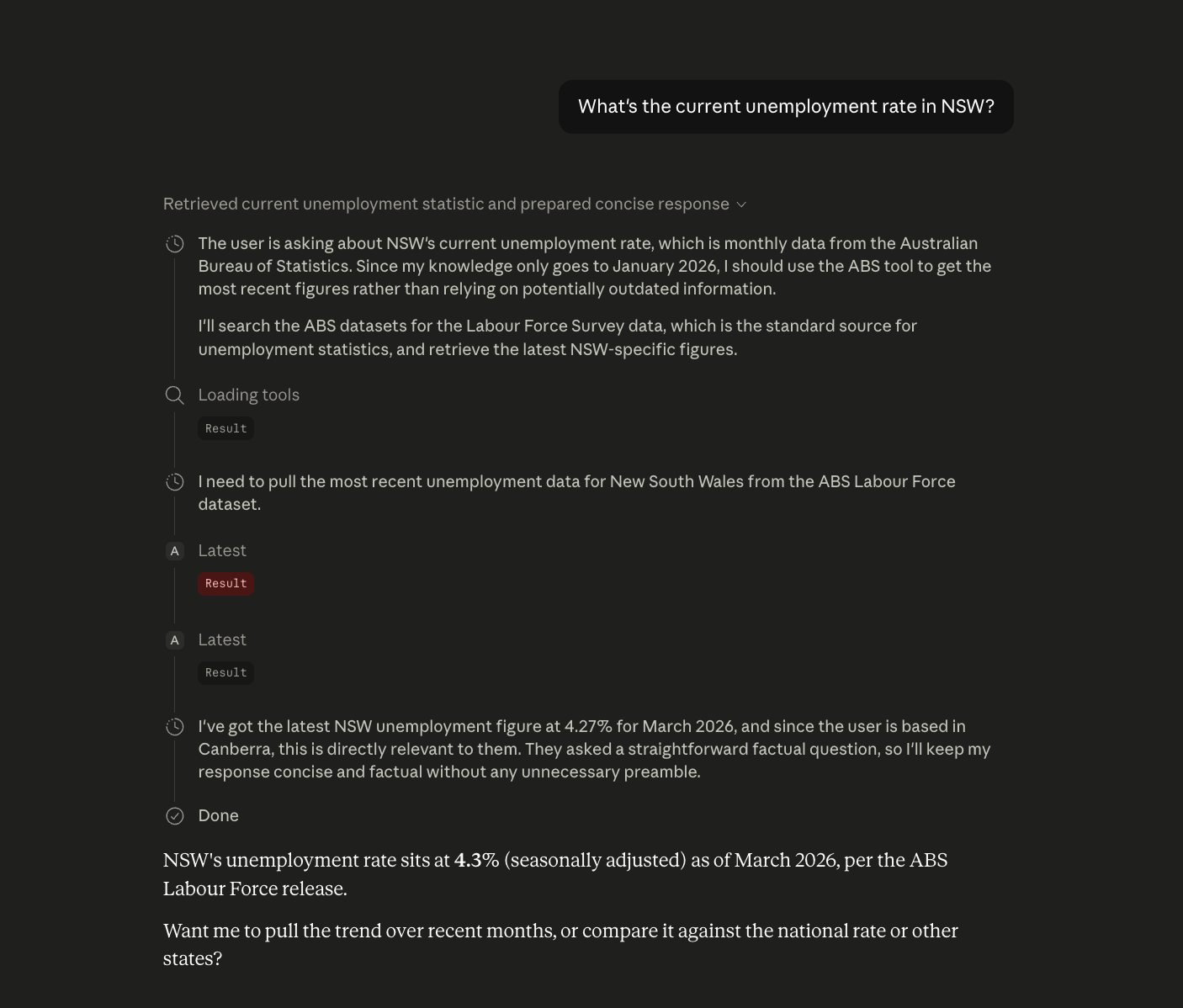
Claude does the picking; this server does the SDMX translation, unit attribution, and clean response shaping. You don't have to know what M13.3.1599.20.1.M means — and neither does Claude.
How it differs from existing ABS MCP servers
The one existing community option (seansoreilly/abs) exposes a single query_dataset tool that passes raw SDMX through. This package offers semantic tools and curated mappings for the highest-value dataflows so an LLM can answer real questions without you needing to know what M13.3.1599.20.1.M means.
Sister MCPs (Australian Public Data portfolio)
Want all 9 sources behind one REST API? The hosted gateway at ausdata.io adds cross-source joins, full history, webhooks, and HMAC-signed responses on top of these MCPs — free tier (500 calls/mo, no card).
- abs-mcp — this one. Australian Bureau of Statistics (CPI, unemployment, ERP, building approvals)
- rba-mcp — Reserve Bank of Australia (cash rate, lending stats, exchange rates)
- ato-mcp — Australian Taxation Office (tax stats, ACNC charities)
- apra-mcp — Australian Prudential Regulation Authority (banking, insurance, super)
- aihw-mcp — Australian Institute of Health and Welfare
- asic-mcp — Australian Securities and Investments Commission (company registers)
- aemo-mcp — Australian Energy Market Operator (NEM dispatch, spot prices, generation)
- au-weather-mcp — Open-Meteo (Bureau of Meteorology aggregator)
- wgea-mcp — Workplace Gender Equality Agency
- aus-identity — Postcode / state / ABN normalisation helper used by all sisters
Changelog
See CHANGELOG.md for release history.
License
MIT — Harry Vass, 2026.
Reviews
No reviews yet
Be the first to review this server!
More Developer Tools MCP Servers
Git
Freeby Modelcontextprotocol · Developer Tools
Read, search, and manipulate Git repositories programmatically
Fetch
Freeby Modelcontextprotocol · Developer Tools
Web content fetching and conversion for efficient LLM usage
Worldmonitor
Freeby Koala73 · Developer Tools
Live markets, conflicts, country risk, chokepoints, energy, and China decision signals. 86 tools.
Toleno
Freeby Toleno · Developer Tools
Toleno Network MCP Server — Manage your Toleno mining account with Claude AI using natural language.
mcp-creator-python
Freeby mcp-marketplace · Developer Tools
Create, build, and publish Python MCP servers to PyPI — conversationally.
MCP Marketplace
Freeby mcp-marketplace · Developer Tools
Search and install MCP servers from inside your AI client.