
Server data from the Official MCP Registry
Stateless MCP server for AccelByte Gaming Services APIs with OpenAPI integration
About
Stateless MCP server for AccelByte Gaming Services APIs with OpenAPI integration
Remote endpoints: streamable-http: https://{studio}-{game}.prod.gamingservices.accelbyte.io/mcp/{studio}-{game} streamable-http: https://{private_cloud_url}/mcp/{namespace}
Security Report
This is a legitimate MCP server for AccelByte Gaming Services with well-structured OAuth 2.0 authentication and appropriate security controls. The codebase demonstrates good security practices around token handling, input validation, and XSS prevention. Minor code quality issues around error handling and some broad exception catches prevent a higher score, but permissions align with the server's purpose as a developer tool API gateway. Supply chain analysis found 8 known vulnerabilities in dependencies (0 critical, 6 high severity).
4 files analyzed · 14 issues found
Security scores are indicators to help you make informed decisions, not guarantees. Always review permissions before connecting any MCP server.
Permissions Required
This plugin requests these system permissions. Most are normal for its category.
How to Install & Connect
Available as Local & Remote
This plugin can run on your machine or connect to a hosted endpoint. during install.
Documentation
View on GitHubFrom the project's GitHub README.
AGS API MCP Server
A Model Context Protocol (MCP) server that gives AI assistants (VS Code Copilot, Cursor, Claude, Gemini, Antigravity) access to AccelByte Gaming Services (AGS) APIs through OpenAPI integration.
What It Does
- Search AGS API operations by description, tags, method, or service
- Describe specific operations — parameters, schemas, auth requirements
- Execute API requests with your authenticated token
- Render query results as charts, tables, and metrics (see Analytics & Visualization)
AccelByte hosts the AGS API MCP Server for you — you don't need to install or run anything locally. Just point your AI assistant at your environment's MCP URL and sign in.
Quick Install
Paste this into your AI coding assistant — it will fetch the install guide, ask you a couple of questions, and configure everything for you:
Install the AGS API MCP server for me. Fetch and follow the instructions at
https://raw.githubusercontent.com/AccelByte/ags-api-mcp-server/refs/heads/master/INSTALL.md
Works in VS Code Copilot, Cursor, Claude Code, Antigravity, and Gemini CLI.
Claude Desktop users: The simplest path is Settings → Connectors → Add custom connector (Name:
ags-api, URL: your MCP URL) — no AI installer needed. See Claude Desktop below for the full instructions and the fallback for accounts where workspace policy blocks custom connectors.If you do want to use the Quick Install prompt above, switch to the Code tab first (Chat and Cowork can't edit your config file).
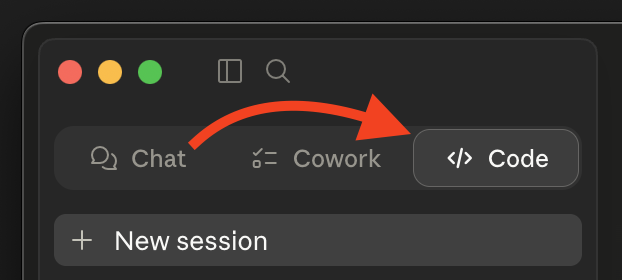
Prefer to do it yourself? See Manual Install below.
Manual Install
Step 1: Find Your MCP Server URL
The URL depends on which AGS edition you're on:
| Edition | URL format |
|---|---|
| Public Cloud | https://{studio}.prod.gamingservices.accelbyte.io/mcp/{studio} |
| Private Cloud | https://{domain}/mcp |
- Public Cloud customers receive a
{studio}namespace at registration — that one value goes in twice, once as the subdomain and once as the path. Studio admins and game admins use the same URL; your assigned roles decide which namespaces you can reach, not the URL you connect to. - Private Cloud customers use their own environment domain, whatever it is — no namespace segment. You may need to coordinate with AccelByte support to enable the MCP endpoint.
"Shared Cloud" is the same thing as Public Cloud — older docs and support threads use that name.
Not sure which edition you're on? Check with your AccelByte administrator.
Step 2: Configure Your Client
The deployed server uses OAuth 2.0 with PKCE and Dynamic Client Registration (DCR). If your client supports DCR, you can connect to the URL directly. If not — or if your client only supports stdio transport — use mcp-remote as a bridge.
Need
mcp-remote? It runs vianpx. You need Node.js 18+ withnpxavailable — verify withnpx --version. Most installers (nodejs.org, Homebrew,nvm, official Windows installer) bundlenpxvianpmautomatically, but minimal Linux distros sometimes ship Node without it; installnpmfrom your package manager if that's the case. No globalmcp-remoteinstall required.
Substitute your URL from Step 1 wherever you see <URL> below.
Visual Studio Code (Copilot)
.vscode/mcp.json in your workspace (or user settings.json):
{
  "servers": {
    "ags-api": {
      "type": "http",
      "url": "<URL>"
    }
  }
}
If you hit DCR errors, swap to: { "command": "npx", "args": ["-y", "mcp-remote", "<URL>"] }.
See the VS Code MCP documentation.
Cursor
.cursor/mcp.json in your workspace (or user settings):
{
  "mcpServers": {
    "ags-api": {
      "type": "http",
      "url": "<URL>"
    }
  }
}
If you hit DCR errors, swap to: { "command": "npx", "args": ["-y", "mcp-remote", "<URL>"] }.
See the Cursor MCP documentation.
Claude Code
claude mcp add --transport http ags-api <URL>
Fallback: claude mcp add ags-api -- npx -y mcp-remote <URL>.
See the Claude Code MCP documentation.
Antigravity
mcp_config.json in your project root:
{
  "mcpServers": {
    "ags-api": {
      "type": "http",
      "url": "<URL>"
    }
  }
}
If you hit DCR errors, swap to: { "command": "npx", "args": ["-y", "mcp-remote", "<URL>"] }.
See the Antigravity MCP documentation.
Gemini CLI
gemini mcp add --transport http ags-api <URL>
Fallback: gemini mcp add ags-api -- npx -y mcp-remote <URL>.
See the Gemini CLI MCP documentation.
Claude Desktop
Claude Desktop has two install paths. Pick the first one that works for your account:
Option A — Custom Connector (recommended for personal / Pro accounts)
- Open Settings → Connectors → Add custom connector (under the "Customize" area).
- Fill in:
- Name:
ags-api - Remote MCP server URL: your
<URL>from Step 1
- Name:
- Save. Claude Desktop handles OAuth (DCR + PKCE) natively — no config file edits, no
mcp-remote.
Don't see "Add custom connector"? Some Team and Enterprise plans disable custom connectors via workspace policy. If the option is missing or greyed out, use Option B.
Option B — mcp-remote config file (fallback when custom connectors are blocked)
Edit claude_desktop_config.json:
- macOS:
~/Library/Application Support/Claude/claude_desktop_config.json - Windows:
%APPDATA%\Claude\claude_desktop_config.json
{
  "mcpServers": {
    "ags-api": {
      "command": "npx",
      "args": ["-y", "mcp-remote", "<URL>"]
    }
  }
}
Restart Claude Desktop after saving.
Step 3: Sign In
When your AI assistant first calls a tool, it will open a browser to AccelByte to complete OAuth. Approve the consent screen and you're connected.
Using the Tools
Once connected, your assistant has access to these tools:
get_token_info
Returns details about your authenticated session — subject, namespace, roles/permissions, token kind, and expiration.
"What's my current user information?"
search-apis
Search AGS operations by description, HTTP method, tags, or service.
"Find APIs for user management" · "Search for inventory endpoints"
describe-apis
Get the full schema for a specific operation — parameters, request/response shapes, auth requirements.
"What parameters does the createItem endpoint need?"
run-apis
Execute an API request. Write operations (POST/PUT/PATCH/DELETE) prompt for consent before running.
"Get my user profile" · "List all items in my inventory"
Analytics & Visualization
The server exposes 16 render tools for turning tabular data into charts, tables, and metrics inside MCP hosts that support app resources:
render_bar_chart,render_line_chart,render_area_chart,render_scatter_chart,render_histogram_chart,render_box_chart,render_heatmap_chartrender_pie_chart,render_donut_chart,render_waterfall_chart,render_funnel_chart,render_gauge_chart,render_state_timeline_chartrender_table,render_metric,render_meter
All render tools require a provider:
provider="facade"reads Athena Facade results byquery_id+namespaceprovider="direct"renders small inline datasets fromdata_columns+data_rows
The typical Athena Facade flow:
- Use
run-apisto submit a query viaPOST /afs/v1/admin/namespaces/{namespace}/queries, preferably withwait_ms=0if you plan to render byquery_id - Poll
GET /afs/v1/admin/namespaces/{namespace}/queries/{id}untilstatus="SUCCEEDED" - Pass that
query_idto arender_*tool withprovider="facade"
If the submit returns 200 with inline rows on the fast path, render those rows directly with provider="direct".
See docs/ARCHITECTURE.md for the render-tool input matrix and the Athena Facade operation list.
Workflow Prompts
The server also provides workflow resources and prompts. Ask your assistant about available workflows or invoke the run-workflow prompt.
Troubleshooting
mcp-remote opens a browser every time
mcp-remote caches tokens under ~/.mcp-auth/. If it's re-authenticating on every launch, that directory may be unwritable or hold stale entries.
First, check permissions on ~/.mcp-auth/ (it needs to be writable by your user). If permissions look fine, the cache may be stale — back the directory up (e.g. mv ~/.mcp-auth ~/.mcp-auth.bak) and retry. Restore the backup if the move doesn't help. Note: removing the cache will sign you out of every MCP server you've authenticated with via mcp-remote, not just this one.
Native config fails with an OAuth or DCR error
Your client may not yet support Dynamic Client Registration. Switch to the mcp-remote fallback config shown above.
Sign-in succeeds but tool calls fail with 403
Your AccelByte user may not have permission for the operation you're calling. Check with your AGS administrator.
Authentication fails with "Invalid Request", "invalid client ID", or "client ID not found"
If your client connected before but now fails at sign-in — often with a generic IAM Invalid Request page mentioning an invalid redirect URI, client ID, or target path, or an "invalid client ID" / "client ID not found" error — the cached Dynamic Client Registration (DCR) is likely stale.
Clients that use DCR cache the IAM client ID they registered. If an administrator or an inactive-client cleanup job later removes that IAM client, the cached registration becomes invalid. The client keeps reusing the deleted client ID and authentication fails before a fresh DCR registration is ever attempted.
This is different from normal token expiry. When only your access token has expired, the client silently refreshes it or reauthorizes against the same valid client ID and you may not notice. A deleted client can't be refreshed — you have to clear the cached registration so the client runs DCR again and registers a new one.
Recovery — clear the cached authentication for the ags-api server, then sign in again:
- Claude Code: run
/mcp, select theags-apiserver, and choose Clear authentication. Then reconnect (via/mcpor by restarting) to trigger a new sign-in. - Codex: run
codex mcp logout ags-api, thencodex mcp login ags-api. mcp-remoteclients: seemcp-remoteopens a browser every time above for clearing the~/.mcp-auth/cache.
Clearing authentication only removes the local OAuth state (the cached registration and tokens) for this one server and requires you to sign in again — it creates a fresh DCR registration and restores access. You do not need to remove and re-add the MCP server, and you should not wipe all MCP credentials globally unless your client offers no way to clear a single server on its own.
Documentation
- Installation Guide — followed by the Quick Install prompt; readable on its own
- Architecture — design, security mechanisms, render tools, AFS operations
- Environment Variables — for self-hosters
- Self-Hosting & Development — build, run, test, deploy with Docker
Looking for V1? See docs/v1/README.md (legacy; stdio + server-managed OAuth).
Contributions
This repository is published as-is. We don't accept external pull requests at this time. For bug reports and questions, please open an issue.
Reviews
No reviews yet
Be the first to review this server!
More Developer Tools MCP Servers
Git
Freeby Modelcontextprotocol · Developer Tools
Read, search, and manipulate Git repositories programmatically
Fetch
Freeby Modelcontextprotocol · Developer Tools
Web content fetching and conversion for efficient LLM usage
Worldmonitor
Freeby Koala73 · Developer Tools
Live markets, conflicts, country risk, chokepoints, energy, and China decision signals. 90 tools.
Paperclip
Freeby Paperclipai · Developer Tools
Trending hip-hop artist momentum scores across four cultural dimensions.
Toleno
Freeby Toleno · Developer Tools
Toleno Network MCP Server — Manage your Toleno mining account with Claude AI using natural language.
mcp-creator-python
Freeby mcp-marketplace · Developer Tools
Create, build, and publish Python MCP servers to PyPI — conversationally.