
Server data from the Official MCP Registry
Search, move, mark, delete and draft your real mail over a self-hosted index.
About
Search, move, mark, delete and draft your real mail over a self-hosted index.
Security Report
Valid MCP server (2 strong, 2 medium validity signals). 9 known CVEs in dependencies (0 critical, 4 high severity) Imported from the Official MCP Registry.
4 files analyzed · 9 issues found
Security scores are indicators to help you make informed decisions, not guarantees. Always review permissions before connecting any MCP server.
What You'll Need
Set these up before or after installing:
Environment variable: EMAILSERVER_DATABASE_URL
Environment variable: EMAILSERVER_AUTH_MODE
Environment variable: EMAILSERVER_API_TOKEN
Environment variable: CREDENTIAL_ENCRYPTION_KEY
How to Install
Add this to your MCP configuration file:
{
  "mcpServers": {
    "io-github-alexanderkrauck-mailindex-mcp": {
      "env": {
        "EMAILSERVER_API_TOKEN": "your-emailserver-api-token-here",
        "EMAILSERVER_AUTH_MODE": "your-emailserver-auth-mode-here",
        "EMAILSERVER_DATABASE_URL": "your-emailserver-database-url-here",
        "CREDENTIAL_ENCRYPTION_KEY": "your-credential-encryption-key-here"
      },
      "args": [
        "-y",
        "github:alexanderkrauck/mailindex-mcp"
      ],
      "command": "npx"
    }
  }
}Documentation
View on GitHubFrom the project's GitHub README.
mailindex-mcp




A mail client for an AI agent. Everything you can do in Thunderbird — search, move, mark, delete, draft — over your own index, on your own machine.
Most email MCP servers forward each question straight to IMAP. That answers "show
me my last 10 messages" and falls apart on everything else: SEARCH is
inconsistent between providers, it cannot see inside attachments, it never tells
the model whether it actually searched everything, and it cannot do a thing about
what it finds.
So when you ask an assistant to clear eight thousand newsletters out of your inbox, it tells you that would be eight thousand tool calls and suggests you go and do it by hand in the web interface.
This one keeps its own copy of your mail and acts on it:
delete_mail(account_id=3, participants=["newsletter@example.com", ...])
→ matched: 4147, affected: 4147, to: "[Google Mail]/Bin"
One call. One connection. Six seconds. That is the difference between a search box and a mail client.
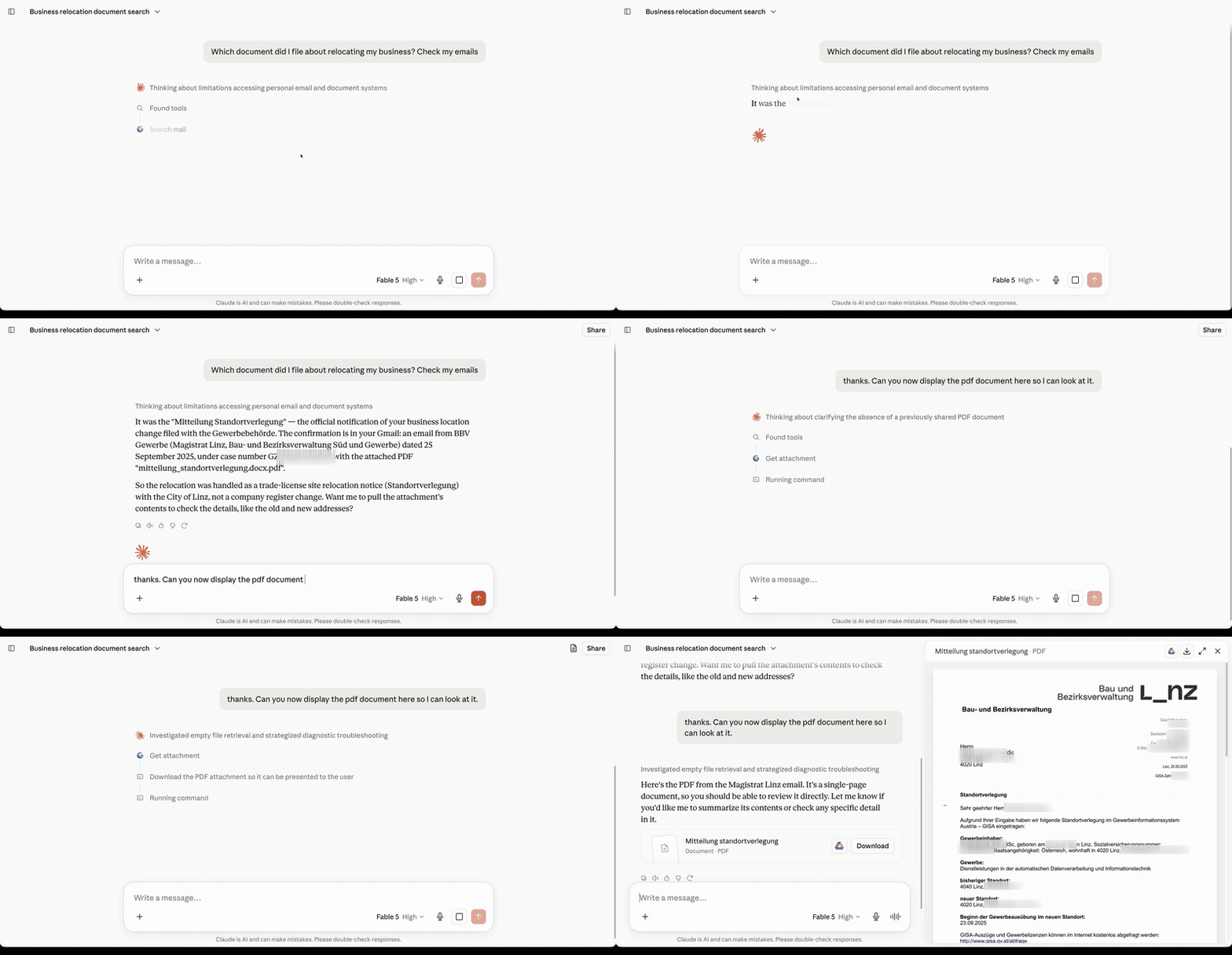
A real question against a live index of about 59,000 messages across six accounts. One string is blurred: a case number belonging to a real filing.
Why this instead of the other email MCP servers
| This project | Typical email MCP | |
|---|---|---|
| Can it change anything | Move, mark, delete, draft, manage folders — in bulk, by search | Read-only, or one message per call |
| Search | Own PostgreSQL index, GIN full-text, stemmed across languages | Live IMAP SEARCH per call |
| Result completeness | Exact total_count, signed cursors, per-account coverage | Whatever the folder returned |
| Attachments | Text extracted and indexed at sync time (PDF, DOCX, XLSX, PPTX, OCR) | Base64 into the model's context, or not at all |
| Attachment binaries | Never stored; refetched through a 5-minute signed URL | Stored on disk or inlined |
| Transport | Remote HTTP endpoint | Local stdio process on your machine |
| Setup on the client | Paste a URL | Install a runtime, edit config JSON, store credentials locally |
| Users | Multi-tenant, every row owner-scoped | Single user |
| Tool surface | 22 tools, all annotated | Frequently 40+ |
What it costs you, stated up front. You run PostgreSQL and a container. The index is about 28 MB per 1,000 messages — a 50,000-message archive is roughly 1.5 GB — and the image is 1.25 GB because it carries OCR language data. The first sync downloads every message once; search works on what has arrived while the rest continues in the background, and each account reports its own coverage so the model knows what it has not seen yet.
In exchange your assistant can answer questions about mail from years ago, including text inside attachments, and then act on the answer. None of it leaves your machine.
Quickstart
Five minutes, local only, no accounts to create anywhere.
git clone https://github.com/alexanderkrauck/mailindex-mcp.git
cd mailindex-mcp
cp .env.example .env
docker compose up -d
Every compose file here pulls
ghcr.io/alexanderkrauck/mailindex-mcp
— amd64 and arm64, so a Raspberry Pi or an Apple Silicon machine works the same
way. Append --build to any of them to compile it yourself instead; expect
several minutes, because the image carries OCR language data.
Pin a version for anything you care about. This is pre-1.0: the schema
changes between releases and migrations run automatically on start, so an
unpinned latest can migrate your database the moment you restart.
MAILINDEX_IMAGE=ghcr.io/alexanderkrauck/mailindex-mcp:0.1.0 docker compose up -d
MAILINDEX_IMAGE works with all three compose files, and belongs in your .env
rather than on the command line. Note the image tag has no v — the git tag is
v0.1.0, the image is 0.1.0, and 0.1 follows the latest patch of that minor
version.
Check it came up:
curl http://localhost:8002/api/v1/health
The default development mode is unauthenticated and Docker binds it to
127.0.0.1 only. It is meant for exactly this: trying the thing out on your own
machine.
Connect your AI client
Do this before connecting a mailbox — it is how you connect one.
claude mcp add --transport http mail http://localhost:8002/mcp
For other clients, point them at http://localhost:8002/mcp over streamable HTTP.
Then ask something your inbox search would struggle with — a phrase inside a PDF
someone sent you three years ago works well.
Connect a mailbox
Just ask your client — add_mail_account is one of the tools:
Connect my mailbox you@example.com, IMAP imap.example.com, SMTP smtp.example.com
Do not give it the password. Asked without one, it hands you back a short-lived URL to a form that asks for the password alone and sends it from your browser straight to the server. It never passes through the model, never lands in the conversation transcript your AI provider keeps, and it is the only way that works with clients such as ChatGPT that refuse to transmit secrets.
Use an app password from your provider's security settings, never your account login password. For Gmail, ask it to start the Gmail OAuth flow instead: that uses the Gmail API and survives label changes better. Microsoft 365 and Exchange Online accept no password at all, so ask it to connect a Microsoft mailbox: you sign in at Microsoft and approve what the server may do, exactly as with Gmail (setup).
curl -X POST http://localhost:8002/api/v1/accounts \
  -H 'Content-Type: application/json' \
  -d '{
    "name": "personal",
    "account_name": "you@example.com",
    "username": "you@example.com",
    "password": "your-app-password",
    "host": "imap.example.com",
    "port": 993,
    "smtp_host": "smtp.example.com",
    "smtp_port": 465
  }'
Synchronization starts on its own and runs in the background. Search works on what has arrived already — ask "how much of my mail have you indexed so far?" and it will tell you exactly, per account, because every search reports its own coverage rather than pretending to be complete.
Which setup do I need?
Four ways people arrive at this, and the shortest honest path for each.
"I want to see if this is real" — 5 minutes, your laptop
Everything runs locally, nothing to sign up for.
git clone https://github.com/alexanderkrauck/mailindex-mcp.git
cd mailindex-mcp && cp .env.example .env
docker compose up -d          # pulls the published image
claude mcp add --transport http mail http://localhost:8002/mcp
Add a mailbox with an app password (see below), wait for it to sync, then ask
your client something your inbox search would lose. What you need: Docker,
and an app password from your provider. What to expect: the first build
compiles psycopg2 and pulls ~130 MB of OCR language data, so it takes minutes,
not seconds. Auth is off and Docker binds to 127.0.0.1 only — fine here,
never expose it.
"I want this on my phone and laptop, every day" — one person, one server
You need a small VPS and a domain. Caddy gets the TLS certificate for you.
cat > .env <<'ENV'
EMAILSERVER_DOMAIN=mail.example.com
POSTGRES_PASSWORD=...
EMAILSERVER_API_TOKEN=...
CREDENTIAL_ENCRYPTION_KEY=...
SESSION_SECRET=...
ENV
docker compose -f docker-compose.single-user.yml up -d
Every value from openssl rand -base64 32; the API token must be at least 32
characters or the server refuses to start. What you need: a VPS with ~2 GB
RAM and disk for roughly 25 MB per 1,000 messages, a domain, and an app password
per mailbox. What to expect: works with anything that sends an
Authorization header — Claude Code, Cursor, mcp-remote. It will not work
with the claude.ai or ChatGPT web connectors, which negotiate OAuth and cannot
send a static token. If you want those, use the next one.
"My family/team should each have their own" — a few people
Google OAuth, so each person signs in as themselves and sees only their own mailboxes.
docker compose -f docker-compose.production.yml up -d
What you need: everything above, plus a Google Cloud OAuth Web application with the two redirect URIs listed under Deployment modes. What to expect: an unverified-app warning until you submit the consent screen, and a 100-user cap while unverified — neither matters at this size.
Set
REGISTRATION_MODE=allowlist. Withopen, any Google account on earth can register on your server and attach mailboxes, andALLOWED_GOOGLE_EMAILSis never read. Tenant isolation still keeps strangers out of your mail, but they get an account on your box. This is the easiest thing to get wrong on a public host.
"Could this be internal infrastructure?" — 500-person company
Honestly: not yet, and here is exactly what is missing rather than a maybe.
What works today. Run it for one team as a pilot using the Google setup above. Multi-tenancy is real and enforced at the query level — every row is owner-scoped, and ownership comes from the authenticated token rather than anything a caller supplies. Mailbox credentials are encrypted at rest and never returned. Attachment binaries are never stored.
What blocks a company-wide rollout.
| Gap | Why it matters |
|---|---|
| Login is Google OIDC only | No Entra ID, Okta, generic OIDC or SAML. If your directory is not Google, nobody can sign in. |
| No provisioning or deprovisioning | Users self-register; there is no SCIM, no group mapping, and no way to revoke someone's index when they leave. |
| No audit export | Sends are audited; reads, searches and mailbox writes are not, which most compliance reviews ask about. |
| Single Postgres, single container | No HA, no read replicas, no horizontal sync workers. Backup and restore is your pg_dump. |
| Attachment text sits in the database | Retention and legal hold are whatever you build. |
If you are that person: the pilot is genuinely worth running, and the honest pitch internally is "a search index over our own mail, on our own hardware, that an assistant can use" — not "an approved platform".
Mailbox credentials, whichever setup you pick
Signing in to this server grants access to nothing. Each mailbox is connected separately:
- Gmail — either an app password over IMAP, or the Gmail OAuth flow via
begin_gmail_connection, which uses the Gmail API instead and survives label changes better. - Microsoft 365 / Exchange Online — OAuth only, via
begin_microsoft_connection. Microsoft accepts neither a password nor an app password for these mailboxes. See Connecting Microsoft 365. - Everything else — an app password from the provider's security settings. Never your login password.
Connecting Microsoft 365 / Exchange Online
Microsoft mailboxes are connected the way Gmail is: you sign in at Microsoft and approve what this server may do, and the server keeps only the resulting refresh token, encrypted. That needs one app registration, made once per server.
1. Register an app in the Microsoft Entra admin center under App registrations → New registration:
- Supported account types: Accounts in any organizational directory and
personal Microsoft accounts, so any Microsoft 365 mailbox can connect. If only
your own organisation should, choose this organizational directory only and set
MICROSOFT_TENANTto its tenant ID below;commonis refused for such an app. - Redirect URI, platform Web:
https://mail.example.com/api/v1/accounts/microsoft/callback(addhttp://localhost:8002/api/v1/accounts/microsoft/callbackfor a local trial).
2. Add these delegated permissions under API permissions → Add a permission:
| API | Permission | What it is for |
|---|---|---|
| Office 365 Exchange Online (under APIs my organization uses) | IMAP.AccessAsUser.All | reading, searching, moving and flagging mail over IMAP |
| Microsoft Graph | Mail.Send | sending mail |
| Microsoft Graph | User.Read, openid, profile, email, offline_access | knowing which mailbox signed in, and staying signed in |
Whether a user may approve these for themselves is the tenant's user consent setting. Where it is restricted, the connection page says an administrator has to approve the app first; Grant admin consent on this page does it for everyone.
3. Create a client secret under Certificates & secrets. Copy its Value straight away; Microsoft shows it once. Secrets expire (at most after 24 months): put the date in a calendar. Replacing the secret in the environment and restarting is all a renewal takes, because the stored credentials do not contain it and no mailbox has to be connected again.
4. Give the server the registration, then restart it:
MICROSOFT_CLIENT_ID=<Application (client) ID>
MICROSOFT_CLIENT_SECRET=<the secret's Value>
MICROSOFT_TENANT=common            # or your tenant ID
(docker-compose.yml reads the same three with an EMAILSERVER_ prefix.)
5. Connect a mailbox. Ask your assistant to connect a Microsoft mailbox, open the link it returns, pick the account and approve. The page that follows says whether the mailbox is usable, and if not, why.
What to know:
- Sending goes through Microsoft Graph, not SMTP. Exchange Online ships with
SMTP AUTH switched off for the whole organisation, and turning it on is a
security decision for that organisation's administrator. Graph needs only the
user's own consent. Exchange files the message in Sent Items itself and keeps
its
Message-ID, so a sent message is never indexed twice. Replies are threaded, andBccrecipients stay hidden from everyone else. - Exchange keeps one body per message. Send text and HTML and what arrives is the HTML. Search is unaffected: the index extracts text from it.
- Calendar, contacts, tasks, notes and journal are listed by Exchange as if
they were mail folders. They are left out of synchronisation and of
list_mail_foldersfor mailboxes in English, German, French, Spanish, Italian, Dutch and Portuguese. For another language the server says so in its log and indexes every folder; name the ones to skip inEMAILSERVER_EXCLUDED_SYNC_FOLDERS='["Kalendarz","Kontakty"]'. - IMAP can be switched off per mailbox. The connection page then says so; an
administrator turns it on with
Set-CASMailbox -Identity user@example.com -ImapEnabled $true. - Revoking. Deleting the mailbox here removes the stored token but does not revoke it at Microsoft. To do that, remove the app's consent under Enterprise applications in Entra.
- Personal Outlook.com accounts use the same flow, but this has only been verified against Exchange Online work and school mailboxes.
Deployment modes
EMAILSERVER_AUTH_MODE picks how callers are authenticated. Mailbox credentials are
always separate from this.
| Mode | Who can call it | What you need | Works with |
|---|---|---|---|
development | anyone on loopback | nothing | local clients only |
single_user | one owner with a static bearer token | a token, a domain | Claude Code, Cursor, mcp-remote, anything that sends a header |
google | multiple users via Google OAuth + dynamic client registration | a Google Cloud OAuth client, a domain | Claude.ai, ChatGPT and Grok web connectors, plus all of the above |
Production, single user, no Google project
The shortest path to a real deployment. Caddy obtains and renews TLS.
cat > .env <<'ENV'
EMAILSERVER_DOMAIN=mail.example.com
POSTGRES_PASSWORD=...
EMAILSERVER_API_TOKEN=...
CREDENTIAL_ENCRYPTION_KEY=...
SESSION_SECRET=...
ENV

docker compose -f docker-compose.single-user.yml up -d
Generate each secret with openssl rand -base64 32. EMAILSERVER_API_TOKEN must be
at least 32 characters; the server refuses to start otherwise.
claude mcp add --transport http mail https://mail.example.com/mcp \
  --header "Authorization: Bearer $EMAILSERVER_API_TOKEN"
Production, multiple users, Google OAuth
Needed if you want Claude.ai or ChatGPT web connectors, which negotiate OAuth and cannot send a static header, or Grok's connectors to sign in with OAuth.
Create a Google OAuth Web application and configure:
- Authorized JavaScript origin:
https://mail.example.com - Authorized redirect URIs:
https://mail.example.com/auth/callbackhttps://mail.example.com/api/v1/accounts/gmail/callback
Do not add the AI vendor's callback to the Google client. The MCP server allows
https://claude.ai/api/mcp/auth_callback, https://chatgpt.com/connector/oauth/* and
Grok's https://grok.com/connectors-oauth-exchange-code/ (also on console.x.ai)
itself, then redirects the completed authorization back to the client.
cat > .env <<'ENV'
EMAILSERVER_DOMAIN=mail.example.com
POSTGRES_PASSWORD=...
GOOGLE_CLIENT_ID=123.apps.googleusercontent.com
GOOGLE_CLIENT_SECRET=...
JWT_SIGNING_KEY=...
CREDENTIAL_ENCRYPTION_KEY=...
SESSION_SECRET=...
REGISTRATION_MODE=allowlist
ALLOWED_GOOGLE_EMAILS=["owner@example.com"]
ENV

docker compose -f docker-compose.production.yml up -d
Add https://mail.example.com/mcp in the client. It receives an OAuth challenge,
discovers the authorization metadata, registers its callback, and sends the user
through Google.
Two things to expect from Google: an unverified-app warning until you submit the consent screen for review, and a 100-user cap while unverified. Neither matters for a personal or family deployment.
Upgrading an existing single-owner installation: set
CLAIM_LEGACY_ACCOUNTS_ON_FIRST_LOGIN=true, allowlist exactly the intended owner, let
that user log in once to claim the existing accounts, then set it back to false.
Security model
- Google OpenID Connect identifies an application user by the stable
subclaim. - Each user owns multiple Gmail, Microsoft 365, Zoho, or generic IMAP/SMTP accounts.
- Mailbox credentials are separate from login identity and encrypted at rest.
- MCP derives ownership from the authenticated token; callers never supply an owner ID.
- Mailbox passwords are write-only tool and API inputs, and are never returned.
- Original attachment binaries are not stored. A signed URL refetches them on demand.
- Development mode is unauthenticated and must remain bound to loopback.
Signing in does not grant access to any mailbox. Gmail and Microsoft 365 are connected through separate OAuth consent flows; Zoho and generic IMAP use provider app passwords. A Microsoft mailbox's stored credential is its refresh token alone: the app registration's secret stays in the server's environment.
MCP tools
Twenty-two tools, each annotated with read-only, destructive and open-world hints. It is a mail client, not a search box: everything you can do in Thunderbird you can do here, over an index instead of a folder listing.
| Tool | |
|---|---|
list_mail_accounts | accounts, non-secret settings, exact stored message counts |
add_mail_account | add an IMAP/SMTP mailbox |
update_mail_account | change one mailbox's settings |
delete_mail_account | remove an account and everything indexed from it; nothing at the provider |
begin_mail_account_password_setup | short-lived password-only browser form |
begin_gmail_connection | five-minute signed URL for Google consent |
begin_microsoft_connection | five-minute signed URL for Microsoft consent |
search_mail | exhaustive lexical search |
search_mail_regex | bounded regex search |
get_mail | one message, bounded body |
get_thread | reconstructed thread with confidence |
get_attachment | metadata, extracted text, expiring download URL |
begin_attachment_upload | signed slot for new file bytes, attached or embedded inline |
send_mail | send or reply, with owned attachments |
list_mail_folders | folders of one mailbox, with declared roles and indexed counts |
create_mail_folder | create and subscribe to a folder |
rename_mail_folder | rename a folder, keeping its mail and children |
delete_mail_folder | remove a folder, emptying it into Trash first |
mark_mail | set or clear read and flagged state, in bulk |
move_mail | move mail to another folder, in bulk |
delete_mail | move to Trash, in bulk; permanent only from Trash |
save_draft | write a draft into the mailbox's Drafts folder |
Standalone connection tests and manual sync are deliberately outside the MCP surface.
Bulk. mark_mail, move_mail and delete_mail select messages the same way
search_mail does — pass email_ids, or the same filters to act on everything
that matches. One call opens one connection and issues one command per folder, so
clearing 8,000 newsletters is one call rather than 8,000. Each response reports
matched against affected, and sets truncated when a limit cut the work
short, so a partial batch is never mistaken for a finished one. A call with
neither ids nor filters is refused rather than treated as "the whole mailbox".
Gmail. Gmail has labels, not folders, so a single location is projected from
them by precedence — TRASH > SPAM > DRAFT > INBOX > SENT, and ARCHIVE for a
message carrying none of those. That projection is what makes folder-scoped
search, Trash exclusion and writes work identically across providers: a Gmail
message is addressed by its provider id rather than a UID, and moving it means
adding one label and removing the one it came from. SENT and DRAFT are
Gmail's to assign and are never removed. Folder creation, renaming and deletion
are refused there, with the reason.
Writes. Every write goes to the mailbox first and is only recorded locally
once the server confirms it, so the index never claims a change that did not
happen. They hold the same lease the synchronizer uses, keyed on
(host, port, username) rather than on an account row, because two accounts can
name one physical mailbox and an untagged EXPUNGE landing during a folder
census renumbers the sequence numbers that census is reading. Writes address the
live copy of a message rather than one sitting in Trash. delete_mail moves to
Trash and needs a second, explicit call to destroy anything.
Passwords. add_mail_account and update_mail_account take an optional
write-only password. When a client will not transmit secrets, omit it and open the
returned setup URL, or call begin_mail_account_password_setup; the linked form asks
only for the password. A failed connection test keeps both the configuration and the
encrypted credential, so settings can be corrected without re-entering it.
Removing an account. delete_mail_account takes two calls. The first, with
only account_id, reports what would go; the second deletes, and only when
confirm_name equals the account's name exactly -- the name rather than the
address, because an old password account and a newer OAuth connection can share
one mailbox. Gone afterwards: the stored credential, the settings, every indexed
message with its extracted attachment text, and the sync state. Nothing changes at
the provider, so the mailbox can be connected again later and is then indexed from
scratch; revoking the access granted there (Google account permissions, Microsoft
My Apps) remains the owner's step. The record of mail sent through the account is
kept, detached from it. A synchronization step already writing to the account is
waited for (up to 30 seconds), and the rest of that synchronization is fenced out.
While a step is still writing after that, or a send from the account that has
recorded its claim has not finished, the answer is CONFLICT with retry_after,
and nothing is deleted. A send the deletion overtakes fails with nothing sent.
DELETE /api/v1/accounts/{id} is different: it disables an account and keeps its
data.
Search. search_mail and search_mail_regex return total_count, raw_count,
returned_count, has_more, and a signed next_cursor. Reuse the same filters with
next_cursor until has_more is false for an exhaustive result. Deduplication
defaults to exact, which groups equal RFC Message-ID values while retaining every
source account and message ID; mirror also groups normalized body copies; none
returns every stored row. Responses additionally report matching fields,
participant-domain facets, and per-account sync coverage.
Stemming. match defaults to stemmed, which finds inflected forms of a
word: on a real 52,000-message mailbox invoices goes from 104 hits to 1,016 and
Verträge from 133 to 1,168. The cost is precision — meeting also matches
meet — so pass match="exact" for order numbers, identifiers and surnames,
which a stemmer would widen. Both modes are indexed; every response reports which
one ran.
Read state. is_unread, is_flagged and is_answered filter on flags
mirrored from the provider. They are tri-state: a message whose provider never
reported flags matches neither true nor false, and search returns a
FLAG_STATE_UNKNOWN warning saying how many messages that removed, rather than
quietly reporting them as read. Gmail publishes no answered label, so
is_answered is always unknown for Gmail OAuth accounts. Flags are refreshed by
the periodic reconciler, so they lag the mailbox by up to
EMAILSERVER_DELETION_RECONCILE_INTERVAL.
get_mail and get_thread return bounded plain text by default; HTML must be
requested explicitly. send_mail accepts owned attachment_ids and refetches each
original binary from its provider before sending.
HTTP API
GET /api/v1/docs serves the OpenAPI browser. Every account, message, attachment,
sync and send lookup is owner-scoped.
GET    /api/v1/me
GET    /api/v1/accounts
POST   /api/v1/accounts
GET    /api/v1/accounts/{id}
PATCH  /api/v1/accounts/{id}
DELETE /api/v1/accounts/{id}
POST   /api/v1/accounts/{id}/test
POST   /api/v1/accounts/{id}/sync
GET    /api/v1/accounts/gmail/connect
GET    /api/v1/accounts/microsoft/connect
GET    /api/v1/emails/search
GET    /api/v1/emails/search/regex
GET    /api/v1/emails/{id}
GET    /api/v1/attachments/{id}
POST   /api/v1/send
How synchronization works
The parts that make search trustworthy rather than best-effort:
-
Alembic applies versioned, data-preserving migrations on startup.
-
Message identity is the normalised RFC
Message-ID, which travels with the message. Location lives separately inmessage_placements, one row per folder, so moving a message upstream relocates it instead of deleting and re-creating it. Gmail API messages keep the provider's own id, which already survives a label change. -
IMAP cursors persist UID, UIDVALIDITY and folder. Backfills run oldest-first and are bounded per cycle. A cursor advances only after its batch commits, and a UIDVALIDITY change resets just that folder.
-
Gmail OAuth accounts use
messages.list/getfor resumable backfill andhistory.listfor incremental change. An expired history ID triggers a generation-marked full sync before upstream deletions are reconciled. -
Microsoft 365 accounts synchronise over IMAP with an OAuth token, like any other IMAP account, and send through Microsoft Graph. A copy of a message in Sent Items and the one delivered to INBOX are the same message by
Message-ID, though Exchange lays their MIME out differently; an attachment is therefore found again by its checksum rather than by its position. -
Periodic metadata-only reconciliation mirrors flags and upstream deletions, with a durable checkpoint so a restart does not force a full rescan.
-
Account work is bounded by a global concurrency limit and protected by expiring database leases, so two workers cannot sync one mailbox and a crashed worker cannot hold a permanent lock.
-
PostgreSQL GIN indexes back lexical body and attachment search. The same text is indexed once per configured language and stored as one combined vector, so a German invoice and an English newsletter are both stemmed correctly in the same mailbox; identical lexemes collapse, so the union costs about as much as the unstemmed index it sits beside.
EMAILSERVER_SEARCH_TEXT_CONFIGSselects the languages and defaults to["simple", "english", "german"]. Changing it needs a matching index, which the migration only builds once:CREATE INDEX CONCURRENTLY ix_email_logs_search_fts_simple_english_french ON email_logs USING gin (( to_tsvector('simple', coalesce(sender,'')||' '||coalesce(recipient,'')||' '||coalesce(subject,'')||' '||coalesce(body_plain,'')) || to_tsvector('english', coalesce(sender,'')||' '||coalesce(recipient,'')||' '||coalesce(subject,'')||' '||coalesce(body_plain,'')) || to_tsvector('french', coalesce(sender,'')||' '||coalesce(recipient,'')||' '||coalesce(subject,'')||' '||coalesce(body_plain,'')) ));Without it search still returns the same answer, by scanning every stored body.
-
Provider flags are normalised at sync time into
is_unread,is_flaggedandis_answered. IMAP reports that a message was read and the Gmail API reports that it was not, in two different encodings; neither is filterable as stored. A message the provider never reported flags for stays null rather than defaulting to read. -
Attachment text is extracted at sync time. Image attachments are OCR'd in every language installed in the image, because tesseract given no language assumes English and mangles accented scripts: German umlauts come back as
dirfen Fubodeninstead ofdürfen Fußboden, so the text is indexed but can never be found by searching the words on the page. The image shipseng deu fra ita spa nld por; add or trim withdocker build --build-arg TESSERACT_LANGS="eng deu jpn", and pin a subset at runtime withEMAILSERVER_OCR_LANGUAGES=deu+engto trade coverage for speed. -
A
Dateheader that parses but is implausible, such as a year of 2611, is discarded rather than stored, because search sorts and paginates on that column. Gmail falls back to the provider timestamp; IMAP leaves it null.scripts/repair_email_dates.pyclears values written before this check. -
Regex search is separate and bounded by scope, pattern, result and statement time.
-
Sends support idempotency keys and append an owner-scoped audit record.
Development
The test suite is self-contained. It uses in-memory SQLite and a temporary data directory, so it needs no PostgreSQL, no Docker and no network.
python -m venv .venv && . .venv/bin/activate
pip install -r requirements.txt
pytest -q
ruff check .
It covers tenant isolation, tool exposure and annotations, static-token and OAuth authentication, encryption, token tampering, attachment limits, IMAP cursor behavior, Gmail history behavior, and OAuth challenge metadata.
scripts/verify_postgres_search.py is a different thing: a read-only smoke test that
runs against a populated deployment to confirm exhaustive search, dedup, facets and
regex behave on real data.
docker compose exec email-server python -m scripts.verify_postgres_search
License
MIT. See LICENSE.
Contributing and security
- CONTRIBUTING.md — how to run it, and what this project cares about enough to argue with you over in review.
- SECURITY.md — what is protected, what is not, and where to report a vulnerability privately.
- CHANGELOG.md — what changed between releases.
Reviews
No reviews yet
Be the first to review this server!
More Developer Tools MCP Servers
Rea
Freeby Morluto · Developer Tools
Reverse engineer anything from your terminal or agent with one CLI and MCP server.
Paperclip
Freeby Paperclipai · Developer Tools
Trending hip-hop artist momentum scores across four cultural dimensions.
Toleno
Freeby Toleno · Developer Tools
Toleno Network MCP Server — Manage your Toleno mining account with Claude AI using natural language.
MCP Marketplace
Freeby mcp-marketplace · Developer Tools
Search and install MCP servers from inside your AI client.
mcp-creator-python
Freeby mcp-marketplace · Developer Tools
Create, build, and publish Python MCP servers to PyPI — conversationally.
by Lharries · Communication
Read, search, and send WhatsApp messages through your AI assistant