
Server data from the Official MCP Registry
MCP server for MikroTik RouterOS: typed tools, dry-run, RBAC, audit logs, and rollback.
About
MCP server for MikroTik RouterOS: typed tools, dry-run, RBAC, audit logs, and rollback.
Security Report
MikroMCP is a well-architected MCP server for RouterOS management with thoughtful security design. The codebase demonstrates strong defensive practices including input validation, permission scoping, audit logging, and safe mutation patterns. A few low-severity issues exist around error handling breadth and dependency management, but these do not materially impact security given the server's purpose and threat model. Supply chain analysis found 14 known vulnerabilities in dependencies (0 critical, 7 high severity). Package verification found 1 issue.
4 files analyzed · 19 issues found
Security scores are indicators to help you make informed decisions, not guarantees. Always review permissions before connecting any MCP server.
Permissions Required
This plugin requests these system permissions. Most are normal for its category.
What You'll Need
Set these up before or after installing:
Environment variable: MIKROMCP_CONFIG_PATH
Environment variable: MIKROMCP_STDIO_IDENTITY
Environment variable: MIKROMCP_LOG_LEVEL
How to Install
Add this to your MCP configuration file:
{
  "mcpServers": {
    "io-github-alikarami-mikromcp": {
      "env": {
        "MIKROMCP_LOG_LEVEL": "your-mikromcp-log-level-here",
        "MIKROMCP_CONFIG_PATH": "your-mikromcp-config-path-here",
        "MIKROMCP_STDIO_IDENTITY": "your-mikromcp-stdio-identity-here"
      },
      "args": [
        "-y",
        "mikromcp"
      ],
      "command": "npx"
    }
  }
}Documentation
View on GitHubFrom the project's GitHub README.
MikroMCP
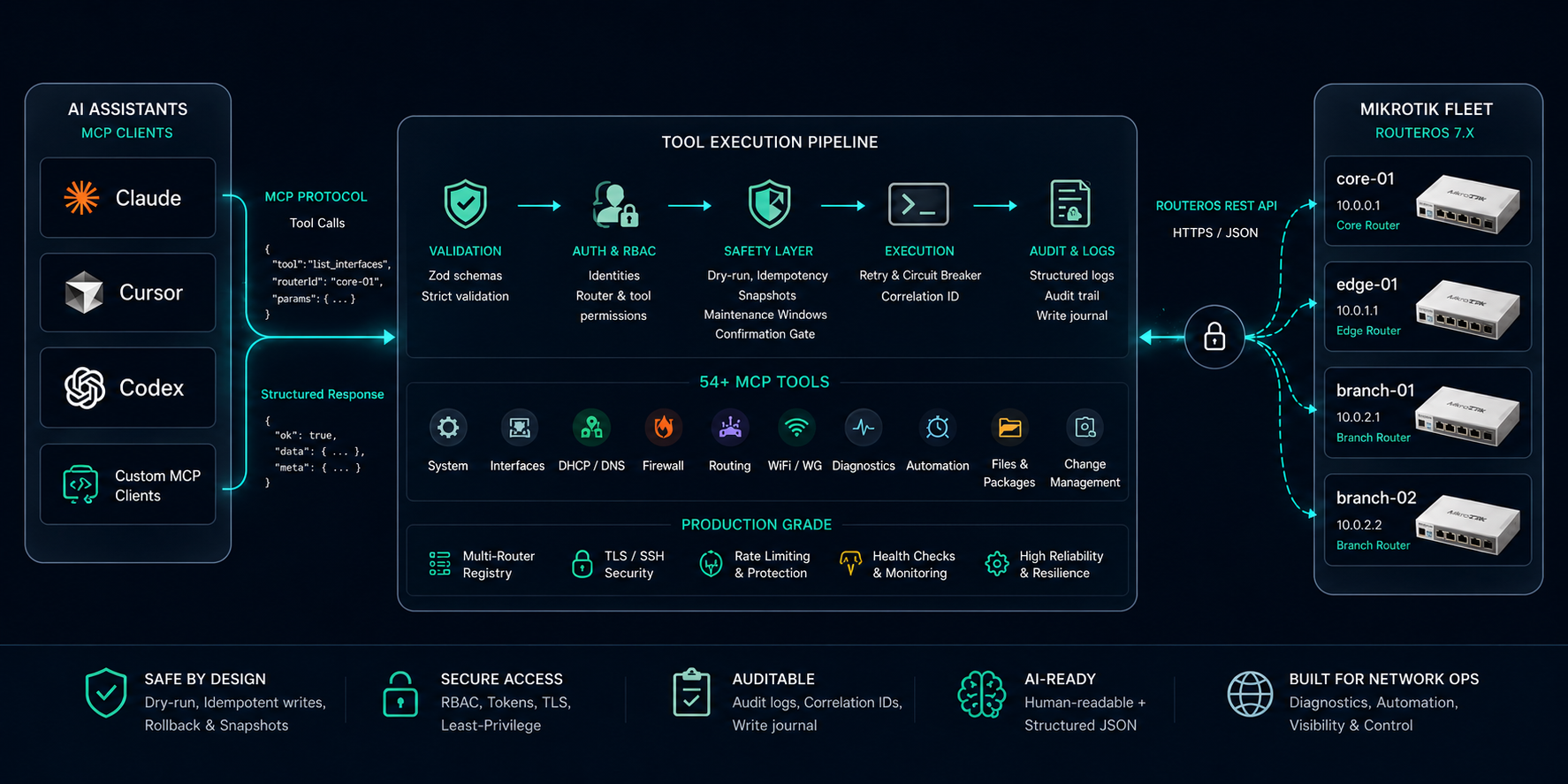
AI-native network automation for MikroTik RouterOS. MikroMCP exposes RouterOS as a typed, auditable Model Context Protocol server so Claude, Cursor, Codex, and other MCP clients can inspect, diagnose, and safely operate MikroTik routers in natural language.





MikroMCP exists because raw router CLI access is the wrong abstraction for AI agents. RouterOS is powerful, but asking an LLM to improvise shell commands against production network gear is risky. MikroMCP gives agents a controlled tool surface: strict schemas, idempotent writes, dry-run previews, per-router circuit breakers, retry policies, RBAC, audit logs, snapshots, and rollback-aware change workflows.
In one sentence: MikroMCP turns MikroTik RouterOS into a production-minded MCP control plane for AI infrastructure, DevOps automation, and modern router management.
Quick Start
That's the whole setup for a single-router stdio deployment. For standalone binaries, Docker, HTTP/SSE mode, the RouterOS API prerequisites, and the full 15-minute walkthrough, see the Getting Started guide.
Feature Showcase
| Category | What MikroMCP covers |
|---|---|
| 🧭 Router management | System status, clock, reboot, packages, files, scripts, scheduler jobs, containers |
| 🌐 Network operations | Interfaces, VLANs, IP addresses, DHCP leases, DNS static records, bridge ports, WiFi clients |
| 🔥 Firewall and policy | Filter/NAT rules, mangle rules, address lists, route tables, routing rules |
| 🛰️ Routing visibility | Static routes, routing tables, BGP peers, OSPF neighbors |
| 🔀 SwOS switches | Experimental. MikroTik SwOS and SwOS Lite switches (deviceType: "swos") over the reverse-engineered .b HTTP API: port links, PoE, SFP diagnostics, and guarded whole-blob writes with a firmware-compatibility check |
| 🔐 Secure access | HTTP bearer auth, bcrypt token hashes, RBAC, router/tool restrictions, confirmation tokens |
| 🧪 Diagnostics | Router-originated ping, traceroute, torch, log filtering, guarded SSH command execution |
| 🛡️ Change safety | Dry-run, idempotent writes, snapshots, write journal, plan_changes, apply_plan, rollback_change |
| ⚙️ Production behavior | Retries for read tools, per-router circuit breakers, correlation IDs, structured logs, audit logs |
| 🤖 AI-agent fit | Human-readable responses plus structured JSON content for reasoning, chaining, and automation; server advertises an instructions string on MCP initialize so clients self-configure; optional routerId resolved via MIKROMCP_DEFAULT_ROUTER for single-router setups; usage skill for safe, guided tool use in Claude Code |
| 🧩 MCP compatibility | stdio for desktop clients, Streamable HTTP and legacy SSE for remote or service-style clients |
122 typed tools in total — browse the full catalog with parameters, defaults, and copy-paste example prompts in Available Tools.
Demo
Usage
Review by Claude
Real-World Usage Examples
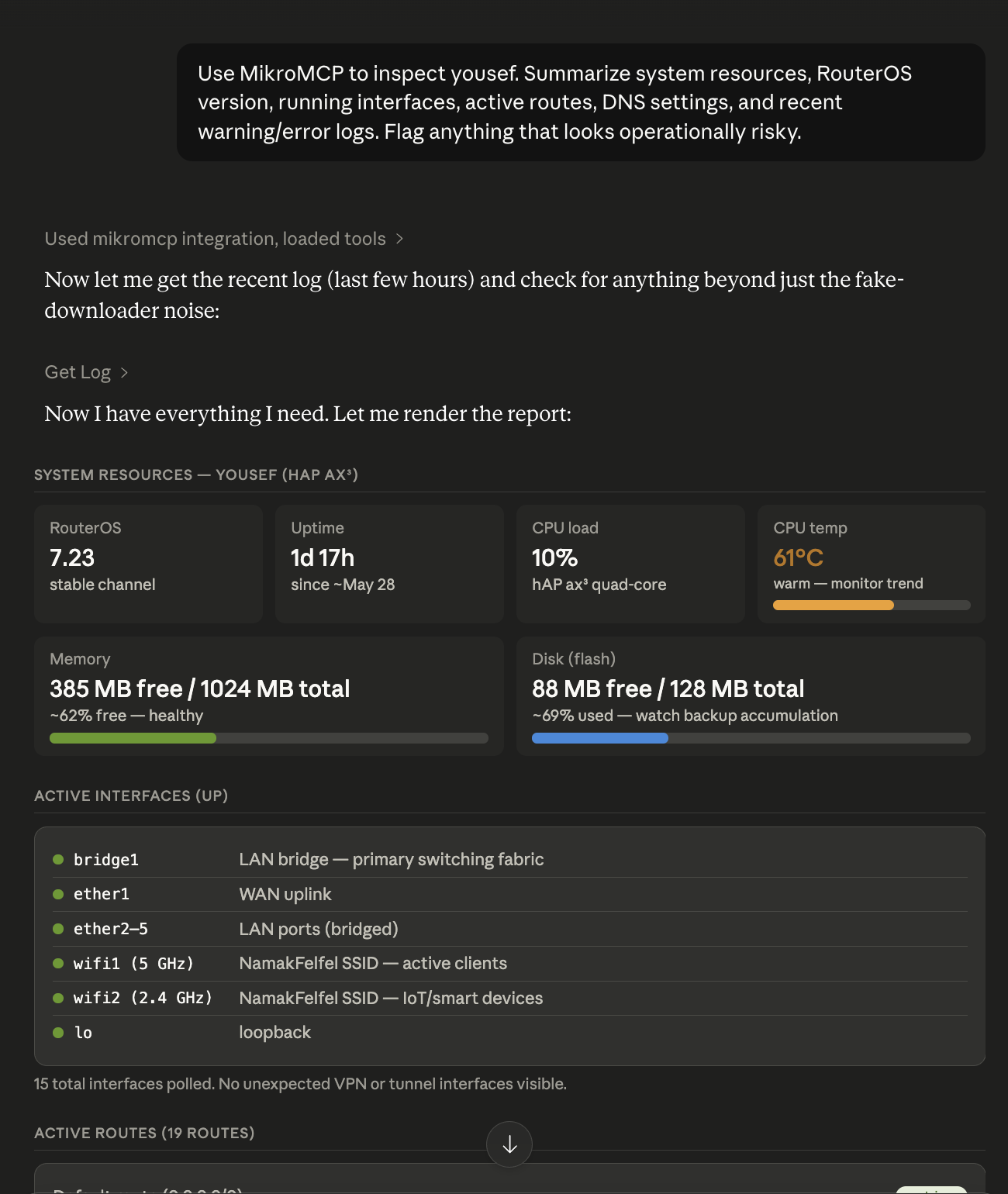
Router Inspection
Use MikroMCP to inspect core-01. Summarize system resources, RouterOS version,
running interfaces, active routes, DNS settings, and recent warning/error logs.
Flag anything that looks operationally risky.
Firewall Management
List firewall filter and NAT rules on edge-01. Identify disabled rules,
overlapping port forwards, broad accept rules, and anything without comments.
Do not change anything yet.
Safe Static Route Change
Dry-run a route on core-01 for 10.20.0.0/16 via 192.168.88.1 in the main table.
Show the exact planned diff and tell me whether an existing route conflicts.
WireGuard Operations
Show WireGuard peers on branch-02. Sort by last handshake age and flag peers
that have not handshaken recently or have no transfer counters.
Interface Diagnostics
Check interface health on edge-01, then run ping and traceroute from the router
to 1.1.1.1. If packet loss is present, use torch on the WAN interface for a
short traffic snapshot.
Plan / Apply / Rollback Workflow
Create a change plan that adds a DNS record and a firewall address-list entry
on edge-01. Use dry-run first, explain the plan, then wait for approval before
applying anything.
Why MikroMCP Is Useful For AI Agents
MCP gives LLMs a standard way to call tools. MikroMCP makes RouterOS a high-quality MCP target by turning network operations into well-described, machine-readable, permission-aware actions.
AI assistants can use MikroMCP to:
- Investigate router state without memorizing RouterOS command syntax.
- Chain tool calls across interfaces, routes, firewall rules, logs, and diagnostics.
- Return both operator-friendly summaries and structured JSON for follow-up reasoning.
- Preview changes before mutation and explain exactly what would happen.
- Respect tool-level authorization, router scoping, maintenance windows, and confirmation gates.
FAQ
What is MikroMCP?
MikroMCP is an open-source Model Context Protocol (MCP) server that exposes MikroTik RouterOS as 122 typed, auditable tools — letting AI assistants inspect, diagnose, and safely operate routers in natural language instead of improvising CLI commands.
MikroMCP vs RouterOS API
The RouterOS REST/API exposes raw endpoints. MikroMCP wraps them in schema-validated, idempotent, dry-run-able tools with RBAC, audit logging, snapshots, and rollback — the safety layer an LLM needs before it touches production gear.
MikroMCP vs SSH automation
Instead of brittle SSH scripts that screen-scrape CLI output, MikroMCP returns structured, typed results with confirmation gates and per-router circuit breakers. SSH is used only where REST can't reach — ping, traceroute, torch, and guarded run_command.
MikroMCP for Claude Code
MikroMCP speaks MCP over stdio and HTTP/SSE, so Claude Code and Claude Desktop drive RouterOS directly. Pair it with the bundled usage skill for safe, guided workflows.
MikroMCP for Codex
Codex connects to MikroMCP over the standard MCP protocol — see Connecting to AI Assistants.
MikroMCP for Cursor
Cursor connects to MikroMCP as an MCP server (stdio or HTTP) to inspect and manage MikroTik routers without leaving the editor.
MikroMCP for OpenClaw
Any MCP-compatible client — OpenClaw included — can use MikroMCP; configure it as a stdio or HTTP MCP server.
RouterOS AI Automation Guide
Start with Getting Started to install and connect, then use the usage skill and Available Tools to automate RouterOS safely with an AI assistant.
Best MCP Servers for Network Engineers
MikroMCP is purpose-built for MikroTik/RouterOS operations with production-grade safety — dry-run, rollback, audit, and RBAC — making it a strong MCP choice for network engineers adopting AI tooling.
Documentation
The README stays intentionally short. Everything below is documented in depth in the wiki:
| Resource | Use it for |
|---|---|
| Getting Started | Install (npm, binary, Docker), configure, and connect in 15 minutes |
| RouterOS API Setup | Enable the REST API, create a user, TLS and firewall |
| Configuration | Router registry, credentials, all environment variables |
| Running | Run commands, HTTP/SSE transport, troubleshooting |
| Connecting to Claude Desktop | Register MikroMCP in Claude Desktop |
| Connecting to AI Assistants | Claude Code, Cursor, Codex, HTTP/Docker/systemd |
| Using the Skill | Install the MikroMCP usage skill so your assistant drives the tools safely |
| Available Tools | All 122 tools — parameters and example prompts |
| Architecture | System layers, request pipeline, auth model |
| Error Handling | Error categories, retry engine, circuit breaker |
| Security | Threat model, hardening checklist, vulnerability reporting |
| Development | Project structure, tests, MCP Inspector workflow |
| Contributing | Adding tools, coding conventions, PR checklist |
| Roadmap · ROADMAP.md | Shipped milestones and guiding principles |
Contributing
Issues, bug reports, tool requests, documentation improvements, and pull requests are welcome.
Good first contributions:
- Add a read-only tool for an uncovered RouterOS surface.
- Add screenshots, demo GIFs, or topology diagrams.
- Expand tests around RouterOS response normalization and idempotency edge cases.
- Help validate RouterOS version compatibility across real MikroTik devices and CHR.
Development standards:
- TypeScript strict mode, ESM imports with
.jsextensions - Zod schemas with
.strict(), idempotency anddryRunfor write tools MikroMCPErrorfor domain errors, focused Vitest coverage for every tool
Please open an issue before large changes so maintainers can align on scope.
Acknowledgements
- @f0086 — SwOS / SwOS Lite switch support (v1.9.0), which took MikroMCP beyond RouterOS for the first time.
Security
MikroMCP controls real network devices — treat it like an operations system: least-privilege RouterOS users, verified TLS (or pinned fingerprints), credentials only in ~/.mikromcp/.env, scoped RBAC identities, and audit logging for shared use. The full hardening checklist and vulnerability-reporting process are on the Security page.
Community And Support
- ⭐ Star the repository if MikroMCP helps your MikroTik or MCP workflow.
- 🍴 Fork it to add RouterOS surfaces your network depends on.
- 🧵 Open an issue for bugs, feature requests, compatibility notes, or documentation gaps.
License
MikroMCP is released under the MIT License.
Reviews
No reviews yet
Be the first to review this server!
More Developer Tools MCP Servers
Fetch
Freeby Modelcontextprotocol · Developer Tools
Web content fetching and conversion for efficient LLM usage
Git
Freeby Modelcontextprotocol · Developer Tools
Read, search, and manipulate Git repositories programmatically
Paperclip
Freeby Paperclipai · Developer Tools
Trending hip-hop artist momentum scores across four cultural dimensions.
Toleno
Freeby Toleno · Developer Tools
Toleno Network MCP Server — Manage your Toleno mining account with Claude AI using natural language.
mcp-creator-python
Freeby mcp-marketplace · Developer Tools
Create, build, and publish Python MCP servers to PyPI — conversationally.
MCP Marketplace
Freeby mcp-marketplace · Developer Tools
Search and install MCP servers from inside your AI client.