
Server data from the Official MCP Registry
Local MCP server generating complete App Store & Google Play screenshot sets.
About
Local MCP server generating complete App Store & Google Play screenshot sets.
Security Report
Valid MCP server (1 strong, 1 medium validity signals). No known CVEs in dependencies. ⚠️ Package registry links to a different repository than scanned source. Imported from the Official MCP Registry. 1 finding(s) downgraded by scanner intelligence.
5 files analyzed · 1 issue found
Security scores are indicators to help you make informed decisions, not guarantees. Always review permissions before connecting any MCP server.
Permissions Required
This plugin requests these system permissions. Most are normal for its category.
How to Install
Add this to your MCP configuration file:
{
  "mcpServers": {
    "io-github-antonkarliner-truepane": {
      "args": [
        "-y",
        "truepane-mcp"
      ],
      "command": "npx"
    }
  }
}Documentation
View on GitHubFrom the project's GitHub README.
Truepane
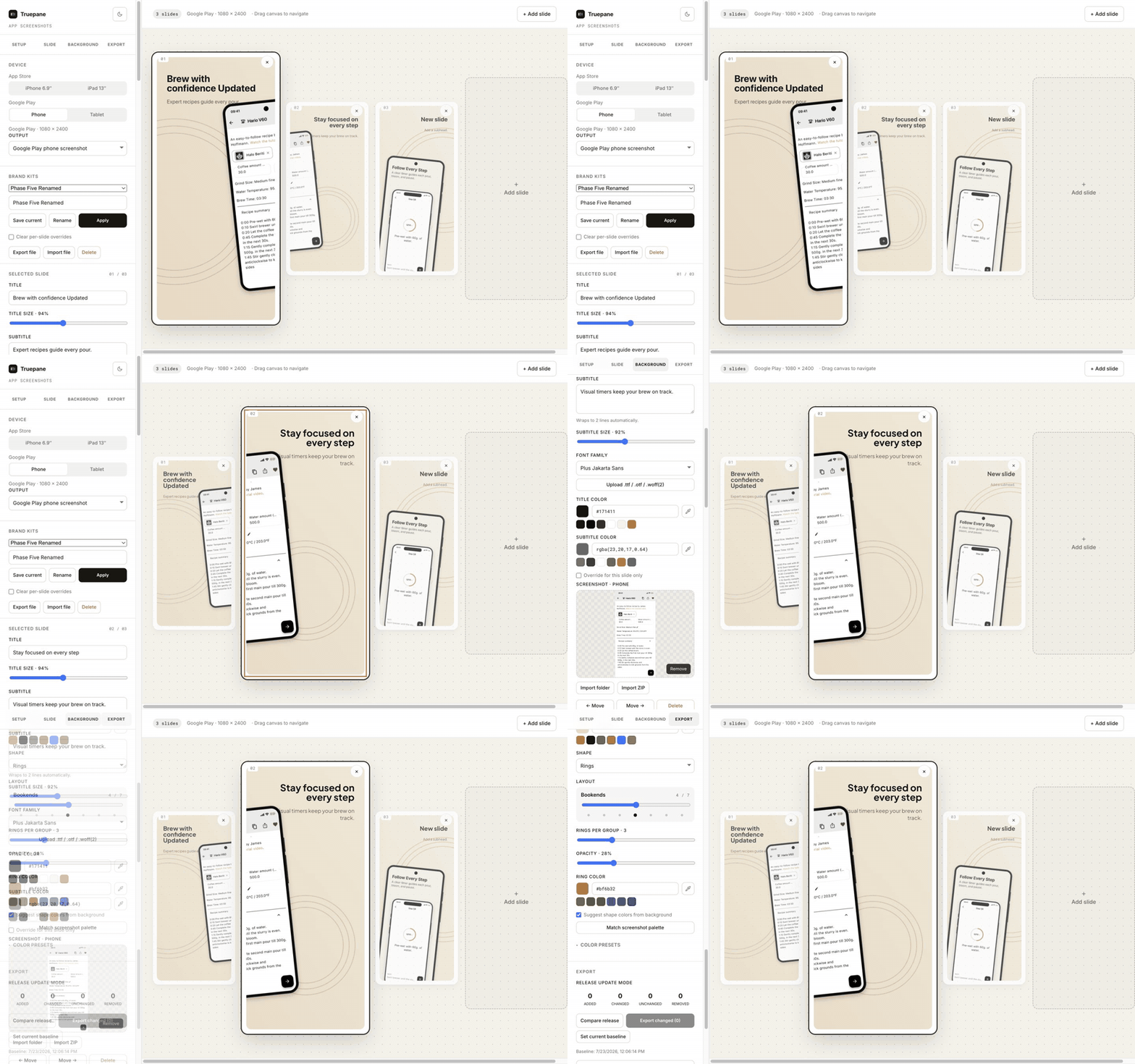
Truepane is a free, open-source screenshot-set builder for the App Store and Google Play. Compose and localize a complete release visually in the browser, or hand the same project to an AI agent through the bundled MCP server. Try it at truepane.dev.
Everything renders to <canvas> in the browser. Screenshots stay on your machine.
Optional AI helpers send only the text you ask them to process (and, when supplied,
your Groq API key) to the configured Edge Function and model provider. Google Fonts
are also loaded from Google's CDN unless you use a system or uploaded font.
Guides
- Create App Store screenshots with Codex or Claude Code
- Update localized App Store screenshots without uploading them
Why this exists
Most screenshot generators composite a pre-rendered PNG of a phone. This one draws the device frame procedurally on a canvas — body, bezel, buttons, camera, and the screen mask are all geometry, not bitmaps. That choice drives most of what makes the tool small, sharp, and cheap to run.
Features
- Procedural device frames at exact store sizes: iPhone 6.9″ (1320×2868), iPad 13″ (2064×2752), Android phone (1080×2400), Android tablet (1600×2560).
- Backgrounds = fill + shape. A fill layer (solid, or linear/radial gradient) plus an optional shape overlay (rings, blobs, waves, dots, mesh, arcs, triangles, grid, zigzag, bubbles), each with independent colors. Shapes flow continuously across the strip and reproduce exactly from a stored seed.
- Custom background images: upload a backdrop, then control blur, fit, opacity, scrim, and whether it spans one slide or the full strip. Imported images are resized locally to a practical render budget.
- One composable shape family. Alongside the ten fixed looks,
Custom…is a parameter surface rather than a preset: pick a primitive (ring, disc, arc, triangle, bar, blob) and an arrangement (scatter, grid, row, radial, wave), then tune count, size, spacing, rotation, stroke weight, and a fade along the strip. It is data, not code — twelve bounded numbers and two closed enums — so a shared project file stays inert, renders identically forever, and can be diffed. That makes it the intended surface for agent-driven variation over MCP: an agent composes a background by filling in numbers instead of shipping drawing code. Its controls live behind Advanced in the background panel so the picker stays uncluttered. - Color tools: content-based palette extraction from your screenshot, harmonized shape suggestions, an eyedropper (native EyeDropper API + a click-a-slide fallback for Safari/Firefox), and curated color-science presets.
- AI prompt → style (optional): describe a vibe ("calm, warm, organic") and a Groq model returns a style + palette. Bring your own Groq key, or use the hosted endpoint.
- Typography: curated Google Fonts (incl. Apple/Android system fonts and Noto
multi-script + CJK) plus custom
.ttf/.otf/.woff(2)upload. - Flexible composition: choose a preset or place text and devices directly, resize them, rotate devices from −20° to +20°, and drag or nudge mockups on canvas.
- Cross-slide devices: span one synchronized device across two adjacent slides. Both clipped halves share their screenshot, position, scale, and rotation.
- Export: per-slide PNG, one horizontal strip PNG, or a ZIP of everything. Plus JSON project import/export. The editor auto-saves documents and content-addressed binary assets to IndexedDB, with a localStorage fallback where IndexedDB is unavailable.
- Responsive editor with history: purpose-built desktop and mobile layouts, light and dark themes, and a 100-step undo/redo history with standard keyboard shortcuts.
- Multi-platform projects: keep separate iPhone, iPad, Android phone, and Android tablet captures on the same ordered slides. Locale screenshots fall back only to their own target's source capture; they never borrow another platform's image.
- Localization: store translated copy, locale-specific captures, and per-language fonts in one project. Translation can be entered manually, generated through the optional AI helper, or produced by an MCP-connected agent.
- Preview-first bulk import: choose a folder or ZIP, review deterministic
target/locale/slide mappings, correct rows, then apply once. Explicit
target/locale/NN-name.pngpaths take priority; conflicts never overwrite silently. - Shared release preflight: the editor and MCP report the same stable issue codes for missing captures/translations, locale fallbacks, crop risk, composition, fonts, and fill/text contrast. Warnings are advisory and require “export anyway” in the web editor.
- Local brand kits: save typography, text colors, background, custom font, and
default composition for reuse. Kits are portable
.truepane-brand.jsonfiles and never contain slides, screenshots, targets, translations, credentials, or history. - Flexible output surfaces: keep the four native store screenshot sizes, render a Google Play feature graphic at exactly 1024×500, or choose bounded custom dimensions. The procedural device is scaled and placed as a layer; captures are never stretched.
- Release update mode: explicitly save deterministic release signatures, compare added/changed/unchanged/removed assets later, and export a changed-only ZIP with a manifest. Baselines contain hashes, not rendered PNGs, and never update implicitly.
Design decisions (the interesting part)
Each of these was a deliberate fork, chosen for a reason:
- Procedural frames, not image mockups. The target is flat store-submission screenshots at exact required resolutions — which procedural drawing nails: crisp at any scale, no asset pipeline, and no licensing exposure (most "free" device-mockup packs are not actually clean for commercial redistribution). Flat 2D rotation is supported; perspective and photographic mockups remain out of scope.
- Parametric backgrounds, not diffusion images. Backgrounds are seeded procedural shapes that reproduce exactly and stay tasteful. A raster image model would be unpredictable, costly per call, hard to keep consistent across a set, and would force a heavier backend. AI is used only as a thin prompt → parameters layer.
- Content-based palette runs entirely client-side — no model, no cost.
- $0-egress architecture. The app is static and all image work happens in the browser, so hosting bandwidth is effectively free. The only metered cost is the optional AI prompt call, which is rate-limited and can be replaced with your own key.
Architecture
src/core/— platform-neutral project logic shared by the browser and MCP server: canvas rendering, normalization, composition, output validation, preflight, bulk import, brand kits, release comparison, and background-image preparation.src/core/render.tsdefines the device frames and paints every pixel.- Concentric-corner invariant: the BODY / BEZEL / SCREEN rounded rects share a
center of curvature (
x + requal across all three; same fory + r). Breaking it produces "laddery" corner kinks. New frames go throughdefineFrame(), which throws on violation; theshell()helper derives the inner rects so the invariant holds by construction. - Backgrounds render in two layers: a fill (solid / linear / radial gradient) then an
optional shape overlay from a generator registry. Each shape lays out in strip-space
so it flows across slides; a seeded
mulberry32PRNG keeps a strip reproducible. - Masking uses offscreen canvases with
destination-in/destination-out(rather thanctx.clip()) to get antialiased edges.
- Concentric-corner invariant: the BODY / BEZEL / SCREEN rounded rects share a
center of curvature (
src/App.tsx— editor state, history, hydration, persistence coordination, and web export paths.src/Sidebar.tsxandsrc/MobileLayout.tsxprovide the desktop and mobile control surfaces;src/components.tsxcontains shared controls and the canvas preview.src/storage/— IndexedDB document and content-addressed asset storage, including migration from the original localStorage format and cleanup of unreferenced binaries.src/Welcome.tsxandsrc/GuidePage.tsx— the public landing page and prerendered guide/comparison routes.src/ai.tsis the browser client for the optional AI style and translation endpoints.server/mcp/— the Node MCP server and native-canvas adapter. The publishable npm package metadata lives inpackages/truepane-mcp/.supabase/functions/generator-bg-prompt/— the Edge Function that turns a prompt into validated, clamped style params (raw model output never reaches the renderer).supabase/functions/generator-translate/— the optional title/subhead translation endpoint.
Running locally
npm install
npm run dev        # http://localhost:5173
npm run build      # tsc -b && vite build → dist/
npm run preview    # serve the production build
npm run typecheck
npm test           # vitest (pure-logic suite)
Configuration
The AI prompt feature is optional. Without it, the app is fully functional and the
AI controls are hidden. To enable them, copy .env.example to .env and opt in:
VITE_ENABLE_AI=true
VITE_PUBLIC_SITE_URL=https://truepane.dev
VITE_BG_PROMPT_URL=https://YOUR-PROJECT.supabase.co/functions/v1/generator-bg-prompt
VITE_SUPABASE_ANON_KEY=your-anon-key
VITE_TRANSLATE_URL=https://YOUR-PROJECT.supabase.co/functions/v1/generator-translate
VITE_ENABLE_AI gates both helpers. Configure either endpoint independently; an
unconfigured helper stays hidden. The Edge Functions read GROQ_API_KEY from Supabase
secrets. The background helper also accepts an optional BG_PROMPT_MODEL (default
llama-3.3-70b-versatile). Deploy them with:
supabase functions deploy generator-bg-prompt --project-ref YOUR-REF --no-verify-jwt
supabase functions deploy generator-translate --project-ref YOUR-REF --no-verify-jwt
Server-side rate limiting is currently best-effort (in-memory, per isolate). Add a durable limiter before a high-traffic public launch.
Temporary beta gate
A soft, client-side password gate can be enabled during private beta by setting
VITE_GATE_PASSWORD_HASH to the SHA-256 of your password (unset = no gate):
printf '%s' 'your-password' | shasum -a 256 # put the hash in .env
It's a deterrent, not real security (it's a static client app) — meant to be removed after beta.
Use with AI agents (MCP)
Truepane ships a local MCP server, so an AI agent
(Claude Code, Codex, …) can take simulator screenshots and turn them into store-ready
slides without a human driving the browser UI. It renders with a native canvas
(@napi-rs/canvas) — screenshots are read from local paths and PNGs are written to
local paths; nothing is uploaded anywhere, and no configuration or env vars are
needed: the agent is the LLM, so styling and translation are its own judgment calls
(the web app's AI helpers are not involved).
It's a standard stdio MCP server published to npm as
truepane-mcp, so any MCP-capable
client can launch it with npx -y truepane-mcp — no checkout needed. Setup for
the common ones:
Claude Code
claude mcp add --scope user truepane -- npx -y truepane-mcp
Codex CLI
codex mcp add truepane -- npx -y truepane-mcp
Or configure Codex manually in ~/.codex/config.toml:
[mcp_servers.truepane]
command = "npx"
args = ["-y", "truepane-mcp"]
Cursor, Windsurf, Claude Desktop, and other JSON-config clients — add to the
client's mcpServers block (e.g. .cursor/mcp.json,
claude_desktop_config.json):
{
  "mcpServers": {
    "truepane": { "command": "npx", "args": ["-y", "truepane-mcp"] }
  }
}
Restart the client, then confirm that the Truepane tools are available.
The server lives in packages/truepane-mcp. To run it
from a repo checkout instead (for development), point the client's command at
npx tsx server/mcp/index.ts, or npm run mcp:build and run
node packages/truepane-mcp/dist/index.js.
Workflow the tools expect
list_options— start here to discover the full workflow, platforms (with exact store pixel sizes), output surfaces, fonts, fills, shapes, and composition presets.create_project— slide titles/subheads + absolute screenshot file paths. Passtargetsto start a multi-platform project.set_style— colors, background, typography (font,titleScale/subtitleScale, andtitleWeight/subtitleWeightfrom 100–900), chosen with the agent's own design judgment (suggest_palette_from_screenshotextracts an accent + background tint from a screenshot with pure local math if a starting point helps). Itscompositionpatch controls normalized text/device position, size, alignment, and flat rotation. Useslide_indexfor a slide-specific composition.set_screenshots— attach each capture with itstargetand optionallanguage. A missing target stays visibly empty; Truepane never stretches a capture from a different platform into it. For a prepared directory,import_screenshotsreturns a dry-run mapping by default; repeat withapply: true, dry_run: falseto apply only non-conflicting files.render— writes full-resolution PNGs (e.g. iPhone 6.9″ = 1320×2868) into an output dir you pass, and returns a small inline preview to inspect. Adjust and re-render until it looks right. Passtarget: "all"for one folder per target.rendersummarizes advisory preflight warnings; callvalidate_projectfor the complete ordered target/locale/slide matrix.set_translations— the agent translates the slide texts itself and stores the results per language; thenrenderwithlanguage: "all"writes per-language subfolders (source/,es/, …), matching the web app's all-languages ZIP. A locale can also carry its own screenshots (for apps whose UI is itself localized): passscreenshot_pathper slide here, orset_screenshotswith alanguage; a locale without its own screenshot reuses the base one. Each language can render in its own font too (fonthere, orset_stylewith alanguage) — e.g. San Francisco for the base andNoto Sans Arabicforar— since the server has no per-glyph fallback for scripts a font doesn't cover.export_project/load_project— round-trip v2 project JSON with the web app's Import/Export Project, so a human can fine-tune the agent's work (or vice versa).
Use span_device_across_slides to place one device across an adjacent slide pair.
The two clipped halves keep their screenshot, position, scale, and rotation linked,
including after project export/import and later screenshot or copy updates.
export_brand_kit and apply_brand_kit move the current visual defaults between
projects without carrying project content. Applying preserves per-slide overrides
unless clear_slide_overrides: true is explicitly supplied.
Use set_output to persist a native, play-feature, or custom output on an MCP
project. render also accepts temporary output_id, output_width,
output_height, and output_frame overrides.
Use compare_release, set_release_baseline, and render changed_only:true for
release updates through MCP. Any future pixel-affecting renderer change must bump
RENDERER_SCHEMA_VERSION in src/core/release.ts, intentionally marking every
asset changed.
Google Fonts are fetched on demand and cached in ~/.cache/truepane/fonts (Inter is
bundled, so offline rendering works out of the box). The -apple-system font renders
as real San Francisco on macOS — from your own installed system font, which is never
bundled or redistributed (Apple's font is proprietary) — and falls back to Inter on
Linux/CI. Because SF is a variable font, its full weight range resolves (including
Heavy/Black via titleWeight/subtitleWeight), not just Regular/Bold. A curated set
of Google fonts — Inter, Manrope, and Fraunces — is loaded as a single-file
variable font too, so their full weight range resolves as well; every other Google
font uses its static faces (typically up to 700). Want another font's full range?
Open an issue or PR adding it to VARIABLE_FONT_URLS in server/mcp/fonts.ts. For
non-Latin target languages,
pick a font that covers the script (Inter covers Cyrillic/Greek; Noto Sans JP/KR/SC
for CJK; Noto Sans Arabic for Arabic, which is shaped and laid out right-to-left
automatically) — unlike browsers, server-side rendering has no per-glyph system-font
fallback, so glyphs a font lacks come out as boxes.
Deployment
The site builds to dist/ and can be hosted as a static SPA anywhere. This repository is
configured for Cloudflare Workers static assets through wrangler.jsonc; deploy it with:
npm run deploy
Set VITE_PUBLIC_SITE_URL at build time for canonical URLs, robots.txt, the sitemap,
and prerendered guide metadata. Set the optional AI variables above only when those
helpers should be exposed.
License
AGPL-3.0. Because this is a client-side app, the source is distributed to every browser — so forks, including publicly hosted ones, must make their source available under the same license.
The Inter font files bundled with truepane-mcp are distributed under the SIL Open
Font License 1.1; the copyright notice and license travel with them in
server/mcp/assets/fonts/LICENSE-Inter.txt and in the published npm package.
Support
If this is useful to you, sponsorship is welcome — see .github/FUNDING.yml.
Reviews
No reviews yet
Be the first to review this server!
More Developer Tools MCP Servers
Rea
Freeby Morluto · Developer Tools
Reverse engineer anything from your terminal or agent with one CLI and MCP server.
Paperclip
Freeby Paperclipai · Developer Tools
Trending hip-hop artist momentum scores across four cultural dimensions.
Git
Freeby Modelcontextprotocol · Developer Tools
Read, search, and manipulate Git repositories programmatically
Fetch
Freeby Modelcontextprotocol · Developer Tools
Web content fetching and conversion for efficient LLM usage
Toleno
Freeby Toleno · Developer Tools
Toleno Network MCP Server — Manage your Toleno mining account with Claude AI using natural language.
MCP Marketplace
Freeby mcp-marketplace · Developer Tools
Search and install MCP servers from inside your AI client.