
Server data from the Official MCP Registry
Streams live progress from mcp-telemetry-sdk-instrumented tools to any connected MCP client.
About
Streams live progress from mcp-telemetry-sdk-instrumented tools to any connected MCP client.
Security Report
Valid MCP server (2 strong, 4 medium validity signals). No known CVEs in dependencies. ⚠️ Package registry links to a different repository than scanned source. Imported from the Official MCP Registry. 1 finding(s) downgraded by scanner intelligence.
10 files analyzed · 1 issue found
Security scores are indicators to help you make informed decisions, not guarantees. Always review permissions before connecting any MCP server.
Permissions Required
This plugin requests these system permissions. Most are normal for its category.
How to Install
Add this to your MCP configuration file:
{
  "mcpServers": {
    "io-github-arnavranjan005-mcp-telemetry-server": {
      "args": [
        "-y",
        "mcp-telemetry-server"
      ],
      "command": "npx"
    }
  }
}Documentation
View on GitHubFrom the project's GitHub README.
mcp-telemetry




Socket.IO for AI agents. Instrument any MCP server's tool calls with a few lines, and any MCP client watching (Claude Code, Cursor, or your own tooling) gets live, structured progress — no polling, no context-flooding tool calls.
Your MCP server                    mcp-telemetry server         Agent
─────────────────                  ────────────────────         ─────
mcp-telemetry-sdk
  job.stepStart('build')
       │
       │ local socket (queued, persistent connection)
       ▼
  collector receives event
  store updates job state
       │
       │ MCP notifications/progress
       ▼
                                    telemetry_subscribe tool     Claude Code
                                    pushes event to agent   →   sees inline
                                                                 live status
Why this exists
MCP tool calls are synchronous: an agent calls a tool, waits, gets a result. For anything long-running, that leaves two bad options — block the whole call with no visibility, or have the agent poll a status tool in a loop (which floods the conversation with repeated tool calls and burns context for no new information).
MCP does have one legitimate way for a server to push updates mid-call: notifications/progress, keyed to a progressToken on the in-flight request. But every MCP server author ends up re-implementing the same plumbing — extracting the token, wiring a timer, tailing output, cleaning up on completion. mcp-telemetry is that plumbing, factored out once, plus a companion server so a job started in one session can be watched from a completely different one.
How it fits together
Two packages, one job each:
| Package | Who uses it | What it does |
|---|---|---|
mcp-telemetry-sdk | MCP server authors | Import it, call job.start() / .stepDone() / .log() from your tool handlers. Zero runtime dependencies — it's a socket writer with a persistent, queued connection and nothing else. |
mcp-telemetry-server | Agent users | An MCP server you register once. Exposes telemetry_subscribe (blocks and streams live progress for a job), plus telemetry_jobs/telemetry_job_status for point-in-time queries. |
These two packages are architecturally independent — the SDK never calls any MCP tool, and the server never imports your tool's code. They only ever meet at a local socket, so a producer with a broken connection can't take down anything, and a collector that's overwhelmed can't block your tool call.
Quickstart
1. Instrument your MCP server (mcp-telemetry-sdk)
npm install mcp-telemetry-sdk
import { McpServer } from "@modelcontextprotocol/sdk/server/mcp.js";
import { MCPTelemetry } from "mcp-telemetry-sdk";

const server = new McpServer({ name: "my-deploy-server", version: "1.0.0" });
const telemetry = new MCPTelemetry(); // zero config — derives a socket path from cwd

server.tool("deploy", { env: z.string() }, async ({ env }) => {
  const job = telemetry.createJob({ task: `deploy ${env}` });

  job.start();
  job.stepStart("build");
  await runBuild();
  job.stepDone("build", { duration: 2100 });

  job.stepStart("test");
  const passed = await runTests();
  if (!passed) {
    job.stepFailed("test", "3 tests failed");
    await job.done(1);
    return { content: [{ type: "text", text: "Deploy failed at test stage" }] };
  }
  job.stepDone("test");

  await job.done(0);
  return { content: [{ type: "text", text: "Deployed successfully" }] };
});
That's the entire integration. If nothing is listening on the socket, every call is a fast no-op — your server behaves identically with or without a collector running.
2. Watch it from an agent (mcp-telemetry-server)
npm install -g mcp-telemetry-server
Register it as an MCP server, alongside your instrumented one:
{
  "mcpServers": {
    "deploy": { "command": "npx", "args": ["-y", "deploy-mcp"] },
    "telemetry": { "command": "npx", "args": ["-y", "mcp-telemetry-server"] }
  }
}
Then, in your agent session:
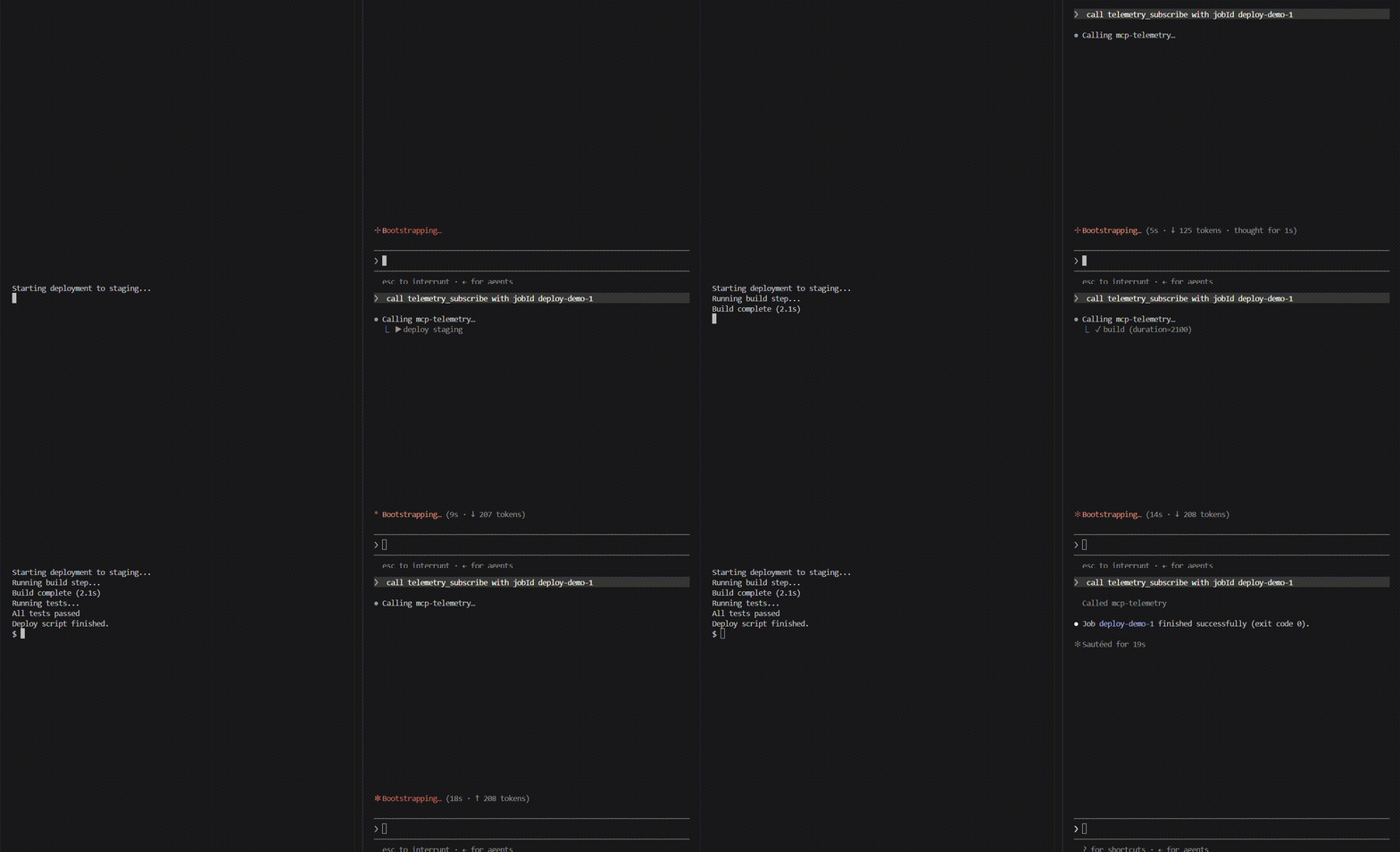
You:   deploy to staging
Agent: calls the deploy tool, then telemetry_subscribe with the returned job id

  ▶ deploy staging
  ↻ build
  ✓ build (duration=2100)
  ↻ test
  ✓ test
  ✓ job done (exit 0)

Agent: "Deployed to staging successfully."
No polling, no separate terminal, no context-flooding tool calls — one deploy call plus one telemetry_subscribe call, regardless of how long the job runs.
API reference
mcp-telemetry-sdk
new MCPTelemetry(opts?)
Creates a telemetry client. opts.socketPath overrides the default (derived from process.cwd() via getSocketPath()). Owns one persistent, queued connection shared by every job it creates.
telemetry.createJob({ id?, task }) → JobHandle
Starts tracking a job. id defaults to an auto-incrementing job-N.
telemetry.disconnect()
Closes the underlying connection. Call on server shutdown if you want a clean teardown instead of letting it idle.
JobHandle method | Emits | Notes |
|---|---|---|
start() | job_start | Call once, at the beginning of the tool handler. |
stepStart(name, meta?) | step_start | name is any string — 'build', 'implement', whatever fits your domain. |
stepDone(name, meta?) | step_done | meta is arbitrary key/value data (shown in telemetry_subscribe's live output). |
stepFailed(name, reason?) | step_failed | |
log(line, stream?) | log | stream is 'stdout' | 'stderr', optional. Rapid log lines are coalesced by the server before being pushed live — see below. |
cost(amount, meta?) | cost | amount in USD. |
done(exitCode?) | job_done | Async. This is the terminal event — nothing else may be sent after it, so it actively retries delivery for up to 1.5s instead of relying on a future send() to recover from a transient connection failure. Safe to call without await. |
getSocketPath(root?) is also exported, for advanced cases where you need to compute the same path a producer and a server will independently derive.
mcp-telemetry-server
Exposes three MCP tools:
| Tool | Behavior |
|---|---|
telemetry_subscribe({ jobId?, timeoutMs? }) | Blocks and streams live notifications/progress for the given job (or the next job to start, if jobId is omitted) until it finishes or timeoutMs elapses (default 5 min). This is the tool your agent calls to watch a job. |
telemetry_jobs() | Lists all jobs the server currently knows about, with status and cost. |
telemetry_job_status({ jobId }) | Full state of one job — every step, cost, and any failure reason. |
Comparison
Three genuinely different categories of approach exist near this space — none of them solve the same problem:
| mcp-telemetry | Async job runners | Completion notifiers | OpenTelemetry MCP instrumentation | |
|---|---|---|---|---|
| Mechanism | Push (notifications/progress) | Poll (call a status/tail tool yourself) | Push, but only at completion (webhook/sound) | Traces/metrics to an observability backend |
| Live step-by-step progress | Yes | No — you ask, it answers | No — only "it's done" | No — post-hoc analysis |
| Watch from a different session | Yes | No — tied to the session that started it | Partial (a webhook can fire anywhere) | N/A — not agent-facing |
| Who it's for | Any MCP server author + any agent | Anyone needing async shell execution specifically | Anyone wanting a completion ping | Server operators monitoring their own deployment |
Relationship to SEP-1686 (MCP Tasks): the MCP spec's own answer to this problem — Accepted into the spec (not just proposed), giving requests a durable task handle (taskId) with tasks/get polling and a progressToken valid for the task's whole lifetime. It's the eventual "correct" fix, backed by real production cases (Amazon cites healthcare data pipelines, CI/CD wrapping, and multi-agent systems in the SEP itself). The catch: it's labeled awaiting-sdk-change — the standard is settled, but client/server SDKs haven't implemented it yet, so it isn't something you can rely on today. mcp-telemetry solves the same problem now, on the current stable protocol — a working bridge you can adopt today and retire once Tasks lands in the SDKs you depend on, not a competing standard.
Design notes worth knowing before you rely on this
- The producer→server connection is a persistent, queued socket, not one connection per event. Events are flushed in order once connected; a burst that arrives before the connection finishes establishing is queued and delivered in order once it does.
- Delivery is best-effort, not guaranteed, with one exception:
done(). Every other event silently drops if the collector isn't reachable and nothing else triggers a retry — this is deliberate (telemetry should never be able to block or crash your actual tool call).done()is the one event that actively retries for a bounded window, since it's usually the last thing a job ever sends. telemetry_subscribeonly shows live-forward events — it doesn't replay history. If a job already finished before you subscribed, usetelemetry_job_statusinstead.- This is not a distributed job queue. There's no persistence across a collector restart, no cross-machine delivery, and no retry policy beyond what's described above. If you need that, you want a real message queue — this is deliberately just enough to solve "watch a local MCP tool call live," nothing more.
Development
git clone https://github.com/arnavranjan005/mcp-telemetry.git
cd mcp-telemetry
npm install
npm run build
npm test
See CONTRIBUTING.md for the full setup, monorepo layout, and PR expectations.
License
Reviews
No reviews yet
Be the first to review this server!
More Developer Tools MCP Servers
Fetch
Freeby Modelcontextprotocol · Developer Tools
Web content fetching and conversion for efficient LLM usage
Git
Freeby Modelcontextprotocol · Developer Tools
Read, search, and manipulate Git repositories programmatically
Paperclip
Freeby Paperclipai · Developer Tools
Trending hip-hop artist momentum scores across four cultural dimensions.
Toleno
Freeby Toleno · Developer Tools
Toleno Network MCP Server — Manage your Toleno mining account with Claude AI using natural language.
mcp-creator-python
Freeby mcp-marketplace · Developer Tools
Create, build, and publish Python MCP servers to PyPI — conversationally.
MCP Marketplace
Freeby mcp-marketplace · Developer Tools
Search and install MCP servers from inside your AI client.