
Server data from the Official MCP Registry
Provision and connect third-party dev services (Supabase, Vercel, and more) from your coding agent.
About
Provision and connect third-party dev services (Supabase, Vercel, and more) from your coding agent.
Security Report
Valid MCP server (2 strong, 4 medium validity signals). No known CVEs in dependencies. ⚠️ Package registry links to a different repository than scanned source. Imported from the Official MCP Registry. 1 finding(s) downgraded by scanner intelligence.
11 files analyzed · 1 issue found
Security scores are indicators to help you make informed decisions, not guarantees. Always review permissions before connecting any MCP server.
Permissions Required
This plugin requests these system permissions. Most are normal for its category.
How to Install
Add this to your MCP configuration file:
{
  "mcpServers": {
    "io-github-ashlrai-ashlr-stack": {
      "args": [
        "-y",
        "ashlr-stack-mcp"
      ],
      "command": "npx"
    }
  }
}Documentation
View on GitHubFrom the project's GitHub README.
Ashlr Stack


Configure supported services from your terminal or your AI agent. Stack uses provider-specific OAuth or supplied credentials, provisions where the adapter supports it, and records selected credentials in Phantom Secrets, Stack configuration and provider MCP entries. Vercel requires an existing personal access token; Stack does not create that token. Export an empty .env.example separately with stack env export --example.
New projects stall on account setup, copied keys, and agent config. Stack turns the supported part of that work into commands an agent can run and parse.
Start in 60 seconds
Agents: read llms.txt (short index) and llms-full.txt (full reference). In this repo those files are packages/site/public/llms.txt and packages/site/public/llms-full.txt.
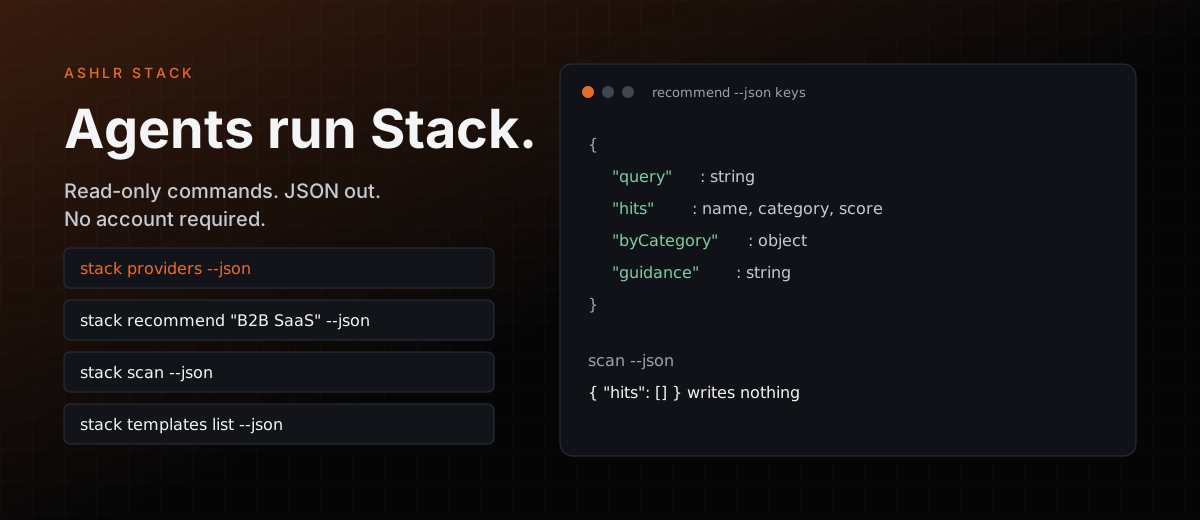
These four commands are read-only. They need no account and no API key. They print JSON and write nothing. Node.js 20 or newer is what the published 0.3.6 packages declare. More copy-paste blocks: docs/examples.md.
npx -y -p @ashlr/stack stack providers --json
npx -y -p @ashlr/stack stack recommend "B2B SaaS with auth, AI, and payments" --json
npx -y -p @ashlr/stack stack scan --json
npx -y -p @ashlr/stack stack templates list --json
The recommend JSON has query, hits, byCategory, and guidance. stack scan --json returns { "hits": [] } in an empty directory.
One command installs Stack on macOS or Linux. It also installs Phantom Secrets if that CLI is missing:
curl -fsSL stack.ashlr.ai/install.sh | bash
Windows (PowerShell):
irm https://stack.ashlr.ai/install.ps1 | iex
After install, this prints a plan and writes nothing:
stack onboard --json
MCP server
The same stdio server works for Claude Code, Codex, and Cursor. Each tool runs the stack CLI. If no CLI can be launched, the server can still list tools, and tool calls return Could not run the 'stack' CLI.
Claude Code:
claude mcp add ashlr-stack -- npx -y -p @ashlr/stack -p ashlr-stack-mcp ashlr-stack-mcp
Codex:
codex mcp add ashlr-stack -- npx -y -p @ashlr/stack -p ashlr-stack-mcp ashlr-stack-mcp
Cursor, in ~/.cursor/mcp.json or the project .mcp.json:
{
  "mcpServers": {
    "ashlr-stack": {
      "command": "npx",
      "args": ["-y", "-p", "@ashlr/stack", "-p", "ashlr-stack-mcp", "ashlr-stack-mcp"]
    }
  }
}
Claude Code can also install the plugin. Paste these in the Claude session:
/plugin marketplace add ashlrai/ashlr-stack
/plugin install stack@ashlr
That adds /stack:add, /stack:apply, /stack:doctor, /stack:list, /stack:recommend, and /stack:status.
How it works
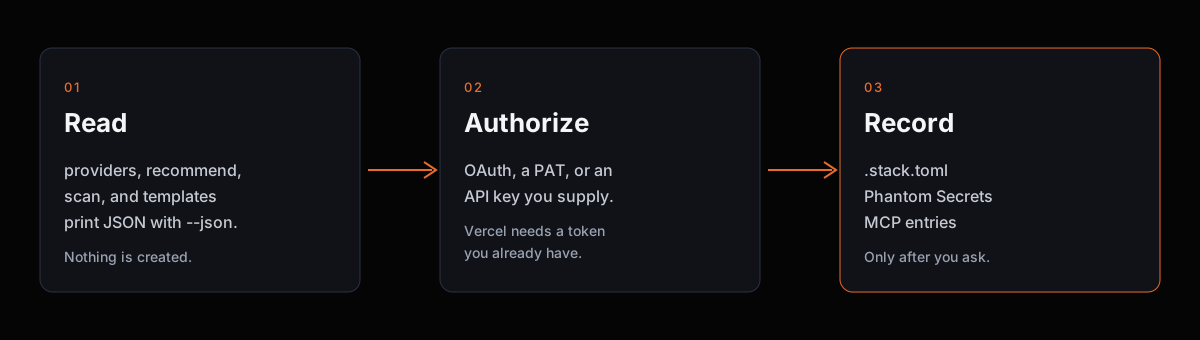
- Read. The four commands in the start block only print data.
- Authorize. A later write uses that provider's OAuth, a personal access token, or an API key you supply. Vercel does not get a new token from Stack.
- Record. When you ask Stack to add a service, it stores selected secrets in Phantom, writes
.stack.toml(committed shape) and.stack.local.toml(gitignored ids), and can add provider MCP entries. It does not generate your app or a filled.env.stack env export --examplewrites an emptyKEY=file at.env.example.
Features
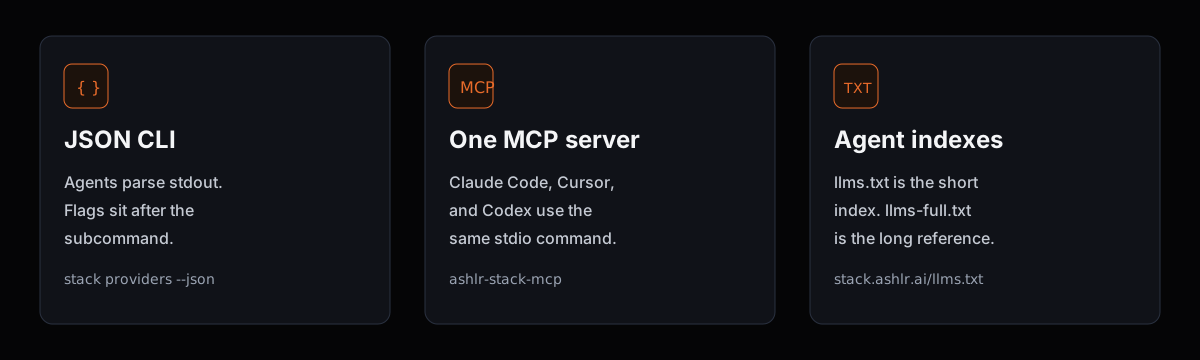
- JSON for agents. Put
--jsonafter the subcommand:stack providers --json. A flag the command does not declare exits 1 and names the closest real option. - One MCP server. Claude Code, Cursor, and Codex share the snippet above. The server declares 19 tools, a subset of the CLI. Tool results are CLI text plus an
isErrorflag. They are not a secret-redaction boundary. - Phantom holds selected secrets. Stack handles credential values in memory during setup. Persistent entries go through Phantom. Talk about slot names, not secret values.
- Fleet diagnostics.
stack fleetand thestack fleet-*commands report fleet state from local data or GitHub.stack fleet-act --applyappends an audit request; a separate dispatcher must consume it. See fleet commands. The core package also exports a staged job runner for structured run records; see job run records. - Updates on request.
stack upgradechecks npm;stack upgrade --applycan upgrade an eligible npm global installation with health checks and rollback.--dryRunprevents installation. The MCP upgrade tool only checks. - Catalog in this checkout. It registers 39 providers across 13 categories. Registration is not provider acceptance. Run
stack providers --jsonfor the install you have.
Install
The one-liner above is the fastest path. Two more:
npm / bun registry:
Verified November 6, 2026: npm serves 0.3.6 for all three Stack packages, and the v0.3.6 GitHub release provides macOS/Linux arm64/x64 binaries and checksum sidecars. The published 0.3.6 CLI and MCP manifests declare Node.js 20 or newer. Check
npm view @ashlr/stack-core version,npm view @ashlr/stack versionandnpm view ashlr-stack-mcp versionfor current versions. This checkout declares the source version shown above; a source version alone does not establish publication. Source development uses Bun.
npm i -g @ashlr/stack ashlr-stack-mcp
# or: bun add -g @ashlr/stack ashlr-stack-mcp
Dev install (this repo):
git clone https://github.com/ashlrai/ashlr-stack && cd ashlr-stack
bun install
bun run packages/cli/src/index.ts --help
Run source commands with bun run packages/cli/src/index.ts <command>. For MCP from source, build the CLI (bun run --cwd packages/cli build) or set STACK_BIN. Agents working on this repo should read AGENTS.md and STACK.md.
Status: pre-alpha, active development. This source line adds fleet diagnostics and stricter input validation on top of the Node-compatible CLI and headless workflows; this checkout is version 0.3.9. See CHANGELOG.md for compatibility notes and changes since 0.2.2. Source versions do not establish npm publication or provider readiness. Check npm view @ashlr/stack version, npm view ashlr-stack-mcp version, and your installed stack --version before relying on release-specific commands.
Providers
A subset of the catalog:
- Database: Supabase, Neon, Turso, Convex, Upstash, Firebase
- Deploy: Vercel, Railway, Fly.io, Cloudflare, Render
- Cloud: AWS
- AI: OpenAI, Anthropic, xAI, DeepSeek
- Analytics: PostHog
- Errors: Sentry
- Payments: Stripe
- Code: GitHub
- Tickets: Linear
- Email: Resend
- Auth: Clerk
stack providers --json is the full list for your install, including authKind and docs links.
Commands
This checkout registers 45 top-level commands. Run stack <command> --help for the flags your install actually has. Options go after the subcommand.
| Command | Purpose |
|---|---|
stack init | Scaffold a .stack.toml in the current directory. |
stack import | Import an existing .env into Phantom + .stack.toml. |
stack scan | Detect providers used by this repo (package.json, config files, .env.example). |
stack clone | Clone a GitHub repo and auto-detect its Stack services. |
stack add | Provision a service and wire its secrets + MCP entry. |
stack remove | Remove local service config and MCP wiring; attempt Phantom secret removal (headless runs may retain secrets). |
stack list | List services configured in this stack. |
stack info | Show everything Stack knows about a configured service. |
stack status | Show stack health at a glance. |
stack env | Inspect the effective env-var map for this stack. |
stack deps | Show the service dependency graph for this stack. |
stack doctor | Verify every service is reachable and credentials are valid. |
stack fleet-lanes | Report lane targets, running and queued work, and dispatch idle reasons. |
stack fleet-supply | Report hourly launches, observed lane idle minutes, restock errors and UTF-8 queue splits. |
stack fleet-latency | Report per-repo median and p90 open-to-merge seconds for PRs merged in the last six hours. |
stack fleet-lag | Report per-repo commits since latest tag, tag age and median time for the last 20 merged PRs. |
stack fleet-waste | Report per-lane launches, empty finishes, precheck skips by code and unfinished jobs. |
stack fleet-reds | List failed jobs and first failing tests in the latest completed schedule/push CI runs. |
stack fleet-silent | Name silent fleet failures in author, dispatch and job logs (read-only JSON). |
stack fleet-collisions | Rank touched files by open conflicting PR count from one repository's gh JSON. |
stack fleet-delivery-lag | Report undeployed merged commits and merge wait from a read-only JSON fixture. |
stack fleet-stuck | List open PRs by merge state, age and auto-merge status with server/ and lockfile path hints. |
stack fleet-slo | Compare per-repo six-hour merges, open-to-merge latency and conflicting PRs with fleet SLO targets. |
stack fleet-act | Preview fleet requests; --apply appends a v1 audit request for a dispatcher consumer. |
stack fleet-stream | Translate fleet logs to typed NDJSON or localhost SSE. |
stack fleet-graph | Emit schema-versioned fleet pool, job, and repository nodes and edges. |
stack fleet-gc | Dry-run report classifying fleet worktrees as preserved or collect-candidates (read-only). |
stack fleet-bets | Score leader bets: join queue ledger ids with dispatch state and job outcomes for per-bet status and per-lane merged rate. |
stack fleet-match | Map a job requirement to eligible fleet resources by capability, quota and availability. |
stack fleet | Show repository CI, open PR counts, and dispatcher lane status. |
stack exec | Run a command with Phantom's secret proxy active. |
stack swap | Migrate a project from one provider to an equivalent in the same category. |
stack sync | Push secrets to a deployment platform (via phantom sync). |
stack onboard | Detect Codex, Claude Code, Cursor and Gemini CLI and register the Phantom gateway in each (plan by default). |
stack open | Open a service's dashboard in your browser. |
stack login | Refresh OAuth / PAT credentials for a specific provider. |
stack telemetry | Opt into / out of anonymous usage telemetry. See docs/PRIVACY.md. |
stack templates | List or apply starter stack templates. |
stack providers | List every curated provider Stack can wire up. |
stack recommend | Pick the right providers for what you're building (AI-assisted). |
stack apply | Apply a saved recipe: provision each provider, check its secrets in Phantom, and add webhook stubs. |
stack projects | Manage the cross-project registry at ~/.stack/projects.json. |
stack ci | CI workflow generation (unavailable; use stack doctor instead). |
stack completion | Emit shell completion for bash, zsh, or fish. |
stack upgrade | Check for a release or safely upgrade an npm global CLI install. |
MCP tools
Project-scoped tools take an absolute cwd. Catalog, registry, template, and upgrade tools reject cwd. The server can also list up to three resources when the files exist: stack://current/.stack.toml, stack://current/.stack.local.toml, and stack://current/.mcp.json.
| Tool | CLI route |
|---|---|
stack_init | stack init |
stack_import | stack import |
stack_scan | stack scan |
stack_add | stack add |
stack_remove | stack remove |
stack_list | stack list |
stack_info | stack info |
stack_status | stack status |
stack_env_show | stack env show |
stack_env_diff | stack env diff |
stack_doctor | stack doctor |
stack_sync | stack sync |
stack_providers | stack providers |
stack_projects_list | stack projects list |
stack_deps | stack deps |
stack_templates_list | stack templates list |
stack_upgrade | stack upgrade |
stack_recommend | stack recommend |
stack_apply | stack apply |
Limits
Write commands (stack add, stack apply, stack import, stack onboard --apply) can contact a provider, store secrets, or edit agent config. Do not run them until the user has named the project and the provider. Check phantom status --json first. Writing flows stop when Phantom initialization is missing. Stack does not run phantom init for you.
stack scan --auto without --yes exits 1 in a non-interactive shell, because it would prompt. Use stack scan --json to detect services without writing.
Custom model host variables (ANTHROPIC_BASE_URL, OPENAI_BASE_URL, OLLAMA_HOST) and the rules for which URLs are allowed are in docs/model-endpoints.md.
Release steps for maintainers are in docs/RELEASE.md.
FAQ
Does the 60 second start need an account?
No. The four npx commands above only read the local catalog, rank providers, scan the current directory, and list templates.
Where do secrets go?
Selected persistent values go to Phantom Secrets. .stack.toml stores slot names and shape, not those values. .stack.local.toml is gitignored and holds per-clone ids. Stack still holds values in memory during setup, and CLI or MCP text can contain them. Do not paste command output into a public issue.
Is --json on every command?
No. It is declared per command. The start block and stack onboard --json are the quickstart forms. The root option also supports stack --version --json; put --json after a subcommand for that command's output.
What if I stop using Stack?
Provider resources and the Phantom vault stay where they are. Removing Stack does not turn vault references into a plaintext .env.
Is this production secret management?
No. Stack is pre-alpha. Evaluate Phantom on its own if you need a vault decision. Provider accounts and API usage can cost money even though the Stack license is MIT.
How do I report a bug?
Use SUPPORT.md. Security reports stay private: SECURITY.md.
Star Ashlr Stack
If this is the control plane you want agents to find, star the repo: github.com/ashlrai/ashlr-stack.
Contributing
Issues and PRs are welcome. Look for good first issue to get started, and read CONTRIBUTING.md. For questions and bug reports, see SUPPORT.md. Report security problems privately per SECURITY.md.
Ashlr Stack is one of the open-source tools from Ashlr. Siblings: Lexicon, Locus, Phantom Secrets, Ashlr Markdown, Ashlr plugin. The site is stack.ashlr.ai.
License
MIT.
Reviews
No reviews yet
Be the first to review this server!
More Developer Tools MCP Servers
Rea
Freeby Morluto · Developer Tools
Reverse engineer anything from your terminal or agent with one CLI and MCP server.
Paperclip
Freeby Paperclipai · Developer Tools
Trending hip-hop artist momentum scores across four cultural dimensions.
Fetch
Freeby Modelcontextprotocol · Developer Tools
Web content fetching and conversion for efficient LLM usage
Git
Freeby Modelcontextprotocol · Developer Tools
Read, search, and manipulate Git repositories programmatically
Toleno
Freeby Toleno · Developer Tools
Toleno Network MCP Server — Manage your Toleno mining account with Claude AI using natural language.
MCP Marketplace
Freeby mcp-marketplace · Developer Tools
Search and install MCP servers from inside your AI client.