
Server data from the Official MCP Registry
Architecture diagram with concurrency capacity and bottleneck estimates from any codebase.
About
Architecture diagram with concurrency capacity and bottleneck estimates from any codebase.
Security Report
workflow-generator is a well-designed static analysis tool with clean architecture and appropriate permissions for its purpose. The MCP server implementation uses stdin/stdout communication with no network calls, file writes are confined to a specified output directory, and dependencies are minimal. No authentication is required for local operation, which is appropriate for a local static analysis tool. Low-severity code quality concerns around broad exception handling and partial input validation do not substantially impact security. Supply chain analysis found 8 known vulnerabilities in dependencies (0 critical, 5 high severity). Package verification found 1 issue.
4 files analyzed · 14 issues found
Security scores are indicators to help you make informed decisions, not guarantees. Always review permissions before connecting any MCP server.
Permissions Required
This plugin requests these system permissions. Most are normal for its category.
How to Install
Add this to your MCP configuration file:
{
  "mcpServers": {
    "io-github-askuma-workflow-generator": {
      "args": [
        "-y",
        "workflow-generator-copilot"
      ],
      "command": "npx"
    }
  }
}Documentation
View on GitHubFrom the project's GitHub README.
workflow-generator
Scan any project and generate WORKFLOW.html — a dark-mode visual system diagram showing every component, how they talk to each other, and where your throughput ceiling actually is.
Works with Python, Node.js, Go, Java, Rust, Ruby, and mixed projects. No external dependencies for the core scanner.
Vendored and generated directories (node_modules, venv, site-packages, dist, …) are never scanned,
and capacity figures are clearly labeled as static-analysis estimates.
Live demo → — generated from fastapi/full-stack-fastapi-template, unmodified.
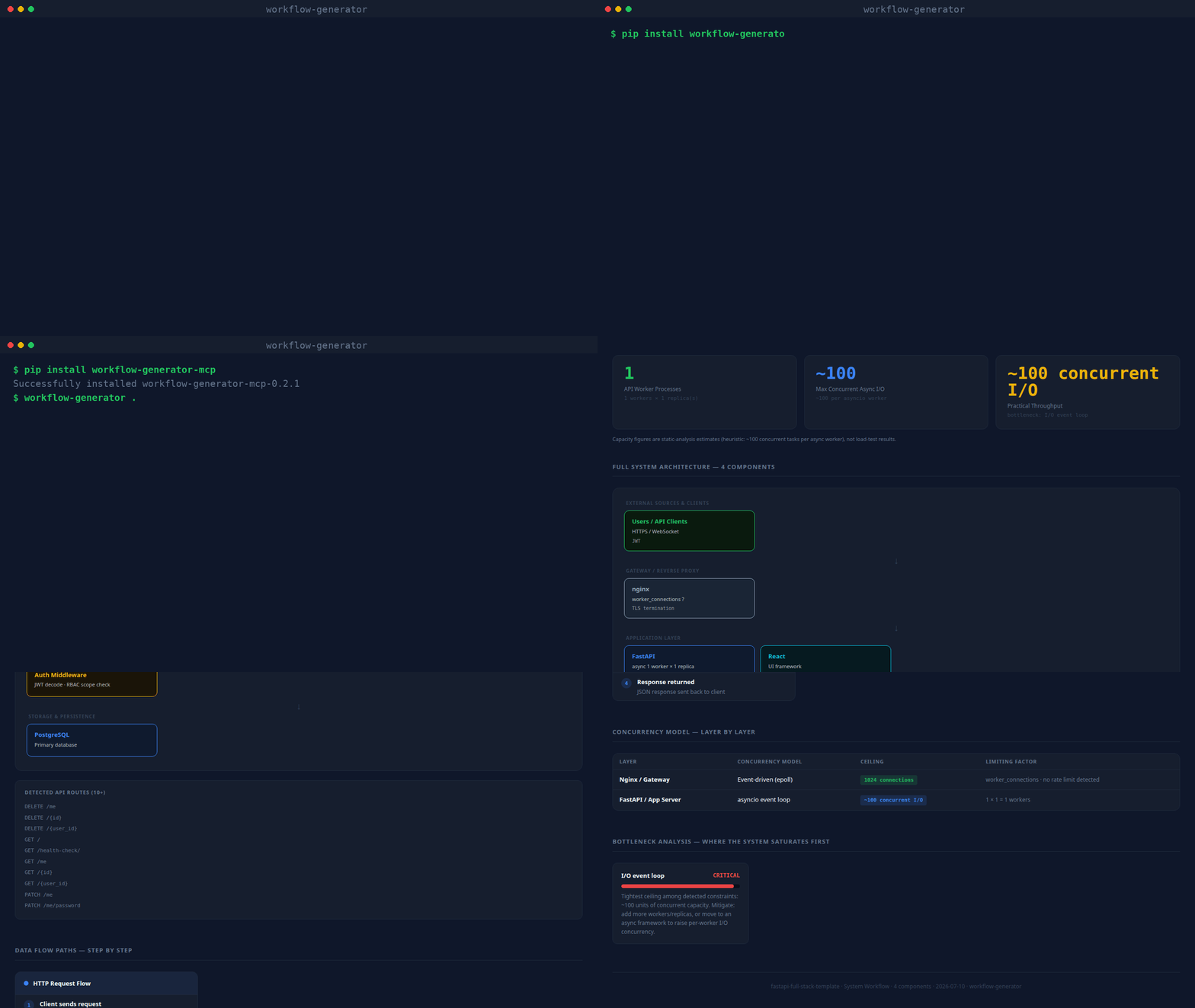
(real CLI output, unscripted — static screenshot if you'd rather not autoplay)
What it produces
Every generated page contains:
| Section | What you get |
|---|---|
| Stat row | Workers · Concurrent I/O ceiling · Semaphore limit · Rate limit · Practical throughput |
| Architecture diagram | Layered flow: external sources → gateway → API → queues → AI → storage |
| Data flow cards | Write path, read/query path, background jobs — inferred from what's detected |
| Concurrency table | Every layer: model · ceiling · limiting factor |
| Bottleneck analysis | Ranked CRITICAL → LOW with mitigation notes |
| Codebase dependency graph | Force-directed module/import graph — click a node to isolate its neighbors, hover for file details. Import-direction edges are clearly distinguished from real observed traffic (see below) |
| Guided tour | Spotlight walkthrough of every section, shown automatically the first time a report is opened; replay anytime with the ? button |
Codebase dependency graph
Every source file (Python, JS/TS, Go, Java, Rust, Ruby) becomes a node; every real import becomes
an edge — resolved with a language-appropriate parser (Python's ast module, regex for JS/TS/Go/
Java/Rust/Ruby), not guessed. Files that match an already-detected component (an LLM call, a
database client, a queue) get an edge to that component too, so you can see exactly which files
talk to Redis, OpenAI, etc. Large repos (350+ files) are automatically aggregated into
directory-level nodes so the graph stays readable; override with --graph-detail files or
--graph-detail dirs.
By default the graph only shows what the code says (import direction, static "this file calls
Redis"), which is honest but not the same as real traffic. Pass --access-log /path/to/access.log
(any combined/common log format) to overlay real observed request counts onto the HTTP-entry
edges — and the generated report includes a ready-to-run k6 load-test script
covering up to 5 detected routes, so the "Practical throughput" number can be checked against a
real measurement instead of only a static-analysis estimate.
What it detects
| Category | Examples |
|---|---|
| API frameworks | FastAPI, Flask, Django, Express, Nest.js, Gin |
| Gateways | nginx, Caddy, Traefik (with rate limits + worker_connections) |
| LLM providers | OpenAI, Anthropic Claude, Cohere, AWS Bedrock |
| Vector stores | Qdrant, Pinecone, Weaviate, ChromaDB, pgvector, FAISS, Milvus |
| Databases | PostgreSQL, MySQL, MongoDB, SQLite, Redis |
| Queues | Celery, BullMQ, Kafka, RabbitMQ, RQ, AWS SQS |
| Async primitives | asyncio.Semaphore, run_in_executor, asyncio.gather, asyncio.Lock |
| Workers | --workers N (uvicorn/gunicorn), replicas: (docker-compose), PM2 instances |
| External sources | Jira, Azure DevOps, Slack, GitHub, Stripe, Salesforce, Twilio |
| Evaluation | TruLens, RAGAS, LangSmith |
Install
pip (CLI + MCP server)
pip install workflow-generator-mcp

workflow-generator . WORKFLOW.html       # CLI: scan and write the report
workflow-generator-mcp                    # stdio MCP server
With pip installed, any MCP host config reduces to:
{
  "mcpServers": {
    "workflow-generator": { "command": "workflow-generator-mcp" }
  }
}
Claude Code (skill)
mkdir -p ~/.claude/skills
git clone https://github.com/askuma/workflow-generator.git ~/.claude/skills/workflow-generator
Then in any Claude Code session:
/workflow-generator
/workflow-generator /path/to/project
MCP server (Claude Desktop, VS Code, Cursor, Zed, Windsurf, Continue)
1. Install the dependency:
pip install mcp
2. Add to your MCP host config (replace ~ with your actual home path):
~/Library/Application Support/Claude/claude_desktop_config.json (Mac)
%APPDATA%\Claude\claude_desktop_config.json (Windows)
{
  "mcpServers": {
    "workflow-generator": {
      "command": "python3",
      "args": ["~/.claude/skills/workflow-generator/mcp/server.py"]
    }
  }
}
.vscode/mcp.json
{
  "servers": {
    "workflow-generator": {
      "type": "stdio",
      "command": "python3",
      "args": ["~/.claude/skills/workflow-generator/mcp/server.py"]
    }
  }
}
~/.cursor/mcp.json
{
  "mcpServers": {
    "workflow-generator": {
      "command": "python3",
      "args": ["~/.claude/skills/workflow-generator/mcp/server.py"]
    }
  }
}
.zed/settings.json
{
  "context_servers": {
    "workflow-generator": {
      "command": {
        "path": "python3",
        "args": ["~/.claude/skills/workflow-generator/mcp/server.py"]
      }
    }
  }
}
~/.windsurf/mcp_config.json
{
  "mcpServers": {
    "workflow-generator": {
      "command": "python3",
      "args": ["~/.claude/skills/workflow-generator/mcp/server.py"]
    }
  }
}
3. Restart your tool, then ask:
generate a workflow diagram for this project
how many concurrent requests can this handle?
show me the system architecture
MCP tools exposed:
generate_workflow— scans project, writesWORKFLOW.html, optionally opens in browseranalyze_workflow— returns structured JSON summary (no file written)
Command line (standalone)
No install needed beyond Python 3.8+:
python3 ~/.claude/skills/workflow-generator/scripts/analyze.py . ~/WORKFLOW.html
# then open ~/WORKFLOW.html
Optional flags:
--access-log /path/to/access.log   # overlay real request counts onto the dependency graph
--graph-detail auto|files|dirs     # force file-level or directory-level graph nodes (default: auto)
Example output (terminal)
Written: /your/project/WORKFLOW.html
Framework: FastAPI · Workers: 8 · Concurrent I/O: ~800
Practical throughput: ~50–200 req/min
Bottleneck: OpenAI (LLM latency 3–30s per call)
Gateway: nginx · 2 rate limit zone(s)
LLM: OpenAI · eval: TruLens RAG Triad
Storage: Qdrant, Redis
External sources: Jira, Azure DevOps, Slack
Repo layout
workflow-generator/
├── SKILL.md                        ← Claude Code skill definition
├── INSTALL.md                      ← detailed per-platform install guide
├── workflow_generator_mcp/
│   ├── analyze.py                  ← core scanner + HTML renderer (stdlib only)
│   └── server.py                   ← MCP stdio server (package form)
├── scripts/
│   └── analyze.py                  ← thin compatibility shim -> workflow_generator_mcp/analyze.py
├── tests/                          ← pytest suite for the scanner
├── mcp/
│   ├── server.py                   ← MCP stdio server
│   └── requirements.txt            ← pip install mcp
└── copilot/
    ├── index.js                    ← GitHub Copilot Extension (Express)
    ├── package.json
    └── openai_function.json
License
MIT
Reviews
No reviews yet
Be the first to review this server!
More Developer Tools MCP Servers
Paperclip
Freeby Paperclipai · Developer Tools
Trending hip-hop artist momentum scores across four cultural dimensions.
Git
Freeby Modelcontextprotocol · Developer Tools
Read, search, and manipulate Git repositories programmatically
Toleno
Freeby Toleno · Developer Tools
Toleno Network MCP Server — Manage your Toleno mining account with Claude AI using natural language.
mcp-creator-python
Freeby mcp-marketplace · Developer Tools
Create, build, and publish Python MCP servers to PyPI — conversationally.
MCP Marketplace
Freeby mcp-marketplace · Developer Tools
Search and install MCP servers from inside your AI client.
MarkItDown
Freeby Microsoft · Content & Media
Convert files (PDF, Word, Excel, images, audio) to Markdown for LLM consumption