
Server data from the Official MCP Registry
Solve it once. From then on, your AI knows. Experience for coding agents, hosted in the EU.
About
Solve it once. From then on, your AI knows. Experience for coding agents, hosted in the EU.
Security Report
Valid MCP server (1 strong, 1 medium validity signals). 6 known CVEs in dependencies (1 critical, 3 high severity) Package registry verified. Imported from the Official MCP Registry.
6 files analyzed · 7 issues found
Security scores are indicators to help you make informed decisions, not guarantees. Always review permissions before connecting any MCP server.
Permissions Required
This plugin requests these system permissions. Most are normal for its category.
How to Install
Add this to your MCP configuration file:
{
  "mcpServers": {
    "io-github-cachly-dev-mcp-server": {
      "args": [
        "-y",
        "@cachly-dev/mcp-server"
      ],
      "command": "npx"
    }
  }
}Documentation
View on GitHubFrom the project's GitHub README.
cachly — experience for coding agents (MCP server)
Solve it once. From then on, your AI knows.
Every fix, every decision and every dead end becomes experience your AI uses at the right moment. You build faster, and your team builds on what you figured out.


@cachly-dev/mcp-server connects cachly to Claude Code, Cursor,
GitHub Copilot, Windsurf, Cline, Continue.dev, Zed, Codex CLI and Gemini CLI over
MCP. It offers 124 MCP tools. Your editor lists 27 entries
by default and reaches the rest through one of them, cachly_tool (details under MCP
Tools below). Your AI stores a lesson after a fix, and finds it again when the same
problem returns. Your Brain (the store of your lessons) lives on EU servers.
Start without an account
Claude Code
/plugin marketplace add cachly-dev/cachly-mcp
/plugin install cachly-brain@cachly
There is no JSON to write, no path to set and no key to copy. Without a key, cachly creates a test Brain on EU servers when the session starts (the plugin hook does it; the first tool call does it if the hook did not). The test Brain has 14 days of the Dev tier. After that it runs on the free tier with the same key.
Check it with claude mcp list. You should see plugin:cachly-brain:cachly … ✔ Connected.
claude plugin details shows MCP servers (0) even when the server runs, because it
does not count them.
The plugin adds three Claude Code hooks:
| Hook | What it does |
|---|---|
SessionStart | Gives your AI a briefing: last session, open failures, recent lessons |
UserPromptSubmit | Puts the lessons that match your prompt next to it |
Stop | Can record a fix while it is fresh |
Turn on auto-update once: /plugin → Marketplaces → cachly → Enable auto-update.
Claude Code leaves it off for marketplaces outside Anthropic's own. The MCP server updates
itself on every start, but the hooks come with the plugin and update only with it. If an
update is waiting, the first session_start of a session says so in one line.
Keep your test Brain
npx @cachly-dev/mcp-server@latest claim
You sign in once in the browser. The test Brain then moves into your account with all its lessons. Every test key is revoked, and you get a new key that is stored where your editor and hooks look for it. The Brain restarts once, which takes about 20 seconds. If you already have a free Brain, the one-Brain limit of the free tier applies and the move is refused with a message.
Cursor, Windsurf, VS Code, Cline, Continue.dev, Zed
npx @cachly-dev/mcp-server@latest autopilot
autopilot finds the editors you use and writes the MCP config for each. It adds a git
hook that learns from your commits and fills your Brain from your git history. You sign
in once in the browser (a device code, no password, no credit card), so the Brain
belongs to your own account from the start. Restart your editor afterwards.
You can also add the server by hand (see Manual Setup). Without a key, the first tool call creates the same test Brain as in Claude Code.
Already inside Claude, Cursor or Copilot? Paste this to your AI:
Set up cachly for this project. Run: npx @cachly-dev/mcp-server@latest autopilot
Follow the browser sign-in, then restart the editor.
VS Code extension
Install cachly Brain. It creates your Brain on first start, with no account form.
JetBrains plugin
Install Cachly Brain from the JetBrains Marketplace (IntelliJ IDEA, PyCharm, GoLand, WebStorm, Rider). The status bar, the Brain health and the lessons view live in the IDE. The source is at cachly-dev/cachly-intellij. The JetBrains plugin guide shows how Claude Code, Junie and JetBrains AI Assistant get the Brain over MCP.
MCP Registry
The server is listed in the official
MCP Registry as
io.github.cachly-dev/mcp-server. Clients that browse the registry find it by name. The
entry points at this npm package.
Guides
| Guide | What you find there |
|---|---|
| Claude Code hooks: which event to use when | SessionStart, UserPromptSubmit, PreToolUse, Stop and more, sorted by when they fire. What each one can block, add and change. |
| A UserPromptSubmit hook for Claude Code | The stdin JSON, additionalContext, a working Node script and five traps to avoid. |
| The same hooks in VS Code and Copilot CLI, Codex CLI and Gemini CLI | Which event takes context in each editor, and the exact file setup writes there. |
| Comparisons: Supermemory, Zep, claude-mem, Basic Memory, mem0, Letta | Side by side, each row with its source and a visible date, including when the other product fits better. |
| EU-hosted MCP server: what leaves your machine | Where data lands: storage in Germany, embeddings in the EU, the network edge, and a checklist. |
| Lessons learned for coding agents | How to write a lesson your agent finds again: symptom, decisive fact first, what failed, files, a check. With examples and a LESSONS.md. |
| JetBrains plugin guide | What the plugin does, and how Claude Code, Junie and JetBrains AI Assistant use the Brain. |
| Repo X-ray | Enter a public GitHub repo. In a few seconds you see how many problems its team has solved, and which ones more than once. |
How it works
- A fix, a decision or a dead end is stored as a lesson: topic, what worked, what failed, severity, file paths, commands and author.
- At the start of a session, your AI receives a briefing with the last session, open failures and recent lessons.
- When you ask for something,
smart_recalllooks up the lessons that match. It combines keyword search (BM25), meaning-based search and the causal graph, in 11 languages. - When an error appears,
causal_tracewalks from the symptom to the cause and to the fix that worked. - Before a deploy,
brain_predictlists failure patterns from past incidents. - A git hook and the CI templates add lessons from commits and from red-to-green runs.
- Lessons are shared in the team. Each one carries the name of whoever learned it.
To see what your AI would know before you install anything, run
npx @cachly-dev/mcp-server@latest demo in a project folder. It reads your git history and
prints your fixes, patterns and decisions. Nothing leaves your machine.
Our agreement with you. You can leave and take your data:
npx @cachly-dev/mcp-server@latest export writes every lesson to lessons.md (to read)
and lessons.jsonl (to reuse). Code excerpts are stored only if you call index_project
yourself, and only on your own EU instance. Read
what leaves your machine before you
decide.
MCP Tools (124 total, 27 listed by default)
Your editor sees 27 entries by default: the daily tools (26 of them) and one dispatcher,
cachly_tool. This is on purpose. The full list of 124 costs about 28,000 tokens in every
request. The 27 listed entries cost about 8,000. All other tools (98 of them) run through
the dispatcher:
cachly_tool(tool: "team_roster")                  run any of them by name
cachly_tool(tool: "team_roster", describe: true)  get its schema first
Nothing is unreachable. The server dispatches by name, so team_roster called directly
still works. Set CACHLY_ALLE_WERKZEUGE=1 to list all 124. Set CACHLY_PROFILE=lean to
list 8 plus cachly_tool, or CACHLY_PROFILE=recall to list the 3 read-only tools.
Session and lessons (most used)
| Tool | What it does |
|---|---|
session_start | Full briefing: last session, open failures, recent lessons, Brain health |
session_end | Save what you built; extract lessons from the summary and the git log |
learn_from_attempts | Store a structured lesson after any fix, deploy or discovery (with author, visibility) |
recall_best_solution | The known fix for a topic, with its success and failure history |
smart_recall | Hybrid BM25 + semantic + causal-graph search, 11 languages, quality-reranked |
remember_context | Keep architecture findings, decisions and file summaries |
compact_recover | Recover your context after you hit the context-window limit |
Team Brain and org knowledge graph
| Tool | What it does |
|---|---|
team_learn / team_recall | Share lessons across the team with author attribution |
team_confirm | A reviewer confirms a lesson (senior or peer); confirmed lessons rank higher in recall |
team_assign_role / team_roster / team_whoami | Roles (admin, reviewer, contributor, viewer), enforced once an admin is set |
team_audit | Admin-only governance trail: every role change and lesson confirmation |
brain_who_knows | Find your team's experts on a topic, ranked from authorship |
brain_file_map | Experts and lessons per file, before you touch it |
team_expertise_map | The team's skills matrix in one table |
brain_collab_pairs | Who works with whom, with bus-factor alerts |
brain_portability | Config snippets for 7 MCP clients, so the same Brain serves any model |
skill_gaps | Knowledge blind spots: unresolved failures, missing attribution |
brain_coverage | A 0–100 health score for the knowledge of your codebase |
madc_deliberate | Specialist AI agents vote to resolve contradictory lessons |
memory_crystalize | Distill all lessons into a Crystal for instant team context |
team_crystallize | A Team Crystal: fixes that 2 or more teammates reached independently |
Causal intelligence
| Tool | What it does |
|---|---|
causal_trace | Root-cause analysis through the causal knowledge graph |
brain_predict / brain_predict_failures | Predict likely failures before they happen |
brain_from_git | Fill people, files and lessons from git history, incrementally |
brain_from_ci | Bulk-ingest CI outcomes: red→green becomes a fix lesson with a causal fixes edge, green→red a causes edge |
memory_consolidate | Detect contradictions, merge duplicates, expire stale lessons |
ckg_inspect | Inspect the causal graph around a concept |
Example:
causal_trace(problem="auth breaks after restart")

→ Root: k8s:namespace-terminating
→ Via:  keycloak:jwks-race
→ Fix:  PollUntilContextTimeout 3min
Shareable and public Brains
| Tool | What it does |
|---|---|
brain_seed_starter | Seed 16 universal lessons so your first smart_recall finds something; runs on a fresh repo |
brain_share | Publish a Brain snapshot as a link (public or unlisted). For your own data, run npx @cachly-dev/mcp-server export |
brain_import | Import a shared Brain into yours: topic_prefix, min_confidence, dry_run |
brain_share_list / brain_unshare | List your shares; revoke one so the link goes dead |
brain_discover | Search the Brain marketplace for ready-made knowledge bases |
Knowledge Commons, infrastructure and roadmap
| Tool | What it does |
|---|---|
syndicate / fedbrain_search | Contribute to, and search, the global Knowledge Commons |
brain_marketplace / brain_install | Browse and install curated Domain Brains (Kubernetes, Auth, databases) |
cache_get / cache_set / semantic_search / index_project | Cache and semantic operations. Pass org_id on cache_get / cache_set to share the cache org-wide |
cache_stats / cache_org_stats | Hits, estimated USD saved and a monthly projection, per instance or across your org |
list_instances / create_instance / delete_instance | Manage Brain instances |
roadmap_add / roadmap_next | A project roadmap stored in the Brain |
Run health to see what is wired up in your editor. The full catalog is generated from
src/tools.ts.
CLI commands
npx @cachly-dev/mcp-server@latest autopilot # One command: signs in, configures every editor, fills the Brain from git
npx @cachly-dev/mcp-server@latest claim     # Move a test Brain into your account, lessons included
npx @cachly-dev/mcp-server@latest demo      # Preview your Brain from git history (no account needed)
npx @cachly-dev/mcp-server@latest bench     # Run the recall benchmark (no sign-in needed)
npx @cachly-dev/mcp-server@latest autosetup # Interactive variant: pick editors yourself
npx @cachly-dev/mcp-server@latest health    # Check token, API, editors and git hook
npx @cachly-dev/mcp-server@latest export    # Write every lesson to lessons.md and lessons.jsonl
npx @cachly-dev/mcp-server@latest digest    # Weekly Brain summary, shareable
npx @cachly-dev/mcp-server@latest share     # Generate a shareable stats card
npx @cachly-dev/mcp-server@latest publish   # Publish your Brain as an importable link (--public)
npx @cachly-dev/mcp-server@latest badge     # Get a live README badge for your Brain
npx @cachly-dev/mcp-server@latest invite    # Invite a teammate to share your Brain
npx @cachly-dev/mcp-server@latest index .   # Index a project's code into the Brain (CI-friendly)
npx @cachly-dev/mcp-server@latest learn-git # Learn lessons from recent git commits
The method behind bench is described in BENCH.md.
Tip: learn from every merged PR. Run
learn-gitin CI with the cachly-brain-setup GitHub Action andmode: learn. Each merged PR then teaches your Brain.
CI integration
Every CI run is a lesson. A red→green transition is a proven fix, and a green→red one is a
known cause. Ready-to-paste templates live in src/ci-integration/:
- GitHub Actions: use cachly-dev/cachly-action.
It needs the secrets
CACHLY_API_KEYandCACHLY_BRAIN_INSTANCE_ID. - GitLab CI: copy
brain-from-ci-gitlab.ymlinto your pipeline. It adds two.postjobs (on_successandon_failure) withallow_failure: true. The full GitLab template adds hidden jobs forlearn,scanandconfirm. Pull it in withinclude: remote:. - Anything else:
push-ci-outcome.mjsis a standalone Node.js helper with no dependencies. It always exits 0, so your CI never fails because of a Brain push.
Already have months of CI history? The brain_from_ci tool ingests past outcomes in one
call, the way brain_from_git ingests commits.
FAQ
Does my AI need to call session_start by hand?
No. A session starts on the first tool call and ends when the editor closes.
Can my whole team share one Brain?
Yes. Use team_learn and team_recall, or
npx @cachly-dev/mcp-server@latest invite teammate@example.com.
Is my code sent to cachly servers?
Only if you call index_project yourself. It stores a short excerpt (up to
summary_chars, 1200 characters by default) per indexed file, on your own EU instance.
Every other tool stores lesson text, commit messages, session summaries and key-value
context, but no source code. Storage is in Germany and embeddings are computed in the EU.
API traffic passes through Cloudflare, a US company. The
EU guide lists every data flow.
What is causal_trace?
Given an error, it walks the causal knowledge graph to find the root cause, the
intermediate causes and the fix that worked, with its date and commands.
What if I hit the context-window limit mid-session?
Call compact_recover. It rebuilds your context from the Crystal, the recent
sessions and the registry of work in progress. Usually one tool call is enough.
How do I write lessons my agent finds again? Lead with the decisive fact. The lessons guide shows how, with examples.
Editor support matrix
npx @cachly-dev/mcp-server@latest autopilot detects and configures the editors below.
Manual snippets are in Manual Setup.
| Editor / client | Auto-setup | Config file written | Global config | Notes |
|---|---|---|---|---|
| Claude Code | yes | ~/.claude/mcp.json + .mcp.json | yes, always | Without a key: test Brain at session start (plugin) or on the first tool call; browser sign-in only as fallback |
| Cursor | yes, detected via .cursor/ | .cursor/mcp.json, hooks in .cursor/hooks.json | no | Project-level; restart Cursor after setup. Lessons arrive with the first tool call of a turn |
| Windsurf | yes, detected via .windsurf/ | .windsurf/mcp.json | no | Project-level; restart Windsurf after setup |
| VS Code + Copilot | yes, detected via .vscode/ | .vscode/mcp.json, hooks in .github/hooks/cachly-ambient.json | no | Needs the VS Code MCP support or Copilot chat. Briefing at session start, lessons before each prompt |
| Codex CLI | hooks yes, detected via ~/.codex | hooks in .codex/hooks.json | no | Trust .codex/ and confirm the hook once in /hooks. For the tools, init --editor codex prints the codex mcp add line |
| Gemini CLI | hooks yes, detected via ~/.gemini | hooks in .gemini/settings.json | no | Lessons are appended to the prompt (BeforeAgent). For the tools, init --editor gemini prints the gemini mcp add line |
| Cline | yes, detected via VS Code | .vscode/mcp.json | no | Shares the config with Copilot; restart VS Code |
| Continue.dev | yes, detected via .continue/ | .continue/config.json | no | Uses the modelContextProtocolServers key |
| Zed | yes, detected via .zed/ | .zed/settings.json | no | Uses the context_servers key |
| Windsurf (global) | autosetup --editor windsurf | ~/.windsurf/mcp.json | yes | Pass --editor to target the global config |
| Any other MCP client | autosetup --editor claude | .mcp.json | no | Standard mcpServers stdio format |
Which sign-in path each case uses:
| Scenario | Path |
|---|---|
autosetup or autopilot from a terminal (TTY) | OAuth device flow: one click in the browser, the API key is saved automatically |
autosetup from a VS Code task or CI (no TTY) | Detects the non-interactive run, opens the browser with a step-by-step guide, prints the CACHLY_JWT=... autosetup command |
| First tool call without any key | Test Brain: an anonymous Brain on EU servers. The key is saved to ~/.cachly/credentials.json and ~/.claude/mcp.json, and the call goes through. If that fails (offline, rate limit), the inline device flow starts with a URL and a code |
First tool call with CACHLY_BRAIN_INSTANCE_ID set but no key | Inline device flow. You already have a Brain, so no second account is created |
CACHLY_JWT=cky_live_xxx npx ... autosetup | Skips the sign-in step and uses the key you pass |
Manual Setup
{
  "mcpServers": {
    "cachly": {
      "command": "npx",
      "args": ["-y", "@cachly-dev/mcp-server@latest"]
    }
  }
}
Without a key, the first tool call creates a test Brain on EU servers. No sign-up.
Run npx @cachly-dev/mcp-server@latest autopilot to use your own account instead.
{
  "mcpServers": {
    "cachly": {
      "type": "stdio",
      "command": "npx",
      "args": ["-y", "@cachly-dev/mcp-server@latest"]
    }
  }
}
{
  "context_servers": {
    "cachly": {
      "command": {
        "path": "npx",
        "args": ["-y", "@cachly-dev/mcp-server@latest"]
      }
    }
  }
}
Self-hosting and bring-your-own embeddings
Embeddings turn text into vectors for the meaning-based search. By default, cachly computes them on its own servers in the EU as soon as you are signed in. Your text goes to a third-party provider only when you name that provider yourself:
| Provider | Env vars | Model |
|---|---|---|
| cachly (default, EU servers) | none beyond your key | managed |
| Ollama (local) | OLLAMA_BASE_URL, detected automatically | nomic-embed-text |
| OpenAI | CACHLY_EMBED_PROVIDER=openai and OPENAI_API_KEY | text-embedding-3-small |
| Google Gemini | CACHLY_EMBED_PROVIDER=gemini and GEMINI_API_KEY | text-embedding-004 |
| Mistral | CACHLY_EMBED_PROVIDER=mistral and MISTRAL_API_KEY | mistral-embed |
| Cohere | CACHLY_EMBED_PROVIDER=cohere and COHERE_API_KEY | embed-english-v3.0 |
Run npx @cachly-dev/mcp-server@latest health to see which provider is active.
Point at your own backend. Every install can talk to a private backend instead of
api.cachly.dev:
# One command: run the setup against your self-hosted backend
npx @cachly-dev/mcp-server@latest autopilot --api-url https://cachly.mycorp.internal

# Or without prompts
npx @cachly-dev/mcp-server@latest autosetup \
  --instance-id <uuid> --api-key <cky_live_...> \
  --api-url https://cachly.mycorp.internal
autosetup writes CACHLY_API_URL into the editor config only when it differs from the
default cloud. Default installs stay clean, and self-hosted installs keep talking to your
backend on every editor start.
Pricing
Current prices and limits are on cachly.dev/pricing.
| Tier | Storage | Price | Brains |
|---|---|---|---|
| Free | 25 MB | €0/mo | 1 |
| Dev | 200 MB | €19/mo | 3 |
| Pro | 900 MB | €49/mo, 5 seats | 10 |
| Business | 7 GB | €199/mo | 25 |
The free tier needs no credit card.
Environment Variables
| Variable | Default | Description |
|---|---|---|
CACHLY_JWT | none | API key. The setup wizard sets it for you |
CACHLY_BRAIN_INSTANCE_ID | none | Default Brain UUID. Optional, it is resolved automatically |
CACHLY_API_URL | https://api.cachly.dev | Override for a self-hosted backend |
CACHLY_EMBED_PROVIDER | automatic | Name an embedding provider yourself (see above) |
CACHLY_ALLE_WERKZEUGE | unset | Set to 1 to list all 124 tools instead of 27 |
CACHLY_PROFILE | unset | lean lists 8 tools plus cachly_tool, recall lists the 3 read-only tools |
CACHLY_UPDATE_CHECK | on | Set to false to stop the version check. npm is asked at most once a day, with a 2-second limit |
CACHLY_NO_TELEMETRY | unset | Set to 1 to disable usage pings. They include your API token and up to 80 characters of smart_recall queries |
CACHLY_LERNEN | on | Learning from use in the prompt hook. For 5 % of prompts the matching lessons are computed but not shown (control group), up to 10 % try a stricter or shorter setting. At the end of each turn the hook reports which setting ran and whether the agent named a shown lesson; topics are sent hashed, prompts never. Set to 0 (or CACHLY_NO_TELEMETRY=1) to turn it off |
CACHLY_KONTROLLE_ANTEIL | 5% | Share of prompts in the control group. 0 turns the control group off, at most 50% |
CACHLY_ERKUNDUNG | 10% | Share of prompts that may try another setting. 0 keeps the leading setting, at most 10% |
Ecosystem and docs
| Package | What it does |
|---|---|
@cachly-dev/mcp-server | This server, for Claude Code, Cursor, Copilot, Windsurf, Cline and Zed |
| Cachly Brain for VS Code | Status bar, lessons view and ambient learning in the editor |
| Cachly Brain for JetBrains | The same Brain in IntelliJ IDEA, PyCharm, GoLand, WebStorm and Rider |
@cachly-dev/openclaw | Semantic caching for LLM calls in JS/TS apps |
| cachly-dev/cachly-action | GitHub Action: setup, PR risk scan, learning from merged PRs, weekly hygiene |
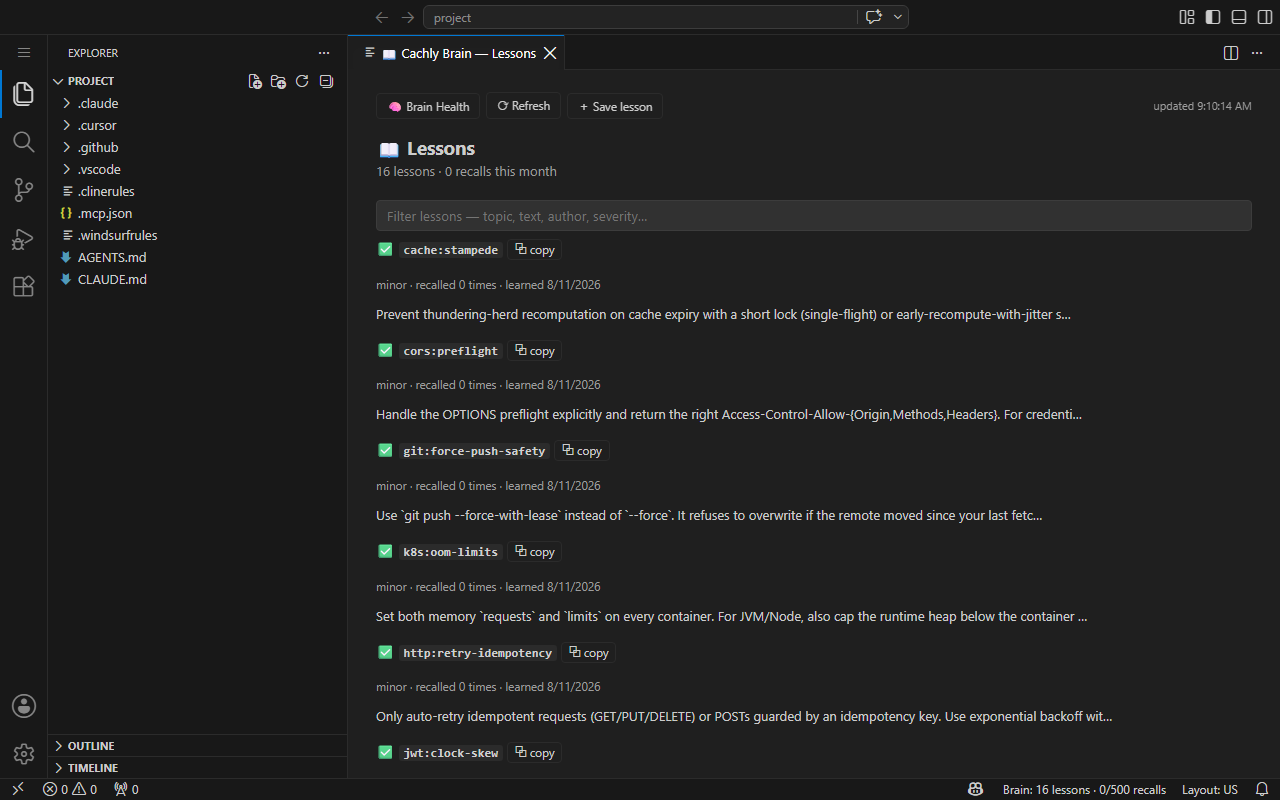
The VS Code extension shows the same Brain in the editor:
- cachly.dev: dashboard and sign-up
- Documentation
- MCP docs
- Release notes
- GitHub Issues: bugs and feature requests
Solve it once. From then on, your AI knows.
npx @cachly-dev/mcp-server@latest autopilot
Reviews
No reviews yet
Be the first to review this server!
More Developer Tools MCP Servers
Fetch
Freeby Modelcontextprotocol · Developer Tools
Web content fetching and conversion for efficient LLM usage
Git
Freeby Modelcontextprotocol · Developer Tools
Read, search, and manipulate Git repositories programmatically
Worldmonitor
Freeby Koala73 · Developer Tools
Live markets, conflicts, country risk, chokepoints, energy, and China decision signals. 93 tools.
Toleno
Freeby Toleno · Developer Tools
Toleno Network MCP Server — Manage your Toleno mining account with Claude AI using natural language.
MCP Marketplace
Freeby mcp-marketplace · Developer Tools
Search and install MCP servers from inside your AI client.
mcp-creator-python
Freeby mcp-marketplace · Developer Tools
Create, build, and publish Python MCP servers to PyPI — conversationally.