
Server data from the Official MCP Registry
MCP server mode for Qoder CLI — delegate coding tasks to local Qoder agents from any MCP client.
About
MCP server mode for Qoder CLI — delegate coding tasks to local Qoder agents from any MCP client.
Security Report
qodercli-mcp is a well-architected MCP server with clean code, proper permission semantics, and comprehensive safety controls. The server correctly defaults to read-only mode, validates all inputs via Zod, sanitizes CLI arguments, and includes timeout/output-size protections. No credential storage, injection vulnerabilities, or exfiltration patterns detected. Minor code quality observations around error handling and logging do not materially impact security. Supply chain analysis found 3 known vulnerabilities in dependencies (0 critical, 3 high severity). Package verification found 1 issue.
4 files analyzed · 9 issues found
Security scores are indicators to help you make informed decisions, not guarantees. Always review permissions before connecting any MCP server.
Permissions Required
This plugin requests these system permissions. Most are normal for its category.
What You'll Need
Set these up before or after installing:
Environment variable: QODERCLI_PATH
Environment variable: QODERCLI_DEFAULT_PERMISSION_MODE
Environment variable: HTTP_PROXY
Environment variable: HTTPS_PROXY
How to Install
Add this to your MCP configuration file:
{
  "mcpServers": {
    "io-github-cantbeblank96-qodercli-mcp": {
      "env": {
        "HTTP_PROXY": "your-http-proxy-here",
        "HTTPS_PROXY": "your-https-proxy-here",
        "QODERCLI_PATH": "your-qodercli-path-here",
        "QODERCLI_DEFAULT_PERMISSION_MODE": "your-qodercli-default-permission-mode-here"
      },
      "args": [
        "-y",
        "qodercli-mcp"
      ],
      "command": "npx"
    }
  }
}Documentation
View on GitHubFrom the project's GitHub README.
qodercli-mcp
English | 简体中文





The missing MCP server mode for Qoder CLI — delegate coding tasks to local Qoder agents from any MCP client (Qoder IDE, Claude Code, Cursor…).
A minimal MCP server that wraps the local qodercli (Qoder CLI) as MCP tools, letting any MCP client (Qoder IDE, Claude Code, Cursor, …) call Qoder like a sub-agent.
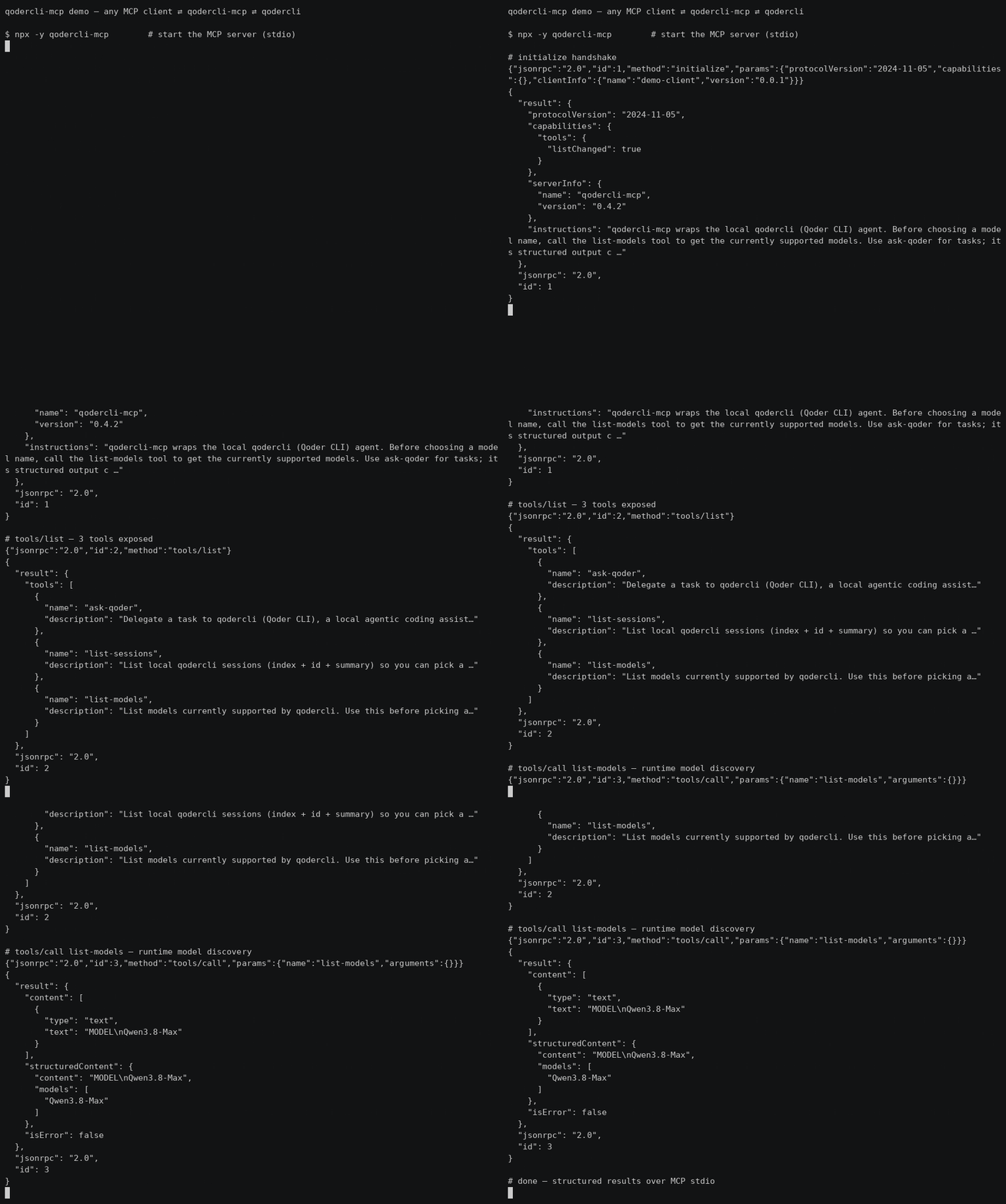
30s demo: MCP client ⇄ qodercli-mcp ⇄ qodercli — initialize → tools/list → list-models (real output, not sped up)
Quick start
Zero-config via npx — add this to your MCP client config (~/.qoder/mcp.json, claude_desktop_config.json, …):
{ "mcpServers": { "qodercli-mcp": { "command": "npx", "args": ["-y", "qodercli-mcp"] } } }
Three tools are exposed:
| Tool | Purpose |
|---|---|
ask-qoder | Delegate a task to qodercli |
list-sessions | Discover resumable sessions |
list-models | Runtime model discovery |
Highlights: verified permission semantics (see below — e.g. dont_ask is read-only),
codex-style sandbox/approval_policy, structured output (session_id/duration_ms/total_credits).
Full configuration options are in Install.
Why
Some CLI agents ship an official MCP server mode (e.g. codex mcp-server), but qodercli currently only acts as an MCP client. This project fills that gap with a thin wrapper: it spawns qodercli -p <prompt> under the hood and streams the result back over MCP stdio.
Features
ask-qodertool — delegate a prompt to qodercli- Structured output (
session_id,is_error,duration_ms,total_credits,num_turns) via-o jsonparsing list-sessionstool to discover resumable sessionslist-modelstool for runtime model discovery (no stale model lists)reasoning_effortparameter (--reasoning-effort)- Server
instructionsin the MCP initialize result guide clients on usage - Codex-style
sandboxlevels (read-only/workspace-write/danger-full-access) - System prompt injection (
system_prompt/append_system_prompt) - Working directory, model, permission mode, output format control
- Session resume (
resume_session_id) for multi-turn delegation - Timeout protection with SIGKILL fallback
- Proxy quota support (
HTTP_PROXY/HTTPS_PROXYinjection) - Zero build step — plain ESM JavaScript, Node.js >= 18
Prerequisites
- Node.js >= 18
qodercliinstalled and signed in (qodercli login)
Install
Option A — npx (recommended): no clone needed, the MCP client downloads the package on first use.
"command": "npx", "args": ["-y", "qodercli-mcp"]
Option B — from source (for development):
git clone https://github.com/cantbeblank96/qodercli-mcp.git
cd qodercli-mcp
npm install
MCP client configuration
Qoder IDE
Add to ~/.qoder/mcp.json. Prefer the absolute path of node and set QODERCLI_PATH explicitly (nvm-managed binaries are often missing from the PATH seen by MCP child processes):
Proxy Support: To use your Qoder CLI proxy quota, add
HTTP_PROXYand/orHTTPS_PROXYto the server's environment. When these are set at the MCP server level, they will be passed to all qodercli subprocesses.
{
  "mcpServers": {
    "qodercli-mcp": {
      "command": "npx",
      "args": ["-y", "qodercli-mcp"],
      "env": {
        "QODERCLI_PATH": "/absolute/path/to/qodercli",
        "PATH": "/usr/local/bin:/usr/bin:/bin"
      }
    },
    "qodercli-mcp-with-proxy": {
      "command": "npx",
      "args": ["-y", "qodercli-mcp"],
      "env": {
        "QODERCLI_PATH": "/absolute/path/to/qodercli",
        "HTTP_PROXY": "http://127.0.0.1:39900",
        "HTTPS_PROXY": "http://127.0.0.1:39900",
        "PATH": "/usr/local/bin:/usr/bin:/bin"
      }
    }
  }
}
Developers running a local checkout instead of the published package (Option B) should replace command/args with the absolute node path and /path/to/qodercli-mcp/src/index.js (nvm-managed node is often missing from the PATH seen by MCP child processes).
Claude Code / Claude Desktop
{
  "mcpServers": {
    "qodercli-mcp": {
      "command": "node",
      "args": ["/absolute/path/to/qodercli-mcp/src/index.js"],
      "env": {
        "QODERCLI_PATH": "/absolute/path/to/qodercli"
      }
    }
  }
}
Tool: ask-qoder
| Parameter | Type | Description |
|---|---|---|
prompt | string (required) | The task or question for qodercli |
cwd | string | Working directory |
model | string | Model for this session; call list-models to discover available names |
reasoning_effort | string | Reasoning effort level (--reasoning-effort), e.g. low/medium/high; depends on the model |
permission_mode | enum | dont_ask (default, read-only) | accept_edits (auto-approve file edits) | bypass_permissions (full access incl. shell) | auto | default; mutually exclusive with approval_policy, prefer sandbox |
approval_policy | enum | codex-style: untrusted→read-only | on-request→auto | never→full access |
sandbox | enum | read-only | workspace-write | danger-full-access (codex-style; controls the effective permission mode) |
system_prompt | string | Replace the default system prompt |
append_system_prompt | string | Append instructions to the default system prompt |
resume_session_id | string | Resume a previous session |
output_format | string | Passed to -o (default json). Note: non-json formats degrade structured output (session_id etc. become unavailable) |
extra_args | string[] | Raw CLI args appended before the prompt; reserved flags (permission mode, system prompt, model, -o, -r, -w...) are rejected |
timeout_ms | number | Timeout in ms, default 600000 |
Structured output
ask-qoder declares an MCP outputSchema and returns, in addition to the
human-readable text, a structuredContent object:
{
  "session_id": "77826b5c-...",   // pass back as resume_session_id
  "content": "OK",
  "is_error": false,
  "exit_code": 0,
  "duration_ms": 1280,
  "total_credits": 0.53,
  "num_turns": 1,
  "timed_out": false,
  "truncated": false
}
Sandbox mapping
| sandbox | Effective permission mode | Effect on qodercli |
|---|---|---|
| (omitted) | dont_ask | Read-only: permission-requiring tools are silently denied |
read-only | dont_ask | Plus --disallowed-tools write_file,replace,run_shell_command as defense in depth |
workspace-write | accept_edits | Agent can create/modify files in cwd |
danger-full-access | bypass_permissions | Full access including shell |
Explicit permission_mode or approval_policy always wins over sandbox.
Permission modes (verified semantics)
| Mode | Behavior |
|---|---|
dont_ask | Read-only: silently denies every tool call that requires permission. Headless-safe default |
accept_edits | Auto-approves file edits; shell still governed by policy |
bypass_permissions | Auto-approves everything including shell |
auto | qodercli's own automatic policy |
default | Interactive confirmation — not headless-friendly, avoid in MCP calls |
Tool: list-sessions
Lists local qodercli sessions (index, summary, session id) so a client can
pick a resume_session_id. Takes no arguments.
Tool: list-models
Lists models currently supported by qodercli (via --list-models), so a
client can pick a valid model value at runtime instead of relying on
stale knowledge. Returns both a text list and a structured models array.
Takes no arguments.
Usage Examples
Example 1: Simple code explanation
{ "name": "ask-qoder", "arguments": {
  "prompt": "Explain what main.py does",
  "cwd": "/path/to/project",
  "timeout_ms": 180000
}}
Example 2: Ask a second opinion
{ "name": "ask-qoder", "arguments": {
  "prompt": "@src/service.py Review this file for security issues and suggest improvements",
  "model": "qwen-plus",
  "permission_mode": "dont_ask",
  "timeout_ms": 300000
}}
Example 3: Multi-turn conversation via resume
// First call — session_id comes back in structuredContent
{ "name": "ask-qoder", "arguments": {
  "prompt": "Help me refactor this module to improve readability",
  "cwd": "/projects/backend",
  "timeout_ms": 300000
}}
// Then reuse structuredContent.session_id:
{ "name": "ask-qoder", "arguments": {
  "prompt": "Now add error handling for database timeouts",
  "resume_session_id": "77826b5c-cd6b-4213-b423-d95b4e1deab0"
}}
// Or discover ids with list-sessions
{ "name": "list-sessions", "arguments": {} }
Example 4: Code review with specific focus
{ "name": "ask-qoder", "arguments": {
  "prompt": "Analyze performance bottlenecks in utils.py",
  "model": "qwen-max",
  "permission_mode": "default",
  "output_format": "text",
  "timeout_ms": 240000
}}
Example 5: Read-only analysis
{ "name": "ask-qoder", "arguments": {
  "prompt": "Audit this codebase for security issues; do not modify anything",
  "cwd": "/workspaces/repo",
  "sandbox": "read-only",
  "timeout_ms": 300000
}}
read-only disables write/shell tools — good for audits and reviews.
Example 6: Project-wide analysis
{ "name": "ask-qoder", "arguments": {
  "prompt": "Summarize the architecture of this project and identify key modules",
  "cwd": "/workspaces/repo",
  "timeout_ms": 420000,
  "model": "qwen-plus"
}}
Best Practices
- Specify working directory — Always pass
cwdwhen operating on a specific project - Use timeout protection — For complex prompts, set explicit
timeout_msshorter than 60min - Resume for multi-turn — Chain follow-ups via
resume_session_idinstead of repeating context - Model selection — Call
list-modelsfirst to discover currently supported models; larger models are better for deep analysis - Permission mode — The server default is read-only (
dont_ask); setQODERCLI_DEFAULT_PERMISSION_MODE=bypass_permissionsto make full (YOLO) access the default for personal deployments. Per-call: tasks that must create/modify files needsandbox: "workspace-write"; shell access needsdanger-full-access. Do not combinesandboxwith an explicitpermission_mode(the latter wins)
Environment variables
| Variable | Default | Description |
|---|---|---|
QODERCLI_PATH | qodercli | Path to the qodercli binary |
QODERCLI_TIMEOUT_MS | 600000 | Default timeout |
QODERCLI_MAX_OUTPUT_MB | 50 | Per-call stdout/stderr cap in MB (OOM protection) |
QODERCLI_DEFAULT_PERMISSION_MODE | dont_ask | Default permission mode when the caller omits permission_mode/approval_policy/sandbox; set bypass_permissions for full (YOLO) access |
HTTP_PROXY | - | HTTP proxy URL for qodercli |
HTTPS_PROXY | - | HTTPS proxy URL for qodercli |
Development
npm test        # smoke test: protocol handshake + tool invocation
node src/index.js   # run the server manually (stdio)
Disclaimer
This is an unofficial, third-party tool. It is not affiliated with, endorsed, or sponsored by Qoder. Use permission_mode: bypass_permissions with care — delegated prompts may modify files in the target working directory.
Product Hunt Gallery
Main gallery image (1270×760, dark tech theme): ph-gallery.png. Optional demo video can be converted from the GIF (docs/demo.gif).
License
MIT
Reviews
No reviews yet
Be the first to review this server!
More Developer Tools MCP Servers
Git
Freeby Modelcontextprotocol · Developer Tools
Read, search, and manipulate Git repositories programmatically
Fetch
Freeby Modelcontextprotocol · Developer Tools
Web content fetching and conversion for efficient LLM usage
Worldmonitor
Freeby Koala73 · Developer Tools
Live markets, conflicts, country risk, chokepoints, energy, and China decision signals. 86 tools.
Toleno
Freeby Toleno · Developer Tools
Toleno Network MCP Server — Manage your Toleno mining account with Claude AI using natural language.
mcp-creator-python
Freeby mcp-marketplace · Developer Tools
Create, build, and publish Python MCP servers to PyPI — conversationally.
MCP Marketplace
Freeby mcp-marketplace · Developer Tools
Search and install MCP servers from inside your AI client.