
Server data from the Official MCP Registry
FHIR chart tools for MCP: read-only by default, with elicitation-gated, human-approved writes.
About
FHIR chart tools for MCP: read-only by default, with elicitation-gated, human-approved writes.
Security Report
Valid MCP server (1 strong, 1 medium validity signals). No known CVEs in dependencies. ⚠️ Package registry links to a different repository than scanned source. Imported from the Official MCP Registry. 1 finding(s) downgraded by scanner intelligence.
7 files analyzed · 1 issue found
Security scores are indicators to help you make informed decisions, not guarantees. Always review permissions before connecting any MCP server.
Permissions Required
This plugin requests these system permissions. Most are normal for its category.
What You'll Need
Set these up before or after installing:
Environment variable: MEDPLUM_ACCESS_TOKEN
Environment variable: MEDPLUM_CLIENT_ID
Environment variable: MEDPLUM_CLIENT_SECRET
Environment variable: MEDPLUM_BASE_URL
How to Install
Add this to your MCP configuration file:
{
  "mcpServers": {
    "io-github-cbetz-last-ehr": {
      "env": {
        "MEDPLUM_BASE_URL": "your-medplum-base-url-here",
        "MEDPLUM_CLIENT_ID": "your-medplum-client-id-here",
        "MEDPLUM_ACCESS_TOKEN": "your-medplum-access-token-here",
        "MEDPLUM_CLIENT_SECRET": "your-medplum-client-secret-here"
      },
      "args": [
        "-y",
        "@lastehr/mcp"
      ],
      "command": "npx"
    }
  }
}Documentation
View on GitHubFrom the project's GitHub README.
Last EHR





Read the chart broadly. Write only what a human approved. Last EHR is the agent layer for a headless FHIR EHR. It does three things, and the write protocol is only one of them.
It reads the chart broadly. 25 of US Core 9.0.0's 27 readable resource types, across 23 patient-scoped sections, following references so authors, encounters, and provenance stop being dead pointers. Counted in the open, with the ceiling published rather than implied, in FHIR coverage.
It is built so the agent cannot fake an absence. "She has never had a flu shot" is the answer a chart agent must never invent, so a read reports when its window was capped, when a reference lookup was refused, and when a code filter matched nothing in a section that does hold records. Filters that a section cannot apply are refused with the legal values instead of silently dropped. These are safety-boundary tests, not best-effort behavior.
Every write is a proposal. Show the exact resource, require an explicit human decision, commit exactly what was reviewed, and record what created it. That half is a small protocol, Approval-Gated Agent Writes on FHIR (v0.1 draft): Proposal → Decision → Commit → Audit. Two implementations run here, a web approval card and MCP elicitation-gated write tools, plus a conformance suite that checks implementations with its own FHIR reads. Independent implementations and criticism are invited.
Five FHIR backends sit behind one interface. This repository is the reference implementation: bring your own FHIR backend and model key for a real agent (Medplum for the authenticated path, or any verified adapter for synthetic evaluation), or start with the zero-key local synthetic walkthrough.
Last EHR is a layer, not an EHR. It runs on top of a headless FHIR backend (Medplum for authenticated use; HAPI FHIR, Firely Server, Aidbox, or Oystehr for synthetic evaluation) and talks to it over the FHIR API. It is not the system of record, stores no PHI of its own, and never bundles or forks the backend.
Status: early / alpha. APIs, structure, and scope will change. Use synthetic data only. · License: Apache-2.0
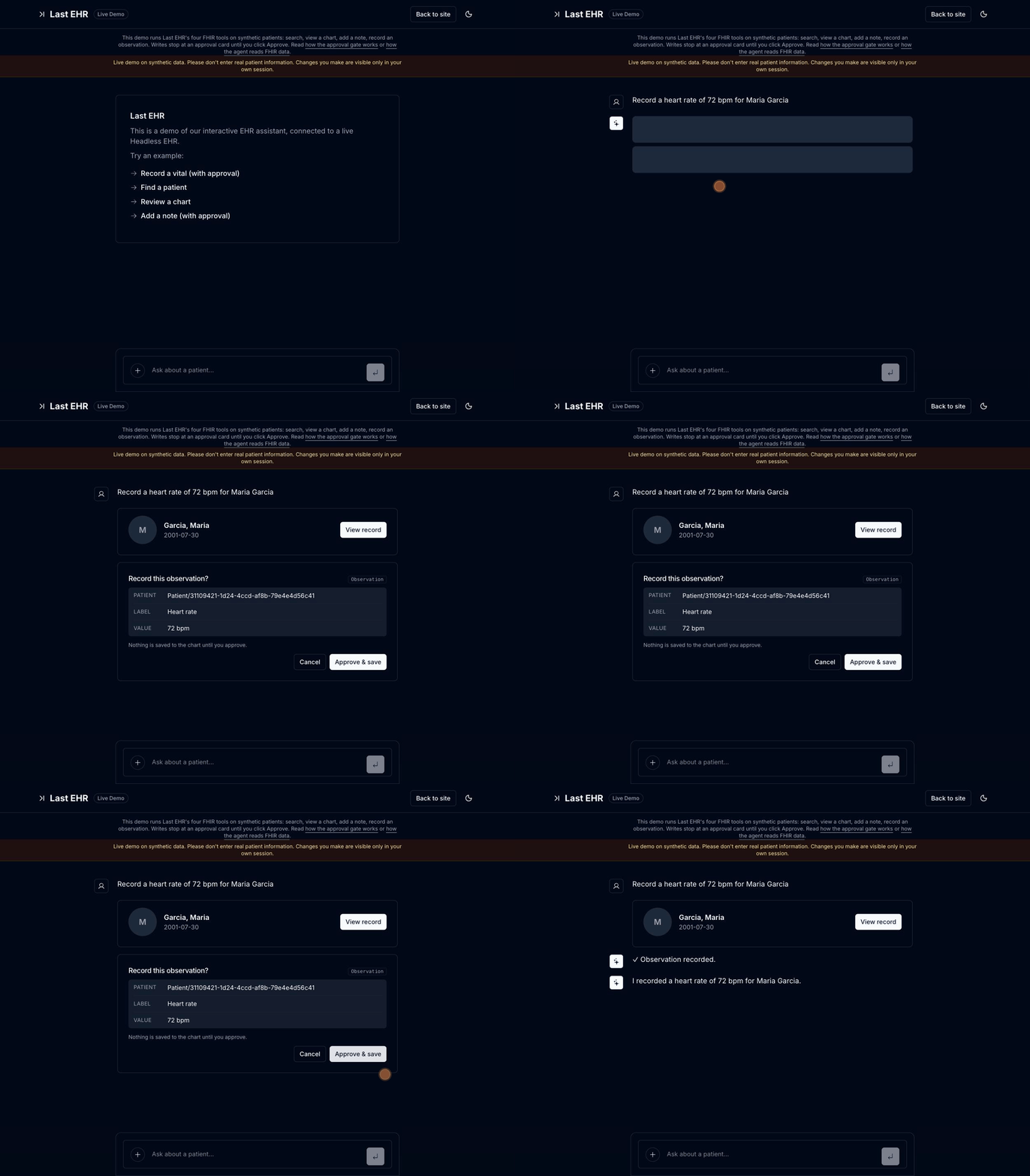
Try the live demo: no sign-up, synthetic data, and every write goes through the approval gate.
Start here
| Goal | Start here |
|---|---|
| See the approval loop now | Try the live synthetic-data demo: no sign-up. |
| Read the protocol | Approval-Gated Agent Writes on FHIR, v0.1 draft |
| See exactly what the agent can reach in FHIR | FHIR coverage: counted against US Core, ceiling included |
| Test an MCP (stdio) implementation of the protocol | npx @lastehr/agent-write-conformance — see the conformance guide |
| Give an MCP client bounded chart tools — read-only by default, opt-in approved writes (Medplum, or the local HAPI stack) | npx -y @lastehr/mcp init --client claude-code |
| Try fixture MCP locally without FHIR credentials or a provider API key | npm run mcp:demo -- --client claude-code |
| Prove the synthetic web-agent workflow locally | npm run eval |
| Inspect the complete flow locally with no account or model key | npm run demo:local |
30-second synthetic-data walkthrough
- Open the live demo.
- Ask:
Find patients named Smith. - Ask:
Record a heart rate of 72 bpm for Maria Garcia. - Inspect the proposed write, then approve it. The data is synthetic and the approval card shows exactly what will be saved.
For MCP, @lastehr/mcp is deliberately a separate surface that is
read-only by default (search_patients, show_patient_info,
read_chart_section, and read_document — the same bounded chart reads the
web agent gets), with one opt-in: elicitation-gated write proposals a human
approves per action.
Configure a least-privilege Medplum token before connecting it to a real
project; full setup is in the
MCP guide and the Official MCP Registry listing.
Want to inspect the read surface before configuring Medplum? From a
checkout, npm run mcp:demo starts the included local HAPI stack, resets the
four synthetic fixture charts, and prints a Claude Code/Cursor configuration.
That checkout-only MCP Local Lab needs no FHIR/Medplum credentials or
model-provider API key of its own and is restricted to fixture patients. Your
MCP client still uses its normal account and may send those synthetic results
to its model provider. It is not the published package, generic HAPI support,
or a path for PHI.
For a deterministic safety-mechanics check, npm run eval creates a separate
synthetic target, proves the proposal/approval and denial paths, verifies chart
association, cleans up, and writes a scrubbed report. It is not a clinical,
authorization, or compliance certification; see the evaluation guide.
What it does
- A chat agent (Vercel AI SDK) with FHIR tools. It reads the chart (search patients, view a patient chart, read one filtered chart section) and writes to it (add a note, record an observation, create a follow-up task), streamed and rendered as structured cards.
- Writes are confirmation-gated: the agent proposes a write, you approve it, and only then is it saved. Nothing touches the chart without your click. Approved writes carry the standard AIAST security label, with optional Provenance recording author-agent and human-verifier roles (role labels, not user identity).
- The gate is a specified protocol, not just app behavior: Approval-Gated Agent Writes on FHIR (v0.1 draft) names the rules — only an explicit approval commits, every ambiguous outcome fails closed, policy can only narrow the gate — and the conformance suite tests an implementing MCP stdio server's gate mechanics with independent FHIR reads. CI runs it against this repository's own server on every pull request and merge.
- Authentication, multi-tenancy, and access control are delegated to your Medplum project (
Project= tenant,ProjectMembership= user,AccessPolicy= RBAC). Last EHR doesn't reimplement any of that, and writes are bounded by your AccessPolicy.
Support status
Last EHR is Medplum-supported for authenticated deployments and includes a
local, no-auth HAPI FHIR mode for synthetic-data evaluation. Firely
Server (FHIR_BACKEND=firely), Aidbox (FHIR_BACKEND=aidbox), and
Oystehr (FHIR_BACKEND=oystehr) are verified synthetic-evaluation
adapters: each passed both contract harnesses and the
FHIR Agent Safety Eval against a disposable synthetic
target. Other FHIR R4 backends need an adapter before they are
supported. See the full support matrix for the web,
SMART, MCP, auth, and evaluation boundaries before choosing a path.
Self-hosted demos can offer a backend picker (swap the EHR under the
live agent, per session) and an "under the hood" panel streaming the
agent's FHIR operations — both off by default; see the support matrix for
the eligibility rules and npm run check:backends for preflight.
What it isn't
- Not a charting EHR, not a system of record, and not a Medplum replacement. It's a thin agent layer: a small, growing set of tools over your FHIR backend.
- Not a guarantee. The approval gate is a human-in-the-loop boundary, not a safety proof: it stops unilateral writes, but it relies on you reading what you approve. Models can propose wrong or fabricated clinical facts, and approval fatigue is real. Last EHR provides the gate; you provide the review.
How it works
Next.js 15 (App Router) + React 19. The agent lives in app/api/chat/route.ts (streamText + FHIR tools); the FHIR calls go through a small backend interface (lib/fhir/backend.ts) with five built-in adapters: Medplum (hosted or self-hosted, token-authenticated), plus local HAPI FHIR, Firely Server, Aidbox, and Oystehr for synthetic evaluation (docs/support.md). The interface is four methods plus contract notes, so an adapter for another headless EHR is a small, well-scoped contribution. See docs/adapters.md and the roadmap.
flowchart LR
    B["Browser chat"] --> A["/api/chat<br/>streamText + FHIR tools"]
    A -- "reads<br/>search_patients, show_patient_info, read_chart_section" --> M[("Your FHIR backend<br/>(Medplum, HAPI, Firely, Aidbox, Oystehr)")]
    A -- "writes<br/>add_note, record_observation,<br/>record_superseding_observation, create_task" --> C{"Approval card"}
    C -- "Approve & save" --> M
    C -- "Cancel" --> N["Nothing saved"]
    M -. "Every call runs as the signed-in user,<br/>bounded by your AccessPolicy.<br/>The layer stores no PHI." .-> A
On the public demo, writes are also tagged with your session, so you only ever see the seed data plus your own edits.
Quickstart
Fastest: try the hosted demo at lastehr.com/demo. No account, no keys, synthetic data.
One-click deploy with your own keys:
You'll still need a Medplum project seeded with the synthetic patients (npm run seed, below) for the demo to have data.
Run it locally (authenticated Medplum path). Prerequisites: Node 22.18+ (or 24.2+), a Medplum project (Medplum-hosted free tier or your own), and one tool-capable model API key (OpenAI, Anthropic, or Amazon Bedrock). For a real agent without Medplum, the same .env.local works with FHIR_BACKEND=hapi against the local Docker stack, or with any verified synthetic-evaluation adapter (support matrix).
git clone https://github.com/cbetz/last-ehr.git
cd last-ehr
npm install
cp .env.example .env.local      # then edit .env.local (see below)
npm run seed                     # load synthetic patients into your Medplum
npm run dev                      # http://localhost:3000/demo
At minimum set, in .env.local:
- a model key:
OPENAI_API_KEY(default provider), orANTHROPIC_API_KEYwithAI_PROVIDER=anthropic, or AWS credentials plusAI_PROVIDER=bedrockandMODEL_ID; NEXT_PUBLIC_MEDPLUM_BASE_URL/MEDPLUM_BASE_URLif you're pointing at your own Medplum (leave blank to use Medplum's hosted API);MEDPLUM_CLIENT_ID+MEDPLUM_CLIENT_SECRET(a Medplum ClientApplication): used bynpm run seed, and by the no-sign-in quickstart when you also setNEXT_PUBLIC_QUICKSTART=true. Or setNEXT_PUBLIC_MEDPLUM_GOOGLE_CLIENT_IDto sign in via Medplum's Google OAuth instead.
npm run seed loads a small synthetic patient set (scripts/fixtures/patients.ts: four patients with conditions, medications, allergies, immunizations, and vitals/labs, two named "Smith"). It wipes and recreates those patients each run, so it is safe to re-run. Then open /demo and ask: "find patients named Smith." Use synthetic data only.
Local FHIR stack, no Medplum account or model key: the repo ships a Docker Compose stack with HAPI FHIR and Postgres, plus an explicit scripted walkthrough that exercises the approval loop without calling an external model provider.
npm install
npm run demo:local                            # HAPI, seed data, and http://localhost:3000/demo
demo:local forces the local HAPI + scripted configuration without creating or
overwriting .env.local. This fixed, no-network walkthrough always finds the
seeded Maria Garcia record and proposes one Heart rate: 72 bpm Observation.
It does not interpret your prompt, browse charts, or call a model provider; the
FHIR wrapper permits only that synthetic record and observation. Press Ctrl-C
to stop Next.js; use npm run demo:local:down to remove the local stack.
Honest scope: the local HAPI server runs with no auth, so this mode is for
local, single-tenant use only; per-browser session isolation is client-side
filtering, not a security boundary. The published @lastehr/mcp package targets
Medplum (credentialed) or a local HAPI stack; the separate checkout-only
npm run mcp:demo Local Lab exposes four synthetic, read-only fixture
charts without credentials.
Neither local route is a real-data or production path. To run a real agent
against HAPI, configure .env.local with a supported model key instead. The
hosted public demo stays on Medplum.
To run the app container too, use npm run docker:local after filling
.env.local; it combines the HAPI/Postgres compose stack with the app image.
Release tags and manual publish runs push a prebuilt scripted-demo image to
ghcr.io/cbetz/last-ehr; if the pull fails, no public image has been
published yet. See
Pull and run from GHCR.
For the longer version, see docs/quickstart.md.
Docs
- Approval-Gated Agent Writes on FHIR: the v0.1 draft protocol — Proposal, Decision, Commit, Audit, and the policy rules.
- Protocol conformance suite: test an implementing MCP stdio server with a scripted reviewer and independent FHIR verification.
- Quickstart: hosted demo, Medplum local run, and local HAPI evaluation.
- Support matrix: exactly which backends and interfaces work today.
- Architecture: the chat route, tools, backend adapters, and data boundary.
- Backend adapters: the adapter contract, harnesses, checklist, and contribution path.
- Adapter starter: an executable bearer-token FHIR REST baseline with a contract suite.
- Approval-gated writes: what the gate protects and what it does not.
- MCP server: published chart tools (Medplum, or the local HAPI stack) — read-only by default with an opt-in human-approved write profile — plus the checkout-only synthetic Local Lab.
- FHIR Agent Safety Eval: a disposable synthetic workflow report for proposal, approval, denial, association, and cleanup mechanics.
- Deployment: env vars, rate limiting, Docker, and public-demo hardening.
- Threat model: trust boundaries and known limitations.
- Roadmap: what is current, next, and deliberately out of scope.
Launch from the Medplum app (SMART on FHIR)
Last EHR can launch directly from app.medplum.com. Register it once in your Medplum project by creating a ClientApplication with:
launchUri=https://<your-deploy>/launchredirectUri=https://<your-deploy>/launch/callback
then set SMART_CLIENT_ID to that ClientApplication's id in your deployment.
Last EHR appears on the Apps tab of every Patient and Encounter page;
launching it opens the chat already scoped to that patient, reusing your
Medplum sign-in (SMART App Launch with PKCE, public client, no secret). The
token is bounded by the granted SMART scopes and your AccessPolicy, and writes
still stop at the approval card.
Use chart tools over MCP
@lastehr/mcp is a small, standalone MCP server for
Medplum (or the local HAPI stack). It gives Claude Code, Cursor, and other
MCP clients four bounded chart read tools — search_patients,
show_patient_info, read_chart_section, and read_document, the same read
surface the web agent has; writes exist only as an explicit opt-in where a
human approves each proposed write through the client's approval prompt
(details).
npx -y @lastehr/mcp init --client claude-code
Use npx -y @lastehr/mcp --version to check the installed MCP package version
without starting the server.
Authenticate with a least-privilege MEDPLUM_ACCESS_TOKEN, or
MEDPLUM_CLIENT_ID plus MEDPLUM_CLIENT_SECRET; set MEDPLUM_BASE_URL for a
self-hosted Medplum instance. Read access can still return PHI, so review the
MCP client's model-provider and data-handling boundary before connecting it to
a real project.
From a checkout, npm run mcp builds and starts that same package. Full setup,
client configuration, and the support boundary are in the MCP guide.
The Official MCP Registry listing is the canonical discovery record for the exact, verified release.
To evaluate the MCP surface before configuring Medplum, use the separate local lab from a repository checkout:
npm install
npm run mcp:demo -- --client claude-code
It starts local HAPI, reloads the repository's synthetic fixture records, and
prints a client registration command. The generated MCP process exposes two of
the package's four read-only tool names — search_patients and
show_patient_info only, since its fixture client serves too few resource
types for the section reader — and can only resolve those fixture patients.
It is not included in @lastehr/mcp, does not make HAPI a supported package
backend, and must never be pointed at real data. The Local Lab server needs no
FHIR credential or provider API key, but the MCP client itself still needs its
normal model account and may transmit the synthetic tool output to that model.
Configuration
Every variable is documented in .env.example. The real-agent
model path is provider-agnostic with one hard rule: every external provider
offered here can carry a BAA, because deployments of this project head toward
real clinical data even though the demo is synthetic-only. The scripted
option is a separate, explicit, zero-key local HAPI walkthrough, not a model
provider or a PHI-ready mode.
| AI_PROVIDER | Key | Example MODEL_ID | BAA path |
|---|---|---|---|
scripted | None | Fixed local synthetic sequence | No external provider call. Requires explicit local HAPI flags; cannot act as a general agent. |
openai (default) | OPENAI_API_KEY | gpt-4.1-mini | OpenAI signs BAAs with zero-retention options for API traffic on qualifying plans. |
anthropic | ANTHROPIC_API_KEY | claude-sonnet-4-6 | Anthropic signs BAAs with zero-retention options for API traffic on qualifying plans. |
bedrock | AWS credential env + AWS_REGION | us.anthropic.claude-haiku-4-5-20251001-v1:0 | Amazon Bedrock is available under an AWS BAA for eligible services; set an explicit model id or inference profile. |
The BAA requirement applies to the external-provider rows: signing one is the operator's step, not a default, and a bare API key is not PHI-ready. Aggregators that cannot sign a BAA (OpenRouter, per their current public terms) are deliberately not offered. Analytics (PostHog) and the marketing-site waitlist (Neon) are optional and lastehr.com-specific.
Security & data
Last EHR stores no patient data of its own; everything lives in your FHIR backend. But be clear about what the approval gate is: it is a write-safety control, not a privacy control. In external-model modes, anything the agent reads from the chart is sent to your model provider as context, under your API key, with no approval step. The scripted local demo makes no model request and is restricted to its one seeded synthetic record; it is not a path for real data.
Use synthetic data unless you have real agreements in place. Pointing this at real PHI requires, at minimum:
- a BAA with your model provider that covers your API traffic (consumer plans don't qualify);
- a HIPAA-eligible FHIR backend with its own BAA;
- your own compliance review. This project is alpha and is not a HIPAA-covered service; PHI handling is the operator's responsibility.
See SECURITY.md for the full posture and how to report vulnerabilities.
Open-core
Self-hosting is free and Apache-2.0. A managed hosted tier (managed Medplum + a signed BAA, multi-tenancy, billing) may follow, built only after the open-source core has traction.
Not affiliated
A personal open-source project. Not affiliated with, endorsed by, or sponsored by Medplum, Vercel, or any employer.
License
Apache-2.0. See NOTICE for third-party attributions, CONTRIBUTING.md to contribute, and GOVERNANCE.md for how the project is run.
Reviews
No reviews yet
Be the first to review this server!
More Developer Tools MCP Servers
Git
Freeby Modelcontextprotocol · Developer Tools
Read, search, and manipulate Git repositories programmatically
Fetch
Freeby Modelcontextprotocol · Developer Tools
Web content fetching and conversion for efficient LLM usage
Worldmonitor
Freeby Koala73 · Developer Tools
Live markets, conflicts, country risk, chokepoints, energy, and China decision signals. 90 tools.
Paperclip
Freeby Paperclipai · Developer Tools
Trending hip-hop artist momentum scores across four cultural dimensions.
Toleno
Freeby Toleno · Developer Tools
Toleno Network MCP Server — Manage your Toleno mining account with Claude AI using natural language.
mcp-creator-python
Freeby mcp-marketplace · Developer Tools
Create, build, and publish Python MCP servers to PyPI — conversationally.