
Server data from the Official MCP Registry
MCP server for managing workouts, routines, and exercise data through the Hevy API
About
MCP server for managing workouts, routines, and exercise data through the Hevy API
Security Report
Valid MCP server (3 strong, 3 medium validity signals). 1 code issue detected. No known CVEs in dependencies. Package registry verified. Imported from the Official MCP Registry. Trust signals: 4 highly-trusted packages. 1 finding(s) downgraded by scanner intelligence.
6 files analyzed · 2 issues found
Security scores are indicators to help you make informed decisions, not guarantees. Always review permissions before connecting any MCP server.
Permissions Required
This plugin requests these system permissions. Most are normal for its category.
What You'll Need
Set these up before or after installing:
Environment variable: HEVY_API_KEY
How to Install
Add this to your MCP configuration file:
{
  "mcpServers": {
    "io-github-chrisdoc-hevy-mcp": {
      "env": {
        "HEVY_API_KEY": "your-hevy-api-key-here"
      },
      "args": [
        "-y",
        "hevy-mcp"
      ],
      "command": "npx"
    }
  }
}Documentation
View on GitHubFrom the project's GitHub README.
Hevy MCP Server
Talk to your Hevy workout data from Claude, Cursor, Codex, and other MCP clients.







Connect to the hosted MCP · Use the Hevy CLI · Watch the 18-second demo · Explore all 23 tools · Documentation
Hevy CLI
Prefer the terminal? The separate
@chrisdoc/hevy-cli
package reads workouts, routines, exercises, and body measurements directly
from the Hevy API, and can create or update those resources with explicit
confirmation. Deletion is not supported.
npm install -g @chrisdoc/hevy-cli
export HEVY_API_KEY=your-hevy-api-key

hevy workouts list --page-size 10
hevy summary --weeks 4
Add --json to any command for scripts and pipelines. The CLI is a standalone
Hevy API client, not an MCP wrapper. See
packages/cli/README.md for the full command
reference, pagination behavior, and exit codes.
hevy-mcp is an open-source Model Context Protocol (MCP)
server for the Hevy fitness and workout tracking
app. It lets AI assistants read, analyze, create, and update your Hevy workouts,
routines, exercise templates, and body measurements through authenticated Hevy
API requests.
The Node stdio/HTTP adapter and Cloudflare Worker share the same MCP tools. See deployment modes to choose a transport, or architecture for workspace ownership, runtime scopes, and supported embedding APIs.
A Hevy API key, available with Hevy PRO, is required.
See it in action
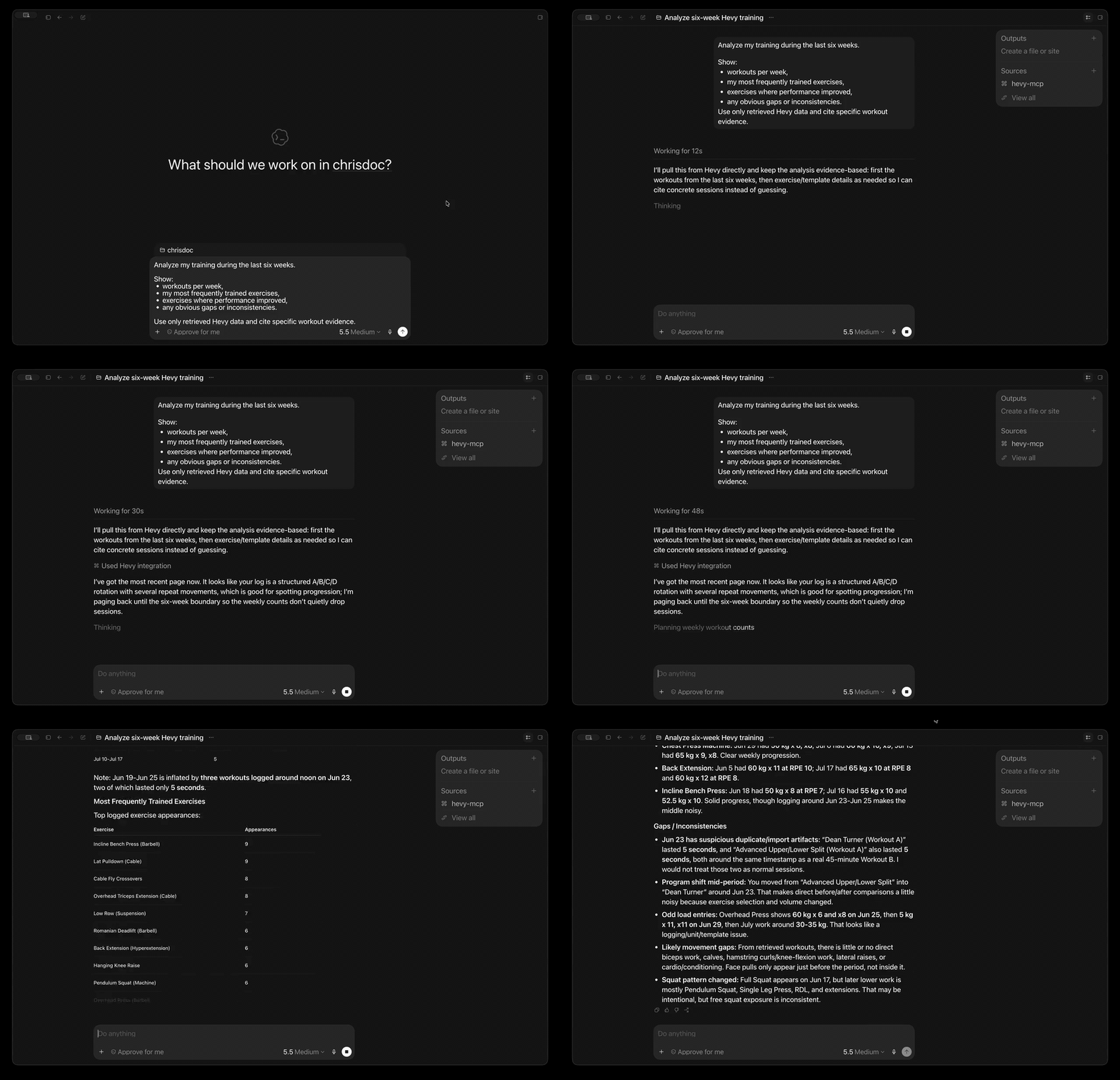
In the demo, the assistant retrieves real Hevy data and answers a multi-part training question with evidence from the user's workout history.
What can you do with it?
- Analyze training progress: summarize 1-12 weeks of workouts and body measurements in one tool call.
- Ask questions in plain language: find recent sessions, frequently trained exercises, consistency gaps, routine details, or exercise history.
- Plan and log training: create or update workouts, routines, routine folders, custom exercises, and body measurements.
- Search without huge responses: discover routines and exercise templates with compact, AI-friendly results.
- Connect from your preferred MCP client: use the hosted Streamable HTTP endpoint or run locally with Codex, Claude Desktop, Cursor, and other clients.
- Start without installing anything: connect directly to the production Cloudflare Worker—no Node.js, package download, or Docker container required.
- Keep local control when you want it: run the same server with
npx,bunx, or the official Docker image.
Try asking:
Analyze my training over the last six weeks. Show workouts per week, my most frequently trained exercises, any obvious gaps or inconsistencies, and cite the workout evidence you used.
Find my push-day routine and show its exercises and sets.
Compare my recent body measurements with my training consistency.
Create a completed workout from my saved routine. Ask me for any missing set results before writing it to Hevy.
Claude integration
The repository includes a Claude plugin that connects to the hosted OAuth-enabled MCP endpoint without embedding a user's Hevy API key.
Claude.ai and Claude Desktop
In Claude, open Settings → Connectors → Add custom connector and enter:
https://mcp.hevy-mcp.dev/mcp
Complete the OAuth flow and enter the Hevy API key when prompted. The same remote endpoint can be used by Claude Desktop and other clients that support remote MCP connectors.
Claude Code and Cowork
The Claude plugin is defined by .claude-plugin/plugin.json
and .mcp.json. Install it from this public repository or from
the Claude Plugin Directory after publication. It adds the hosted Hevy MCP
connector and the Hevy workout skill.
See the privacy policy for the hosted service's data handling details.
Quick start
1. Get your Hevy API key
Create an API key in Hevy's API settings, then keep it somewhere secure. API access currently requires a Hevy PRO subscription.
2. Connect hevy-mcp to your client
The hosted Cloudflare endpoint is the fastest way to start. It runs remotely, so your client does not need Node.js, Bun, Docker, or a local server process.
Connect to the hosted endpoint
Production URL:
https://mcp.hevy-mcp.dev/mcp
The endpoint uses Streamable HTTP. Send your Hevy API key as a bearer token on every request.
Codex
Codex CLI, the Codex desktop app, and the IDE extension share the same MCP configuration. Make your Hevy API key available in the environment that starts Codex, then add the hosted server:
export HEVY_API_KEY=your-hevy-api-key
codex mcp add hevy \
  --url https://mcp.hevy-mcp.dev/mcp \
  --bearer-token-env-var HEVY_API_KEY
Codex stores the environment variable name, not the key itself, in its MCP
configuration. Restart Codex or begin a new session, then run codex mcp list
to verify the server is configured.
Other Streamable HTTP clients
Clients that accept a remote MCP URL and fixed headers commonly use this shape:
{
	"mcpServers": {
		"hevy": {
			"url": "https://mcp.hevy-mcp.dev/mcp",
			"headers": {
				"Authorization": "Bearer your-hevy-api-key"
			}
		}
	}
}
Exact configuration keys vary by client. The hosted server requires support for
Streamable HTTP and a fixed Authorization header.
[!IMPORTANT] Treat the bearer value like a password. The Worker validates it with Hevy for each request, does not store it, and forwards it to Hevy only as the required
api-keyheader.
Run locally instead
Choose local stdio if you prefer to run the server on your own machine or your client cannot attach a fixed authorization header to remote MCP requests.
Codex
codex mcp add hevy \
  --env HEVY_API_KEY=your-hevy-api-key \
  -- npx -y hevy-mcp
Claude Desktop or Cursor
Add this mcpServers entry to your client configuration:
{
	"mcpServers": {
		"hevy": {
			"command": "npx",
			"args": ["-y", "hevy-mcp"],
			"env": {
				"HEVY_API_KEY": "your-hevy-api-key"
			}
		}
	}
}
Google Antigravity
There are two ways to configure the Hevy MCP server for Google Antigravity (agy):
Option A: Automatic Plugin Installation (Recommended)
This utilizes the built-in plugin system:
The plugin reads the repository-root mcp_config.json to start the local
stdio server. That configuration intentionally contains no API key; the server
inherits HEVY_API_KEY from the host environment as described below. This is
separate from the manual, user-global configuration described below and from
the repository's .mcp.json, which configures hosted HTTP/OAuth.
-
Install the plugin:
agy plugin install https://github.com/chrisdoc/hevy-mcp -
Provide the
HEVY_API_KEYin your host shell environment so the CLI child process can inherit it:- Persistent: Save the environment variable
HEVY_API_KEYin your system/shell configurations:- macOS / Linux: Add it to your shell profile configurations (e.g.,
~/.zshrcor~/.bashrc):export HEVY_API_KEY="your-actual-api-key" - Windows: Add it to your User or System Environment Variables. In PowerShell, you can run:
[Environment]::SetEnvironmentVariable("HEVY_API_KEY", "your-actual-api-key", "User")
- macOS / Linux: Add it to your shell profile configurations (e.g.,
- Temporary (Session-only): If you do not want to persist the key, export it in your active terminal session before running
agy:export HEVY_API_KEY="your-actual-api-key"
- Persistent: Save the environment variable
Option B: Manual Configuration (No Plugin)
If you prefer configuring it statically via the global configuration file:
-
Open your global MCP configuration file:
- Location:
~/.gemini/config/mcp_config.json
- Location:
-
Add the
hevyconfiguration block under themcpServerskey. Make sure to merge this entry with any existing servers you have configured rather than replacing the entire file contents:{ "mcpServers": { "hevy": { "command": "npx", "args": ["-y", "hevy-mcp"], "env": { "HEVY_API_KEY": "your-actual-api-key" } } } }
Common local configuration locations:
- Claude Desktop on macOS:
~/Library/Application Support/Claude/claude_desktop_config.json - Claude Desktop on Windows:
%APPDATA%\Claude\claude_desktop_config.json - Cursor:
~/.cursor/mcp.json
Restart or reconnect the client after saving the file.
Any stdio MCP client
Configure your client to launch this command with HEVY_API_KEY in the child
process environment:
npx -y hevy-mcp
npx requires Node.js 20 or newer. Restart or reconnect your client after
saving its configuration.
Requires Bun:
{
	"mcpServers": {
		"hevy": {
			"command": "bunx",
			"args": ["hevy-mcp@latest"],
			"env": {
				"HEVY_API_KEY": "your-hevy-api-key"
			}
		}
	}
}
Official images support linux/amd64 and linux/arm64. Keep stdin open with
-i because the container runs the stdio MCP server:
export HEVY_API_KEY=your-hevy-api-key
docker run -i --rm -e HEVY_API_KEY ghcr.io/chrisdoc/hevy-mcp:latest
For an MCP client, store the key in a protected environment file and configure the client to launch Docker:
{
	"mcpServers": {
		"hevy": {
			"command": "docker",
			"args": [
				"run",
				"-i",
				"--rm",
				"--env-file",
				"/absolute/path/to/hevy-mcp.env",
				"ghcr.io/chrisdoc/hevy-mcp:latest"
			]
		}
	}
}
Pin an exact image tag such as ghcr.io/chrisdoc/hevy-mcp:X.Y.Z when you need
reproducible upgrades.
You can also add the npm server to supported clients with
add-mcp:
npx add-mcp hevy-mcp --env "HEVY_API_KEY=your-hevy-api-key"
3. Ask your first question
Try one of these after restarting or reconnecting your MCP client:
- “Give me a training summary for the last four weeks.”
- “What routines do I have saved on Hevy?”
- “Show my three most recent workouts.”
- “Find exercise templates containing squat.”
- “Which Hevy account is connected?”
Your assistant should ask for approval before mutation tools when the client supports tool confirmations.
How it works
Hosted:  Your AI assistant  →  Streamable HTTP  →  Cloudflare Worker  →  Hevy API
Local:   Your AI assistant  →  MCP over stdio   →  local hevy-mcp     →  Hevy API
The hosted endpoint creates a fresh MCP server and Hevy client for each request. Direct bearer authentication uses the supplied Hevy key and caches successful validation for 15 minutes without persisting the raw key. OAuth instead stores the key encrypted in a grant. Neither path creates a shared MCP user session. The local server follows the same tool contract but receives the Hevy key through its process environment.
In either mode, read tools retrieve data; mutation tools create or replace data only when your assistant calls them.
Guided prompts
These server-provided MCP prompts coordinate common multi-step workflows:
| Prompt | Arguments | Workflow |
|---|---|---|
analyze-workout-progress | Optional weeks from 1-12; default 4 | Calls get-training-summary, then analyzes workout activity and body-measurement trends from the returned evidence. |
create-workout-from-routine | Required routine_id and UTC start_time | Loads a routine, collects actual completed-set data and an end time, then creates a workout without inventing results. |
Tools
hevy-mcp registers 23 tools. Read-only tools are safe for exploration; create
and update tools are exposed with MCP mutation annotations so compatible clients
can request confirmation.
| Category | Tool | Description |
|---|---|---|
| Training analysis | get-training-summary | Summarize 1-12 weeks of workout activity and body-measurement trends in one call. |
| Workouts | get-workouts | List workouts in Hevy API order, not by start time, with exercise and timing details. |
| Workouts | get-workout | Get complete details for one workout by ID. |
| Workouts | get-workout-events | List workout update and delete events since a timestamp. |
| Workouts | create-workout | Create a completed workout in Hevy. |
| Workouts | update-workout | Patch workout metadata by ID; is_private is required, while other omitted fields and all exercises remain unchanged. |
| Workouts | replace-workout-exercises | Replace all exercises and sets; is_private is required and updated, while other workout metadata remains unchanged. |
| Routines | search-routines | Search routine titles and return compact metadata for discovery. |
| Routines | get-routines | List custom and default workout routines. |
| Routines | get-routine | Get one routine and its exercise configuration by ID. |
| Routines | create-routine | Create a reusable workout routine. |
| Routines | update-routine | Replace an existing routine's content. |
| Routine folders | get-routine-folder | Get one routine folder's metadata by ID. |
| Routine folders | create-routine-folder | Create a routine folder. |
| Exercise templates | get-exercise-template | Get complete metadata for one exercise template by ID. |
| Exercise templates | search-exercise-templates | Search the full exercise catalog by title substring. |
| Exercise templates | create-exercise-template | Create a custom exercise template. |
| Exercise history | get-exercise-history | Get past performed sets for one exercise template. |
| Body measurements | get-body-measurements | List dated body measurements. |
| Body measurements | get-body-measurement | Get the body measurement entry for one date. |
| Body measurements | create-body-measurement | Create a dated body measurement. |
| Body measurements | update-body-measurement | Update the body measurement for an existing date. |
| Diagnostics | feedback | Report a concise, privacy-safe description of an issue or unexpected behavior. |
create-routine and update-routine require a top-level routine envelope with a non-empty exercises array; each exercise must contain at least one set, and fields use snake_case at every level:
{
	"routine": {
		"title": "Full Body A",
		"folder_id": 123,
		"notes": "First four exercises are the minimum viable workout",
		"exercises": [
			{
				"exercise_template_id": "30E293E3",
				"superset_id": null,
				"rest_seconds": 120,
				"notes": "Controlled active ROM",
				"sets": [
					{
						"type": "normal",
						"rep_range": {
							"start": 6,
							"end": 10
						}
					}
				]
			}
		]
	}
}
The Hevy API currently exposes no delete endpoints for workouts, routines, routine folders, exercise templates, or body measurements, so there are no corresponding delete tools.
Resources
| Name | URI | Description |
|---|---|---|
user-profile | hevy://user | Authenticated Hevy user profile. |
workout-count | hevy://workout-count | Total number of workouts in the account. |
exercise-templates | hevy://exercise-templates | Full formatted exercise template catalog. |
routine-folders | hevy://routine-folders | Full formatted list of Hevy routine folders. |
Hosted Cloudflare endpoint
The production MCP server is live at:
https://mcp.hevy-mcp.dev/mcp
It is the quickest way to use hevy-mcp: there is nothing to install or keep
running locally, and it exposes the same 23 tools as the npm package and Docker
image.
The Cloudflare Worker uses stateless Streamable HTTP at POST /mcp.
Clients must send their Hevy API key as a fixed authorization header:
{
	"mcpServers": {
		"hevy": {
			"url": "https://mcp.hevy-mcp.dev/mcp",
			"headers": {
				"Authorization": "Bearer your-hevy-api-key"
			}
		}
	}
}
In this configuration the bearer value is your Hevy API key, not an OAuth
token. The Worker caches successful validation for 15 minutes under a hashed
key, does not persist the raw key on this direct path, and forwards it upstream
only as Hevy's required api-key header.
OAuth for Claude.ai and other remote MCP clients
The hosted production Worker is deployed with an OAUTH_KV namespace binding,
so it exposes a full OAuth 2.1 layer for clients that cannot send a fixed
header, such as Claude.ai custom connectors. Self-hosted Workers can opt in by
following the OAUTH_KV setup in CONTRIBUTING.md:
- RFC 8414 / RFC 9728 discovery metadata under
/.well-known/ - Client ID Metadata Documents (CIMD), with dynamic client registration
(
/register) as a fallback, and PKCE token exchange (/token) - An
/authorizepage where you paste your Hevy API key once; the key is validated with Hevy and stored encrypted inside the OAuth grant
Add the Worker URL ending in /mcp as a Claude.ai custom connector and
complete the authorization flow in the browser. Direct
Authorization: Bearer <hevy-api-key> requests keep working unchanged — the
OAuth layer is purely additive. Revoking or rotating your Hevy key prevents
subsequent Hevy API access with that key; it does not itself delete stored
grants or immediately clear cached validation.
OAuth access tokens last seven days and refresh tokens last 30 days. This reduces KV writes from frequent hourly refreshes while preserving automatic refresh for supported clients.
The endpoint does not expose legacy SSE or a GET event stream. Without the
opt-in OAuth layer, clients that require OAuth discovery, dynamic
registration, CIMD, or token refresh are not compatible unless they can send
the fixed custom header above.
Self-host the Worker
A clean clone can deploy the portable TypeScript Cloudflare configuration with
pnpm --dir packages/worker exec cf deploy and receive a workers.dev URL. OAuth
requires your own OAUTH_KV namespace; custom domains, routes, and
observability destinations are optional account-owned settings. See
CONTRIBUTING.md for setup and
for the distinction between self-hosting and the maintainer-only named
environments.
See CONTRIBUTING.md to deploy the Cloudflare Worker for self-hosted Streamable HTTP.
Advanced configuration
| Setting | Default | Scope | Notes |
|---|---|---|---|
HEVY_API_KEY | None; required | Local stdio or HTTP | Hevy API key from the Hevy app. Never pass it in a URL. |
HEVY_MCP_API_TIMEOUT | 60000 ms | Local stdio | Positive Hevy API timeout in milliseconds. Invalid values fall back to 60 seconds. |
HEVY_MCP_DEBUG | Disabled | Local Node | Set to exactly 1 for privacy-bounded diagnostics on stderr. Stdout remains reserved for MCP JSON-RPC. |
HEVY_MCP_HTTP_BEARER_TOKEN | None | Non-loopback HTTP | Required when --host is not loopback; use a separate token, never the Hevy API key. |
HEVY_MCP_HTTP_MAX_SESSIONS | 100 | Local HTTP | Maximum established sessions, including sessions currently initializing; excess requests receive 429. |
HEVY_MCP_HTTP_MAX_INITIALIZING | 10 | Local HTTP | Maximum concurrent session initializations; excess requests receive 503 and are not queued. |
HEVY_MCP_HTTP_IDLE_TIMEOUT_MS | 1800000 ms | Local HTTP | Idle sessions are evicted after 30 minutes; each session request resets the timer. |
HEVY_MCP_HTTP_BODY_TIMEOUT_MS | 30000 ms | Local HTTP | Stalled request bodies receive 408; values are bounded to five minutes. |
HEVY_MCP_TELEMETRY | Built: on; source: off | Local Node | Set 0 to disable telemetry or 1 to opt in for source runs. Imports remain side-effect-free. |
HEVY_MCP_TELEMETRY_DIAGNOSTICS | Enabled | Local Node | Set to exactly 0 to keep structural telemetry while suppressing exception messages and stacks. |
XDG_CACHE_HOME | ~/.cache | Local stdio | Changes the root for the npm update-check cache at hevy-mcp/update-check.json. |
SENTRY_DSN | Packaged Sentry SaaS project DSN | Optional local Node telemetry | Sentry project DSN override. An empty value disables Sentry export. The Worker does not import Node telemetry. |
SENTRY_RELEASE | hevy-mcp@<installed-version> | Optional local Node telemetry | Overrides the release label attached to local Sentry error events. |
SENTRY_ENVIRONMENT | Built: production; source: development | Optional local Node telemetry | Overrides the environment label for enabled Sentry error events. |
-h, --help | N/A | Local stdio CLI | Print supported options and exit. |
-v, --version | N/A | Local stdio CLI | Print the installed version and exit. |
The local Node executable uses stdio by default. Opt into local Streamable HTTP with:
HEVY_API_KEY=your-hevy-api-key npx hevy-mcp --transport http --host 127.0.0.1 --port 3000
The local MCP endpoint is http://127.0.0.1:3000/mcp; non-loopback binds
require the separate HEVY_MCP_HTTP_BEARER_TOKEN environment variable. A
Docker deployment must publish the port explicitly:
docker run --rm -p 3000:3000 -e HEVY_API_KEY -e HEVY_MCP_HTTP_BEARER_TOKEN \\
  ghcr.io/chrisdoc/hevy-mcp:latest --transport http --host 0.0.0.0 --port 3000
This Node HTTP mode is distinct from the stateless Cloudflare Worker HTTP endpoint described above: the Node server owns stateful client sessions, while the Worker is designed for hosted deployment and does not import Node code.
Cache behavior
search-exercise-templates and hevy://exercise-templates share a
server-scoped in-memory catalog cache:
- Entries live for five minutes, and the cache holds at most one catalog.
- Concurrent catalog requests share an in-flight fetch when possible.
search-exercise-templatesacceptsrefresh: trueto invalidate the cache.- Each hosted Worker request gets a fresh catalog cache, preventing cross-key sharing.
- Each local HTTP session owns its own MCP server and catalog cache; caches are not shared across sessions.
Local Node telemetry and privacy
Published Node builds enable project telemetry by default. Unbuilt source runs
(such as development and probe scripts) disable it unless
HEVY_MCP_TELEMETRY=1 is set explicitly. This is local Node behavior only; the
Cloudflare Worker does not import Node telemetry. Set HEVY_MCP_TELEMETRY=0
before launching Node to disable all project telemetry in either mode. In
published builds, every value except the literal 0 retains the enabled default.
The scoped Node lifecycle Layer acquires telemetry; importing the package remains
side-effect-free. Enabled source runs use the Sentry environment development;
published builds use production. Set SENTRY_ENVIRONMENT to override this
label, for example to qa or staging. The master setting takes precedence over
SENTRY_DSN and packaged or
runtime OTEL_COLLECTOR_TOKEN credentials, so the disabled path creates no
telemetry exporters or periodic metric readers and makes no telemetry network
requests. SENTRY_DSN remains a Sentry-only setting; when telemetry is enabled,
an empty value disables only Sentry export.
When enabled, actionable errors are sent to the Sentry project configured by
SENTRY_DSN; Sentry performance tracing is disabled. Exception messages and
stacks are bounded and scrubbed before export. Set
HEVY_MCP_TELEMETRY_DIAGNOSTICS=0 to keep structural traces and metrics while
suppressing those details. Traces and metrics continue to be sent to the
collector at
https://otel.chrisdoc.dev/v1/traces and
https://otel.chrisdoc.dev/v1/metrics. The project uses its own OpenTelemetry
Collector; downstream destinations are configured in that infrastructure.
Metrics export every 30 seconds. See observability documentation
for Cloudflare OTLP export and domain tracing.
The raw API key is never exported. Ordinary tool telemetry can include a short,
deterministic HMAC pseudonym derived from the key for correlation; feedback
uses a separate unobserved path. A per-failure diagnostic ID and OTel trace ID
may be attached to actionable errors. See
telemetry data dictionary for the bounded
telemetry fields and privacy contract.
Exception messages and stacks are treated as diagnostic details: they are
length-limited, scrubbed for credentials, URLs, and local home paths, and
removed entirely when HEVY_MCP_TELEMETRY_DIAGNOSTICS=0. Prompts, tool
arguments, tool results, request bodies, API keys, raw identifiers/queries,
exact dates, workout/routine/folder/template/body-measurement content,
names/titles/descriptions/notes, measurement values, arbitrary client
metadata, and unnormalized endpoint paths remain prohibited.
Security and mutations
- Keep
HEVY_API_KEYout of source control, URLs, logs, and screenshots. - Local clients provide the key through the child process environment.
- Direct hosted clients send the Hevy key only in the
Authorization: Bearerheader; successful validation is cached, but the raw key is not persisted. OAuth grants store the key encrypted. Both paths send it to Hevy only as theapi-keyheader. - Browser MCP requests must be same-origin or match an exact allowlisted
origin. The default allowlist includes Claude.ai, ChatGPT, VS Code for the
Web, and github.dev; self-hosted deployments can override it with
MCP_ALLOWED_ORIGINS. See deployment modes for the OAuth authorization-form exception. - Local development can copy
.dev.vars.exampleto.dev.varsto disable Origin validation for MCP Inspector. PR preview Workers use the same development-only setting because their browser origins are dynamic. Never setMCP_DISABLE_ORIGIN_CHECK=trueon a production Worker. - Create operations can produce duplicates when retried. Routine updates
replace content; workout metadata updates preserve omitted fields and
exercises, while
replace-workout-exercisesreplaces all exercises and sets. Review tool inputs and use client confirmations.
Troubleshooting
- The server does not appear: restart or reconnect your MCP client after changing its configuration.
npxfails: confirm that Node.js 20 or newer is installed, then runnpx -y hevy-mcp --versionin a terminal.- Codex cannot see the server: run
codex mcp list, then start a new Codex session after confirming thehevyentry exists. - Hevy API returns 401: the key is invalid, expired, revoked, or misconfigured. Verify or create an active key at Hevy's API settings, then restart the client.
- Hosted authentication fails: confirm the key belongs to a Hevy PRO
account and is sent as
Authorization: Bearer <HEVY_API_KEY>. - Local authentication fails: confirm the key is active and available to the
MCP child process as
HEVY_API_KEY. - Need diagnostics: set
HEVY_MCP_DEBUG=1. Diagnostic output goes to stderr and does not interfere with MCP messages on stdout.
If you find a bug or have a feature request, open an issue.
Contributing
Contributions are welcome. Developer setup, testing lanes, generated-client workflows, Cloudflare Worker deployment, and pull request rules are documented in CONTRIBUTING.md.
Use mise for the pinned Node.js and pnpm versions, then run the deterministic unit lane. It does not need a live Hevy API key:
MISE_AUTO_INSTALL=false mise install
MISE_AUTO_INSTALL=false mise exec -- pnpm install
MISE_AUTO_INSTALL=false mise exec -- pnpm run test:unit
License and acknowledgements
- License: MIT
- Credits: Model Context Protocol and Hevy Fitness
Reviews
No reviews yet
Be the first to review this server!
More Developer Tools MCP Servers
Fetch
Freeby Modelcontextprotocol · Developer Tools
Web content fetching and conversion for efficient LLM usage
Git
Freeby Modelcontextprotocol · Developer Tools
Read, search, and manipulate Git repositories programmatically
Toleno
Freeby Toleno · Developer Tools
Toleno Network MCP Server — Manage your Toleno mining account with Claude AI using natural language.
MCP Marketplace
Freeby mcp-marketplace · Developer Tools
Search and install MCP servers from inside your AI client.
mcp-creator-python
Freeby mcp-marketplace · Developer Tools
Create, build, and publish Python MCP servers to PyPI — conversationally.
FinAgent
Freeby mcp-marketplace · Finance
Free stock data and market news for any MCP-compatible AI assistant.