
Server data from the Official MCP Registry
Develop, test, analyze, and operate SAP ABAP systems through ADT from AI coding agents.
About
Develop, test, analyze, and operate SAP ABAP systems through ADT from AI coding agents.
Security Report
Valid MCP server (1 strong, 0 medium validity signals). No known CVEs in dependencies. Package registry verified. Imported from the Official MCP Registry. Trust signals: 4 highly-trusted packages.
6 files analyzed · 1 issue found
Security scores are indicators to help you make informed decisions, not guarantees. Always review permissions before connecting any MCP server.
How to Install
Add this to your MCP configuration file:
{
  "mcpServers": {
    "io-github-coaspe-sap-abap-mcp": {
      "args": [
        "-y",
        "@coaspe/sap-abap-mcp"
      ],
      "command": "npx"
    }
  }
}Documentation
View on GitHubFrom the project's GitHub README.
SAP ABAP MCP


Connect your AI assistant to an ADT-enabled SAP system to read ABAP, make scoped changes and inspect actual check results.
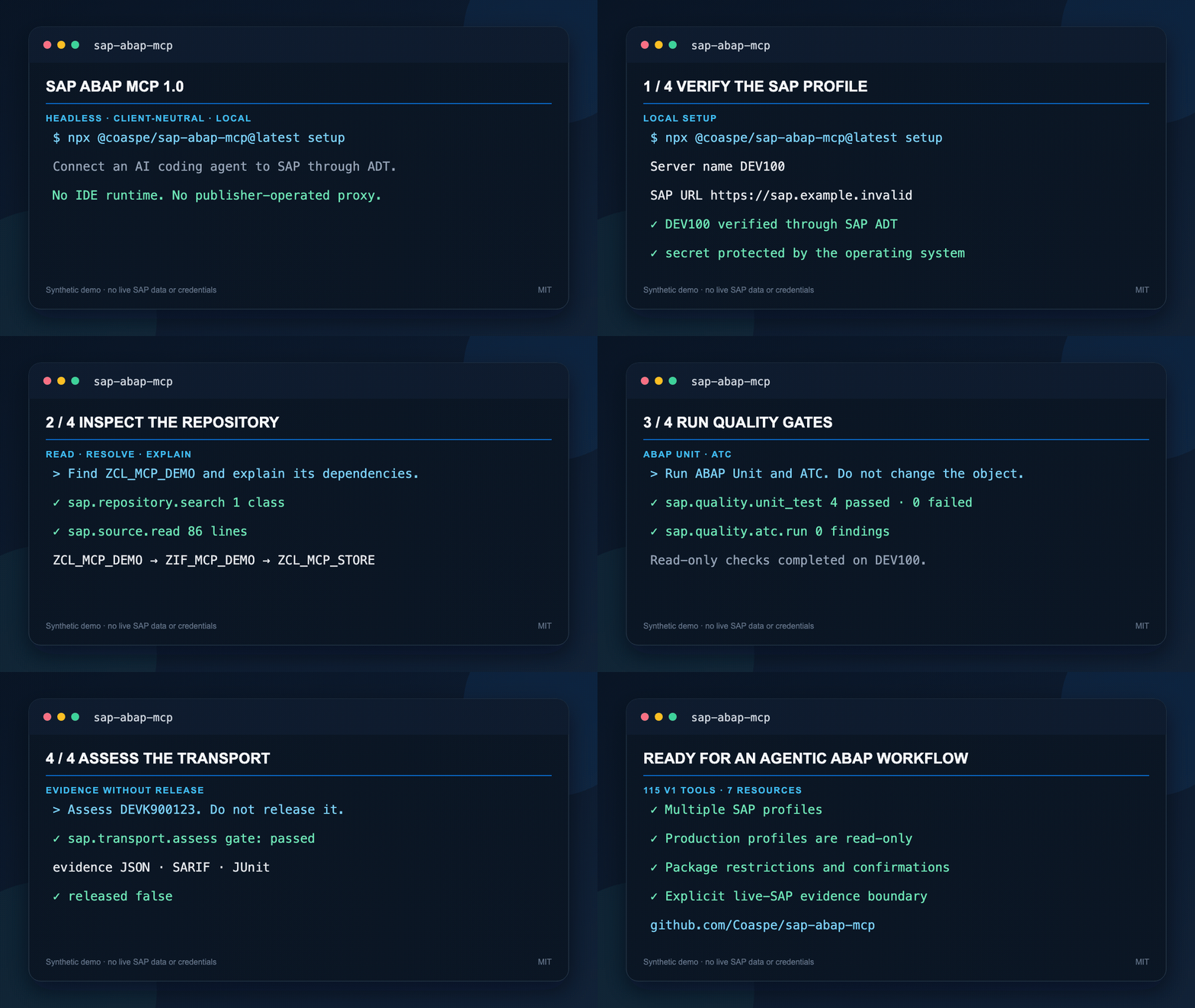
Quick start
- Install Node.js 22/24 and connect to your company VPN.
- Run
npx -y @coaspe/sap-abap-mcp@2.2.0 onboard(npx.cmdon Windows). - Verify and save your SAP connection, register your host, then restart the app and verify an actual SAP system read.
| Host | Setup command |
|---|---|
| Claude Code | npx -y @coaspe/sap-abap-mcp@2.2.0 onboard |
| Codex | npx -y @coaspe/sap-abap-mcp@2.2.0 onboard |
| VS Code | npx -y @coaspe/sap-abap-mcp@2.2.0 register DEV100 --client vscode --apply |
| Cursor | npx -y @coaspe/sap-abap-mcp@2.2.0 register DEV100 --client cursor --apply |
| Gemini CLI | npx -y @coaspe/sap-abap-mcp@2.2.0 register DEV100 --client gemini --apply |
| Claude Desktop | npx -y @coaspe/sap-abap-mcp@2.2.0 register DEV100 --client claude-desktop --apply |
Version 2.2.0 includes company CA files, six-host registration and Windows SAP
Logon import. Omit --apply to preview a registration; existing entries are
preserved and existing settings files are backed up. Claude Desktop MCPB users
should avoid a duplicate registration. On Windows replace npx with npx.cmd.
CA profiles use file format version 3 and need 2.2.0 or later. Existing npm registrations pin their package version: restart alone does not update a 2.1.0 registration. Use registration doctor and reviewed repair to update an existing registration to 2.2.0 before using a CA profile.
See setup details, including Linux environment-only credentials and registration recovery.
2.1.0 fixes noninteractive startup, native macOS credential storage and registration recovery. Windows DPAPI explicitly loads its native security module even when Node inherits a PowerShell 7 module path. Bundled npm/npx Windows launchers are resolved without a shell while preserving custom wrappers. This release also reduces the runtime package. Patched vendor bytes are preserved across Windows and Unix checkouts. Existing five gateways still reach 120 capabilities.
Fixes in 2.2.0
Repeated source patches use the same current-source view, preserve literal $
sequences and activate after unlock. Transport release supports ADT background
runs; the release also improves RAP response recovery, V4 unpublish errors,
old open-transport discovery, CTS-key object assignment, Dictionary checks and
top-level package creation. See the eight fixes and validation limits.
These paths have local automated coverage. Live B4D write/release acceptance has not been established by this release. Older npm 2.1.0 still has the reported source-patch limitations; upgrading the package and its pinned host registration is required to use the fixes.
One existing-object change
Select the existing sap-change-object prompt, with the configured systemId,
exact Z program/class as target, and desired behavior in goal. It reuses
source, semantic/public API, dependency, quality and transport features.
Production/read-only policy, package restrictions, transport requirements and exact-source checks remain enforced. In 2.2.0, source writes recheck the same current-source view under lock, without an explicit inactive probe. A changed current version stops the write. Requested activation follows successful unlock and is skipped on syntax errors. Uncertain multi-object writes stop with saved/uncertain/unattempted identities; there is no automatic rollback or atomic-transaction claim. Inspect state before retrying. Zero tests, unsupported checks and partial findings cannot establish completion.
For a read-only evaluation, keep readOnly: true and expose only search,
describe and invoke_read gateways in the host. Do not execute write, activation,
Unit, ATC, debugger or profiling operations during that evaluation.
See workflow prompts and T1–T5 criteria.
Verified environments and limits
| Scope | Evidence and limit |
|---|---|
| Clean npm tarball, macOS arm64, Node 24 | Eight launch/profile combinations, Unicode/spaces, help, invalid commands and shutdown passed on the reliability candidate |
| macOS Keychain | Actual throwaway legacy-item/UTF-8/9,000-byte storage, renewal and deletion passed |
| Windows read-only field procedure | Owner reports all supplied steps passed without candidate source changes; sanitized operation records were not supplied |
| Windows DPAPI / npx.cmd automation | Windows CI passed: native storage/module-shadow regression, bundled launchers and eight installed-tarball protocol cases |
| Native Desktop MCPB / host restart | Standalone bundle checks and an owner's overall field report remain distinct from retained app-level evidence |
| Current 2.x live-SAP acceptance | not verified by retained operation-level records; owner-reported read-only completion is recorded separately |
| Historical live SAP / model comparison | 2026-08-05 results are historical; no identical-model T1–T5 completion rate or product ranking is established |
Candidate measurements reduced compressed npm size from 26.29 to 13.33 MB and installed dependency bytes from 118.89 to 91.81 MB. Three warm protocol sessions measured 346–351 to 223–239 ms. Cold install was 12.92 to 16.06 seconds; no cold speed improvement is claimed. See exact snapshots and limits.
If setup fails
| Symptom | Next action |
|---|---|
| MCP closes immediately | Keep serve explicit, especially on 2.0.1; verify Node on the host PATH |
SETUP_REQUIRED | Complete local setup and reconnect; this state is not an accepted SAP installation |
| Removed Node/cache or old registered version | Run registration doctor and reviewed repair/update |
| Certificate untrusted / expired / hostname mismatch | Keep verification enabled; use the company CA PEM file or ask the administrator to fix the certificate/URL. See TLS trust |
| SAP URL unknown | On Windows use SAP Logon import to find candidate URLs, then check ADT and confirm the endpoint with your administrator |
| SAP authentication/authorization failure | Renew locally or ask the administrator for ADT permission; avoid blind repeated logins |
| Inactive conflict / uncertain write | Read current active/inactive state and reconcile with its owner before resuming |
Reference and release status
- Transport
assureand CI, full reference, CLI, profiles, changelog. - Evidence index, compatibility, historical live record.
- Roadmap, adopters, distribution, 2.2.0 release.
- Reliability validation and field procedure. Checkout manifest version:
2.2.0.
Normal clients should omit both --api-version and --toolsets.
Privacy Policy
PRIVACY.md: no default remote telemetry. Credentials remain in OS-protected storage. Feedback exports are voluntary; public adopter names and quotes require separate explicit permission. Downloads and automated tests do not establish active users, task success or independent adoption.
Reviews
No reviews yet
Be the first to review this server!
More Developer Tools MCP Servers
Rea
Freeby Morluto · Developer Tools
Reverse engineer anything from your terminal or agent with one CLI and MCP server.
Paperclip
Freeby Paperclipai · Developer Tools
Trending hip-hop artist momentum scores across four cultural dimensions.
Fetch
Freeby Modelcontextprotocol · Developer Tools
Web content fetching and conversion for efficient LLM usage
Git
Freeby Modelcontextprotocol · Developer Tools
Read, search, and manipulate Git repositories programmatically
Toleno
Freeby Toleno · Developer Tools
Toleno Network MCP Server — Manage your Toleno mining account with Claude AI using natural language.
MCP Marketplace
Freeby mcp-marketplace · Developer Tools
Search and install MCP servers from inside your AI client.