
Server data from the Official MCP Registry
Inspect local audio files — playback, metadata, loudness, spectrogram.
About
Inspect local audio files — playback, metadata, loudness, spectrogram.
Security Report
This is a legitimate audio file visualization MCP server with proper structure and no critical security vulnerabilities. The server handles local audio file operations with appropriate permissions. Minor code quality observations exist around auto-generated code handling and error management, but these do not materially impact security. Supply chain analysis found 4 known vulnerabilities in dependencies (2 critical, 1 high severity). Package verification found 1 issue.
3 files analyzed · 8 issues found
Security scores are indicators to help you make informed decisions, not guarantees. Always review permissions before connecting any MCP server.
Permissions Required
This plugin requests these system permissions. Most are normal for its category.
How to Install
Add this to your MCP configuration file:
{
  "mcpServers": {
    "io-github-counterpoint-studio-audio-file-mcp-app": {
      "args": [
        "-y",
        "@counterpoint-studio/audio-file-mcp-app"
      ],
      "command": "npx"
    }
  }
}Documentation
View on GitHubFrom the project's GitHub README.
Audio File MCP App
An MCP App for playing and inspecting local audio files in an MCP host.
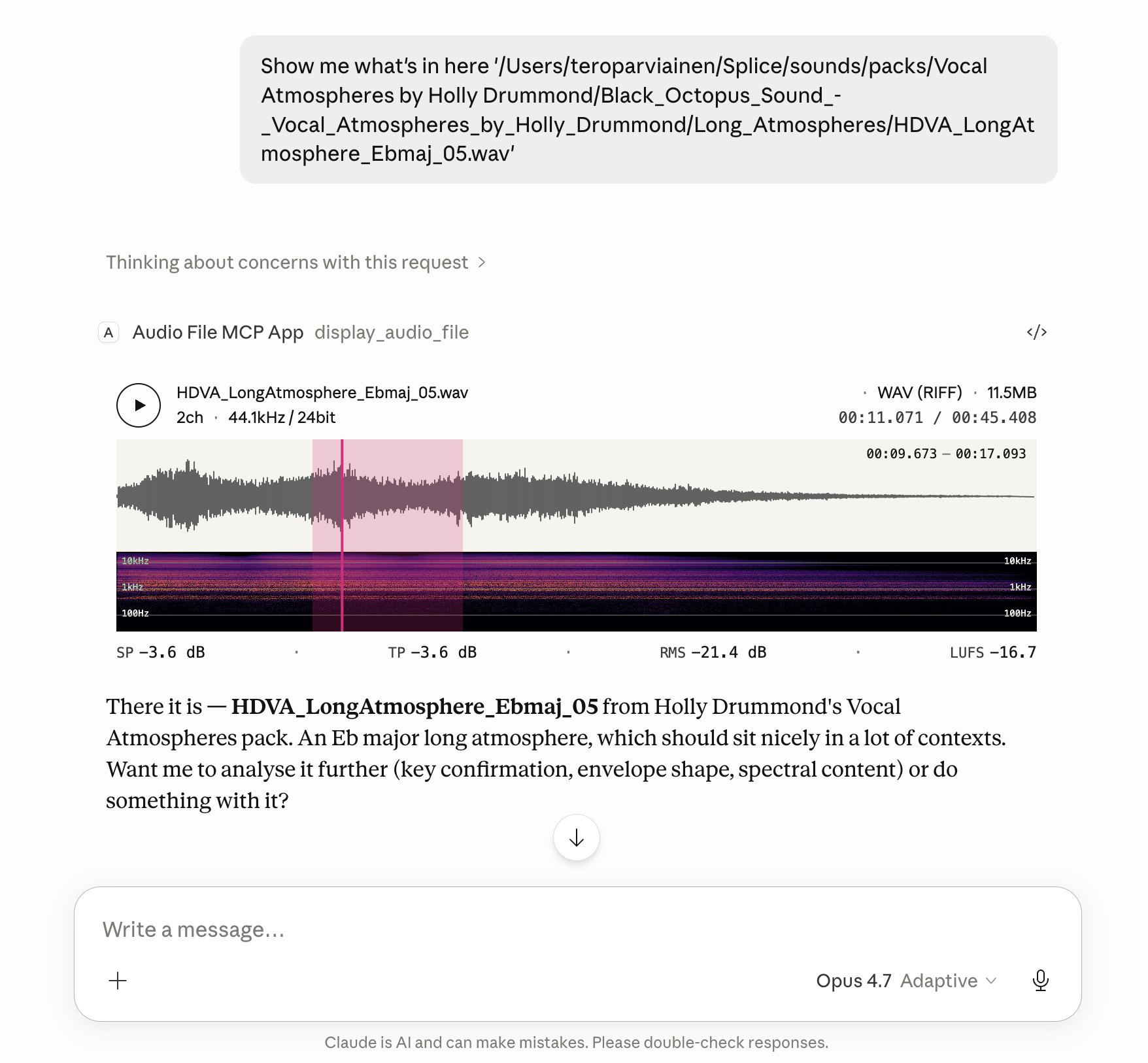
Renders an in-conversation UI with playback, metadata, loudness, a spectrogram, and an optional annotation-lane timeline.
File metadata, loudness statistics, the current playhead position, any selected region, and the annotation lanes active at the playhead are also exposed back to the model, so follow-up tasks can refer to what the user is actually hearing and looking at.
Features
- Global loudness metrics computed to EBU R128: Integrated Loudness (LUFS), Loudness Range (LRA), True Peak (dBTP), Sample Peak, and RMS.
- Instantaneous loudness metrics while playing or hovering: Momentary (400 ms) and Short-Term (3 s) LUFS, plus sample-peak and RMS at the cursor position.
- Waveform colouring by spectral centroid — each waveform slice is shaded along a tonal ramp using a low/mid/high band-energy ratio, so bright/dark regions read at a glance as bright/dark sound.
- Reassigned spectrogram with log-frequency bins (20 Hz floor) and an Inferno colour scale; time-frequency reassignment sharpens transients and tonal partials beyond what a plain STFT shows.
- Looping region selection. Drag on the timeline to mark a region; playback loops over it, and the region's start/end are passed back to the model alongside the file's loudness and playhead state.
- Annotation-lane timeline. Supply timeline annotations and the widget draws a stack of thin labelled lanes between the waveform and spectrogram, aligned to the audio's own timeline. Each lane carries time spans, an optional colour, and an optional envelope that fades span opacity along the lane. Hovering a span reveals its label, and the lanes active at the playhead — plus those starting, ending, or active within a selected region — are reported back to the model.
Install
The server runs locally over stdio. Every install path below configures the
same command: npx -y @counterpoint-studio/audio-file-mcp-app.
Claude Desktop
Easiest: grab the latest .mcpb from the
Releases page
and double-click it. Claude Desktop has Node bundled, so no extra runtime
is needed.
Or add the server by hand to claude_desktop_config.json:
{
  "mcpServers": {
    "audio-file": {
      "command": "npx",
      "args": ["-y", "@counterpoint-studio/audio-file-mcp-app"]
    }
  }
}
Codex Desktop
- Go to Settings -> MCP Servers
- Add Server
- Name:
audiofile-mcp-app - Command to launch:
npx - Arguments
-yand@counterpoint-studio/audio-file-mcp-app
VS Code (Copilot, Agent mode)

Or add to .vscode/mcp.json (workspace) or your user mcp.json:
{
  "servers": {
    "audio-file": {
      "type": "stdio",
      "command": "npx",
      "args": ["-y", "@counterpoint-studio/audio-file-mcp-app"]
    }
  }
}
Goose
Paste this deep link into your browser (Goose Desktop must be installed; the custom URI scheme can't be a real link in a GitHub README):
goose://extension?id=audio-file&name=Audio%20File%20MCP%20App&cmd=npx&arg=-y&arg=%40counterpoint-studio%2Faudio-file-mcp-app
Or run goose configure → Add Extension → Command-line Extension and
enter npx -y @counterpoint-studio/audio-file-mcp-app.
MCP Inspector
npx @modelcontextprotocol/inspector npx -y @counterpoint-studio/audio-file-mcp-app
Usage
Ask the host to show you a local audio file by its absolute path. For example:
"Show me
/Users/me/Music/track.wav"
The host calls the display_audio_file tool, which renders the in-app UI
with waveform, spectrogram, loudness metrics, and playback transport.
Annotation lanes
display_audio_file accepts an optional annotations object describing lanes
to draw on the timeline (or an annotationsPath pointing at a JSON file with
the same { "lanes": [...] } shape — handy for large payloads):
{
  "annotations": {
    "lanes": [
      {
        "label": "Delay tails",
        "color": "#e6007e",
        "spans": [{ "start": 8, "end": 24 }],
        "envelope": [
          { "time": 8, "value": 0 },
          { "time": 24, "value": 1 }
        ]
      }
    ]
  }
}
Times are in seconds on the audio's own timeline. label, color, and
envelope are optional; a lane with an envelope fades its span opacity along
the envelope curve, and uncoloured lanes use a light-accent fill. Overlapping
spans in a lane are truncated at the next span's start so rows never overlap.
The model can author annotations to point out sections, mark events, or
visualise an analysis it just ran.
Client compatibility
Tested and known to work in:
- Claude Desktop — Chat, Cowork, and Code
- Codex Desktop
- Visual Studio Code
- Goose
- MCP Inspector
Development
pnpm install
pnpm run build:dsp   # emsdk required; see WASM-BUILD.md
pnpm run serve       # runs the server with tsx, no compile step
pnpm test
pnpm run build:dist produces the publishable layout under dist/
(dist/mcp-app.html + dist/server/).
Releasing
pnpm version <bump>          # bumps every version string (package.json, server.json,
                             # mcpb/manifest.json, src/server/app.ts) + commits + tags
pnpm publish --access public # publishes to npm, then the MCP Registry (postpublish)
pnpm run build:mcpb          # produces dist/audio-file-mcp-app-<version>.mcpb
gh release create v<version> dist/*.mcpb # attaches the bundle to a GitHub release
The MCP Registry step runs mcp-publisher publish automatically after
pnpm publish. It needs a valid login — if it fails with an auth error, run
mcp-publisher login github and then mcp-publisher publish by hand.
mcp-publisher is a Go binary; install it via brew install mcp-publisher
or per the registry quickstart.
License
ISC © Counterpoint Studio OÜ
Reviews
No reviews yet
Be the first to review this server!
More Developer Tools MCP Servers
Git
Freeby Modelcontextprotocol · Developer Tools
Read, search, and manipulate Git repositories programmatically
Fetch
Freeby Modelcontextprotocol · Developer Tools
Web content fetching and conversion for efficient LLM usage
Worldmonitor
Freeby Koala73 · Developer Tools
Live markets, conflicts, country risk, chokepoints, energy, and China decision signals. 77 tools.
Toleno
Freeby Toleno · Developer Tools
Toleno Network MCP Server — Manage your Toleno mining account with Claude AI using natural language.
mcp-creator-python
Freeby mcp-marketplace · Developer Tools
Create, build, and publish Python MCP servers to PyPI — conversationally.
MCP Marketplace
Freeby mcp-marketplace · Developer Tools
Search and install MCP servers from inside your AI client.