
Server data from the Official MCP Registry
Citation-ready YouTube transcript research and optional channel intelligence for AI agents.
About
Citation-ready YouTube transcript research and optional channel intelligence for AI agents.
Security Report
Valid MCP server (3 strong, 3 medium validity signals). No known CVEs in dependencies. Package registry verified. Imported from the Official MCP Registry.
5 files analyzed · 1 issue found
Security scores are indicators to help you make informed decisions, not guarantees. Always review permissions before connecting any MCP server.
Permissions Required
This plugin requests these system permissions. Most are normal for its category.
What You'll Need
Set these up before or after installing:
Environment variable: YOUTUBE_API_KEY
How to Install
Add this to your MCP configuration file:
{
  "mcpServers": {
    "io-github-coyasong-youtube-research": {
      "env": {
        "YOUTUBE_API_KEY": "your-youtube-api-key-here"
      },
      "args": [
        "-y",
        "@coyasong/youtube-mcp-server"
      ],
      "command": "npx"
    }
  }
}Documentation
View on GitHubFrom the project's GitHub README.
YouTube Research MCP





Turn YouTube videos into citation-ready research for Codex, Claude, Cursor, and other MCP clients. Paste a video URL and get transcript evidence with timestamps and links that open at the exact quoted moment.
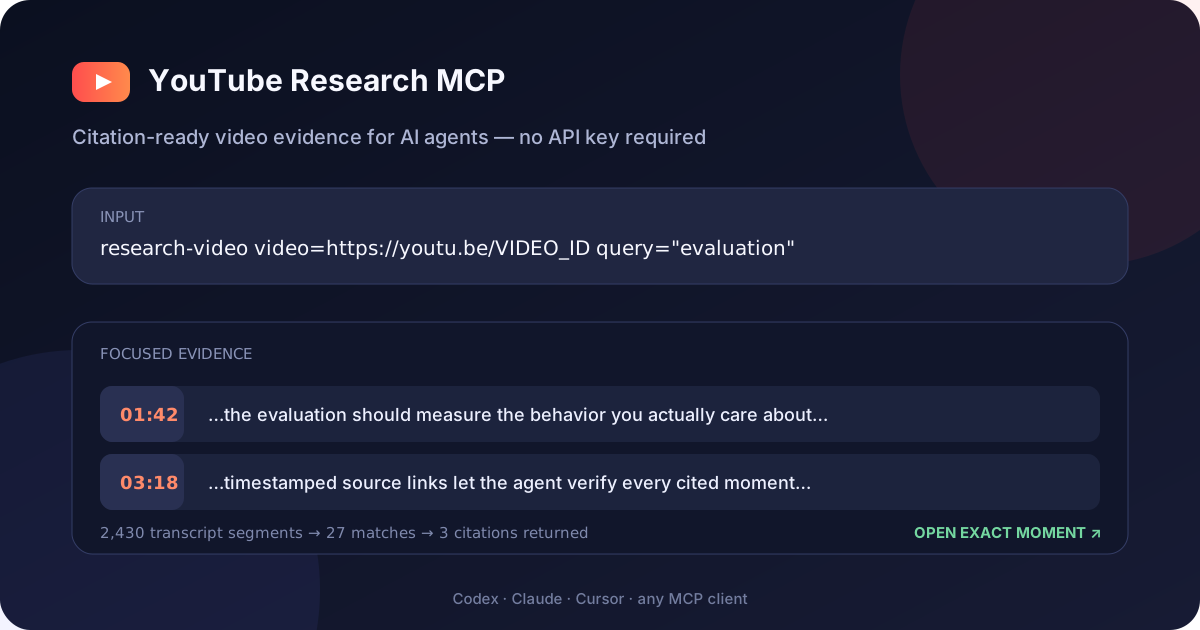
Input:  https://youtu.be/dQw4w9WgXcQ
Output: [01:05] ...evidence text...
        https://www.youtube.com/watch?v=dQw4w9WgXcQ&t=65s
No YouTube API key is required for transcript research.
Why this server
- Citation-ready research — every transcript segment includes a timestamp and source URL.
- Zero-key quick start — transcripts work immediately; add an API key only for search and analytics.
- URL-first input — accepts normal, short, Shorts, embed, live, and raw video-ID formats.
- Agent-efficient filtering — search inside transcripts and return nearby context instead of spending tokens on the entire video.
- Full YouTube intelligence — optional API mode adds comments, video/channel statistics, trends, and comparisons.
- Remote-native MCP — Streamable HTTP transport at
/mcp, plus Docker and Smithery support.
Architecture and trust boundary
flowchart LR
    C[MCP client] -->|stdio or Streamable HTTP| T[Transport]
    T --> R[Tool and resource registry]
    R --> S[YouTubeService]
    S --> K[(In-memory cache)]
    S -->|no key required| YT[Caption tracks]
    S -->|optional API key| API[YouTube Data API v3]
The MCP layer validates inputs and returns structured evidence; it does not ask a model to invent summaries or citations. Transcript tools derive timestamps and canonical links from caption segments. Data API tools return an explicit key-required error when YOUTUBE_API_KEY is unavailable, and remote authentication is enforced before MCP session handling.
Focused evidence, not a transcript dump
The included live smoke test asks a focused question about a public video and compares the response with the full timestamped transcript:
| Response | Characters returned |
|---|---|
| Full transcript | 85,518 |
research-video (3 citations with source identity) | 1,550 |
| Reduction | 98.2% |
This measures response characters, not model-specific tokens. Reproduce it against the default public fixture—or substitute your own video and query:
npm run test:live
LIVE_TEST_VIDEO='https://youtu.be/VIDEO_ID' LIVE_TEST_QUERY='evaluation' npm run test:live
Quick start — no API key
Requirements: Node.js 20 or newer.
The shortest local install uses stdio and needs no API key:
codex mcp add youtube-research -- npx -y @coyasong/youtube-mcp-server@latest
For Claude Desktop and other MCPB-compatible desktop clients, download the latest one-click MCP bundle and open it. The bundle vendors its runtime dependencies, starts locally over stdio, and asks for a YouTube API key only if you want the optional analytics tools.

Or install from the VS Code command line:
code --add-mcp '{"name":"youtube-research","command":"npx","args":["-y","@coyasong/youtube-mcp-server@latest"]}'
For Claude Desktop, Cursor, and other stdio clients, use command npx with arguments -y @coyasong/youtube-mcp-server@latest.
To run the Streamable HTTP transport instead:
git clone https://github.com/coyaSONG/youtube-mcp-server.git
cd youtube-mcp-server
npm install
npm run build
npm start
The server starts at http://localhost:3000/mcp in transcript-only mode. Confirm it with:
curl http://localhost:3000/health
Connect from Codex
With the HTTP server running:
codex mcp add youtube-research --url http://localhost:3000/mcp
Then ask Codex:
Use research-video to find what this video says about evaluation,
and cite the exact moments: https://www.youtube.com/watch?v=VIDEO_ID
Connect with MCP Inspector
npx @modelcontextprotocol/inspector
# Connect to http://localhost:3000/mcp
Install through Smithery
npx -y smithery@latest auth login
npx -y smithery@latest mcp add coyaSONG/youtube-mcp-server --client claude
Enable search, comments, and analytics
Set a YouTube Data API v3 key to switch from transcript-only to full mode:
export YOUTUBE_API_KEY=your_key_here
npm start
YOUTUBE_API_KEY is optional. PORT defaults to 3000.
Secure a remote deployment
Do not expose a full-mode server publicly without authentication: unauthenticated users could consume your YouTube API quota. Set a strong bearer token and restrict browser origins when deploying outside localhost:
export MCP_BEARER_TOKEN='replace-with-a-long-random-secret'
export CORS_ORIGIN='https://your-client.example'
export MAX_SESSIONS=100
export SESSION_IDLE_TIMEOUT_MS=1800000
npm start
Browser origins are denied by default. CORS_ORIGIN accepts a comma-separated
allowlist of exact http:// or https:// origins; wildcard origins are rejected.
Connect Codex using an environment variable rather than writing the secret into its configuration:
export YOUTUBE_MCP_TOKEN='replace-with-a-long-random-secret'
codex mcp add youtube-research \
  --url https://your-server.example/mcp \
  --bearer-token-env-var YOUTUBE_MCP_TOKEN
/health remains public for container health checks. MCP requests return 401 when authentication is enabled and the bearer token is missing or invalid. Idle sessions are removed automatically, and MAX_SESSIONS bounds memory use.
Best first tool
research-video accepts:
video: a YouTube URL or 11-character video IDlanguage: optional caption language such asen,ko, orjaquery: optional phrase to find inside the transcriptcontextLines: surrounding segments to retain, from 0 to 5matchMode:word(default) orsubstringstartSeconds/endSeconds: optional time windowoffset: result offset for paginationmaxSegments: response cap from 1 to 1,000 (default: 200)
It returns structured JSON containing the video title and channel identity, canonical video URL, full caption-track duration and segment count, matching transcript segments, human-readable citation labels, timestamps, directly navigable citation URLs, and pagination metadata. For long videos, use a query or time window first; follow nextOffset only when more evidence is needed.
Compare evidence across videos
research-videos applies one focused query to 2–5 video URLs concurrently. It returns the same structured, timestamp-linked evidence for each source while capping results per video. This is useful for comparing interviews, checking whether multiple sources support a claim, or researching a topic across a short watchlist.
{
  "videos": [
    "https://youtu.be/VIDEO_ONE",
    "https://youtu.be/VIDEO_TWO"
  ],
  "query": "evaluation",
  "maxSegmentsPerVideo": 10
}
See YouTube Research Recipes for copy-paste workflows for fact-checking claims, comparing interviews, navigating long talks, researching multilingual captions, and building citation-ready notes.
Capability modes
| Capability | No-key mode | With YOUTUBE_API_KEY |
|---|---|---|
| Transcript research, filtering, key moments, segmentation, summaries | Yes | Yes |
| Video search and comments | No | Yes |
| Video/channel metadata, statistics, trends, and comparisons | No | Yes |
Captions must be available for the requested video. Age-restricted, private, region-restricted, or caption-disabled videos may not return a transcript.
If this project saves you research time, consider starring the repository so other agent builders can discover it.
See the broader AI tooling portfolio for the
reliability principles shared with ralph-research and tmuxicate.
Docker
docker build -t youtube-research-mcp .
docker run --rm -p 3000:3000 youtube-research-mcp

# Full mode
docker run --rm -p 3000:3000 -e YOUTUBE_API_KEY=your_key youtube-research-mcp
Development
npm run dev             # HTTP server from TypeScript
npm test                # build and run all tests
npm run test:live       # live public-video transcript and citation smoke test
npm run test:user       # clean-room smoke test against the published npm package
npm run test:mcpb       # build, unpack, and exercise the installable MCP bundle
Maintainers can follow the release guide. Published GitHub releases run the complete npm, MCP Registry, MCPB, and Smithery delivery pipeline.
API Reference
Resources
youtube://video/{videoId}- Get detailed information about a specific videoyoutube://channel/{channelId}- Get information about a specific channelyoutube://transcript/{videoId}- Get transcript for a specific video- Optional query parameter:
?language=LANGUAGE_CODE(e.g.,en,ko,ja)
- Optional query parameter:
Tools
Basic Tools
research-video- Get citation-ready transcript evidence from a URL or video ID without an API keyresearch-videos- Compare timestamp-linked evidence across 2–5 videos without an API keysearch-videos- Search for YouTube videos with advanced filtering optionsget-video-comments- Get comments for a specific videoget-video-transcript- Get transcript for a specific video with optional languageenhanced-transcript- Advanced transcript extraction with filtering, search, and multi-video capabilitiesget-key-moments- Extract key moments with timestamps from a video transcript for easier navigationget-segmented-transcript- Divide a video transcript into segments for easier analysis
Tools requiring YOUTUBE_API_KEY are search, comments, statistics, discovery, and channel analysis. enhanced-transcript needs the key only when includeMetadata is true.
Statistical Tools
get-video-stats- Get statistical information for a specific videoget-channel-stats- Get subscriber count, view count, and other channel statisticscompare-videos- Compare statistics across multiple videos
Discovery Tools
get-trending-videos- Retrieve trending videos by region and categoryget-video-categories- Get available video categories for a specific region
Analysis Tools
analyze-channel-videos- Analyze performance trends of videos from a specific channel
Prompts
video-analysis- Generate an analysis of a YouTube videotranscript-summary- Generate a summary of a video based on its transcript with customizable length and keywords extractionsegment-by-segment-analysis- Provide detailed breakdown of content by analyzing each segment of the video
Examples
Accessing a Video Transcript
youtube://transcript/dQw4w9WgXcQ
Getting a Transcript in a Specific Language
youtube://transcript/dQw4w9WgXcQ?language=en
Using the Statistical Tools
// Get video statistics
{
  "type": "tool",
  "name": "get-video-stats",
  "parameters": {
    "videoId": "dQw4w9WgXcQ"
  }
}

// Compare multiple videos
{
  "type": "tool",
  "name": "compare-videos",
  "parameters": {
    "videoIds": ["dQw4w9WgXcQ", "9bZkp7q19f0"]
  }
}
Using the Transcript Summary Prompt
{
  "type": "prompt",
  "name": "transcript-summary",
  "parameters": {
    "videoId": "dQw4w9WgXcQ",
    "language": "en"
  }
}
Using the Enhanced Transcript Tool
// Basic multi-video transcript extraction
{
  "type": "tool",
  "name": "enhanced-transcript",
  "parameters": {
    "videoIds": ["dQw4w9WgXcQ", "9bZkp7q19f0"],
    "format": "timestamped"
  }
}

// With search and time filtering
{
  "type": "tool",
  "name": "enhanced-transcript",
  "parameters": {
    "videoIds": ["dQw4w9WgXcQ"],
    "filters": {
      "timeRange": {
        "start": 60,  // Start at 60 seconds
        "end": 180    // End at 180 seconds
      },
      "search": {
        "query": "never gonna",
        "contextLines": 2
      }
    },
    "format": "merged"
  }
}

// With duration-based segmentation for easier analysis
{
  "type": "tool",
  "name": "enhanced-transcript",
  "parameters": {
    "videoIds": ["dQw4w9WgXcQ"],
    "filters": {
      "segment": {
        "count": 5,
        "method": "smart"  // Balances caption duration across segments
      }
    },
    "format": "timestamped",
    "language": "en"
  }
}
Using the Enhanced Transcript Analysis Features
// Get key moments from a video
{
  "type": "tool",
  "name": "get-key-moments",
  "parameters": {
    "videoId": "dQw4w9WgXcQ",
    "maxMoments": 5
  }
}

// Get a segmented transcript
{
  "type": "tool",
  "name": "get-segmented-transcript",
  "parameters": {
    "videoId": "dQw4w9WgXcQ",
    "segmentCount": 4
  }
}

// Get a segment-by-segment analysis
{
  "type": "prompt",
  "name": "segment-by-segment-analysis",
  "parameters": {
    "videoId": "dQw4w9WgXcQ",
    "segmentCount": 4
  }
}

// Get customized transcript summary
{
  "type": "prompt",
  "name": "transcript-summary",
  "parameters": {
    "videoId": "dQw4w9WgXcQ",
    "language": "en",
    "summaryLength": "detailed",
    "includeKeywords": true
  }
}
Error Handling
The server handles various error conditions, including:
- Invalid or missing API key for Data API tools
- Video or channel not found
- Transcript not available
- Network issues
License
MIT
Acknowledgements
Reviews
No reviews yet
Be the first to review this server!
More Content & Media MCP Servers
Toleno
Freeby Toleno · Developer Tools
Toleno Network MCP Server — Manage your Toleno mining account with Claude AI using natural language.
mcp-creator-python
Freeby mcp-marketplace · Developer Tools
Create, build, and publish Python MCP servers to PyPI — conversationally.
MCP Marketplace
Freeby mcp-marketplace · Developer Tools
Search and install MCP servers from inside your AI client.
FinAgent
Freeby mcp-marketplace · Finance
Free stock data and market news for any MCP-compatible AI assistant.
by Lharries · Communication
Read, search, and send WhatsApp messages through your AI assistant
Google Workspace MCP
Freeby Taylorwilsdon · Productivity
Control Gmail, Calendar, Docs, Sheets, Drive, and more from your AI