
Server data from the Official MCP Registry
Build and verify imagor image URLs, and render layouts at any canvas size, from an MCP client.
About
Build and verify imagor image URLs, and render layouts at any canvas size, from an MCP client.
Security Report
Valid MCP server (4 strong, 1 medium validity signals). No known CVEs in dependencies. Imported from the Official MCP Registry.
7 files analyzed · No issues found
Security scores are indicators to help you make informed decisions, not guarantees. Always review permissions before connecting any MCP server.
Permissions Required
This plugin requests these system permissions. Most are normal for its category.
What You'll Need
Set these up before or after installing:
Environment variable: IMAGOR_BASE_URL
Environment variable: IMAGOR_UNSAFE
Environment variable: IMAGOR_SECRET
Environment variable: IMAGOR_SIGNER_TYPE
Documentation
View on GitHubFrom the project's GitHub README.
Imagor MCP


An MCP server and a skill that add a template layer to imagor.
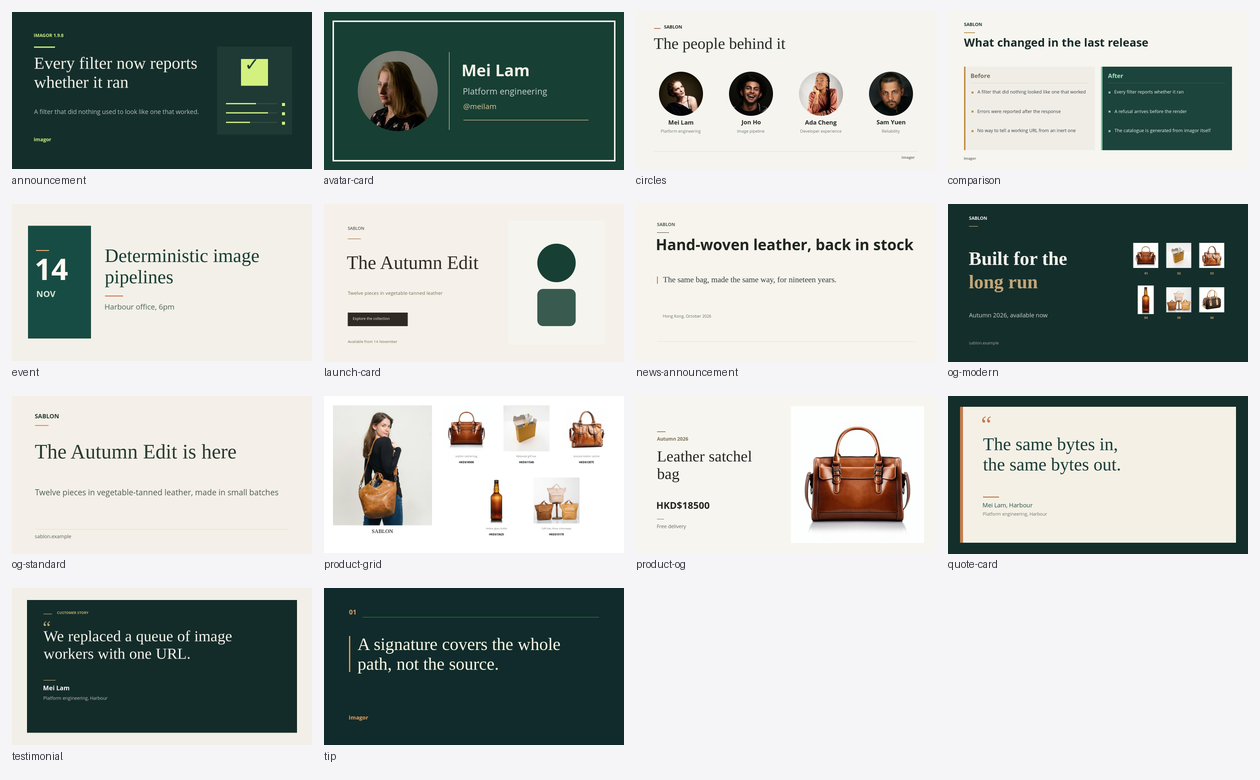
An agent writes a layout: OG cards, product grids, quotes, testimonials. It compiles to one imagor URL, rendered by the imagor you already run.
Quick start
1. Run an imagor.
docker run --rm -p 8000:8000 shumc/imagor -imagor-unsafe
Leave it running, and use a second terminal for the rest.
Unsafe mode is for trying things out. Production runs on IMAGOR_SECRET. See
imagor's security docs.
2. Install the MCP server.
brew trust cshum/tap && brew install imagor-mcp
3. Point a client at it.
| your client | what to do |
|---|---|
| VS Code | add it from here — one click |
| Claude Desktop | open imagor-mcp.mcpb — one click |
| Cursor, Claude Code, Windsurf | add the block below to its config file |
| Codex | the same values in TOML, at ~/.codex/config.toml |
{
  "mcpServers": {
    "imagor": {
      "command": "imagor-mcp",
      "env": { "IMAGOR_UNSAFE": "1", "IMAGOR_BASE_URL": "http://localhost:8000" }
    }
  }
}
Those two settings have to match what you started in step 1: IMAGOR_UNSAFE puts this server
in the same mode, and IMAGOR_BASE_URL is where imagor is.
VS Code keys its servers under servers and Codex reads TOML, so the block above fits
neither. Every client's config file is in Setup.
4. Ask it for something. See the recipes — each one carries a prompt to paste, or describe the image you want. The agent composes through the tools: it writes the layout, renders it, looks at the result, and hands you back the url. Neither of you needs imagor's path syntax: the tools build the path, and refuse one that cannot work.
That is the whole install. It is also in the official MCP Registry as
io.github.cshum/imagor-mcp, which some clients install by name, and as
ghcr.io/cshum/imagor-mcp in a container, which needs a different base
URL, in Setup. Windows binaries are on the
releases page.
Before anything is public, read Security: what this server is trusted with, and what it refuses.
Going deeper
- Setup — every setting, the config file each client reads, and what to do before it is public.
- Reference — every tool the server serves, the layout format, and the skill.
- Cookbook — the ready-made layouts, and the url each one resolves to.
- Contributing — building, testing, and the CLI.
Licence
MIT
Reviews
No reviews yet
Be the first to review this server!
More Developer Tools MCP Servers
Fetch
Freeby Modelcontextprotocol · Developer Tools
Web content fetching and conversion for efficient LLM usage
Git
Freeby Modelcontextprotocol · Developer Tools
Read, search, and manipulate Git repositories programmatically
Toleno
Freeby Toleno · Developer Tools
Toleno Network MCP Server — Manage your Toleno mining account with Claude AI using natural language.
MCP Marketplace
Freeby mcp-marketplace · Developer Tools
Search and install MCP servers from inside your AI client.
mcp-creator-python
Freeby mcp-marketplace · Developer Tools
Create, build, and publish Python MCP servers to PyPI — conversationally.
FinAgent
Freeby mcp-marketplace · Finance
Free stock data and market news for any MCP-compatible AI assistant.