
Server data from the Official MCP Registry
Shared project memory for Claude Code, Codex and Cursor: decisions and corrections through MCP.
About
Shared project memory for Claude Code, Codex and Cursor: decisions and corrections through MCP.
Security Report
Valid MCP server (2 strong, 1 medium validity signals). No known CVEs in dependencies. Package registry verified. Imported from the Official MCP Registry.
4 files analyzed · 1 issue found
Security scores are indicators to help you make informed decisions, not guarantees. Always review permissions before connecting any MCP server.
Permissions Required
This plugin requests these system permissions. Most are normal for its category.
What You'll Need
Set these up before or after installing:
Environment variable: KLYPIX_VAULT
How to Install
Add this to your MCP configuration file:
{
  "mcpServers": {
    "io-github-dahshanlabs-klypix-mcp": {
      "env": {
        "KLYPIX_VAULT": "your-klypix-vault-here"
      },
      "args": [
        "-y",
        "klypix-mcp"
      ],
      "command": "npx"
    }
  }
}Documentation
View on GitHubFrom the project's GitHub README.
klypix-mcp — shared project memory for Claude Code, Codex and Cursor
Every project gets a brain.
Shared project memory for Claude Code, Codex, Cursor and other MCP coding tools. One
brain.klypix file, committed with your code, carries the project's decisions, corrections and open
questions across sessions and between tools. Corrections supersede stale decisions; sessions declare
the files they expect to touch and get warned about same-machine overlap. Versioned in Git. Served
over MCP by a process on your machine. In the standalone setup, brain data stays in your files;
your agent's provider can still receive what the agent reads. Integration depth differs by host — see
Supported hosts.
Klypix is a portable project workspace with a shared brain. This repository provides its local MCP server for shared project memory in coding tools. The Apache-2.0 engine works without the KLYPIX desktop app or a KLYPIX account. The optional Windows workspace lets people inspect the same project brain beside their files. App-based sharing has its own cloud path; see Security and permissions.
For the Projects & Ideas path — saved project materials in ChatGPT or Claude chat — follow Save project materials and use them with your assistant. That uses Klypix's separate hosted connection for the spaces you authorize. Installing this local MCP server does not set up that connection.
Install · Try your first decision · Supported hosts · Privacy · Limits · Uninstall
For a team walkthrough, read the shared project memory setup guide. Choosing an approach? Our memory tools comparison links each tool's official documentation and discloses that Klypix wrote it.
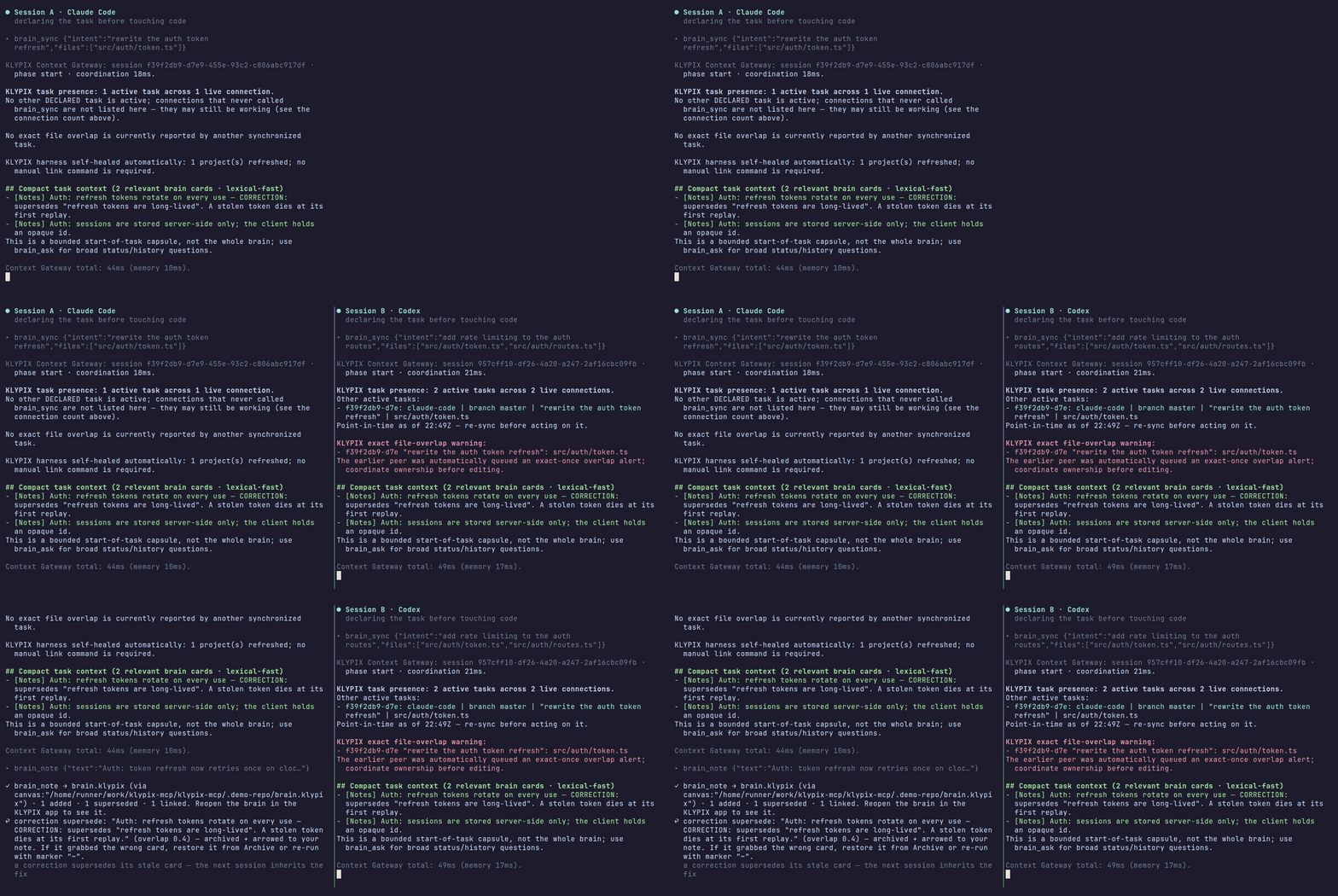
Real output, not a mockup: both panes run a real MCP client against this server (docs/demo/ — the GIF is rendered by CI from a scripted tape against this server, not hand-recorded, and re-rendered when the server's responses change).
With Node.js 20 or newer, run this inside your project:
npx klypix-mcp install
It creates brain.klypix if the project has none, wires the editors it finds on this machine,
registers the .klypix merge driver if this is a git repo, and exits only after a real MCP
handshake has counted the tools that answered.
Next, reconnect your coding host and try your first decision and correction. A successful trial means a fresh session finds your recorded decision and its reason, then finds the corrected decision as current. Check the returned source cards; a successful install alone does not prove that your host has loaded the tools or that a particular decision was retrieved.




Host badges name the integration level, not a flat "compatible" — the levels and what is actually tested are in Supported hosts.
One project. Many agents. One current understanding.
Klypix does not launch, run, supervise, or replace your agents. It is not an agent runtime, a model router, a worktree manager, or a replacement for Git. It holds what the project currently believes.






See the shared project brain in action
Watch how current decisions, corrections, evidence, and active work stay visible to people and carry forward into supported coding-agent sessions.
Watch the 2:21 showcase with sound
The problem
You are running more than one coding agent on one codebase — a Claude Code session here, Codex in another terminal, Cursor open on the side. Context saved in one tool may be missing from the next:
- A new session misses a prior decision, and you explain the same architecture again.
- A decision captured only in a Claude conversation is unavailable to your Codex session.
- One agent implements an approach the team already rejected, because the reason it was rejected lived in a chat that ended.
- Two sessions start changing the same files and nobody finds out until review.
- Git stores the code history; the reasons behind a change still need to be recorded.
Your agents may run independently. Their project understanding should not.
60 seconds: two agents, one project
Illustrative calls and responses: replace /absolute/path/to/project with the same project root
in both sessions (for example, C:/work/api on Windows).
Session A — Claude Code, in your repo:
brain_sync { project: "/absolute/path/to/project", phase: "start",
             intent: "rewrite the auth token refresh", files: ["src/auth/token.ts"] }
// → task-relevant memory capsule (bounded, ~2.8KB)
// → peers: none
Session B — Codex, same repo, half a minute later:
brain_sync { project: "/absolute/path/to/project", phase: "start",
             intent: "add rate limiting to the auth routes",
             files: ["src/auth/token.ts", "src/auth/routes.ts"] }
// → task capsule
// → peers: 1 active session (claude-code) — "rewrite the auth token refresh"
// → overlap: src/auth/token.ts — declared by both sessions
Session A gets the same overlap surfaced on its next KLYPIX action. Neither edit is blocked — the warning is advisory, and both sides only see the overlap because both declared the files they expected to touch.
Then the brain pushes back before the decision, not after:
brain_challenge { claim: "move token storage to localStorage" }
// → "reversed on June 12 — here's the correction card, captured by a different agent."
And the decision is kept where the next session will find it:
brain_note { text: "Token refresh moves to an httpOnly cookie; localStorage was reversed 2026-06-12." }
Prove all of this on your own machine, against the exact build you installed, with two real isolated MCP clients:
npx klypix-mcp conformance
It runs in a temporary fixture and touches nothing else. It checks tool discovery, task memory, truthful peer reporting, overlap surfacing, proactive logging, and in-band delivery of a peer note. It verifies 15 required coordination behaviours — not every tool, and not the retrieval engine.
Quick start
You need Node.js 20 or newer (node -v to check). Every way of connecting runs the server with
node — npx, the installed bundle, and the entry KLYPIX's Settings buttons write — and none of them
checks for Node first.
Run this inside your project:
npx klypix-mcp install
One command for supported editors detected on this machine. It finds the project root (walking up,
so running it from src/ is fine), gives the project a brain if it doesn't have one, wires the
agent tools you actually have installed, registers the card-level .klypix merge driver if it's a
git repo, and then proves the result before it exits:
Illustrative output; detected editors, file counts, tool counts and timings vary with the machine and installed version:
  project   E:\work\api  (git repository root)
  brain     created brain.klypix — a starter brain, ready for its first decision
  editors   Claude Code · Cursor · Codex · Gemini CLI · Antigravity · VS Code
  wired     9 file(s) · 9 updated   (skipped 5 for tools you don't have)
  git       .klypix merge driver registered
  verified  ✓ 25 tools reachable via .mcp.json (892ms)
That last line is the point. MCP config fails silently — a wrong entry means the server never
starts, the agent quietly loses every brain verb, and nothing reports an error. So install opens
a real stdio handshake against the config it just wrote and counts the tools that answered. A
broken entry dies in ~100ms with Connection closed and is reported, not shipped.
What goes where:
- Machine-global, once — the engine + runtime in
~/.claude/project-brain, Claude Code's five lifecycle hooks in~/.claude/settings.json, and the~/.codex/AGENTS.mdguidance block. Claude Code is therefore covered in every project on that machine that has a./brain.klypix. - Per project — MCP config and rules for Cursor, Codex, Cline, Windsurf, Copilot, Gemini CLI /
Antigravity and Aider. Run
installonce inside each project.
Three things it deliberately will not do:
- Write for editors you don't have. Config is projected only for hosts detected on this machine — a two-person team using one editor no longer commits rules for six they never opened. A file your project already carries stays maintained regardless, so you can't silently stop updating your team's committed configs.
- Wire a directory that isn't a project. It refuses your home folder, a drive root, and
anything with no brain, no git repo and no project manifest. A mistyped command can't seed a
brain into
C:\Users\you. - Replace a project-owned server. A repo-relative launch like
node scripts/klypix-mcp-server.mjsis deliberate — it resolves offline and rides a bundle the repo version-gates — so it's left byte-identical and reported. An explicitlinkstill rewrites everything: an action you didn't ask for stays more conservative than one you did.
Opt out with --no-project (CI images, scripted provisioning). --json emits the report as
structured data; --verify-all handshakes every written config instead of one.
Optional, opt-in, and approved inside Codex itself:
npx klypix-mcp install --codex-hooks
Six Codex lifecycle hooks that add automatic per-prompt context injection and a pre-edit
file-overlap warning. Codex owns the trust decision and will ask you to review them.
brain_doctor reports this layer separately as off, execution-unverified, or active. Even with it
on, Codex never captures decisions automatically — the Codex hook never writes the brain.
Re-project everything explicitly:
npx klypix-mcp link
install already does this for the editors you have. Reach for link when you want all 14
managed, hash-stamped files regardless of what's installed — MCP server config for six hosts plus
rules files for eight — or to repair drift. Managed blocks are merged into your existing
instruction files and never clobber your content.
npx klypix-mcp link --check # audits without writing; exits non-zero on drift
Either form works, and both are safe in CI:
npx -p klypix-mcp klypix-link --checkused to drop--checkand write anyway — fixed, and locked bytest/cli-args.mjs, which asserts the standalone bin and the dispatcher parse arguments identically.
Give a project a brain by dropping a brain.klypix into it — the
KLYPIX app does it in one click (Save canvas as project brain), or
create_canvas makes one from any agent.
Your first decision and correction
After installation, reopen your coding tool or reconnect its MCP server, and allow the KLYPIX
tools if your host asks. Run npx klypix-mcp doctor in the project to inspect the installation;
a clean config report does not prove that your host has loaded the tools.
Try the following in a disposable trial project, or replace the example decision with a real
one before saving it. These are MCP tool calls for your agent, not shell commands. Replace
/absolute/path/to/project with your project root throughout. The files: [] scope means this
trial does not plan source-code edits.
-
Record a decision and its reason. Ask your agent to call:
brain_sync { project: "/absolute/path/to/project", phase: "start", intent: "Record the trial storage decision", files: [] } brain_note { area: "Storage", text: "Use SQLite for the trial project database because this prototype runs on one machine." } brain_sync { project: "/absolute/path/to/project", phase: "complete" } -
Open a fresh session in the same project, optionally in a different supported coding tool. Ask it to retrieve the decision rather than infer the answer from your code:
brain_sync { project: "/absolute/path/to/project", phase: "start",
             intent: "Review the trial storage decision", files: [] }
brain_ask { question: "Which database does the trial project use, and why?" }
Check that the returned card contains SQLite and the one-machine rationale. If the tool is missing, reconnect the host and check the host integration table. If the card is missing, confirm both sessions used the same project and that
brain_notereported a successful capture. A fresh brain only knows what has been recorded. -
Change the trial decision explicitly, then ask again:
brain_note { area: "Storage",
             text: "CORRECTION: Use PostgreSQL instead of SQLite for the trial project database because the trial now needs concurrent writes from several machines." }
brain_ask { question: "Which database does the trial project use now, and why?" }
brain_sync { project: "/absolute/path/to/project", phase: "complete" }
Inspect the returned source cards: PostgreSQL should be the current decision, with SQLite retained as superseded history. Confirm that the correction names the earlier decision; a correction cue alone is not a guarantee of a match. This small trial checks your capture and recall path. It does not establish retrieval quality for a larger brain or prove host automation.
For a team on different machines, follow the Git sharing steps and install in each clone. Standalone live presence and file-overlap warnings stay local to one machine and OS user. Keep approved architecture records and stable conventions alongside the brain.
How the brain works
The difference from a folder of notes is not the shape — it is that this memory is a mechanism, not a filing convention.
- Decisions have a lifecycle. A new decision that contradicts an old one supersedes it. The
stale card is archived with an arrow and a date, never deleted, and later answers surface the
correction rather than the corpse. If a later decision returns to an earlier superseded stance,
high-confidence lineage leaves a dated
re-adoptsstamp on the new card plus an earlier→current edge; the original A→B→C history remains intact. - Corrections are explicit, not guessed. Supersession fires on an UPPERCASE correction cue or
an explicit edge.
brain_reconcileonly proposes stale-vs-correction pairs for a human to confirm. - Cards can cite the code they were decided against. An
ev:anchor records a file:line plus the git blob OID at capture time, so the engine can flag a card whose cited code has since moved on. It detects that the code changed — never that the claim became false. - Position means something. Drag a card into the 📌 Focus area and it leads every future session's brief. That is brief priority, not a retrieval-ranking boost.
- You can ask what the project believed then.
brain_askwithas_of: 2026-03-01reweights ranking by card lifecycle dates, so corrections made later do not leak backwards. - Retrieval is local. With the on-device model ("search by meaning"),
brain_askandsearch_all_brainsuse BGE semantic ranking with lexical help for exact identifiers, paths, and versions — still entirely on your machine. Without it, retrieval is keyword-only. The previous cross-encoder is available for experiments withKLYPIX_RERANK=1, but is off by default because it reduced precision and added latency on the frozen human-paraphrase evaluation. - Search by meaning is installed for you (1.97).
npx klypix-mcp installrun by a person in a terminal installs it: about 150 MB to download once, about 110 MB on disk after the files Node never loads are removed. Skip it with--no-semantic(orKLYPIX_SEMANTIC=0). Installs with no terminal — CI, scripts, an AI agent running the install — get it only with--semantic. The Claude plugin never downloads it. Measured on the frozen 102-question set: the right card in the top 5 for 54 questions with it, 19 without. - Preparing a brain never makes a question wait. Each card is turned into a meaning vector once (about 45 ms a card on a laptop CPU, one card at a time, ~305 MB peak), newest cards first, by a low-priority background job that saves as it goes. A question on a brain that is not ready yet answers right away from what is ready plus keywords, and says how far along the preparation is ("Getting this brain ready for search by meaning: 900 of 3,670 cards so far, about 5 min left"). After that, only new or edited cards are prepared.
Bounded semantic-memory runtime
Long-lived MCP and A2A workers use the bounded semantic-memory runtime by default. Models load only when semantic work is requested, native inference is serialized per process, embedding work is split into small batches, and temporary tensors are released after use. Loaded models retire after an idle interval and transparently reload on the next semantic request, so warm queries stay fast without permanently pinning native model memory. These controls change the resource lifecycle only; brain cards, project coordination, and the on-disk brain format are unchanged.
The previous runtime remains available as an emergency rollback. Set
KLYPIX_SEMANTIC_MEMORY_MODE=legacy in the MCP server environment and reconnect or restart the
host. This restores eager model prewarming and the previous inference path without migrating or
deleting brain data. Remove the variable (or set it to bounded) to return to the bounded runtime.
Run the deterministic lifecycle tests with npm run test:memory. For an opt-in real-model soak
against a disposable or backed-up brain, set KLYPIX_MEMORY_SOAK_BRAIN to its path and run
npm run test:memory:soak.
For process-level attribution, run npx klypix-mcp runtime (or add --json; --watch 30 samples
every 30 seconds). It reports KLYPIX workers, supervisors, and legacy launcher overhead separately,
excludes the owning IDE/chat application's RAM, redacts command-line secrets, and never opens a
brain or terminates a process. Multiple processes under one host are reported as parallel sessions,
not called duplicates without an authoritative logical-session receipt.
Project Map: current structure beside project understanding
If the project contains a compatible NetworkX node-link graph.json, agents can ask for bounded
code-structure evidence and current brain context in one read-only call:
project_map_context {
  "question": "what owns refresh-token rotation?",
  "graph_path": "graphify-out/graph.json"
}
Use compare_to with another project-relative graph artifact to add exact total node/edge deltas
and additions/removals from the two bounded query neighborhoods. Both paths are confined to the
declared project root; unsafe source paths are withheld; large or unsupported artifacts are
rejected. When a returned brain card names an exact mapped source path, the structured response
also includes a review-only evidence-link proposal. It never promotes similarity into truth and
never writes graph facts or links into brain.klypix.
Graphify is the first compatible producer. KLYPIX reads artifacts that users generate separately;
it does not bundle, install, or run Graphify and does not imply a partnership. A compatible generic
graph.json works through the same provider-neutral boundary.
For a reproducible map artifact on every pull request and main-branch push, install the shipped read-only workflow into a Git checkout:
npx -y -p klypix-mcp klypix-project-map setup-github /path/to/project
The command refuses to overwrite an existing workflow unless --force is explicit. The installed
workflow has contents: read, pins every action by commit SHA, pins graphifyy==0.9.33, validates
the graph contract, and uploads graphify-out/ as a 14-day build artifact. This is opt-in CI code:
the local MCP tool still never installs or launches Graphify.
Supported hosts and their integration level
Levels are honest. Only the config-writing side is tested for the link hosts; their host-side
behaviour is unverified.
| Host | Level | Wired by | Brief into context | Decision capture | Live presence |
|---|---|---|---|---|---|
| Claude Code | Full automatic (5 lifecycle hooks) | install | Automatic at session start, task-ranked retrieval per prompt | Automatic at turn end | Yes |
| Codex | Native MCP + presence + Context Gateway; optional --codex-hooks | install | Via brain_sync; per-prompt injection only with --codex-hooks | Explicit only (brain_note) — never automatic | Yes |
| Cursor | MCP config + always-on rules file | link | Model must call brain_sync | Model must call brain_note | For the MCP connection |
| Cline | MCP config + always-on rules file | link | Model must call brain_sync | Model must call brain_note | For the MCP connection |
| VS Code (Copilot / Continue) | MCP config + instructions file | link | Model must call brain_sync | Model must call brain_note | For the MCP connection |
| Gemini CLI / Antigravity | MCP config + always-on rules file | link | Model must call brain_sync | Model must call brain_note | For the MCP connection |
| Windsurf | Rules file only | link | Reaches the tools through Windsurf's own global MCP config | Model must call brain_note | Via its own MCP config |
| Aider | Rules file only (no MCP) | link | CLI path: npx -y -p klypix-mcp klypix-read | CLI path: npx -y -p klypix-mcp klypix-append | — |
| Claude Desktop | One-time config: KLYPIX's Settings button, or a manual edit | KLYPIX app or you | Model must call brain_sync | Model must call brain_note | For the MCP connection |
install and link are different things and are not interchangeable: install sets up the
machine engine and hooks, then wires supported hosts detected for this project (see Quick start).
link is the explicit per-project repair/projection path for all 14 managed files, regardless of
which hosts are installed.
Claude Desktop — in the KLYPIX desktop app, Settings → Project → Connect Claude Desktop
writes this entry for you; or add it to claude_desktop_config.json by hand. Either way it needs
Node.js on the PC, and Claude Desktop must be quit completely (tray icon → Quit) and reopened before
it lists the tools:
{
  "mcpServers": {
    "klypix": {
      "command": "npx",
      "args": ["-y", "klypix-mcp", "--vault", "/absolute/path/to/canvases"]
    }
  }
}
Running as a Claude plugin
The KLYPIX Claude plugin starts this server as npx -y klypix-mcp@1.93.0: one exact version, never
a range or latest. It sets three variables: KLYPIX_PLUGIN=1,
KLYPIX_PLUGIN_DATA=${CLAUDE_PLUGIN_DATA} and KLYPIX_VAULT=${CLAUDE_PROJECT_DIR}.
KLYPIX_PLUGIN=1 turns on plugin mode, which changes how the MCP server behaves and nothing
else. Every npx klypix-mcp command (install, link, doctor, sessions and the rest) works
exactly as described elsewhere in this README. Only KLYPIX_PLUGIN=1 turns plugin mode on;
CLAUDE_PLUGIN_ROOT on its own does not.
What plugin mode never does
- Update itself. It never asks npm for a newer release and never installs one, whatever
KLYPIX_AUTO_UPDATEis set to. You run the version the plugin pins, and a newer version reaches you only in a new plugin release. - Run code from outside the package. It runs only the worker inside the pinned package. It
never starts or switches to the copy that
npx klypix-mcp installputs in~/.claude/project-brain, and it never loads the optional on-device semantic model from that folder. Search is keyword-only, so it never downloads model weights. - Write project config files. It never creates or rewrites rules files, editor MCP configs
(
.mcp.json,.cursor/,.codex/config.tomland the rest) or theAGENTS.mdbrief block, in this project or any other. Outside plugin mode,brain_syncand the updater do write these files; Security and permissions explains when. - Change Claude's settings. It never writes
~/.claude/settings.json, hooks, permissions or any other host configuration. - Collect data or read credentials. It sends no telemetry or usage data, reads no API keys or account tokens, and opens no network port. The one token it reads is the local bridge token the KLYPIX app writes for AI tools while it runs (below); it is never logged or returned.
Network. Plugin mode makes two kinds of request, and both go to the public npm registry. The
first is npx downloading the pinned package when the plugin starts the server. The second is one
npm view klypix-mcp version, and it runs only when an agent calls brain_doctor with
check_npm: true. There are no other requests.
Programs it runs on your computer. Read-only git commands in your project (current branch,
tags, log) for coordination and release checks. Also brain_reopen, described at the end of this
section. And on Windows, show_in_klypix with bring_to_front: true while KLYPIX is closed asks
Windows to open that canvas file in KLYPIX (PowerShell Start-Process), at most once every 30
seconds; it never does so while KLYPIX is running.
The KLYPIX app, when it is running (local, not the network). On Windows, a tool call that needs
the KLYPIX app (App mode, under Human control in Klypix) talks to the app over a local named
pipe: inter-process communication on this PC. Plugin mode allows it, exactly as outside plugin
mode. Nothing connects when the server starts; on such a call it reads
%APPDATA%\klypix\agent-bridge\endpoint.json and the bridge token KLYPIX writes in
%LOCALAPPDATA%\klypix\agent-bridge. With KLYPIX closed, or its AI tools on this PC switch
off, nothing connects at all.
What it reads. In your project: brain.klypix, the .klypix canvases, the version field of
package.json and your git tags. On your computer: the coordination files in the table below. If
the KLYPIX desktop app is installed, it also reads the app's data folder (%APPDATA%\klypix),
read-only, to see whether the app is running, which canvases it has open, and the readings it saved
on cards, and, on a call that needs the running app, the app's bridge token (above). It never reads chat history, transcripts or Claude's memory.
What it writes, and where
| Where | What | Why |
|---|---|---|
| Your project | Only what a tool call asks for: brain.klypix (brain_note and the other brain tools), canvases (create_canvas, add_to_canvas), klypix-map/graph.json when project_map_scan is called, and .klypix/claims/<owner>.json when brain_sync is asked to publish a release claim. During a brain write it holds .claude/brain-capture.lock, creating the .claude/ folder if the project has none. The lock file is deleted after the write; the folder stays. Creating a canvas briefly holds .klypix-create.lock in the folder. | The KLYPIX app and every other session that writes the brain use the same locks, so two writers never overwrite each other. |
The plugin's data folder (KLYPIX_PLUGIN_DATA) | Connection receipts (.supervisors/), the running-server heartbeat (.running-servers.json), the list of projects whose brains you used (registry.json, which search_all_brains reads), and the last version and git tag seen in each project (ship-observations/). Also extracted/: copies of the PDFs, Office and other files read_card_contents hands to your AI tool as a local path, taken from the canvas you asked about. | Only this server uses these files. If KLYPIX_PLUGIN_DATA is not set, or still contains a ${...} that was never filled in, it uses CLAUDE_PLUGIN_DATA. If neither is usable, the files go in ~/.claude/project-brain, except extracted/, which then goes in <system temp>/klypix-mcp/extracted (where it always goes outside plugin mode). |
~/.claude/project-brain (shared) | Presence lanes (sessions/), write locks (locks/), restore points (history/), and small records built from your brain: .capture-gap.json, and enrichment/, provenance/, .brief-cache-* and .guards-* when the tools that use them run. | Your other KLYPIX sessions on this computer (Claude Code, Codex, Cursor, the app) use the same files on purpose. Through them, a plugin session and a terminal session on the same project see each other, get warnings when they plan to edit the same files, and pass notes. Restore points are kept here so that npx klypix-mcp brain-history can still undo a brain write after you remove the plugin. |
brain_reopen. Sometimes a session leaves a note for another session that has already closed.
An agent can then call brain_reopen, and KLYPIX asks you first: in chat with Reopen and Not
now buttons, or in a small dialog (PowerShell on Windows, osascript on macOS, zenity or kdialog on
Linux). Only if you choose Reopen does it open a new, visible terminal that runs the app's own
resume command, claude --resume <id> or codex resume <id>. Reopen on your OK has the details.
After you uninstall the plugin. Claude Code removes the plugin and deletes its data folder.
These stay: your brain and canvases, which belong to you; any .claude/ folder a brain write
created in a project; and the presence lanes, write locks and restore points in
~/.claude/project-brain. Other KLYPIX tools on this computer share that folder. If you use none,
you can delete it.
Task briefing
Every Claude Code session starts already knowing the project: a bounded brief of at most 2KB in context, with the full brief written to disk for when broad history or status work needs it.
Every other host gets a bounded ~2.8KB task capsule from one brain_sync call, plus a compact
always-loaded AGENTS.md block that tells the agent to make that call at task start, when scope
changes, and on completion. The gateway capsule is lexical-fast by design. A newly captured open
gap can claim a labeled RECENT OPEN slot only after clearing the normal lexical-relevance floor,
so fresh relevant findings are not crowded out by older area vocabulary.
Briefs are not injected automatically on Cursor, Cline, Copilot, Gemini CLI or Antigravity — there are no lifecycle hooks on those hosts.
The live projection — the file the agent obeys
The coordination bench showed that an agent trusts the instruction file it was launched with over anything a tool or hook tells it, and that each host reads a different surface. So the brain's state is projected into those files, in two halves:
- Committed, from the brain: the compact brief block in
AGENTS.md(standing rules, corrections, open handoff cards), refreshed by the Claude Code Stop hook only when its content changed, so diffs stay quiet. - Machine-local, from the lane (klypix-mcp 1.104.0): which sessions are live on this PC and
which files they hold, the work a stopped session left, and the evidence beside every
"keep off this file" note — written at session start and at every Stop by the Claude Code and
Codex hooks into
CLAUDE.local.mdat the project root (Claude Code loads it besideCLAUDE.md; KLYPIX keeps it out of git through.git/info/exclude, never a committed file) and into one section per project of the Codex global instructions file (~/.codex/AGENTS.override.mdwhen you have one, else~/.codex/AGENTS.md). A project-levelAGENTS.override.mdis never written: Codex loads one file per directory, so it would hide yourAGENTS.md.
The block is a snapshot and says so: bounded to about 2.4KB, rewritten only when its content
changed (the time stamp alone never causes a write), with the keep-off evidence kept first when
the budget bites, and "nothing live" written in words so an older snapshot never stands. It
holds the same strings the hooks print, so the file and the session context cannot disagree.
Sections for projects not touched in a day are pruned from the Codex file, at most eight are
kept, and uninstall unlink strips the block (deleting CLAUDE.local.md only when nothing else
is in it). brain_sync remains the live source; the block tells the agent to call it.
Capture and corrections
brain_note accepts structured supporting references and inert verification text:
{
  "text": "Retry failed uploads with a bounded backoff to preserve queued work.",
  "area": "Storage",
  "evidence": [{ "kind": "file", "ref": "src/uploads.mjs:42" }],
  "verify": "node test/uploads.mjs"
}
File references must stay inside the project. The capture records a fingerprint of the
working file and, when available, the repository HEAD revision. An unchanged fingerprint
means source unchanged, not that the remembered claim is correct or that tests passed.
Dirty working files are fingerprinted as they are; HEAD alone does not describe those bytes.
Read results distinguish changed, missing, and unverified sources. External references
(pr, url, commit, run) are retained without fetching or verifying them. verify is
shown as recorded text and never executed. Optional verifiedAt is explicitly caller-reported.
On an amendment (marker: "~"), omitted metadata is preserved; evidence: [] and
verify: "" clear obsolete metadata. A resolve (✓) archives existing evidence; attach
new evidence with a milestone and closes, or amend before resolving. The CLI accepts the
same JSON on stdin, or --evidence '<JSON array>' and --verify '<text>'.
On Claude Code, decisions are captured automatically at turn end from inline 🧠 BRAIN [Area]:
markers in the transcript, deduped, under a capture lock.
A marker can end with optional suffixes, in any order: closes: <card title or [[wikilink]]>,
ev: <file[:line]>, PR#<n>, verify: <command> and q: <the question this answers?>. They count
only as one run at the end of the line, written lowercase as key: value, and each value must
have its key's shape: references for ev:, a command for verify:, a question (question word
first, ? last) for q:. Anything else is kept as card text, so "a Q: and A: layout", "the ev:
field" or "every agent verify: the tag" never cuts a note short. A malformed segment after a
well-formed one also stays in the text, and the other suffixes still count; the hook tells the
agent on its next prompt. On ✓ and ~ markers a closes: is plain text, because those markers
close nothing. A closes: that will not act keeps the sentence as written: it names no live card,
or it names more than four. A closes: that does not come after the end of a sentence, a
[[wikilink]] or another suffix closes only a card it names by title. One whose named card is
already closed closes nothing else. A ~ update too thin to replace its card (fewer than six
content words and under half the card's) is appended to that card as a dated (~ amended …) line
instead. The card keeps its date, colour and probe, and previews show the newest amendment first.
The correction lands and nothing is lost.
The Stop hook reads the whole transcript every time, so a ~ or ✓ line applies once. A marker
that an older hook (1.85 or 1.86.0) already captured is not captured again after an upgrade. If
1.86.0 cut the note short, the stub is restored to the full text in place. When a marker does not
do what it says, the next prompt tells the agent. A receipt left by a session that has ended goes
to the next session that starts in the project.
On every other host, capture is explicit: brain_note runs the same capture engine as the hooks —
dedup, supersession, round-trip re-adoption receipts, ✓ resolve, ~ update in place, + skill,
closes: — and stamps which agent wrote the card. A ✓ question preference ranks only candidates
that already clear raw lexical overlap and two subject-identity anchors; generic lifecycle wording
cannot turn weak overlap into a closure.
(If you install the git commit hook from the KLYPIX app or run npx klypix-mcp git-hook install,
commit messages also capture automatically for any agent.)
brain_challenge is the other direction: propose a decision and the brain answers with receipts —
prior decisions that deterministically contradict it, standing rules that dispute it, and
approaches tried and reversed, flagged when a different agent wrote them. Evidence is deterministic
only (explicit correction cues, opposite-polarity pairs), never mere topical similarity. Silence
means no contradiction signal was found — not verified consistency. A memory that cannot disagree
with you is flattery.
Presence and task intent
An active session means an authorized MCP connection or host lifecycle adapter that heartbeated within the TTL. A row in a recent-chat list is history, not presence.
Each MCP connection registers itself at initialization and removes itself on disconnect; the TTL covers crashes. Optional host adapters merge into that same logical session rather than double-counting it, enrich it with intent and files, and remove only their own channel. Sessions that never declared a task are still counted, but are shown separately as scope-unknown rather than padding the peer list.
Documentation truncated — see the full README on GitHub.
Reviews
No reviews yet
Be the first to review this server!
More Developer Tools MCP Servers
Rea
Freeby Morluto · Developer Tools
Reverse engineer anything from your terminal or agent with one CLI and MCP server.
Paperclip
Freeby Paperclipai · Developer Tools
Trending hip-hop artist momentum scores across four cultural dimensions.
Git
Freeby Modelcontextprotocol · Developer Tools
Read, search, and manipulate Git repositories programmatically
Fetch
Freeby Modelcontextprotocol · Developer Tools
Web content fetching and conversion for efficient LLM usage
Toleno
Freeby Toleno · Developer Tools
Toleno Network MCP Server — Manage your Toleno mining account with Claude AI using natural language.
MCP Marketplace
Freeby mcp-marketplace · Developer Tools
Search and install MCP servers from inside your AI client.