
Server data from the Official MCP Registry
Strips layout noise via DOM AST; with a query, BM25 filters to relevant sections. No model or API.
About
Strips layout noise via DOM AST; with a query, BM25 filters to relevant sections. No model or API.
Remote endpoints: streamable-http: https://dompruner-mcp.vercel.app/api/mcp
Security Report
Valid MCP server (3 strong, 5 medium validity signals). No known CVEs in dependencies. Package registry verified. Imported from the Official MCP Registry.
2 tools verified · Open access · 1 issue found
Security scores are indicators to help you make informed decisions, not guarantees. Always review permissions before connecting any MCP server.
Permissions Required
This plugin requests these system permissions. Most are normal for its category.
How to Install & Connect
Available as Local & Remote
This plugin can run on your machine or connect to a hosted endpoint. during install.
Documentation
View on GitHubFrom the project's GitHub README.
dompruner-mcp
한국어 | English
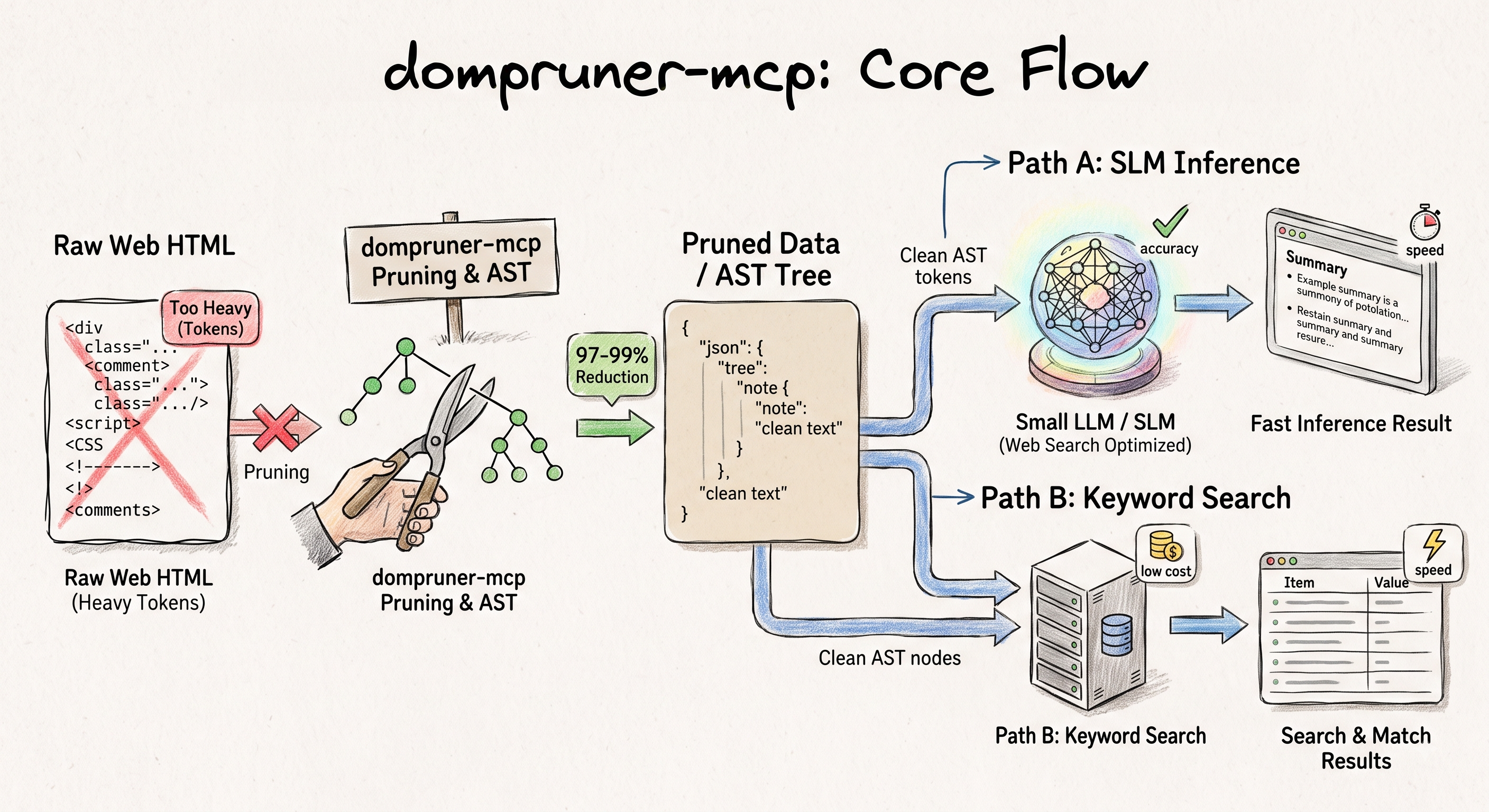
DOM AST middleware for LLM web pipelines — strips layout noise (nav, scripts, sidebars) and passes original text directly. Add a query to filter to relevant sections with BM25.
When an LLM uses the built-in WebFetch, a smaller model pre-processes the HTML and hands back a summarized result — adding latency, cost, and interpretation you didn't ask for. DomPruner skips that entirely: DOM AST parsing strips noise and passes the original content directly to the model.
| Call | Behavior |
|---|---|
dompruner_fetch(url) | Strips layout noise → returns full extracted content |
dompruner_fetch(url, query) | Strips layout noise → BM25 filters to relevant sections (falls back to full content if no match) |
> [DomPruner] docs.python.org
> | Raw HTML  | 44,316 tokens |
> | DomPruner |  1,328 tokens |
> | Reduction |        97.0%  |
> Fetch: 194ms · Parse: 11.2ms
93.5% fewer context tokens than WebFetch on average. 45% faster end-to-end. → Full benchmark
Quick Start
No installation, no API key:
npx -y dompruner-mcp
Claude Code
{
  "mcpServers": {
    "dompruner": {
      "type": "stdio",
      "command": "npx",
      "args": ["-y", "dompruner-mcp"]
    }
  }
}
Add to .mcp.json in your project root, or ~/.claude/.mcp.json for global. Run /mcp to verify.
Claude Desktop
Edit ~/Library/Application Support/Claude/claude_desktop_config.json (macOS) or %APPDATA%\Claude\claude_desktop_config.json (Windows):
{
  "mcpServers": {
    "dompruner": {
      "command": "npx",
      "args": ["-y", "dompruner-mcp"]
    }
  }
}
Cursor / Windsurf / other MCP clients
{
  "mcpServers": {
    "dompruner": {
      "type": "stdio",
      "command": "npx",
      "args": ["-y", "dompruner-mcp"]
    }
  }
}
Remote HTTP (no install, always up to date)
For clients that support HTTP transport — no Node.js install required, always runs the latest version:
{
  "mcpServers": {
    "dompruner": {
      "url": "https://dompruner-mcp.vercel.app/api/mcp"
    }
  }
}
LangChain / LangGraph
langchain-mcp-adapters wraps any MCP stdio server as LangChain tools automatically:
from langchain_mcp_adapters.client import MultiServerMCPClient

client = MultiServerMCPClient({
    "dompruner": {
        "command": "npx",
        "args": ["-y", "dompruner-mcp"],
        "transport": "stdio",
    }
})
tools = await client.get_tools()
Ensuring Your AI Always Uses DomPruner
DomPruner's tool description already tells clients to prefer dompruner_fetch over WebFetch. If your client still falls back, add this to its instruction file:
When retrieving a URL, always use dompruner_fetch instead of WebFetch.
- URL known → dompruner_fetch(url, query?)
- URL unknown → search for the URL first, then dompruner_fetch(url)
| Client | Instruction file |
|---|---|
| Claude Code | CLAUDE.md (project) or ~/.claude/CLAUDE.md (global) |
| Cursor | .cursorrules |
| Windsurf | .windsurfrules |
| Cline | .clinerules |
| GitHub Copilot | .github/copilot-instructions.md |
Tools
| Tool | Description |
|---|---|
dompruner_fetch | Fetch a URL → DOM-refined Markdown. Optional query enables BM25+ section filtering. |
dompruner_sitemap | Fetch all pages in a sitemap.xml → one refined Document per page. |
dompruner_analyze | Token-reduction report for a URL without full content. |
Benchmark Summary
| Metric | WebFetch | DomPruner |
|---|---|---|
| Avg context tokens | ~15,735 | ~1,019 (93.5% less) |
| Answer quality (10 queries) | 9 / 10 | 8 / 10 |
| Avg response time | 5,811 ms | 3,168 ms (45% faster) |
| Content fidelity | Summarized by small model | Original text preserved |
| Extra API key / infra | No | No |
→ Full benchmark · Architecture
Related
- dompruner-py — Python port.
DomPrunerLoader,DomPrunerSitemapLoader,DomPrunerFetchToolfor LangChain.pip install dompruner. - LangChain integrations — dompruner-py listed as a third-party web loader.
Glama Score

License
MIT
Reviews
No reviews yet
Be the first to review this server!
More Developer Tools MCP Servers
Git
Freeby Modelcontextprotocol · Developer Tools
Read, search, and manipulate Git repositories programmatically
Fetch
Freeby Modelcontextprotocol · Developer Tools
Web content fetching and conversion for efficient LLM usage
Worldmonitor
Freeby Koala73 · Developer Tools
Live markets, conflicts, country risk, chokepoints, energy, and China decision signals. 86 tools.
Toleno
Freeby Toleno · Developer Tools
Toleno Network MCP Server — Manage your Toleno mining account with Claude AI using natural language.
mcp-creator-python
Freeby mcp-marketplace · Developer Tools
Create, build, and publish Python MCP servers to PyPI — conversationally.
MCP Marketplace
Freeby mcp-marketplace · Developer Tools
Search and install MCP servers from inside your AI client.