
About
查A股个股/概念最近被多少机构/大V提及、热度高不高。只读数据,机构/大V用匿名ID。量化交易必备。
Remote endpoints: streamable-http: https://lava.ai-dolphin.com/subscribe/v1/mcp
Security Report
Valid MCP server (1 strong, 0 medium validity signals). No known CVEs in dependencies. Imported from the Official MCP Registry.
Endpoint verified · Requires authentication · 1 issue found
Security scores are indicators to help you make informed decisions, not guarantees. Always review permissions before connecting any MCP server.
Permissions Found in Source Code
Found by scanning the linked source code. This listing connects to a hosted endpoint, so none of this runs on your machine: it describes what the server software does where it is hosted.
How to Connect
Remote Plugin
No local installation needed. Your AI client connects to the remote endpoint directly.
Add this to your MCP configuration to connect:
{
  "mcpServers": {
    "io-github-dustinliang666-blip-lava-mcp": {
      "url": "https://lava.ai-dolphin.com/subscribe/v1/mcp"
    }
  }
}Documentation
View on GitHubFrom the project's GitHub README.
lava-mcp · 熔岩消息面热度监测

熔岩(Lava) 提供 A 股股票和概念板块的消息面热度监测 结构化只读数据——支持 量化交易工具 与 AI Agent 股市研究 接入,通过远程 MCP / REST 调用。
只读 · 结构化要点 + 机构/大V ID(
agency_id)· 新闻命中不含标题与正文
新手 3 步
① 开通并复制 API Key(登录熔岩 → 左侧「AI数据服务」→ API Key → 新建;首次登录通常已自动生成「默认」Key)
② 装 Skill,或在豆包办公 / WorkBuddy / 千问办公填 MCP 地址 https://lava.ai-dolphin.com/subscribe/v1/mcp
③ 用中文问「某某股票最近消息面热不热」,或「最近 24 小时全市场哪些股票消息面最热」
远程 MCP(推荐)
| 项 | 值 |
|---|---|
| 传输 | Streamable HTTP |
| Endpoint | https://lava.ai-dolphin.com/subscribe/v1/mcp |
| 鉴权 | 请求头 Authorization: Bearer <API Key>(或 X-API-Key);亦支持 OAuth 2.1(PKCE S256 + DCR) |
| 客户端 | 豆包办公、WorkBuddy(BUDDY)、千问办公(QwenWork)等支持自定义 HTTP MCP 的客户端 |
开通与计费见 落地页:开通赠 100 元代金券;约 1000 次 = 5 元。
本地 Streamable HTTP 代理
proxy/server.py 是可运行的薄代理(Python 3.9+,仅标准库)。它不实现熔岩的查询接口,只把 MCP 的 Streamable HTTP / JSON-RPC 原样转到官方端点,并附上 Authorization: Bearer <LAVA_API_KEY>。个股、概念和热榜数据仍来自 https://lava.ai-dolphin.com。
直接连接官方端点仍然是推荐方式。本地代理适合需要在本机审计转发代码,或客户端不方便单独配置远程请求头的时候。
export LAVA_API_KEY=lvk_你的Key
python3 proxy/server.py
默认监听 http://127.0.0.1:8787/mcp(只绑定本机)。
| 环境变量 | 说明 |
|---|---|
LAVA_API_KEY | 熔岩 API Key。设置后,每个转发请求都带 Authorization: Bearer <key> |
LAVA_PROXY_PORT | 监听端口,默认 8787 |
LAVA_PROXY_HOST | 监听地址,默认 127.0.0.1。监听非本机地址时还要设置 LAVA_PROXY_ALLOW_REMOTE=1 |
LAVA_MCP_UPSTREAM | 上游地址,默认 https://lava.ai-dolphin.com/subscribe/v1/mcp |
LAVA_PROXY_TIMEOUT | 上游超时(秒),默认 180;0 表示不限制 |
客户端把 MCP 地址填成 http://127.0.0.1:8787/mcp,传输选 Streamable HTTP。Key 放在启动代理的环境里即可。未设置 LAVA_API_KEY 时,才会原样转发客户端自己的 Authorization 头。
curl -sS http://127.0.0.1:8787/health

curl -sS http://127.0.0.1:8787/mcp \
  -H 'Content-Type: application/json' \
  -H 'Accept: application/json, text/event-stream' \
  -d '{"jsonrpc":"2.0","id":1,"method":"initialize","params":{"protocolVersion":"2025-06-18","capabilities":{},"clientInfo":{"name":"curl","version":"0"}}}'
GET /health 只检查代理进程,不访问上游。本地测试:python3 -m unittest proxy.test_server。
Skill 模板
仓库内 SKILL.md 与线上官方模板对齐(含全市场热榜、加权、首提、多时间窗、加速榜、日频面板、机构覆盖度与新闻点名)。官方模板:
https://lava.ai-dolphin.com/subscribe/v1/skill
文档与机器可读规范
- 产品落地页:https://lava.ai-dolphin.com/subscribe
- API 文档(canonical):https://lava.ai-dolphin.com/subscribe/docs
- OpenAPI 3.0:https://lava.ai-dolphin.com/subscribe/v1/openapi.json
- llms.txt:https://lava.ai-dolphin.com/llms.txt
- MCP Registry:
server.json - 本地代理:
proxy/server.py - Glama:
glama.json· 线上/.well-known/glama.json
数据模块一览
熔岩同时有站内看板和订阅 API / MCP。数据是 A 股机构/大V 舆情的结构化只读:概念和标的给摘要要点,机构/大V 用匿名 agency_id。订阅落地页是 https://lava.ai-dolphin.com/subscribe ;文档、OpenAPI、MCP 与 Skill 都在同一域名下。
表中的工具名与本文以及线上 OpenAPI 一致。板块趋势和情绪面的订阅路径尚未开放。
| 模块 | 站内 | 订阅 API / MCP | 说明 |
|---|---|---|---|
| 个股消息面热度 | 个股页 / 市场热度 | get_stock_news_heat、get_stock_heat_windows、search_news_flow | 提及次数、机构/大V 覆盖、摘要要点 |
| 概念板块消息面热度 | 概念页 / 概念热榜 | get_market_hot_concepts、get_concept_stock_heat、get_stock_concept_heat | 概念提及排行,以及概念与个股互查 |
| 全市场热榜 / 加速 / 首提 / 高分加权 | 市场热度 | get_market_hot_stocks、get_accelerating_hot_stocks、get_first_mention_stocks、get_weighted_hot_stocks | 多时间窗;动量字段为纯统计量 |
| 日频热度面板 / 机构覆盖度 | 个股页 | get_stock_heat_panel、get_agency_coverage | 日频序列与覆盖计数,适合回测与导出 |
| 新闻点名 | — | get_news_stock_hits | 只返回 news_id、媒体、命中股票;无标题、无正文 |
| 机构/大V 评分(PIT) | 市场热度 | get_agency_ranking、get_agency_pit、get_agency_history、list_agency_pit_dates | 用 agency_id;分数大约 450~1500 |
| 板块趋势 | 站内已上线:侧栏「市场热度」→「板块热度」 | 站内可用 · 订阅接口规划中 | 消息热度 Δ、资金流入流出、价格指数与成分股;口径对齐东财/同花顺 |
| 情绪面(聚合) | 规划中 · 求准优先 | 规划中 | 对外只准备聚合统计;趋势线与订阅接口质量达标后再开放 |
板块趋势(站内已上线 · 订阅接口规划中)
左侧「市场热度」可以切到「板块热度」。默认页是剧烈变化追踪,同时看消息热度变化、资金流入流出和价格变化。点进板块后,详情给出近三个月的消息面、资金流、价格指数(有数据才画)和成分股提及。板块命名对齐东财/同花顺口径。
站内已上线。订阅接口规划中,目前以站内页面为准。
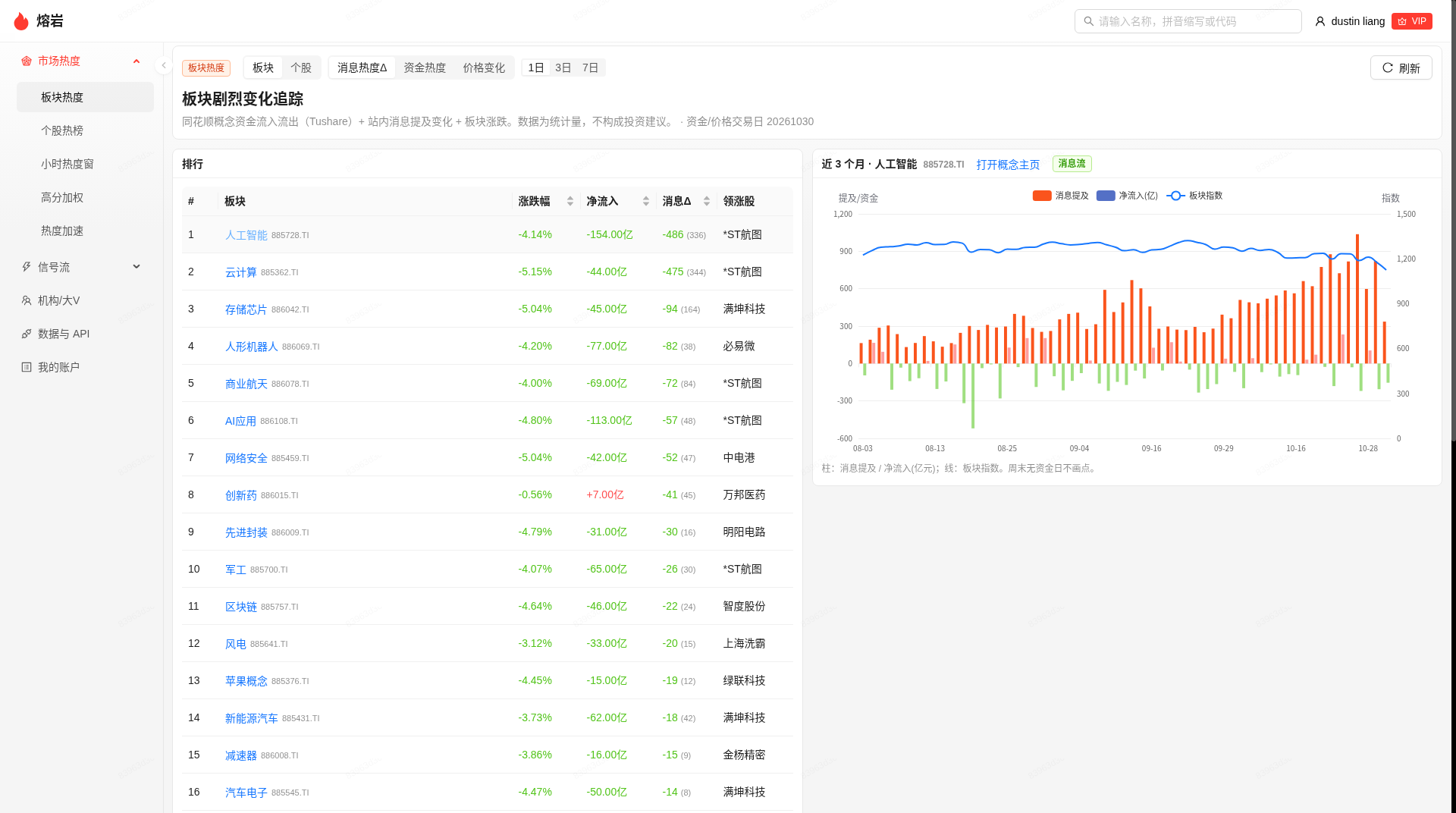
侧栏「市场热度 → 板块热度」:按消息热度变化、资金净流入和价格变化看板块;右侧是选中板块近三个月的消息提及、净流入和板块指数。
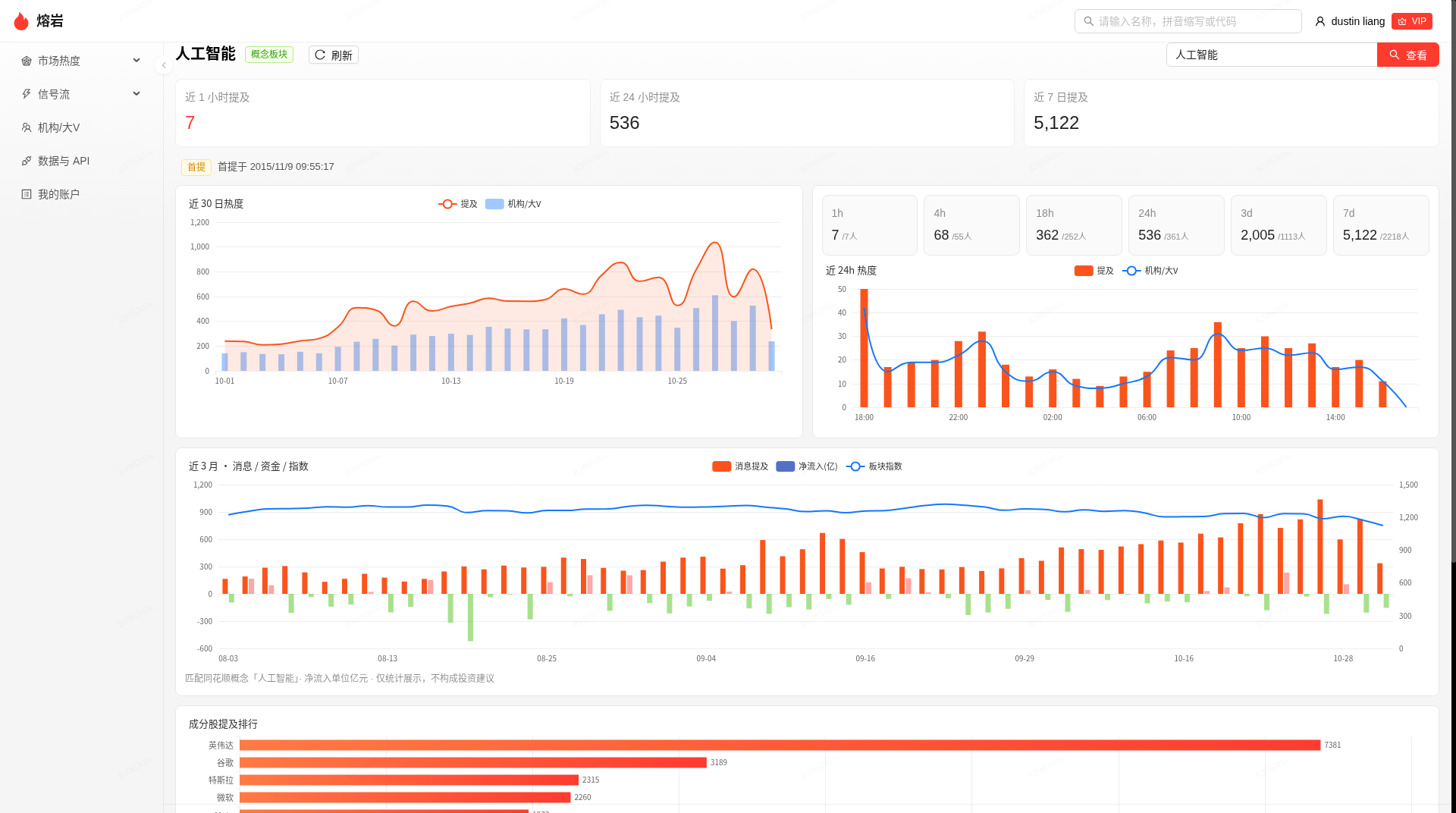
板块详情:近 1 小时 / 24 小时 / 7 日提及,近 30 日与近 24 小时的提及和机构/大V,近三个月消息、资金与指数,以及成分股提及排行。
个股 / 概念热度(站内 + MCP)
全市场热榜、热度加速、高分加权、首提、小时窗、日频面板和机构覆盖度都已经能通过上表里的 MCP / REST 工具读取。站内「市场热度」是同一套统计的预览。
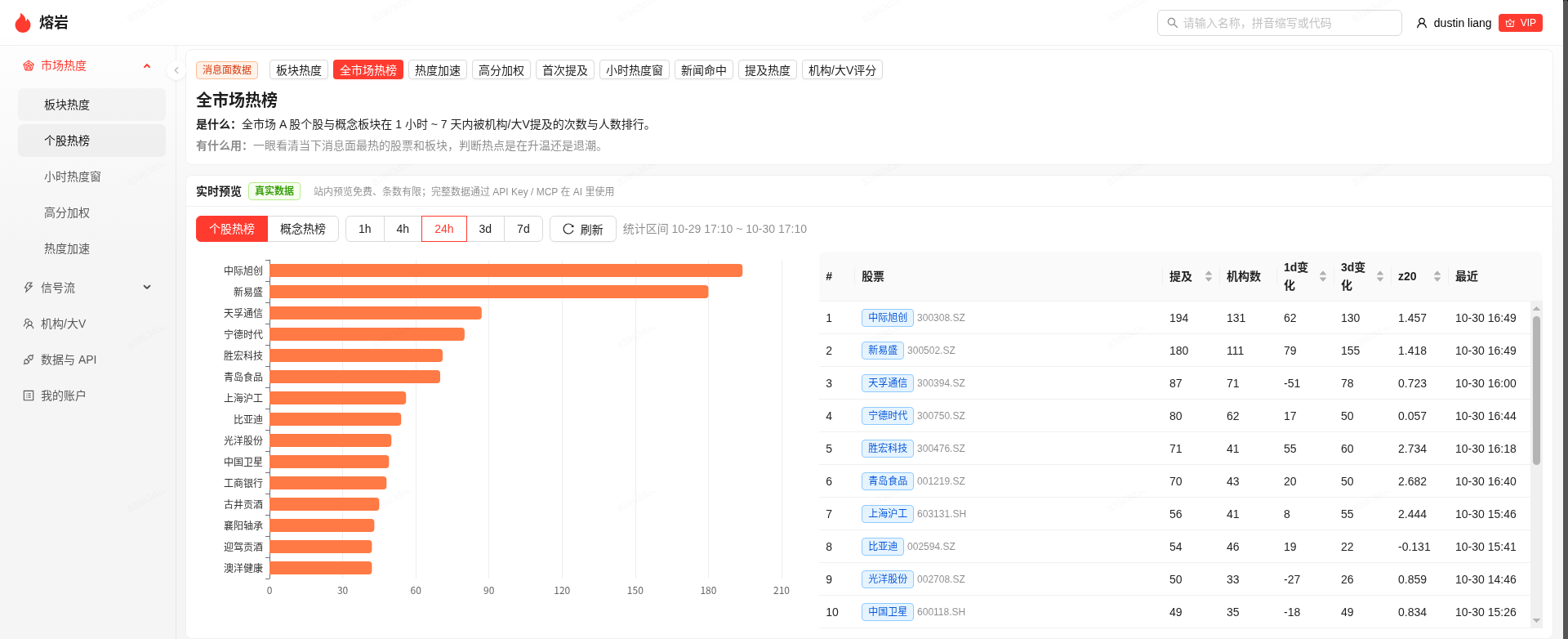
全市场热榜的个股视图:1 小时到 7 天窗口内,按机构/大V 提及次数和人数排序,并给出 1 日变化、3 日变化和 z20。
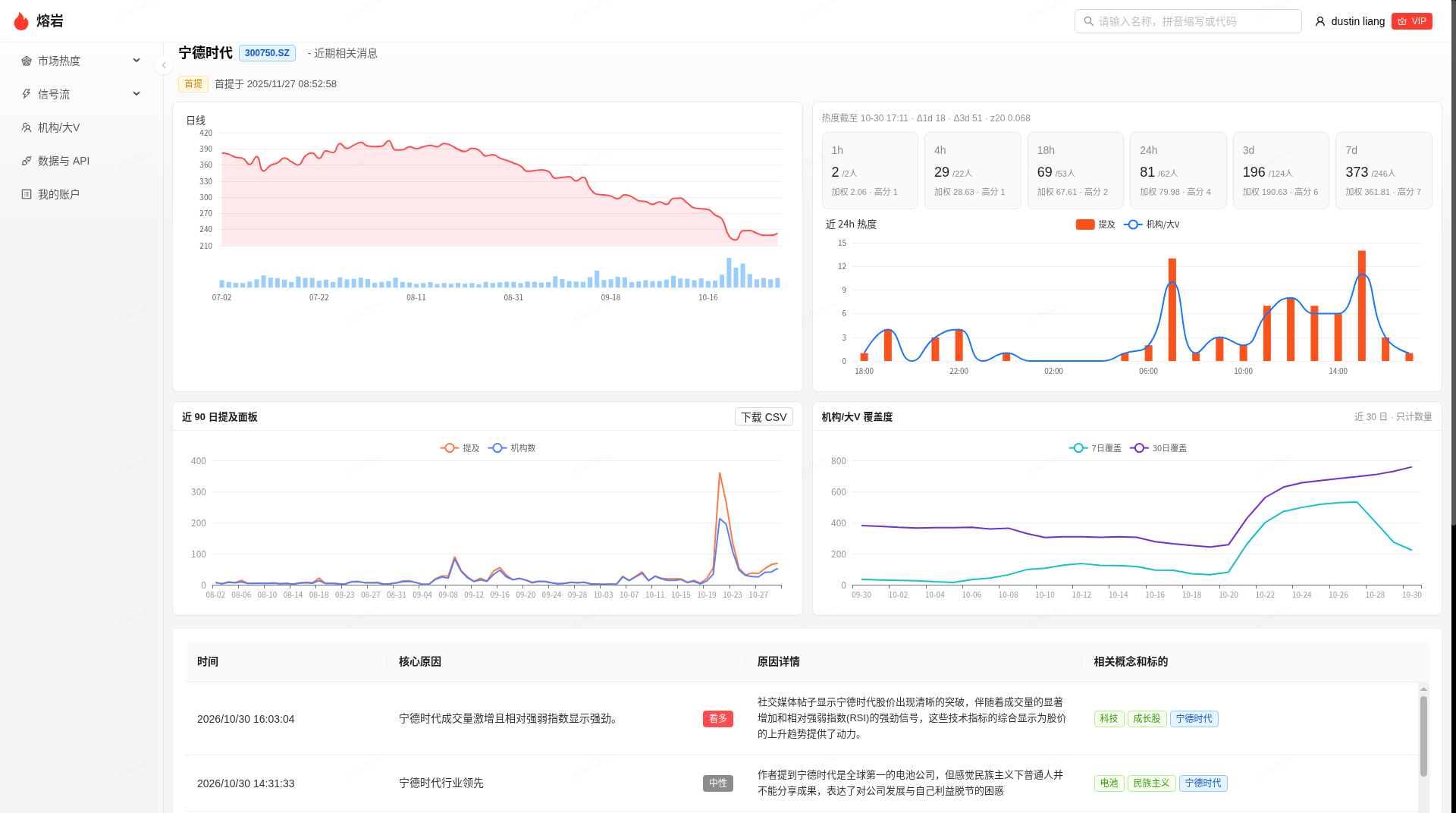
个股页:日线与提及、多时间窗热度、近 24 小时走势、近 90 日提及面板、机构/大V 覆盖度,以及结构化要点。
情绪面(规划中 · 求准优先)
正在做机构/大V 观点的二维情绪聚合。两个轴彼此独立:多空是 bull / bear / neutral,情感面是 calm / joy / fear / frustration / anger。对外只提供聚合统计,方便量化研究和 AI Agent 接入。站内趋势线和订阅接口都在质量达标后再开放。
订阅落地页
开通、计费和能查什么,以落地页为准:https://lava.ai-dolphin.com/subscribe
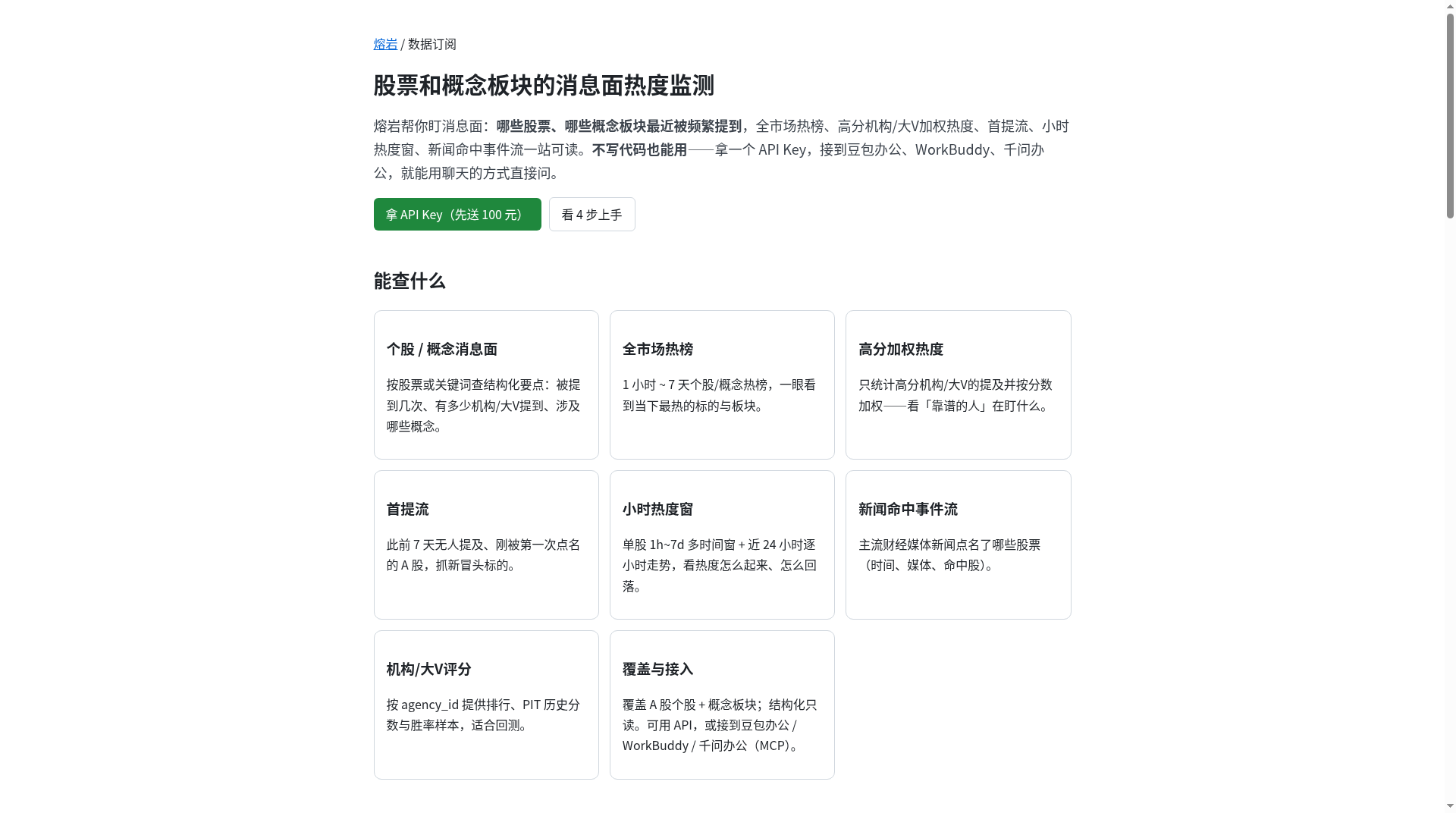
落地页列出已经开放的能力:个股/概念消息面、全市场热榜、高分加权、首提流、小时热度窗、新闻点名、机构/大V 评分,以及 API / MCP 接入。
主要工具(MCP)
| Tool | 用途 |
|---|---|
get_stock_news_heat | 个股消息面热度与结构化观点列表 |
search_news_flow | 关键词检索消息面结构化记录 |
get_concept_stock_heat | 概念 → 个股提及排行 |
get_stock_concept_heat | 个股 → 概念提及排行 |
get_market_hot_stocks | 全市场个股热榜;窗口内会附带 heat_chg_1d / heat_chg_3d / heat_z20 |
get_market_hot_concepts | 全市场概念热榜;时间窗最长 3d |
get_weighted_hot_stocks | 高分机构/大V加权热榜;默认 min_score 1050、order=weighted |
get_first_mention_stocks | 首提流:此前 7 天无提及、窗口内第一次被提到的 A 股 |
get_stock_heat_windows | 单股多时间窗热度 + 逐小时 + 来源拆分 |
get_accelerating_hot_stocks | 热度加速榜:按 heat_chg_1d / heat_chg_3d / heat_z20 动量排序 |
get_stock_heat_panel | 日频历史面板:日频 mentions / agencies / weighted_heat,适合回测与导出 |
get_agency_coverage | 机构覆盖度:覆盖机构数时序与 7/30 日去重、新增覆盖(只给计数) |
get_news_stock_hits | 新闻命中个股:news_id、发布时间、媒体、命中股票;不含标题与正文 |
get_agency_ranking / get_agency_pit / get_agency_history / list_agency_pit_dates | 机构/大V评分(当前 / PIT / 时序) |
get_account | 余额与用量(不计费) |
参数名与线上 MCP / OpenAPI 一致。机构/大V分大约 450~1500,1000 左右为中等,1050 约前 10%。
get_accelerating_hot_stocks
在全市场热榜候选上计算动量,并按变化降序。字段为纯统计量,便于量化因子与监控。
| 参数 | 说明 |
|---|---|
window | 1h / 4h / 18h / 24h / 3d / 7d,默认 24h |
order | chg1d(默认)/ chg3d / z20 |
min_mentions | 最低提及门槛,默认 3 |
market | ashare(默认)/ all |
limit | 返回条数,默认 50,最大 200 |
get_stock_heat_panel
按自然日聚合个股或概念的 mentions、agencies、weighted_heat、is_first_mention_day。区间最长 92 天,单次最多 20 个标的。
| 参数 | 说明 |
|---|---|
type | stock(默认)/ concept |
stock_name / ts_code / concept / codes | 标的选择(见 OpenAPI) |
days 或 start_date/end_date | 回看区间 |
get_agency_coverage
返回每日滚动 7/30 日去重机构/大V数、区间累计新增覆盖、30 日高分占比。只给计数,不返回机构 ID 列表。
| 参数 | 说明 |
|---|---|
stock_name 或 ts_code | 必填其一 |
days | 时序天数,默认 30,范围 7~90 |
min_score | 可选;高分占比计算用 |
其他热榜 / 首提 / 新闻点名
详见线上文档与 OpenAPI:get_market_hot_stocks、get_weighted_hot_stocks、get_first_mention_stocks、get_stock_heat_windows、get_news_stock_hits。
License
本仓库采用 MIT License。
文档与 Skill 模板以站点公开内容为准(线上 SVN r10407 口径)。查询结果来自 lava.ai-dolphin.com;本仓库里可运行的服务端代码是本地转发代理 proxy/server.py。
Reviews
No reviews yet
Be the first to review this server!
More Developer Tools MCP Servers
Rea
Freeby Morluto · Developer Tools
Reverse engineer anything from your terminal or agent with one CLI and MCP server.
Paperclip
Freeby Paperclipai · Developer Tools
Trending hip-hop artist momentum scores across four cultural dimensions.
Toleno
Freeby Toleno · Developer Tools
Toleno Network MCP Server — Manage your Toleno mining account with Claude AI using natural language.
MCP Marketplace
Freeby mcp-marketplace · Developer Tools
Search and install MCP servers from inside your AI client.
mcp-creator-python
Freeby mcp-marketplace · Developer Tools
Create, build, and publish Python MCP servers to PyPI — conversationally.
by Lharries · Communication
Read, search, and send WhatsApp messages through your AI assistant