
Server data from the Official MCP Registry
Audit your own smart-home devices: destinations, encryption, open ports, A-F grade.
About
Audit your own smart-home devices: destinations, encryption, open ports, A-F grade.
Security Report
Valid MCP server (1 strong, 2 medium validity signals). 4 known CVEs in dependencies Package registry verified. Imported from the Official MCP Registry.
6 files analyzed · 5 issues found
Security scores are indicators to help you make informed decisions, not guarantees. Always review permissions before connecting any MCP server.
Permissions Required
This plugin requests these system permissions. Most are normal for its category.
How to Install
Add this to your MCP configuration file:
{
  "mcpServers": {
    "io-github-emirmrkaljevic-iotaudit": {
      "args": [
        "iotaudit"
      ],
      "command": "uvx"
    }
  }
}Documentation
View on GitHubFrom the project's GitHub README.
iotaudit


Is your smart pet feeder, camera or plug safe? iotaudit watches what your own IoT devices
do on the network and gives each one an A–F grade with a one-page HTML report. Everything
runs locally: no account, no telemetry, no cloud.
It answers the questions you actually have about a cheap smart device:
- Who does it talk to? Domains (DNS + TLS SNI + HTTP Host), IPs, country, organisation.
- Is it encrypted? Plaintext HTTP, unencrypted TCP, old TLS, or "custom" high-entropy protocols.
- What ports are open? Optional
nmapscan with risk notes (telnet, RTSP, UPnP, ADB, …). - Is it reachable from the internet? Lists the port forwards your router opened via UPnP and which device they point to (read-only, never changes the router).
- Does it phone home while idle? Idle-upload check and a traffic timeline with bursts.
- Where did the video go? LAN peer (phone P2P) vs cloud vs STUN/TURN, and an honest note when a stream was set up but never actually passed through your computer.
Status: 0.1.4. Hotspot + ARP capture, pcap and PCAPdroid analysis, IPv6/NDP, device-type identification, UPnP port-forward audit, an opt-in default-password check, grading, HTML report, a local web UI and the MCP server work. Offline CVE hints are on the roadmap.
Sample report
A report for a Tuya-associated pet feeder (anonymized). It talks to US clouds over TLS/MQTT, keeps telnet open, uses hardcoded 8.8.8.8, sets up a P2P video session that was not observed on this run, and shows an odd special-use "LAN peer" that is not a real device:
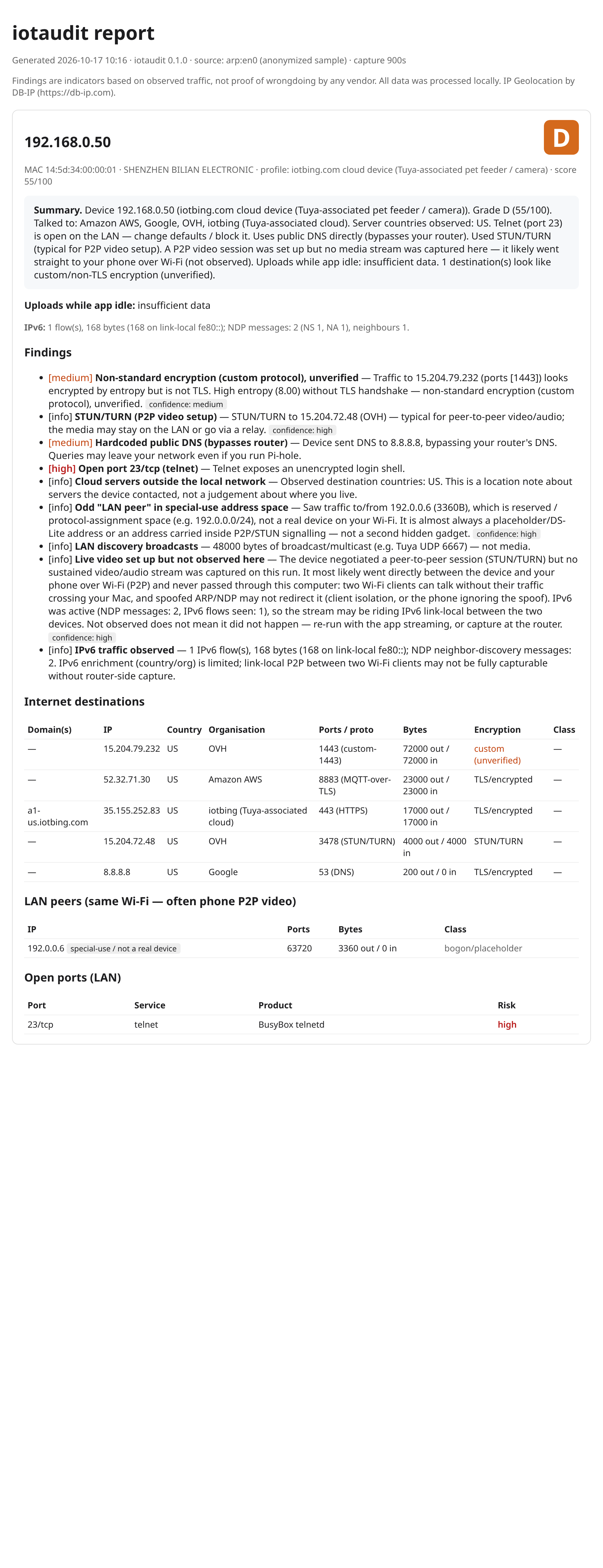
Open docs/sample-report.html in a browser for the full version.
Demo
A short walk-through of a capture, the UPnP port-forward check and the opt-in default-password check (animated SVG, no audio, no tracking):
Install
pipx install iotaudit
# or with the MCP server extra:
pip install "iotaudit[mcp]"
# latest from source:
pipx install "git+https://github.com/emirmrkaljevic/iotaudit"
Capturing needs root (sudo). The optional port scan needs nmap.
Quickstart
macOS
brew install nmap
pipx install iotaudit

# Just run it: pick your device from the list, then leave it alone (or use its app).
sudo "$(which iotaudit)" capture --mode arp --i-own-this-network
iotaudit scans your LAN, lists devices (IP, MAC, vendor; Tuya/Espressif flagged as likely IoT),
and lets you pick one. It then ARP-spoofs only that device so its traffic flows through your
Mac, captures for up to an hour (Ctrl+C stops early and still writes the report), and restores the
ARP tables and IP-forwarding on exit. With a device picked, --watch-lan (phone P2P) and the
IPv6/NDP filter are on by default.
Linux
sudo apt install nmap
pipx install iotaudit

# Same ARP flow as macOS:
sudo "$(which iotaudit)" capture --mode arp --i-own-this-network

# Or hotspot mode: your laptop becomes an AP; re-pair the device to it (needs NetworkManager).
sudo iotaudit capture --mode hotspot --iface wlan0 --ssid iotaudit --password 'choose-a-pass' \
     --device 10.42.0.50 --scan --out feeder.html
Analyse an existing capture
# from Wireshark, your router, or OpenWrt `tcpdump -w`
iotaudit analyze capture.pcap --device 192.168.1.50 --json results.json --out report.html
The report lands at ./iotaudit-report.html with a matching .json next to it.
IPv6, P2P video, and "not observed"
Live video from a camera or feeder often does not go to the cloud: it goes directly to your
phone over the local Wi-Fi (P2P), after a short STUN/TURN handshake. iotaudit tries hard to see
that stream (--watch-lan spoofs device↔phone, and the capture filter now includes IPv6 and NDP),
but two Wi-Fi clients can talk without their traffic ever passing through your computer.
because of Access-Point client isolation, a phone ignoring the spoof, or the stream riding IPv6
link-local (fe80::). When that happens the report says so honestly:
Live video set up but not observed here: the session was negotiated (STUN) but no sustained stream was captured; it most likely went straight to your phone. Not observed ≠ not happening.
For ground truth, capture at the router instead. --ipv6-ndp (experimental) also NDP-spoofs IPv6
link-local pairs.
Default-password check (opt-in)
iotaudit credcheck 192.168.0.50                 # telnet by default
iotaudit credcheck 192.168.0.50 --service telnet --service http
The one active login iotaudit makes, and only when you ask for it. It tries a short list of
documented vendor default credentials (e.g. the root/xc3511 that the Mirai-era cameras
shipped with), never a password wordlist. You confirm the exact IP by typing a phrase, it only
targets a LAN address, it waits between attempts, stops at the first login that works, and reports
just "default login accepted" or "not accepted"; it never keeps or uses the session. Use
it on your own devices only.
Router port forwards (UPnP)
iotaudit upnp # or --json
Many devices quietly ask the router to open a public port to themselves. iotaudit upnp lists
every UPnP port forward and the LAN device it points to. It only sends the two read-only UPnP
queries, and only to a router on a private address. It also runs after each capture (skip with
--no-upnp) and adds a finding when a forward points at the audited device. If nothing answers,
UPnP is off on your router, which is the safest setting.
Web UI and phones
iotaudit web                          # http://127.0.0.1:8765, token printed on start
sudo "$(which iotaudit)" web --lan    # also from a phone on the same Wi-Fi (token required)
View reports, upload a pcap (including PCAPdroid captures from Android) and run a one-click
scan & capture from the browser. Localhost by default; --lan is opt-in, token-protected and only
answers private-range clients. iPhones can use the web UI but cannot capture on their own; see
docs/phones.md for what works on Android and iOS and what does not.
MCP server
iotaudit-mcp # exposes audit tools to a local assistant ("audit my pet feeder")
Consent & scope
iotaudit only audits your own network. It refuses non-private targets and requires
--i-own-this-network (or an interactive I OWN THIS NETWORK confirmation). ARP/NDP spoofing on a
network you do not own may be illegal.
Findings are indicators based on observed traffic, not proof of wrongdoing by any vendor. IP geolocation by DB-IP. MIT licensed.
Reviews
No reviews yet
Be the first to review this server!
More Developer Tools MCP Servers
Rea
Freeby Morluto · Developer Tools
Reverse engineer anything from your terminal or agent with one CLI and MCP server.
Paperclip
Freeby Paperclipai · Developer Tools
Trending hip-hop artist momentum scores across four cultural dimensions.
Git
Freeby Modelcontextprotocol · Developer Tools
Read, search, and manipulate Git repositories programmatically
Fetch
Freeby Modelcontextprotocol · Developer Tools
Web content fetching and conversion for efficient LLM usage
Toleno
Freeby Toleno · Developer Tools
Toleno Network MCP Server — Manage your Toleno mining account with Claude AI using natural language.
MCP Marketplace
Freeby mcp-marketplace · Developer Tools
Search and install MCP servers from inside your AI client.