
Server data from the Official MCP Registry
TeX math, TikZ figures, and tables in the PowerPoint or Word file you have open, from chat.
About
TeX math, TikZ figures, and tables in the PowerPoint or Word file you have open, from chat.
Remote endpoints: streamable-http: https://mcp.tex64.com/mathpoint/mcp
Security Report
Valid MCP server (1 strong, 1 medium validity signals). No known CVEs in dependencies. Imported from the Official MCP Registry.
Endpoint verified · Requires authentication · 1 issue found
Security scores are indicators to help you make informed decisions, not guarantees. Always review permissions before connecting any MCP server.
Permissions Found in Source Code
Found by scanning the linked source code. This listing connects to a hosted endpoint, so none of this runs on your machine: it describes what the server software does where it is hosted.
How to Connect
Remote Plugin
No local installation needed. Your AI client connects to the remote endpoint directly.
Add this to your MCP configuration to connect:
{
  "mcpServers": {
    "io-github-fermion-company-mathpoint": {
      "url": "https://mcp.tex64.com/mathpoint/mcp"
    }
  }
}Documentation
View on GitHubFrom the project's GitHub README.
MathPoint — LaTeX equations in PowerPoint and Word, no TeX install
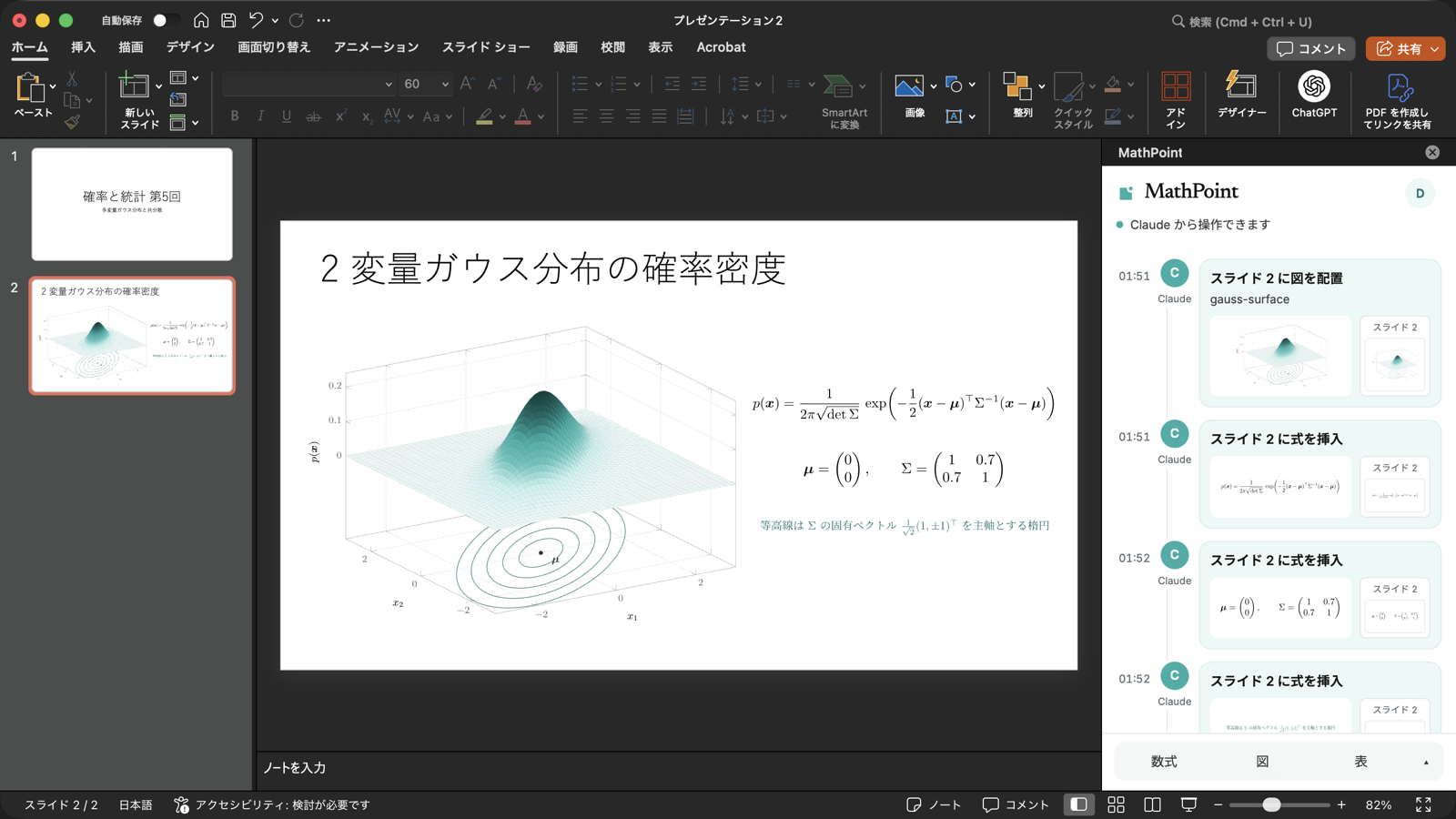
MathPoint is an add-in for Microsoft PowerPoint and Word that puts LaTeX equations, TikZ / pgfplots figures, and tables typeset with real TeX into the slide deck or document you have open. Type LaTeX in its task pane, or ask Claude or ChatGPT in chat. Typesetting runs on the MathPoint server with LuaLaTeX, so you do not need TeX installed, and it works in PowerPoint for the web too.
- Product page: https://tex64.com/mathpoint (日本語: https://tex64.com/ja/mathpoint)
- Guide: https://mcp.tex64.com/mathpoint/docs
- MCP server:
https://mcp.tex64.com/mathpoint/mcp(Streamable HTTP, OAuth sign-in with Google)
This repository holds the public connection details: the Claude plugin, the MCP Registry entry, and this README. The MathPoint service itself is operated by Fermion Inc.
Get started
-
Install the add-in (PowerPoint and Word, Microsoft 365 or Office 2021 and later):
# Mac (Terminal)
curl -fsSL https://mcp.tex64.com/mathpoint/install | sh
# Windows (PowerShell) irm https://mcp.tex64.com/mathpoint/install.ps1 | iexOn the web, use Add-ins → More Add-ins → My Add-ins → Upload My Add-in and choose manifest.prod.xml.
-
Sign in. Reopen PowerPoint or Word, open Home → Add-ins → MathPoint, and sign in with Google in the task pane.
-
Connect your AI. Choose Claude or ChatGPT in the task pane, or add the MCP server yourself:
Client How Claude (claude.ai, desktop) Settings → Connectors → Add custom connector → https://mcp.tex64.com/mathpoint/mcpChatGPT Settings → Apps & Connectors → create a connector (developer mode) with the same URL Claude Code claude mcp add --transport http mathpoint https://mcp.tex64.com/mathpoint/mcp, or install this plugin:/plugin marketplace add Fermion-company/mathpoint-pluginthen/plugin install mathpoint@mathpointCodex codex mcp add mathpoint --url https://mcp.tex64.com/mathpoint/mcp -
Ask. Keep the task pane open and ask in chat.
Use it without an AI
Like IguanaTex, MathPoint works on its own: open the task pane, type LaTeX, check the live preview, and click Insert. TikZ code and tables copied from Excel go in the same way. The LaTeX source is stored with the shape, so you can open it again and re-typeset.
How it compares
| Local TeX | Rendering | Figures and tables | Word | |
|---|---|---|---|---|
| PowerPoint equation editor (LaTeX input) | Not needed | Office math | No | Yes |
| IguanaTex | Required | TeX | If you write them in TeX | No |
| MathType (paid) | Not needed | MathType | No | Yes |
| MathPoint | Not needed | TeX (LuaLaTeX) | TikZ, pgfplots, tabularray | Yes |
IguanaTex is a VBA add-in, so it does not run in PowerPoint for the web; MathPoint does.
A longer comparison: How to use LaTeX equations in PowerPoint: five ways compared.
Example prompts
- “Put the quadratic formula on slide 2.”
- “Make the equations on slide 2 teal and a bit larger.”
- “Add a slide with a 3D surface plot of a bivariate Gaussian.”
- “Redraw this hand-drawn circuit as a clean figure and put it on slide 3.”
- “Turn this table into a booktabs-style table with the decimals aligned.”
- “In my Word document, add Euler’s identity after paragraph 3, and make a ≠ 0 in the text inline math.”
- “Typeset Maxwell’s equations and show me the image.” (works without Office)
Tools
| Tool | What it does | Annotation |
|---|---|---|
list_slides, list_layouts, word_read | Read slides, layouts, and Word paragraphs | read-only |
insert_math, word_insert_math | Typeset LaTeX with TeX and insert it (display, inline, or text mode) | write |
update_math, word_update_math | Re-typeset a MathPoint shape with new LaTeX, size, or color | write, replaces |
render_math | Return typeset math as a PNG without touching any file | read-only |
figure_guide, figure_start, figure_requests, figure_build, figure_place, … | Build TikZ / pgfplots figures and tabularray tables, including redraws of sketches and screenshots, then place them | write |
set_text, add_text_box, add_slide, move_shape, delete_shape | Edit ordinary PowerPoint text and layout | write |
word_insert_text, word_set_text, word_delete | Edit Word paragraphs | write |
insert_image, word_insert_image | Place an image as it is | write |
select_file, usage | Choose which open file to edit; this month’s usage | — |
Edits appear in the open file right away and can be undone with Undo.
Plans
The free plan covers 30 typeset equations, figures, or tables a month (re-typesetting the same item does not count again). A paid plan without a monthly limit (600 JPY a month, tax included) is on the way.
Privacy
Full policy: https://mcp.tex64.com/mathpoint/privacy. In short:
- MathPoint can edit only files where the MathPoint task pane is open.
- Slide and document content passes through the server only when your AI reads it; it is not stored.
- TeX sources and typeset results are kept for up to 30 days for your work.
- Sign-in uses Google. You can disconnect AI apps or delete your account at any time from https://mcp.tex64.com/mathpoint/account.
日本語
MathPoint は PowerPoint と Word に LaTeX の数式・TikZ の図・表を入れるアドインです。 作業ウィンドウに LaTeX を打つか、Claude や ChatGPT にチャットで頼むと、TeX で組んだ 結果が開いているスライドや文書に入ります。組版はサーバーで行うので、TeX の インストールは要りません(IguanaTex と違い、Web 版の PowerPoint でも動きます)。
- Mac はターミナルで
curl -fsSL https://mcp.tex64.com/mathpoint/install | sh、 Windows は PowerShell でirm https://mcp.tex64.com/mathpoint/install.ps1 | iexを実行します。 - PowerPoint を開き直し、ホーム → アドイン → MathPoint を開いて Google でログインします。
- 作業ウィンドウから Claude か ChatGPT をつなぎ、「スライド 2 に二次方程式の解の公式を入れて」のように頼みます。
無料プランは月 30 件までです。詳しくは https://tex64.com/ja/mathpoint をご覧ください。
Support
contact@fermion.company · https://mcp.tex64.com/mathpoint/support
License
The files in this repository are MIT licensed. The MathPoint service is subject to its terms of service.
Reviews
No reviews yet
Be the first to review this server!
More Developer Tools MCP Servers
Rea
Freeby Morluto · Developer Tools
Reverse engineer anything from your terminal or agent with one CLI and MCP server.
Paperclip
Freeby Paperclipai · Developer Tools
Trending hip-hop artist momentum scores across four cultural dimensions.
Git
Freeby Modelcontextprotocol · Developer Tools
Read, search, and manipulate Git repositories programmatically
Fetch
Freeby Modelcontextprotocol · Developer Tools
Web content fetching and conversion for efficient LLM usage
Toleno
Freeby Toleno · Developer Tools
Toleno Network MCP Server — Manage your Toleno mining account with Claude AI using natural language.
MCP Marketplace
Freeby mcp-marketplace · Developer Tools
Search and install MCP servers from inside your AI client.