
Server data from the Official MCP Registry
FoggyKitchen Terraform/OpenTofu blueprints, landing zones, modules, and labs.
About
FoggyKitchen Terraform/OpenTofu blueprints, landing zones, modules, and labs.
Remote endpoints: streamable-http: https://foggykitchen.com/mcp
Security Report
Valid MCP server (1 strong, 1 medium validity signals). No known CVEs in dependencies. Imported from the Official MCP Registry.
Endpoint verified · Requires authentication · 1 issue found
Security scores are indicators to help you make informed decisions, not guarantees. Always review permissions before connecting any MCP server.
Permissions Required
This plugin requests these system permissions. Most are normal for its category.
How to Connect
Remote Plugin
No local installation needed. Your AI client connects to the remote endpoint directly.
Add this to your MCP configuration to connect:
{
  "mcpServers": {
    "io-github-foggykitchen-foggykitchen-mcp": {
      "url": "https://foggykitchen.com/mcp"
    }
  }
}Documentation
View on GitHubFrom the project's GitHub README.
FoggyKitchen MCP for Codex & Claude Code
Bring FoggyKitchen cloud architecture context directly into the AI coding tool you already use.
FoggyKitchen MCP gives compatible AI coding agents controlled access to FoggyKitchen Terraform/OpenTofu modules, implementation examples, architecture patterns, landing-zone guidance, and entitlement-aware technical catalog resources.
It is designed for engineers working with Azure, Oracle Cloud Infrastructure, Terraform/OpenTofu, AKS, OKE, cloud networking, private connectivity, landing zones, and multicloud architectures.
FoggyKitchen MCP is not another hosted LLM, a Terraform execution service, or a generic documentation search engine. It is an entitlement-aware context layer between FoggyKitchen technical assets and your own AI coding agent.
Professional+ required for FoggyKitchen technical catalog MCP access.
Users authenticate with FoggyKitchen. Available MCP capabilities depend on workspace plan and entitlements. Starter remains focused on self-study and platform access; Professional+ enables technical catalog MCP access for compatible AI coding clients.
What can FoggyKitchen MCP do?
Find the right Terraform/OpenTofu module
Help the AI agent locate reviewed FoggyKitchen modules by cloud, architecture intent, topic, repository, and implementation context. The goal is to lead the agent toward an existing FoggyKitchen building block before generating generic infrastructure code from scratch.
Resolve architecture patterns
Use FoggyKitchen context for scenarios such as Azure hub-and-spoke, Azure Firewall transit, private AKS, OCI VCN architecture, private OKE, Autonomous Database private access, OCI landing zones, private endpoints, routing, and OCI <-> Azure connectivity.
Bring implementation examples into the coding loop
Allow the AI client to discover labs, examples, and implementation scenarios so it can point engineers toward working usage patterns rather than only generic documentation.
Use architecture context while coding
FoggyKitchen MCP helps Codex and Claude Code reason about architecture decisions, module selection, implementation paths, networking trade-offs, and deployment structure while the engineer stays in the coding workflow.
Keep access entitlement-aware
FoggyKitchen MCP returns only assets and capabilities available to the authenticated FoggyKitchen workspace. Professional+ is currently the entry point for technical catalog MCP access.
Try these prompts
Azure hub-and-spoke
Use FoggyKitchen MCP.

Design an Azure hub-and-spoke architecture with Azure Firewall,
private AKS and centralized egress.

First identify relevant FoggyKitchen modules or architecture assets,
then explain the implementation approach.
OCI private OKE
Use FoggyKitchen MCP.

I need a private OKE cluster in OCI.

Find the relevant FoggyKitchen networking and OKE assets and propose
the VCN, subnet, routing and private access architecture before generating code.
Architecture review
Use FoggyKitchen MCP.

Review my Terraform architecture for Azure private networking.

Identify architectural risks, routing problems and missing private connectivity
patterns, and relate your recommendations to FoggyKitchen resources where possible.
Landing zone discovery
Use FoggyKitchen MCP.

Resolve the architecture for an Azure firewall transit landing zone.

Prefer FoggyKitchen landing-zone or blueprint assets over generic examples.
OCI / Azure multicloud
Use FoggyKitchen MCP.

Help me design private OCI-to-Azure connectivity.

Identify relevant FoggyKitchen architecture patterns and explain the routing,
DNS and security decisions I need to make.
How it works
Engineer
   |
   v
Codex / Claude Code
   |
   v
FoggyKitchen MCP
   |
   v
Modules . Labs . Blueprints . Architecture Guidance
   |
   v
Architecture decision / implementation
- Engineer asks a cloud or IaC question in Codex or Claude Code.
- The AI agent calls FoggyKitchen MCP.
- FoggyKitchen resolves relevant catalog/context according to entitlement.
- The AI agent combines that context with the user's current coding task.
- Engineer reviews and implements the resulting architecture or code.
FoggyKitchen MCP provides context. The AI client remains responsible for reasoning and code generation, and the engineer remains responsible for review.
See it in practice
OAuth-first authentication
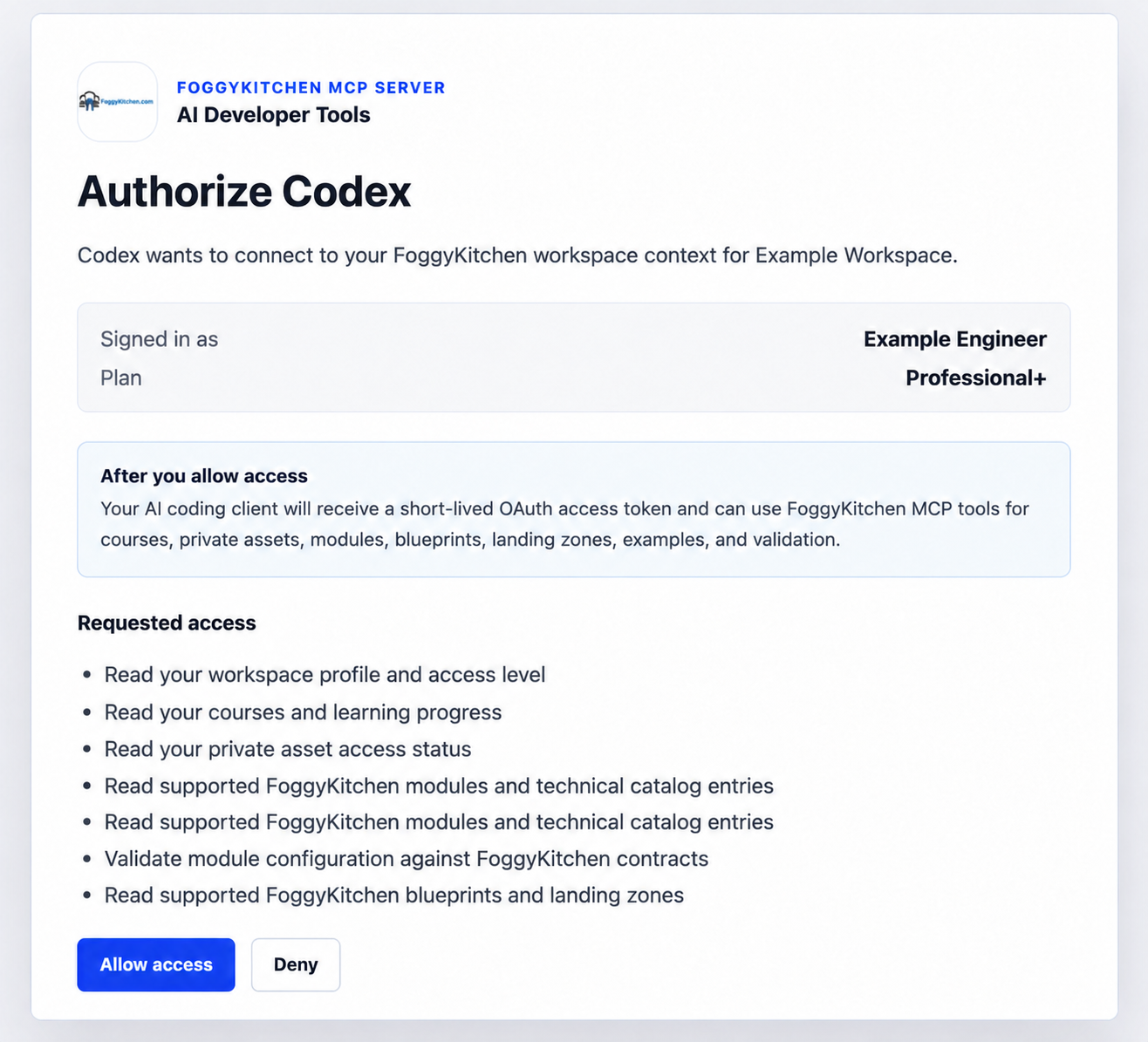
Codex and Claude Code authenticate to FoggyKitchen through OAuth/PKCE. Personal MCP Tokens remain available only as a fallback for legacy or unsupported clients.
Codex + FoggyKitchen MCP
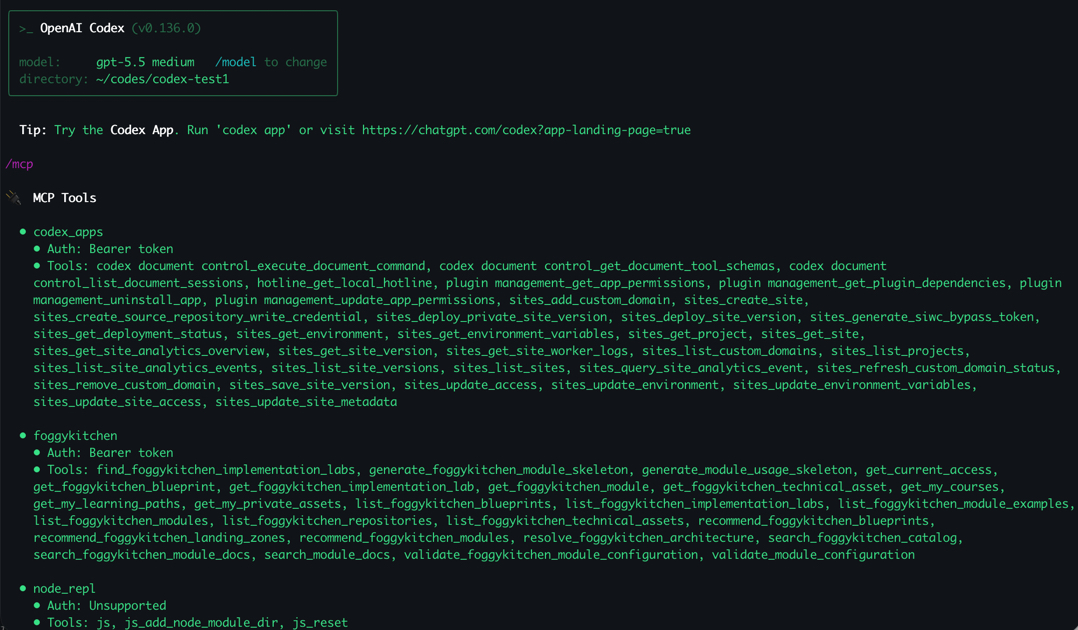
FoggyKitchen technical catalog context becomes available directly in the Codex workflow.
Claude Code + FoggyKitchen MCP
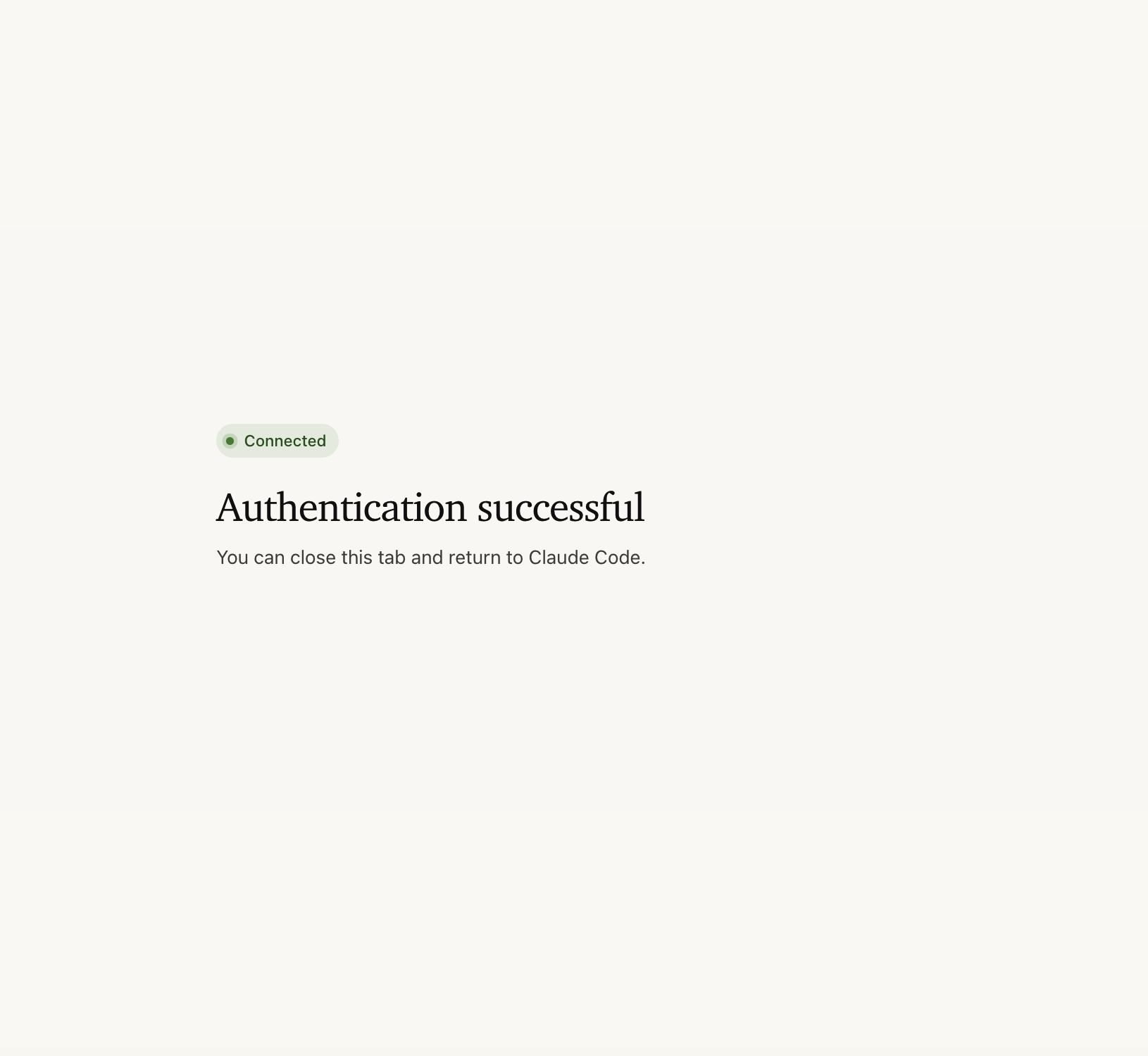
Claude Code can connect to FoggyKitchen MCP and return to the coding session with FoggyKitchen resources available to the agent.
Why this is different from generic AI coding
A generic AI coding model can produce Terraform code.
FoggyKitchen MCP adds curated FoggyKitchen implementation context:
- known modules;
- implementation examples;
- architecture patterns;
- landing-zone assets;
- cloud-specific context;
- entitlement-aware private resources.
The goal is not to replace model reasoning. The goal is to give the model better domain context before it makes infrastructure decisions.
MCP + FoggyKitchen Skills
MCP gives the AI agent access to FoggyKitchen resources and technical catalog context.
Skills teach the agent when and how to apply specialized FoggyKitchen workflows. This repository includes the FoggyKitchen skill, which routes Codex or Claude Code toward FoggyKitchen context for Terraform/OpenTofu, Azure networking, OCI networking, AKS, OKE, Autonomous Database, hub-spoke, private endpoint, landing-zone, and multicloud interconnect work.
Skills do not replace authentication or entitlement checks. The MCP server still controls what resources and tools are available to the authenticated workspace.
Requirements
- Node.js 18 or newer
- A FoggyKitchen Professional+ membership for OAuth access to MCP tools
- Codex with local plugin support, or Claude Code
Install in Codex
Add the FoggyKitchen marketplace:
codex plugin marketplace add https://github.com/foggykitchen/foggykitchen-mcp
Then install the plugin:
codex plugin add foggykitchen-mcp@foggykitchen
Alternatively, configure the MCP server directly in ~/.codex/config.toml:
[mcp_servers.foggykitchen]
url = "https://foggykitchen.com/mcp"
oauth_resource = "https://foggykitchen.com/mcp"
Restart Codex or start a new thread after installing so the MCP tools are loaded.
Install in Claude Code
Register FoggyKitchen as a remote HTTP MCP server:
claude mcp add --transport http foggykitchen https://foggykitchen.com/mcp
You can also use this repository as a project-level MCP configuration. Claude Code auto-detects the .mcp.json at the root of this repo. It connects to https://foggykitchen.com/mcp over HTTP and uses OAuth/PKCE with FoggyKitchen. If you clone the repo and open it as a project, Claude Code will prompt you to approve the foggykitchen MCP server on first use.
Plugin installation is still supported where Claude Code plugin marketplaces are enabled:
claude plugin marketplace add foggykitchen/foggykitchen-mcp
claude plugin install foggykitchen-mcp@foggykitchen
Or from within a Claude Code session:
/plugin marketplace add foggykitchen/foggykitchen-mcp
/plugin install foggykitchen-mcp@foggykitchen
Restart Claude Code or start a new session after adding/installing the server so the MCP tools are loaded.
Sign in with FoggyKitchen
FoggyKitchen MCP supports OAuth/PKCE for Codex and Claude Code. Start the OAuth flow from your AI coding client. FoggyKitchen Settings are used only for manual Personal MCP Tokens.
OAuth is available for Professional+ memberships. Individual Learner and Starter accounts can browse FoggyKitchen, but they cannot authorize MCP access for Codex, Claude Code, or other AI coding clients.
Codex OAuth login
STEP 1. Start login from Codex:
codex mcp login foggykitchen
STEP 2. Your browser opens FoggyKitchen. If you are not signed in, sign in first.
STEP 3. FoggyKitchen shows the OAuth approval screen with Allow access and Deny. Click Allow access.
STEP 4. Codex completes authentication and the FoggyKitchen MCP tools become available.
STEP 5. Run /mcp in Codex to verify the tool list.
Claude Code OAuth login
STEP 1. Start Claude Code, open /mcp, select foggykitchen, and authenticate. Your browser should show FoggyKitchen login if needed, then the OAuth approval screen with Allow access and Deny. After approval, Claude Code should show the server as connected.
STEP 2. Once authenticated, you can close the browser window and return to Claude Code.
STEP 3. Claude Code will notify you about being connected to the MCP server.
STEP 4. Review Claude Code MCP connection details from /mcp.
Manual fallback: Personal MCP Token
Personal MCP Tokens remain available in FoggyKitchen Settings -> AI Developer Tools for legacy clients, smoke tests, and tools that cannot complete OAuth/PKCE yet. OAuth is the recommended flow for Codex and Claude Code.
Treat Personal MCP Tokens as secrets. Do not commit real tokens, request logs containing tokens, or generated files containing secrets. If a token has been pasted into chat, shell history, logs, or source control, rotate it in FoggyKitchen Settings -> AI Developer Tools.
Configuration
The Codex plugin declares the FoggyKitchen MCP endpoint as an OAuth protected resource:
{
  "mcpServers": {
    "foggykitchen": {
      "type": "http",
      "url": "https://foggykitchen.com/mcp",
      "oauth_resource": "https://foggykitchen.com/mcp"
    }
  }
}
For direct smoke tests or legacy clients that do not support OAuth yet, a Personal MCP Token can still be passed as a Bearer token. Do not commit real tokens. If a token has been pasted into chat, shell history, or source control, rotate it.
Quick functional test
After installation and authentication, ask Codex or Claude Code one of these prompts:
Use FoggyKitchen MCP. Check my current access and then resolve the architecture for Azure firewall transit landing zone.
Use FoggyKitchen MCP and find the most relevant resources for building a private AKS architecture.
Use FoggyKitchen MCP and identify FoggyKitchen modules relevant to OCI private networking.
Expected behavior: the AI client should invoke FoggyKitchen MCP tools, resolve FoggyKitchen catalog or architecture context according to your entitlement, and prefer FoggyKitchen resources before falling back to generic cloud documentation.
Publish to MCP Registry
This repository owns the public MCP Registry metadata for FoggyKitchen MCP. The actual remote MCP server is implemented by FoggyKitchen and exposed at https://foggykitchen.com/mcp; server.json only describes that public endpoint for registry consumers.
Publish manually from this repo:
mcp-publisher login github
mcp-publisher publish
Or publish through GitHub Actions by pushing a version tag:
git tag v0.3.2
git push origin v0.3.2
The GitHub Actions workflow uses GitHub OIDC authentication and does not require an MCP Registry secret.
Local Smoke Test
List the tools exposed by FoggyKitchen:
npm run list-tools
Test the stdio bridge manually:
printf '%s\n' '{"jsonrpc":"2.0","id":1,"method":"initialize","params":{}}' '{"jsonrpc":"2.0","id":2,"method":"tools/list","params":{}}' | npm run bridge
Files
.codex-plugin/plugin.jsondeclares the Codex plugin metadata..codex-plugin/mcp.jsondeclares the FoggyKitchen MCP endpoint for Codex usingurlandoauth_resource..claude-plugin/plugin.jsondeclares the Claude Code plugin metadata..claude-plugin/marketplace.jsonlists this plugin forclaude plugin marketplace add//plugin marketplace add..agents/plugins/marketplace.jsonlists this plugin for the Codex plugin marketplace..mcp.jsondeclares the FoggyKitchen HTTP MCP endpoint for Claude Code usingoauth_resource. Claude Code auto-detects this file at the project root; it is not read by Codex.server.jsondeclares the public FoggyKitchen remote MCP server metadata for the official MCP Registry..github/workflows/publish-mcp-registry.ymlpublishesserver.jsonto the official MCP Registry on version tags or manual dispatch.docs/images/contains GitHub README screenshots copied from FoggyKitchen-owned product assets.scripts/mcp-headers.mjsremains available only for legacy Bearer-token smoke tests usingFOGGYKITCHEN_MCP_AUTHORIZATIONorFOGGYKITCHEN_MCP_TOKEN.mcp/foggykitchen-stdio-bridge.mjsremains available as a local stdio bridge fallback and forwards tool requests to FoggyKitchen.skills/foggykitchen/SKILL.mdteaches Codex or Claude Code when and how to use the plugin.scripts/list-tools.mjsis a direct HTTP smoke test usingFOGGYKITCHEN_MCP_AUTHORIZATIONorFOGGYKITCHEN_MCP_TOKEN.
Troubleshooting
- If Claude Code or Codex reports that the MCP server is not logged in, start the OAuth flow from the client:
codex mcp login foggykitchenfor Codex, or/mcpauthentication for Claude Code. - If the browser opens FoggyKitchen Settings instead of the OAuth approval screen, restart the client and start login again from the MCP client. Settings are for Personal MCP Tokens, not OAuth consent.
- If MCP tools are unavailable after installation, restart the AI coding client or start a new session so the server configuration is reloaded.
- If a Personal MCP Token was pasted into chat, shell history, logs, or source control, rotate it in FoggyKitchen Settings -> AI Developer Tools.
About
FoggyKitchen MCP connects Codex, Claude Code, and compatible AI coding agents to curated Azure, OCI, Terraform/OpenTofu, Kubernetes, and cloud architecture context from FoggyKitchen.
Learn more about FoggyKitchen MCP: https://foggykitchen.com/mcpserver
Reviews
No reviews yet
Be the first to review this server!
More Developer Tools MCP Servers
Git
Freeby Modelcontextprotocol · Developer Tools
Read, search, and manipulate Git repositories programmatically
Fetch
Freeby Modelcontextprotocol · Developer Tools
Web content fetching and conversion for efficient LLM usage
Paperclip
Freeby Paperclipai · Developer Tools
Trending hip-hop artist momentum scores across four cultural dimensions.
Toleno
Freeby Toleno · Developer Tools
Toleno Network MCP Server — Manage your Toleno mining account with Claude AI using natural language.
mcp-creator-python
Freeby mcp-marketplace · Developer Tools
Create, build, and publish Python MCP servers to PyPI — conversationally.
MCP Marketplace
Freeby mcp-marketplace · Developer Tools
Search and install MCP servers from inside your AI client.