
Server data from the Official MCP Registry
Your office's procedures inside Claude or ChatGPT - verified citations or an honest refusal.
About
Your office's procedures inside Claude or ChatGPT - verified citations or an honest refusal.
Remote endpoints: streamable-http: https://console.forgeagentsai.com/mcp
Security Report
Valid MCP server (1 strong, 1 medium validity signals). No known CVEs in dependencies. Imported from the Official MCP Registry.
Endpoint verified · Requires authentication · 1 issue found
Security scores are indicators to help you make informed decisions, not guarantees. Always review permissions before connecting any MCP server.
Permissions Found in Source Code
Found by scanning the linked source code. This listing connects to a hosted endpoint, so none of this runs on your machine: it describes what the server software does where it is hosted.
How to Connect
Remote Plugin
No local installation needed. Your AI client connects to the remote endpoint directly.
Add this to your MCP configuration to connect:
{
  "mcpServers": {
    "io-github-forgeagents-jp-oka-anywhere": {
      "url": "https://console.forgeagentsai.com/mcp"
    }
  }
}Documentation
View on GitHubFrom the project's GitHub README.
OKA Anywhere: your office's procedures inside your AI assistant
OKA Anywhere is a remote MCP connector by Forge Agents LLC. It gives Claude, ChatGPT, Cline, or any MCP-capable assistant four tools that answer only from your office's approved procedures, with verified citations, and refuse to guess. If it cannot quote your procedures, it says so. It never invents an answer.
| Connector address | https://console.forgeagentsai.com/mcp |
| Transport | Streamable HTTP, stateless |
| Sign-in | OAuth consent page (paste your office token once), or Authorization: Bearer <office token> for scripts and Claude Code |
| You need | Your office token, from the setup card we send when your office is onboarded |
| Price | $149 a month per office, no per-question charges |
| Support | daldridge@forgeagentsio.com |
What it does
Every office has its own set of approved procedure documents. OKA Anywhere puts that set behind four tools, so anyone on staff can ask their own assistant "how do we handle this?" and get an answer that names the document it came from and quotes it. Each quote is checked word for word against the source before it is shown. When the documentation does not cover a question, the assistant says so plainly and says who to ask. A refusal is the correct answer in that case, not a fault.
Getting started
- Subscribe at forgeagentsio.com/oka-guide.html ($149 a month per office).
- Within one business day you receive a setup card with the connector address and your office token.
- One person connects it once (below). When the connector opens the Forge consent page, paste the office token.
Connect it
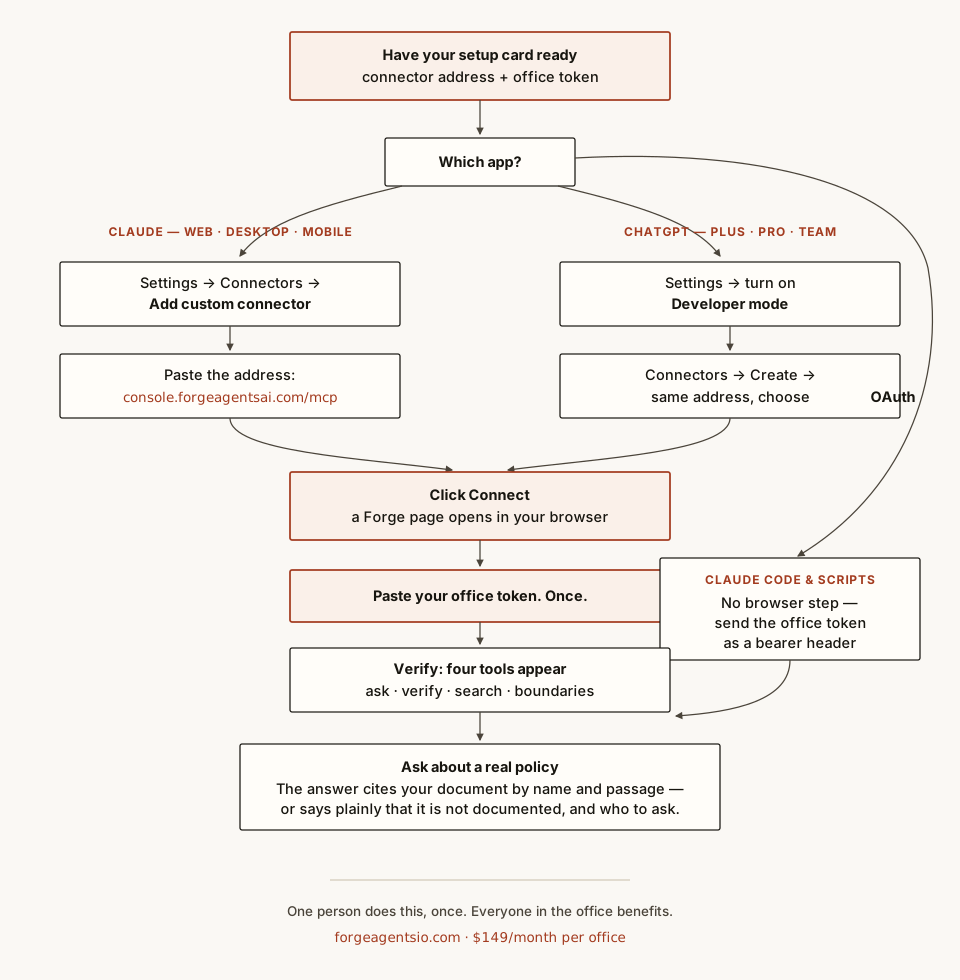
Claude (web, desktop, phone): Settings, then Connectors, then Add custom connector. Paste the address, click Connect, and paste your office token on the Forge page that opens.
ChatGPT (Plus, Pro, Team): Settings, turn on Developer mode, then Connectors, then Create. Paste the address, click Connect, and paste your office token on the Forge page.
Claude Code (no browser needed):
claude mcp add --transport http oka-anywhere https://console.forgeagentsai.com/mcp \
  --header "Authorization: Bearer YOUR_OFFICE_TOKEN"
Cline: add a remote server with the same address and an Authorization header. The exact steps,
written so an agent can follow them, are in llms-install.md.
Any other MCP client: use the address above with Streamable HTTP. A client that cannot send headers is sent to the consent page. A client that can send headers can use the office token as a bearer token on the same address.
After connecting, the client lists four tools and three ready-made prompts.
The four tools
All four tools are read-only. They never change your documents or anything else, and each one is
marked that way (readOnlyHint: true, destructiveHint: false, openWorldHint: false) so a client
can treat them as safe to run.
| Tool | What it does | Input | Uses a model? |
|---|---|---|---|
ask_procedures | Answers a question from your documents, with a Sources list of verified quotes | question | Yes. Every citation is machine-verified against your documents |
verify_claim | Checks whether an exact sentence appears word for word in your documents | claim | No |
search_procedures | Finds the three most relevant passages for a topic | query | No |
list_boundaries | Lists what your documentation explicitly forbids or does not cover | none | No |
Each tool also takes an optional corpus field. Leave it out: it defaults to your office's own
document set, and an id that is not yours is refused.
Prompts
Three prompts can show up in a client's prompt menu. They only tell the assistant which tool to use and to keep the refusal rule. They carry no office text.
| Prompt | Input | What it asks for |
|---|---|---|
ask-a-procedure-question | question | An answer from ask_procedures with its Sources, and list_boundaries if the topic is not covered |
verify-a-statement | statement | An exact check with verify_claim, then the closest passages from search_procedures if it is not found |
show-what-is-not-covered | none | Everything the documentation says it does not cover, grouped by document |
Examples
Questions to ask your assistant once it is connected:
- "What is our policy on same-day cancellations?" The assistant calls
ask_proceduresand answers with the source document and a quote. - "Does our handbook say refunds are issued within 14 days?" It calls
verify_claim. It reports VERIFIED with the document and surrounding text, or says the sentence is not in the documents word for word. - "Show me what we have on opening procedures." It calls
search_proceduresand returns up to three excerpts with their document titles. - "What do our procedures say they do not cover?" It calls
list_boundaries.
Tool calls look like this:
{ "name": "ask_procedures", "arguments": { "question": "What is our policy on same-day cancellations?" } }
{ "name": "verify_claim", "arguments": { "claim": "Refunds are issued within 14 days." } }
{ "name": "search_procedures", "arguments": { "query": "late cancellation fee" } }
{ "name": "list_boundaries", "arguments": {} }
Troubleshooting
- "Couldn't reach the MCP server": paste the address again, exactly:
https://console.forgeagentsai.com/mcp - "That token was not recognized": tokens rotate when re-issued, so use the newest setup card. If you lost it, email support and we will rotate you a fresh one in minutes.
- The assistant refuses to answer something: call
list_boundariesfirst. Usually the topic is not in your documentation yet. Send us the document and it will be. - Rate limit message: each office token allows 60 tool calls an hour. Try again next hour.
Server card
Directories that cannot sign in can read the public server card at
/.well-known/mcp/server-card.json.
It is built from the live tool list, so it always matches what a signed-in client sees, and it never
contains an office token or any office document.
Data stance
Your corpus serves only your office. Calls are logged for support and metering. Nothing trains anything.
Support: daldridge@forgeagentsio.com · Connector: https://console.forgeagentsai.com/mcp · Test results: forgeagentsio.com/proof.html · Privacy: https://forgeagentsio.com/privacy.html · $149 a month per office, no per-question charges.
Reviews
No reviews yet
Be the first to review this server!
More Developer Tools MCP Servers
Git
Freeby Modelcontextprotocol · Developer Tools
Read, search, and manipulate Git repositories programmatically
Fetch
Freeby Modelcontextprotocol · Developer Tools
Web content fetching and conversion for efficient LLM usage
Worldmonitor
Freeby Koala73 · Developer Tools
Live markets, conflicts, country risk, chokepoints, energy, and China decision signals. 90 tools.
Paperclip
Freeby Paperclipai · Developer Tools
Trending hip-hop artist momentum scores across four cultural dimensions.
Toleno
Freeby Toleno · Developer Tools
Toleno Network MCP Server — Manage your Toleno mining account with Claude AI using natural language.
mcp-creator-python
Freeby mcp-marketplace · Developer Tools
Create, build, and publish Python MCP servers to PyPI — conversationally.