
Server data from the Official MCP Registry
Search volume, AI volume, CPC, difficulty, intent, SERP features, long-tail and competitor keywords.
About
Search volume, AI volume, CPC, difficulty, intent, SERP features, long-tail and competitor keywords.
Remote endpoints: streamable-http: https://mcp.apify.com/?tools=gaelasao/keyword-research-api
Security Report
Valid MCP server (1 strong, 1 medium validity signals). No known CVEs in dependencies. Imported from the Official MCP Registry. Trust signals: trusted author (4/4 approved).
Endpoint verified · Requires authentication · 1 issue found
Security scores are indicators to help you make informed decisions, not guarantees. Always review permissions before connecting any MCP server.
Permissions Found in Source Code
Found by scanning the linked source code. This listing connects to a hosted endpoint, so none of this runs on your machine: it describes what the server software does where it is hosted.
How to Connect
Remote Plugin
No local installation needed. Your AI client connects to the remote endpoint directly.
Add this to your MCP configuration to connect:
{
  "mcpServers": {
    "io-github-gaelasao-keyword-research-api": {
      "url": "https://mcp.apify.com/?tools=gaelasao/keyword-research-api"
    }
  }
}Documentation
View on GitHubFrom the project's GitHub README.
Keyword research and building permit data for AI agents (MCP)
Two pay-per-use data tools that any MCP client (Claude, Cursor, VS Code, Codex…) can call. They run on Apify and are served through the official Apify MCP server: there is nothing to install or host.
Keyword Research API: search volume, CPC, difficulty, intent
Keyword search volume and the rest of Google's keyword data in bulk, in every country. A Google Keyword Planner alternative for agents, with no Google Ads account needed:
- Metrics for up to 10,000 keywords per run: search volume, 12-month history, CPC, competition, top-of-page bids, keyword difficulty, search intent, trend, AI search volume (how often the keyword comes up in AI assistants) and SERP features (AI Overview, featured snippet, People Also Ask...), plus Bing search volume on runs of 300+ keywords.
- Keyword ideas from 1 to 20 seed keywords: broad ideas, long-tail suggestions that contain the seed, or Google's related searches.
- Competitor keywords: up to 10 websites per run, with position, ranking page and estimated traffic; filter positions 4 to 20 for striking distance keywords.
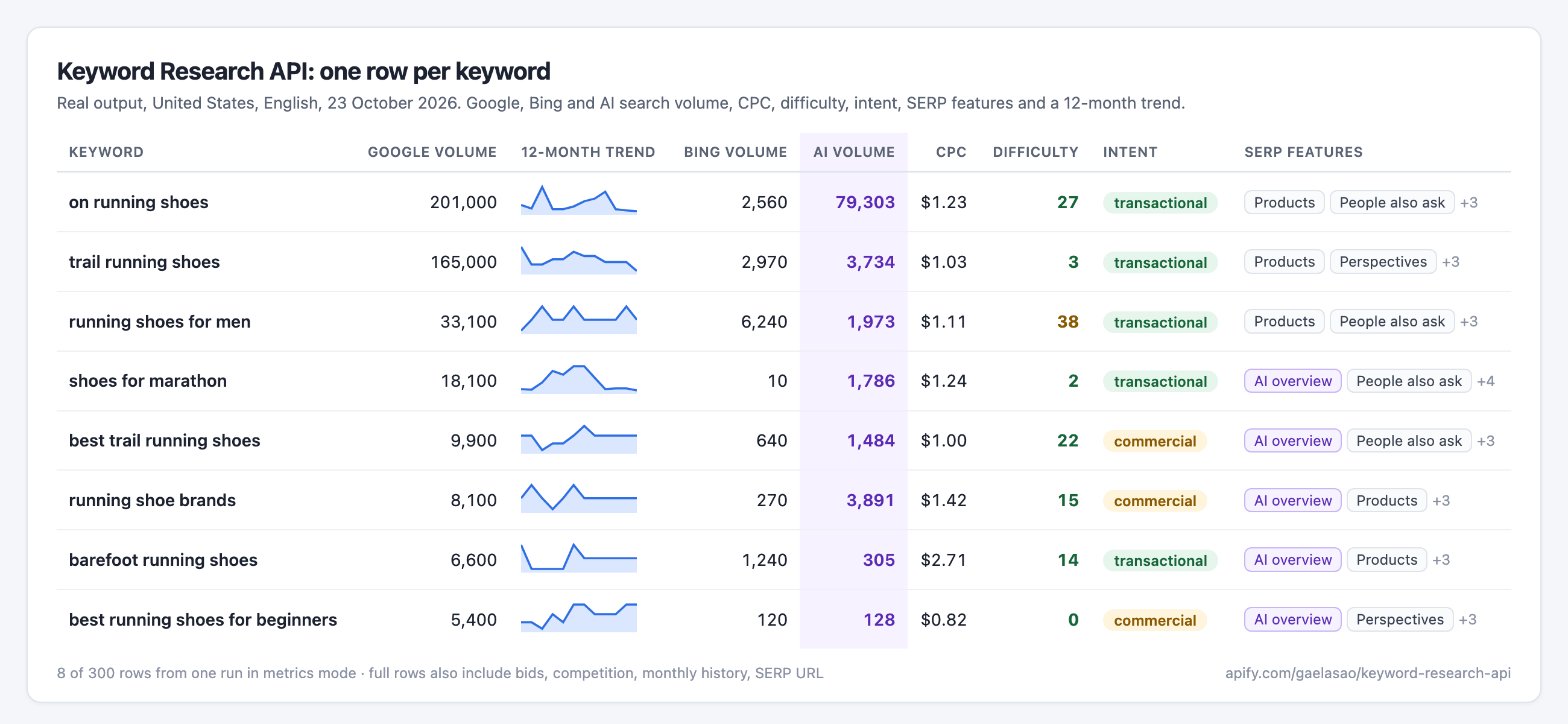
Price: $2 per 1,000 keywords with data, plus $0.01 per run that returns data. Keywords without data are free. Lower prices on higher Apify plans.
- MCP URL:
https://mcp.apify.com/?tools=gaelasao/keyword-research-api - Store page: https://apify.com/gaelasao/keyword-research-api
- How it was built: Keyword research for AI agents: search volume, CPC and difficulty over MCP (DEV)
- Case studies (DEV): Striking distance keywords: what dev.to ranks 11 to 20 for on Google and AI search volume vs Google search volume: what 600 real keywords show
Try asking your agent:
- "Get search volume, CPC and difficulty for these 50 keywords in Germany, sorted by volume."
- "Which keywords bring competitor.com the most traffic in the UK? Show the top 30 with their ranking pages."
- "Find 200 long-tail ideas around 'standing desk' with at least 100 searches a month."
Building Permits API (France, NSW Australia, Far North New Zealand)
Official building permits and planning applications, normalised into one schema, with source links and licences: France (SDES Sitadel: housing, non-residential, development and demolition permits, including the applicant company and its SIREN when it is a legal entity), NSW Planning Portal applications, and Far North District building applications.
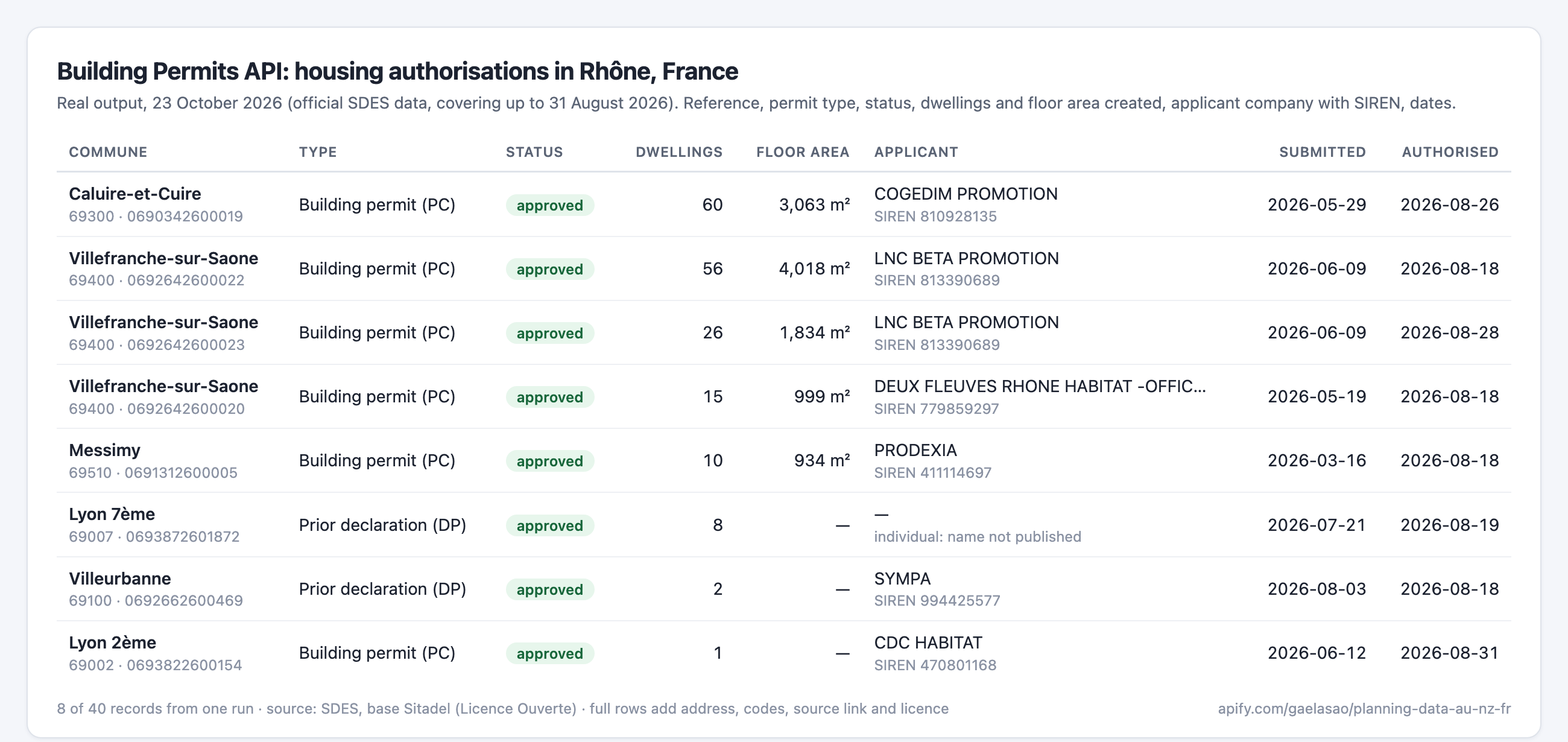
Price: $5 per 1,000 records (lower on higher Apify plans).
- MCP URL:
https://mcp.apify.com/?tools=gaelasao/planning-data-au-nz-fr - Store page: https://apify.com/gaelasao/planning-data-au-nz-fr
Connect
You need an Apify account; runs are billed to it. Clients that support OAuth sign you in on first use. Otherwise, pass your Apify API token.
Claude Code
claude mcp add --transport http apify "https://mcp.apify.com/?tools=gaelasao/keyword-research-api" --header "Authorization: Bearer $APIFY_TOKEN"
Claude Desktop, Cursor or VS Code (JSON config)
{
  "mcpServers": {
    "apify-keyword-research": {
      "url": "https://mcp.apify.com/?tools=gaelasao/keyword-research-api",
      "headers": { "Authorization": "Bearer YOUR_APIFY_TOKEN" }
    }
  }
}
Use both tools at once with ?tools=gaelasao/keyword-research-api,gaelasao/planning-data-au-nz-fr.
Support
Open an issue on the Actor's Issues tab on Apify, with the run ID and your input. Never post your API token.
Reviews
No reviews yet
Be the first to review this server!
More Developer Tools MCP Servers
Rea
Freeby Morluto · Developer Tools
Reverse engineer anything from your terminal or agent with one CLI and MCP server.
Paperclip
Freeby Paperclipai · Developer Tools
Trending hip-hop artist momentum scores across four cultural dimensions.
Git
Freeby Modelcontextprotocol · Developer Tools
Read, search, and manipulate Git repositories programmatically
Fetch
Freeby Modelcontextprotocol · Developer Tools
Web content fetching and conversion for efficient LLM usage
Toleno
Freeby Toleno · Developer Tools
Toleno Network MCP Server — Manage your Toleno mining account with Claude AI using natural language.
MCP Marketplace
Freeby mcp-marketplace · Developer Tools
Search and install MCP servers from inside your AI client.