
Server data from the Official MCP Registry
Interactive Ghidra views in your AI client: decompile, rename, and navigate a binary.
About
Interactive Ghidra views in your AI client: decompile, rename, and navigate a binary.
Security Report
Valid MCP server (2 strong, 1 medium validity signals). No known CVEs in dependencies. Package registry verified. Imported from the Official MCP Registry.
6 files analyzed · 1 issue found
Security scores are indicators to help you make informed decisions, not guarantees. Always review permissions before connecting any MCP server.
Permissions Required
This plugin requests these system permissions. Most are normal for its category.
What You'll Need
Set these up before or after installing:
Environment variable: GHIDRALENS_TOKEN
Environment variable: GHIDRALENS_BRIDGE_URL
How to Install
Add this to your MCP configuration file:
{
  "mcpServers": {
    "io-github-hellosverre-ghidralens": {
      "env": {
        "GHIDRALENS_TOKEN": "your-ghidralens-token-here",
        "GHIDRALENS_BRIDGE_URL": "your-ghidralens-bridge-url-here"
      },
      "args": [
        "-y",
        "ghidralens"
      ],
      "command": "npx"
    }
  }
}Documentation
View on GitHubFrom the project's GitHub README.
GhidraLens
Ghidra, rendered inside your AI client. Click a symbol to rename it. Click a call to follow it.






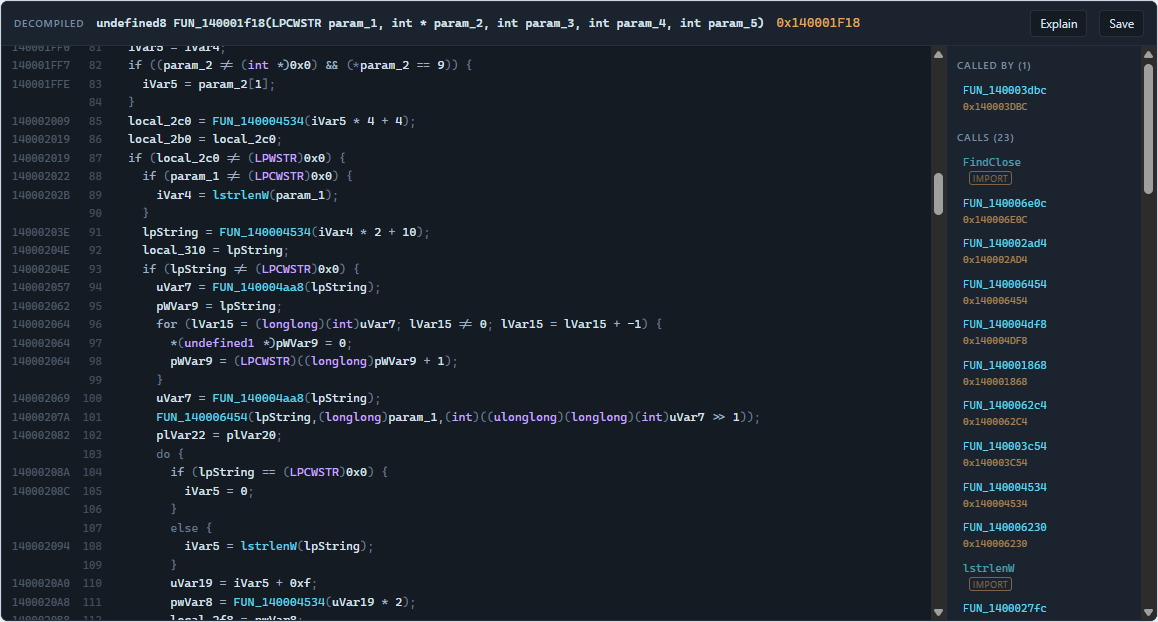
Every Ghidra MCP server so far returns text. The model can read it; you cannot
navigate it. GhidraLens returns the same analysis as an interactive view —
built on MCP Apps
(io.modelcontextprotocol/ui), the extension that lets a server ship real HTML
into the conversation.
You and the model are looking at the same live program. Rename a variable by clicking it and the model's next decompile sees the new name.
That is a real screenshot: where.exe, decompiled by Ghidra, every identifier
carrying the address it came from.
What you get
| View | What it does |
|---|---|
| Decompiler | Ghidra's C output as a live token stream — every identifier carries its address and its kind. Click a local to rename it, click a call to follow it. Callers, callees and variables in a sidebar. |
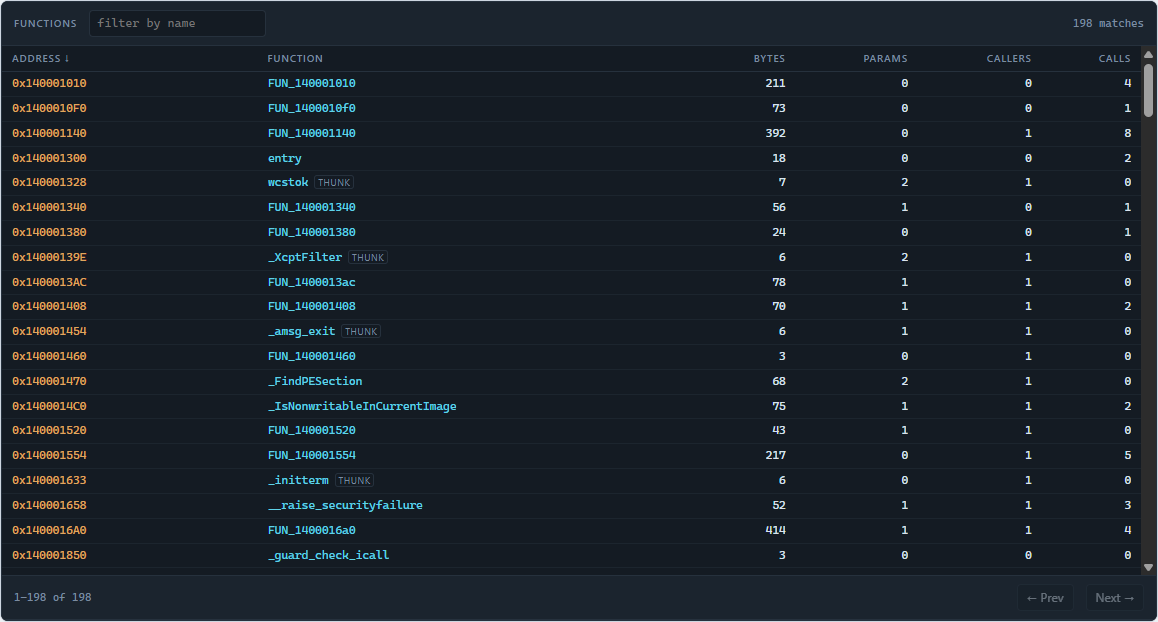
| Function browser | Every function in the binary, filterable and sortable by address, name, size or caller count. Click a row to decompile it. |
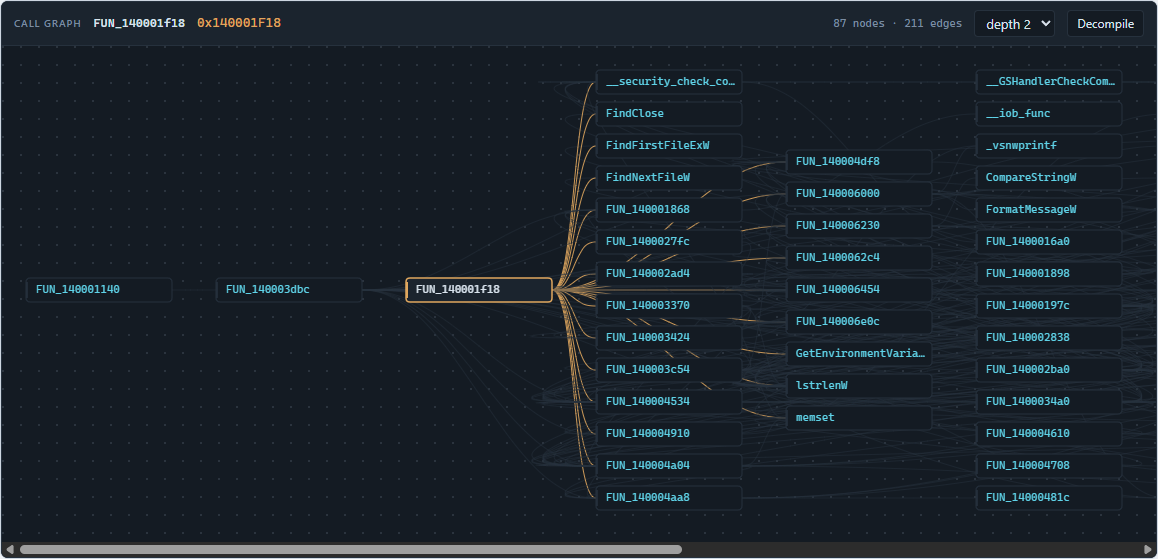
| Call graph | Callers to the left, callees to the right, the function you asked about in the middle. Click any node to recenter. |
Function browser
Call graph
Ten tools total. Three open views; the rest are lookups and writes, including two the model never sees — they exist only so a click in a view can fire them.
How it fits together
  MCP client  ──stdio──▶  server/  ──HTTP──▶  bridge/  ──JPype──▶  Ghidra (JVM)
  (Claude,                 TypeScript         PyGhidra            program stays
   Cursor, …)              MCP server         session             resident
       ▲
       │  ui:// HTML in a sandboxed iframe
       └──  ui/  three self-contained views
The bridge is a separate long-lived process on purpose. Ghidra's auto-analysis is the expensive step, and it happens once. Measured on a 64 KB Windows system utility (198 functions):
| First open, with analysis | 25 s |
| Re-open the same binary | 0.3 s |
| Decompile one 2 KB function | 0.4 s |
| 87-node call graph | < 0.1 s |
Restart the MCP server or the client and the analysed program is still there.
Setup
Prerequisites: Ghidra 11.3+, a JDK 21+, Python 3.9–3.13 (not 3.14 —
JPype has no wheel for it yet), Node 20+. See
bridge/setup.py.md — the Python side is fussy and that file
covers every way it goes wrong. GhidraLens finds a JDK for you if JAVA_HOME is
unset, which covers the usual "installed Java, shell has not restarted" case.
git clone https://github.com/hellosverre/ghidralens
cd ghidralens
npm install
npm run build
Then start the bridge on the binary you want to look at:
python bridge/serve.py --binary /path/to/target.exe
It prints a token. Put that, and the path to the built server, into your MCP client config:
{
  "mcpServers": {
    "ghidralens": {
      "command": "npx",
      "args": ["-y", "ghidralens"],
      "env": {
        "GHIDRALENS_BRIDGE_URL": "http://127.0.0.1:8799",
        "GHIDRALENS_TOKEN": "paste-the-printed-token-here"
      }
    }
  }
}
Running from a clone instead? Point command at node and args at
/absolute/path/to/ghidralens/server/dist/index.js.
Then ask your client: "decompile the function that handles license validation".
Also listed in the official MCP Registry as io.github.hellosverre/ghidralens.
Editing the config by hand? Quit the client first — properly, including any system-tray icon. Claude Desktop keeps its own copy of
claude_desktop_config.jsonin memory and writes it back over yours when it exits, so an edit made while it is running silently disappears on the next restart. Editing through Settings → Developer → Edit Config avoids the race entirely.
Tools
| Tool | Visible to | Renders |
|---|---|---|
open_binary | model | — |
program_info | model | — |
decompile | model + view | Decompiler |
list_functions | model + view | Function browser |
call_graph | model + view | Call graph |
find_strings | model | — |
xrefs_to | model + view | — |
rename_symbol | model + view | — |
add_comment | view only | — |
save_program | model | — |
add_comment is hidden from the model deliberately. Visibility is how MCP Apps
separates "the agent may do this" from "a click may do this"; keeping write
tools out of the model's list keeps it short and stops the model from renaming
things on its own initiative.
Renames and comments live in memory until save_program writes them into the
Ghidra project — after which they show up in the Ghidra GUI like any other edit.
Developing the views without Ghidra
npm run dev:ui
# open http://localhost:5173/dev/harness.html
ui/dev/harness.ts is a real MCP Apps host — it runs the SDK's AppBridge
against the view in an iframe, so the ui/initialize handshake, the opening
ui/notifications/tool-result, and every tools/call a click fires all go over
real postMessage JSON-RPC. There is a message trace down the right-hand side and
a host-theme switch, because the views have to look right in both.
Two data sources, switchable in the toolbar:
- fixtures — no Ghidra needed, nothing to install
- live bridge — proxies to a running bridge, so you develop against a real analysed program
Use live before you trust anything. Fixtures are tidy; real output is a 400-line function with 56 locals and an 87-node call graph, and that is where layout actually breaks.
Running it on a local model
Reverse engineering is exactly the work people would rather not send to a hosted
model, so agent/ollama-agent.mjs is a small MCP host that puts GhidraLens
behind Ollama instead. No API key, nothing leaves the
machine.
OLLAMA_MODEL=qwen3:14b node agent/ollama-agent.mjs "what does this binary do?"
It respects _meta.ui.visibility, so the app-only tools stay hidden from the
model — the same separation a graphical client enforces. A ~9B model is enough to
orient itself with find_strings and list_functions; a 14B is noticeably
better at reading decompiled C.
Tests
| Suite | Needs Ghidra | Covers |
|---|---|---|
node server/smoke.mjs | no | MCP surface: tools, ui:// resources, tool visibility, graceful failure with no bridge |
python bridge/test_serve.py | no | Bridge auth, CSRF rejection, routing, input validation |
python bridge/test_session.py | yes | Every Ghidra call: analysis, caching, decompiler tokens, imports, renames, writes |
node server/live.mjs | yes (bridge running) | The whole chain, and that every payload matches the shape the views index into |
The first two are what CI can run. test_session.py is the one that matters
after touching bridge/session.py — it is the only thing that proves the Ghidra
API calls are right, and it caught three real bugs the day it was written.
Containerising it
The Dockerfile builds the server and views for clients or registries that want
to start it themselves. One thing to get right:
CMD ["node", "server/dist/index.js"]     # correct
CMD ["npm", "run", "start"]              # breaks the protocol
A stdio MCP server speaks JSON-RPC on stdout, and npm run / pnpm run print
the script banner there first:
> ghidralens@0.1.1 start
> node server/dist/index.js
Those lines land in the stream ahead of the handshake and the client gives up mid-initialize. The symptom is unhelpful - the container builds, starts, exits cleanly, and the client just reports no tools - so it is worth not stepping on. Invoke node directly.
Real analysis still needs the bridge on the host: 127.0.0.1 inside a container
is the container, so point GHIDRALENS_BRIDGE_URL at host.docker.internal or
a real address.
Security
The bridge binds 127.0.0.1 only, requires a per-run token in
X-GhidraLens-Token, and rejects any request carrying an Origin or Referer
header — so a page open in your browser cannot reach your decompiler. It has no
multi-user model and is not meant to be exposed; --host refuses anything but
loopback.
Analysing a binary does not execute it, but Ghidra will happily open malware. Use the same isolation you would use for any other RE work.
Licence
MIT.
Reviews
No reviews yet
Be the first to review this server!
More Developer Tools MCP Servers
Git
Freeby Modelcontextprotocol · Developer Tools
Read, search, and manipulate Git repositories programmatically
Fetch
Freeby Modelcontextprotocol · Developer Tools
Web content fetching and conversion for efficient LLM usage
Worldmonitor
Freeby Koala73 · Developer Tools
Live markets, conflicts, country risk, chokepoints, energy, and China decision signals. 93 tools.
Paperclip
Freeby Paperclipai · Developer Tools
Trending hip-hop artist momentum scores across four cultural dimensions.
Toleno
Freeby Toleno · Developer Tools
Toleno Network MCP Server — Manage your Toleno mining account with Claude AI using natural language.
mcp-creator-python
Freeby mcp-marketplace · Developer Tools
Create, build, and publish Python MCP servers to PyPI — conversationally.