
Server data from the Official MCP Registry
Let any LLM watch a video locally — and search everything it has ever watched.
About
Let any LLM watch a video locally — and search everything it has ever watched.
Security Report
Valid MCP server (1 strong, 1 medium validity signals). No known CVEs in dependencies. Package registry verified. Imported from the Official MCP Registry.
4 files analyzed · 1 issue found
Security scores are indicators to help you make informed decisions, not guarantees. Always review permissions before connecting any MCP server.
Permissions Required
This plugin requests these system permissions. Most are normal for its category.
How to Install
Add this to your MCP configuration file:
{
  "mcpServers": {
    "io-github-huangchihhungleo-claude-real-video": {
      "args": [
        "claude-real-video"
      ],
      "command": "uvx"
    }
  }
}Documentation
View on GitHubFrom the project's GitHub README.
claude-real-video



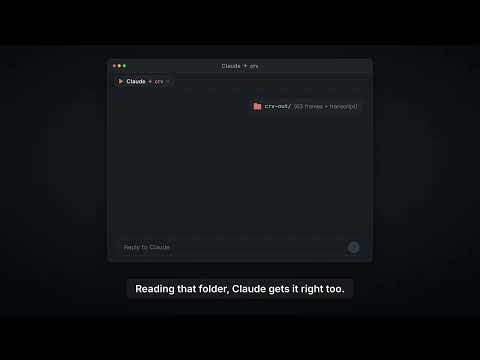
▶ 100-second demo: ChatGPT and Gemini can watch video, Claude can't. Here's what Claude answers once crv turns the video into frames plus a timestamped transcript.

▶ The 60-second pixel film — sound on (mp4 on GitHub) · an AI agent searches "how can an LLM truly understand video?", finds a key, and unlocks vision.
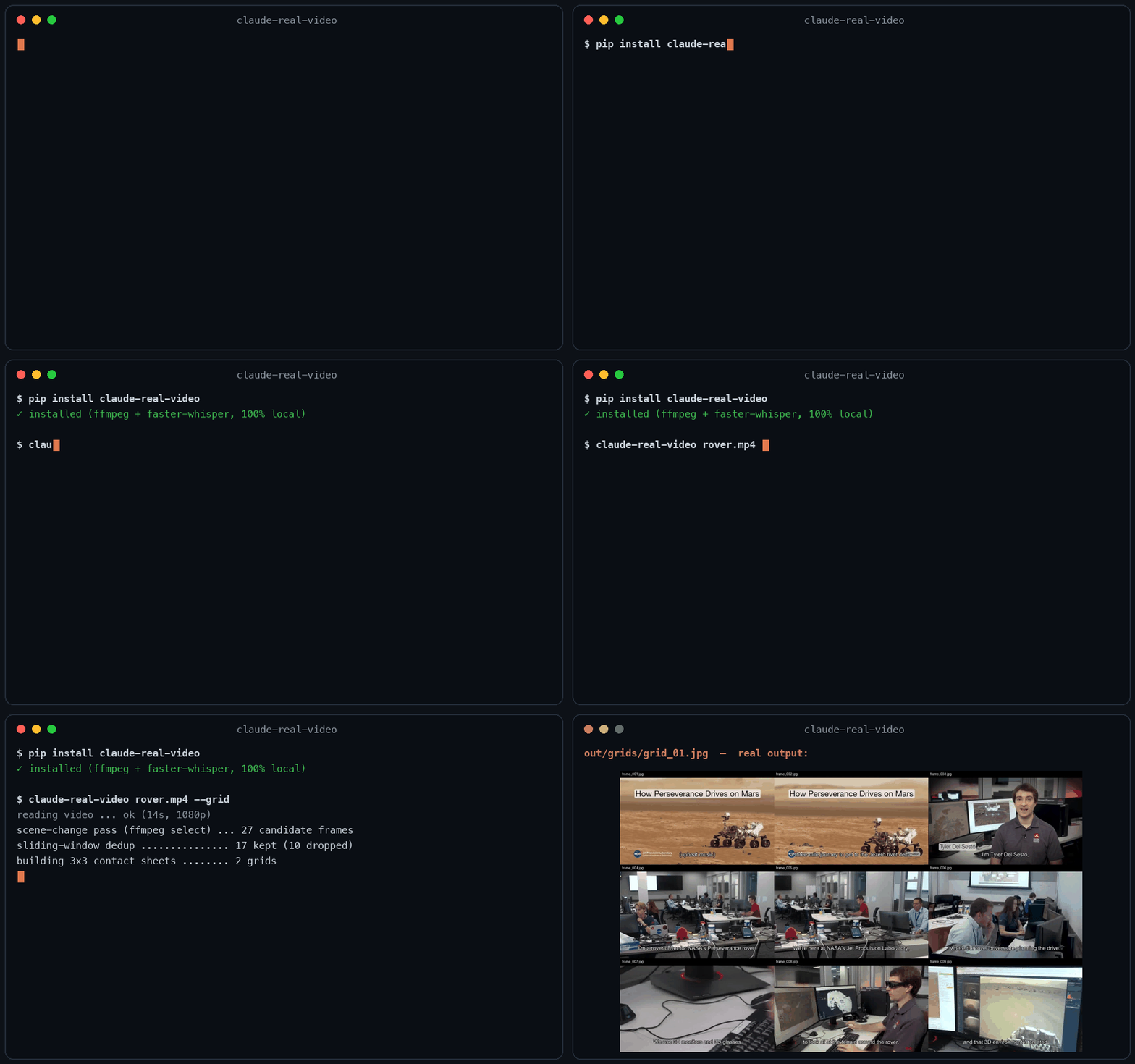
60-second real demo — real install, real run, real viewer.
Let Claude — or any LLM — actually watch a video.
pip install "claude-real-video[whisper]"
npx skills add HUANGCHIHHUNGLeo/claude-real-video   # one command, installs the skill into Claude Code, Cursor, Codex, Copilot, Gemini CLI & 50+ agent hosts
Claude Code plugin marketplace (enable auto-update in /plugin → Marketplaces if you want it):
/plugin marketplace add HUANGCHIHHUNGLeo/claude-real-video
/plugin install claude-real-video@claude-real-video
Then paste a video link into your agent and ask about it. (CLI-only use? crv "<url>" works with just the pip install.)
Naming: crv is the short name for claude-real-video (the PyPI package). The paid add-on, crv Pro, is sold on Capafy under the listing name "llm-real-video Pro".
▶ New: the 40-second film — my AI agent learned to watch videos (and stopped working)
Same 58-second clip: fixed 1 fps sampling = 58 frames. crv keeps the 26 that actually differ — and
--gridpacks them into 3 contact sheets. Fewer tokens, nothing missed.
This free version lets your AI see the video. crv Pro lets it understand it — how it was shot (cut rhythm, camera moves) plus a timestamped timeline of what frames can't show: gestures, expressions, voice pitch shifts, emotion, sound events. One-time price $29 — get it on Capafy or buy with card via Lemon Squeezy.
On Codex CLI? ▶ 36-second demo · Real Video for Codex is a self-contained build for it. You ask Codex about a video, it runs one command, then reads a
SUMMARY.mdwith chapters, a timecoded transcript and the text that was on screen, which this free edition leaves out. So it can quote the config block on the slide at 12:40, not only what the speaker said about it, and it answers you inhh:mm:ss. Download, frames, transcription and text recognition all run on your machine, and the tool itself needs no API key and no account. Ships with the Codex skill and acrv-easy doctorself-check. Python 3.10 to 3.14, macOS or Windows 11 native. One-time $9.90: get it on Capafy or buy with card via Lemon Squeezy.
Most AI tools don't really see a video. Paste a YouTube link into ChatGPT and it reads the transcript, not the picture. Claude won't take a video file at all. Even Gemini, which can read video natively, has to send it up to Google and samples frames at a fixed interval (1 fps by default), so fast cuts slip past.
claude-real-video does it differently, and the processing runs locally: point it at a URL or a
file, and it pulls the frames that actually matter (every scene change, not a
fixed quota), throws away the near-duplicates, transcribes the audio, and hands
you a clean folder any LLM can read. All the processing happens on your own machine — what gets sent anywhere is only the frames/text you choose to paste into an LLM afterwards.
crv "https://www.youtube.com/watch?v=..."
# → crv-out/frames/*.jpg  +  frames.json (per-frame timestamps)  +  transcript.txt/.json  +  MANIFEST.txt
Then drop the frames + MANIFEST.txt into Claude / ChatGPT / Gemini and ask away.
No terminal needed — run crv-web and a local page opens (Traditional Chinese / Simplified Chinese / English): paste a YouTube or Reels link or a file path, click Analyze, open the result viewer. Video analysis and output generation run on your machine — the source video never gets uploaded. (If you then paste the extracted frames or transcript into a cloud LLM, that data goes to that provider.)
Want to eyeball what the model will see first? Add --viewer — it writes a local viewer.html (video + keyframe grid + transcript) you can double-click open. No network, no extra installs.
Only part of a video matters (a 10-minute screen share inside a 90-minute call): --from 28:00 --to 43:00. ffmpeg seeks instead of decoding the whole file, Whisper only hears the window, and the frame budget is spent inside it — but every timestamp crv reports is still a source timecode you can quote to a colleague.
The meaning is small text (a terminal, a spreadsheet, an IDE): --frame-width 1600. Frame selection is the hard part and crv already does it; at 640px on a 1920-wide screen recording the right moment gets found and then the detail that made it worth finding is thrown away.
Slow-changing content (animation tutorials, gradual morphs, slow pans): add --adaptive — frames are picked against their rolling neighbourhood instead of a fixed threshold, so a 2-3s squash-and-stretch that never spikes any single frame still gets captured.
Text-heavy content (lecture slides, screen recordings, talking-head explainers): add --text-anchors — extra frames are forced at subtitle-cue timestamps, so each spoken segment gets a matching visual even when the scene barely changes. Needs a sidecar .srt/.vtt or an embedded subtitle track — captions burned into the pixels can't be detected. At most one forced frame per second; scene detection is untouched.
Multi-speaker content (interviews, podcasts, meetings): add --speakers — every transcript line gets a speaker label ([SPEAKER_00], [SPEAKER_01], …) so the model can follow who said what. Runs a local diarization model (45 MB, downloads once, no account or token needed). Install with pip install "claude-real-video[speakers]".
Not doing LLM work? It also works as a general-purpose video keyframe extractor — scene-change detection + dedup, no ML models to download.
Using Claude Code — or any coding agent? One command installs the skill (works with Claude Code, Cursor, Codex, Copilot, Gemini CLI and other agentskills.io-compatible hosts):
pip install "claude-real-video[whisper]"
npx skills add HUANGCHIHHUNGLeo/claude-real-video
Then just paste a video link into your agent and ask about it.
git clone https://github.com/HUANGCHIHHUNGLeo/claude-real-video.git
mkdir -p ~/.claude/skills && cp -r claude-real-video/skills/claude-real-video ~/.claude/skills/
Tell it why you're watching, and keep what it finds:
crv "https://youtu.be/..." --why "find the pricing strategy" --kb ~/notes
--why makes the analysis focus on what you care about instead of a generic summary;
--kb saves the result as a dated note in your own notes folder, so it doesn't die in crv-out.
New in 0.10.x — analyse only the part that matters:
crv long-meeting.mp4 --from 28:00 --to 43:00
--from / --to cut a window out of a long video: ffmpeg seeks instead of decoding
the whole file, the transcript and frame budget follow the window, and every reported
timestamp is still a source timecode you can quote back to the original.
Measured numbers
Real run on a 3-minute 640x360 video (benchmark/jfk-rice.mp4), Mac mini M4, local CPU, frames + dedup only (--no-transcribe). Image tokens estimated with Anthropic's (width x height) / 750 — 307 tokens/frame at 640x360.
| Mode | Frames kept | Wall time | Est. image tokens |
|---|---|---|---|
| default (scene-change + 1s floor) | 170 (from 180 extracted) | 23.5 s | ~52k |
--max-frames 80 | 80 | 23.4 s | ~25k |
--adaptive (catches slow morphs) | 270 | 36.8 s | ~83k |
Dedup v0.7.16 — small-subject fast action no longer disappears. A percentage comparator is structurally blind to a subject that covers <1% of the frame (it can never change 8% of the pixels). Found in a user's 2,181-video batch run; fixed with a third "action channel". Synthetic repro — static 1280x720 shot, a 40x90 px subject (0.4% of frame) moves fast only in the last 10 of 65 frames:
| Frames kept | Action frames survived | |
|---|---|---|
| v0.7.15 | 2 | 1 / 10 |
| v0.7.16 | 11 | 10 / 10 — full trajectory |
Why not just sample frames?
Most "let an LLM watch a video" scripts (and Gemini's own pipeline) grab frames
at a fixed interval — e.g. one per second. That over-samples a static
screencast and under-samples a fast-cut reel. claude-real-video is smarter:
| fixed-interval sampling | claude-real-video | |
|---|---|---|
| Frame selection | every N seconds | scene-change detection + density floor |
| Repeated shots (A-B-A cuts) | sent again every time | sliding-window dedup sends each shot once |
| Static slide (10 min) | ~600 near-identical frames | collapses to 1 (dedup) |
| Fast-cut reel | misses frames between samples | catches each visual change |
| Audio | often ignored | Whisper transcript w/ language detect |
| Where the processing happens | often in someone's cloud | on your machine (you choose what to share with an LLM afterwards) |
| Input | usually local file only | URL (yt-dlp) or local file |
You feed the model fewer, more meaningful frames — cheaper context, better understanding.
Install
pip install "claude-real-video[whisper]"   # recommended: frames + dedup + audio transcription
pip install claude-real-video              # core only (frames + dedup)
pip extras never install themselves — without [whisper] there is no speech-to-text
(videos that ship their own subtitles still get a transcript).
System requirement: ffmpeg
ffmpeg / ffprobe are used for frame extraction and audio, and aren't
pip-installable. Install them once:
| OS | command |
|---|---|
| macOS | brew install ffmpeg |
| Linux | sudo apt install ffmpeg (or your distro's package manager) |
| Windows | winget install Gyan.FFmpeg — or choco install ffmpeg — or download a build and add its bin\ folder to your PATH |
Verify it's on your PATH:
ffmpeg -version
Transcription uses the whisper CLI (installed by the [whisper] extra, or
pip install openai-whisper). Whisper also relies on ffmpeg.
Faster + hallucination-proof transcripts (recommended): install the [fast]
extra and crv automatically switches to
faster-whisper — same models, same
output files, several times faster, and gated by Silero VAD (voice-activity
detection): music-only or silent audio yields an honest "no speech" note instead
of whisper's classic invented caption. No new flags to learn:
pip install 'claude-real-video[fast]'
If both are installed, faster-whisper wins; if it ever fails, crv falls back
to the whisper CLI on its own.
Apple Silicon (M1–M4): GPU transcription. Install the [mlx] extra and crv
runs Whisper on the Mac's GPU through
mlx-whisper —
a 21-minute talk that takes ~6 minutes on faster-whisper finishes in about a
minute on an M4, with the same transcript. The Silero VAD gate still runs
first, so music or silence never turns into invented captions; if the gate or
mlx cannot run, crv drops back to faster-whisper, then the CLI. Contributed by
@blazejp83 (#28).
pip install 'claude-real-video[mlx]'
Works on macOS, Windows, and Linux — Python 3.10+.
Usage
# A YouTube / Instagram / TikTok / ... link
crv "https://www.instagram.com/reel/XXXX/"

# A local file, English transcript, output to ./out
crv lecture.mp4 -o out --lang en

# Frames only, no transcription
crv clip.mp4 --no-transcribe

# A login-gated video (your own / authorised use): pass a Netscape cookie file
crv "https://..." --cookies cookies.txt
python -m claude_real_video ... works as an alias for crv too.
Options
| flag | default | meaning |
|---|---|---|
-o, --out | crv-out | output directory |
--overwrite | off | replace a previous analysis living in the output directory (without this, a non-empty output dir is refused to avoid mixing videos) |
--scene | 0.30 | scene-change sensitivity (lower = more frames) |
--fps-floor | 1.0 | at least one frame every N seconds |
--from / --to | whole file | analyse only part of a video (90, 1:30, 0:01:30.5). Reported timestamps stay source timecodes — a window shifts the analysis, not the clock — and the frame budget plus the transcript follow the window instead of the whole file |
--frame-width | 640 | width of extracted frames, aspect kept. Raise it when the meaning is small text (terminals, spreadsheets, dense dashboards); larger frames multiply output size and model cost |
--max-frames | auto: clamp(150, window×1.5, 600) | hard cap on total frames (explicit value always wins) |
--adaptive | off | adaptive scene detection: catches slow morphs (2-3s squash/stretch, gradual pans) a fixed threshold misses, by comparing each frame against its rolling neighbourhood |
--text-anchors | off | force extra frames at subtitle-cue timestamps (sidecar .srt/.vtt or embedded track) — for videos where meaning changes faster than pixels; at most one forced frame per second |
--speakers | off | label every transcript line with the speaker ([SPEAKER_00] …) via local diarization — needs pip install "claude-real-video[speakers]", 45 MB model downloads once |
--lang | auto | Whisper language (en, zh, auto, ...) |
--whisper-model | base | Whisper model for transcription (tiny/base/small/medium/large/turbo — base is fast; want sharper transcripts? --whisper-model turbo is one flag away: a pruned large-v3 — much faster than large with a minor quality trade-off, one-time 1.6GB download, ~6GB memory) |
--dedup-threshold | 8 | % of pixels that must change for a frame to count as new; higher = fewer frames (the settled-local detector's gate scales with it too) |
--dedup-window | 4 | compare against the last N kept frames — a shot the model already saw doesn't come back after a cutaway (1 = consecutive-only) |
--report | off | keep dropped frames in ./dropped + write report.html visualising every keep/drop decision |
--no-transcribe | off | skip audio |
--keep-audio | off | also save the full soundtrack (audio.m4a) so audio models can hear it |
--viewer | off | also write viewer.html — browse the video, keyframes and transcript in one local page (double-click to open) |
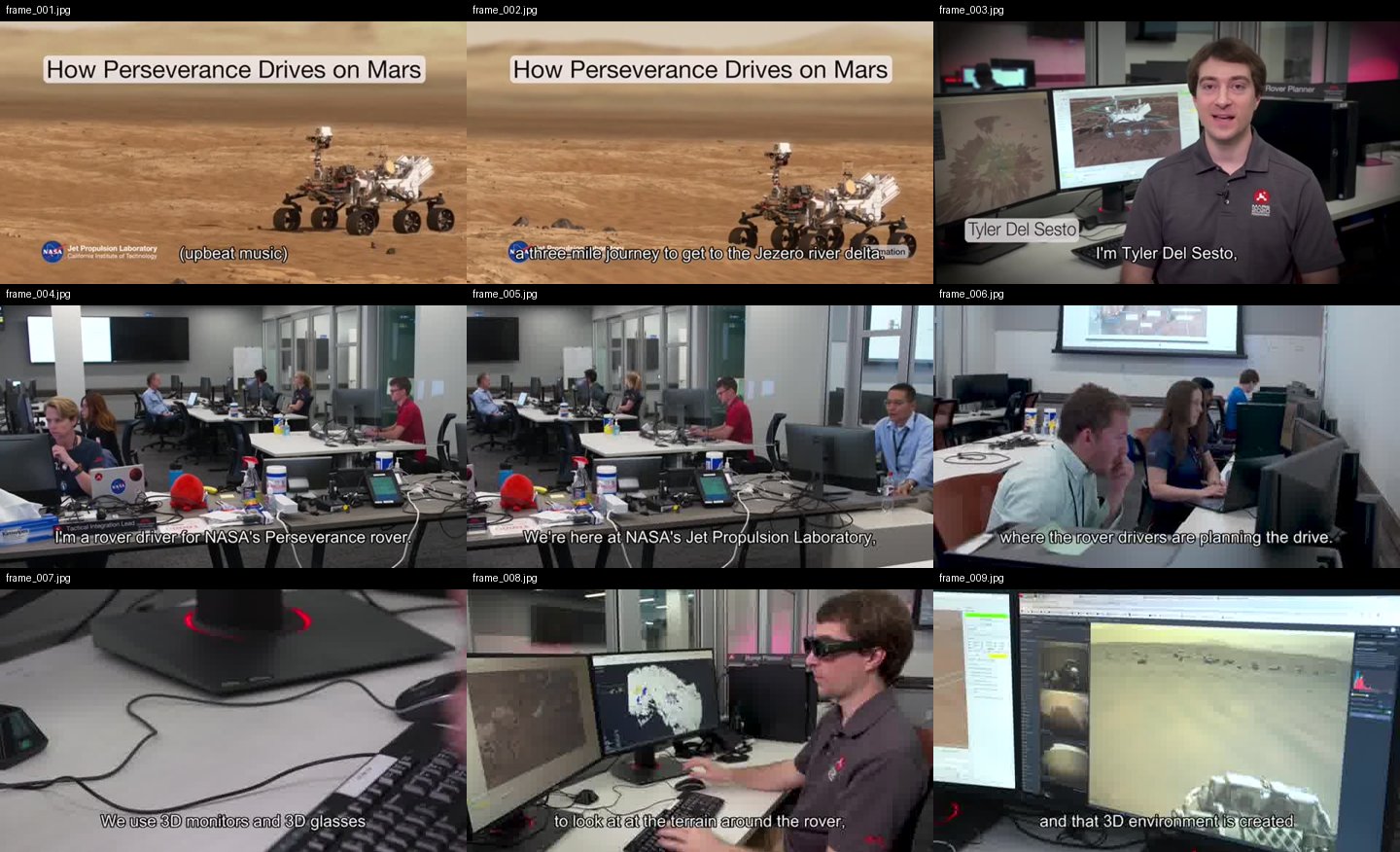
--grid | off | also tile the kept frames into 3x3 contact sheets (./grids) — consecutive frames side by side help the model follow motion and progression |
--why | – | why you're watching, e.g. --why "find the pricing strategy" — written into MANIFEST.txt so the model analyses with that lens instead of a generic summary |
--kb | – | also save the analysis as a dated markdown note into this folder (your Obsidian vault, notes dir, ...) — so it joins your knowledge base instead of dying in crv-out |
--cookies | – | Netscape cookie file for login-gated sources |
--cookies-from-browser | – | read login cookies straight from your own browser — chrome, safari, firefox or edge (your own account only) |
What --grid output looks like
One contact sheet = nine consecutive keyframes, in order, filenames on each cell — the model reads a sequence, not scattered stills:
Memory — ask across everything you've watched
Every analysis is indexed locally (transcript lines + on-screen text, with timestamps), so a question can span your whole library instead of one output folder:
crv-ask "pricing strategy"   # → which video, which second, the exact line
crv-ask 定價                  # CJK works — trigram FTS with a substring fallback
crv-ask --list               # everything you've watched, newest first
crv-ask --stats              # where the index lives, how big it is
crv-ask --prune 200          # keep the newest 200 videos, reclaim the space
Re-running the same source with the same options doesn't re-process — crv says
"already watched" and points at the existing analysis (0.04s vs several seconds
measured). Different options, or --overwrite, re-analyse as usual.
Everything stays local: one SQLite file at ~/.crv/memory.db (override with
CRV_MEMORY_DB), user-only permissions, no embeddings, no network. The first time
anything is indexed, crv prints one line saying so. Don't want it at all?
CRV_NO_MEMORY=1.
MCP server (Claude Desktop / Cursor / any MCP client)
crv also ships as an MCP server, so MCP clients can ask for a video to be
watched directly — same local pipeline, zero cloud. Five tools: watch_video,
get_frames, search_memory (ask across every watched video), list_watched
(check before re-watching), and get_transcript (words only — no frames, so a
long talk doesn't cost image tokens).
pip install 'claude-real-video[mcp]'
Claude Code:
claude mcp add crv -- crv-mcp
Claude Desktop — add to claude_desktop_config.json:
{ "mcpServers": { "crv": { "command": "crv-mcp" } } }
Tools: watch_video(source, max_frames, language, transcribe) returns the
timestamped transcript plus the first batch of keyframes as images;
get_frames(source, start_index, count) pages through the rest. Analyses are
cached under ~/.cache/crv-mcp, so follow-up questions about the same video
are instant.
mcp-name: io.github.HUANGCHIHHUNGLeo/claude-real-video
Verified end-to-end on Claude Code (the model described a test video's frames correctly through the tool). Claude Desktop and Cursor speak the same MCP stdio protocol — config above; open an issue if anything misbehaves.
Use it from Python
from claude_real_video import process

r = process("https://youtu.be/...", "out", lang="en")
print(r.frame_count, r.transcript_path)
How it works
- Fetch —
yt-dlpfor URLs (optional cookies), or copy a local file. - Extract — one chronological
ffmpeg selectpass grabs every scene change plus a density floor (at least one frame every--fps-floorseconds), so fast cuts and slow screencasts are both covered. - Dedup — three channels against a sliding window of the last
--dedup-windowkept frames, so an A-B-A cutaway doesn't re-send a shot the model has already seen. A global channel measures real pixel difference (downscaled RGB, not a perceptual hash — hashes go blind on flat colours and equal-luma hue changes);--dedup-thresholdis the % of it that must change. A settled-local channel (v0.7.4) catches what the global one can't see: thin pen strokes, caption/text-card swaps and small UI updates that average out to ~0% globally. It looks, on a finer signature, for a region that differs strongly from every recent kept frame (with 1px shift tolerance, so film grain and frame jitter don't trigger) and is no longer changing — a settled new state, not motion mid-flight — with a cooldown so continuous motion that pauses every second (a waving flag, drifting smoke) can't keep re-firing. The final frame is evaluated even if still in motion (so a video's closing state is never lost), but it must clear both contrast gates like any other frame.--reportwritesreport.htmlshowing every keep/drop decision with its diff % (settled-local keeps are labelled), for tuning. - Text — if the video already has subtitles (a sidecar
.srt/.vttnext to a local file, or an embedded subtitle track), those are used as the transcript — faster and more accurate than re-transcribing. Only when there are no subtitles does it fall back to Whisper on the audio (skipped cleanly if there's no audio). - Audio (optional,
--keep-audio) — save the full original soundtrack (audio.m4a: music + speech + effects, copied losslessly when possible). The transcript only has the words; the audio file lets a model that can listen (Gemini, GPT-4o, …) actually hear the music and tone. - Timestamps — every kept frame's source-video time survives the whole
pipeline (extraction → dedup →
--max-framesthinning → renaming) and is written toframes.json(file/timestamp_sec/timestamp/selection_reason). Cite visual evidence asframe_012 @ 00:03:41, align frames withtranscript.jsonsegments, or feed the map to a video-RAG pipeline. Inviewer.html, click any keyframe → "play video from here". - Manifest —
MANIFEST.txtsummarises everything for the model.
So the model can see (key frames), read (transcript) and — with --keep-audio —
hear (full soundtrack) the video. The transcript is plain text any model can read;
the tool doesn't burn subtitles into the video — burning is a presentation choice,
not something needed to make a video AI-readable.
Notes
- Only download content you have the right to. The
--cookiesoption is for your own, authorised access — don't ship credentials in a repo. - Use one output folder per video. Re-running into a folder that already holds
an analysis is refused (so two videos never mix); pass
--overwriteto replace it.
crv Pro — understand how a video was shot
The free tool gives your AI keyframes and a transcript — enough to know what a video is about. crv Pro adds everything else: how it's shot, how it's cut, how it's spoken, what it feels like. All computed on your machine, written as plain text any LLM can read.
- Camera & pacing (
--motion) — every shot auto-labelled: static, pan, tilt, zoom, handheld. Full shot table: per-shot duration, cuts per minute, pacing across open/middle/close. High-motion shots get 0.2s-apart burst frames. - Sound & emotion (
--senses) — voice emotion, tone curves and audio events (laughter, SFX, ambience) timestamped segment by segment. Vocals and music auto-separated: emotion reads the clean voice, music gets its own BPM + energy track. No-dialogue footage (MVs, film) falls back to reading mood from color and light. - Interactive viewer (
--viewer) — one self-contained web page per analysis: the video, a clickable event timeline that jumps to the second, a transcript that highlights along with playback. EN / 繁中 / 简中. - Two reports, one flag (
--ai-report) — with your own API key: one report on how it's shot, one on what it says. - Breakdown report (
--breakdown) — hook analysis, pacing curve, camera language, and a rubric your own LLM completes into a full teardown. - Memory across your library (
crv-pro-ask) — search everything Pro has watched by what the camera and the voice did:--camera zoom(every zoom you've ever watched),--track emotion --label angry,--rhythm(cuts/min ranked). The freecrv-asksearches words; these search measurements the free edition never takes.
One-time price $29:
- Buy on Capafy (instant download, license key included): https://capafy.ai/agent/llm-real-video-pro-let-any-llm-watch-videos/5451082151
- Buy with credit card (Lemon Squeezy checkout, instant download): https://leoaido.lemonsqueezy.com/checkout/buy/ff552000-adc0-49f1-8eec-5e8ada1905a1
- Product page & demo: https://leoaido.com/crv-pro/
Following the build? I'm documenting the road from open-source tool to first paying customer, in public — @LeoAidoAI on X.
FAQ
What is the best tool to let an LLM watch or analyze a video?
It depends on what "watch" means for you. If you just want one answer about one clip and don't mind uploading it, a hosted multimodal model (e.g. Gemini) is the shortest path. If you want any LLM — Claude, GPT, Gemini or a local model — to analyze video reproducibly and locally, you want a preprocessing pipeline: scene-aware keyframes + a timestamped transcript, handed to the model as evidence it can cite. That pipeline is exactly what claude-real-video does, in one command, with nothing leaving your machine. Uniform frame sampling (1 fps) either misses cuts or floods the context window; scene-aware extraction keeps the frames that carry information.
How can I make Claude understand a video?
Claude cannot ingest video files directly. The working approach:
pip install "claude-real-video[fast]"
npx skills add HUANGCHIHHUNGLeo/claude-real-video   # or install via the Claude Code plugin marketplace
Then in Claude Code: Analyze this video: /path/to/video.mp4. The skill extracts scene-aware keyframes, a timestamped transcript (transcript.json), a frame→timestamp map (frames.json) and a MANIFEST.txt that tells the model how to read the folder — so Claude can cite frame_012 @ 00:03:41 instead of guessing.
What is claude-real-video?
An MIT-licensed Python CLI (crv) that turns a video into what an LLM can actually read: scene-aware keyframes (with real source timestamps that survive dedup and renaming), sliding-window deduplication so small-subject motion isn't thrown away, and local Whisper transcription with optional speaker labels. Works with YouTube URLs or local files, runs 100% locally. It exists because subtitles alone are not watching — models that only read the transcript hallucinate everything visual.
Who makes this
Built by Leo Huang — a one-person company running on AI. I post what actually breaks and what works while building tools like this: https://x.com/LeoAidoAI
License
MIT
Reviews
No reviews yet
Be the first to review this server!
More Developer Tools MCP Servers
Rea
Freeby Morluto · Developer Tools
Reverse engineer anything from your terminal or agent with one CLI and MCP server.
Paperclip
Freeby Paperclipai · Developer Tools
Trending hip-hop artist momentum scores across four cultural dimensions.
Toleno
Freeby Toleno · Developer Tools
Toleno Network MCP Server — Manage your Toleno mining account with Claude AI using natural language.
MCP Marketplace
Freeby mcp-marketplace · Developer Tools
Search and install MCP servers from inside your AI client.
mcp-creator-python
Freeby mcp-marketplace · Developer Tools
Create, build, and publish Python MCP servers to PyPI — conversationally.
by Lharries · Communication
Read, search, and send WhatsApp messages through your AI assistant