
Server data from the Official MCP Registry
Unicode text styling and ASCII art generation with 23 styles and 322+ figlet fonts
About
Unicode text styling and ASCII art generation with 23 styles and 322+ figlet fonts
Remote endpoints: sse: https://humanjesse.github.io/textarttools-mcp/sse
Security Report
Valid MCP server (1 strong, 1 medium validity signals). No known CVEs in dependencies. Imported from the Official MCP Registry. Trust signals: trusted author (3/3 approved).
4 files analyzed · No issues found
Security scores are indicators to help you make informed decisions, not guarantees. Always review permissions before connecting any MCP server.
How to Connect
Remote Plugin
No local installation needed. Your AI client connects to the remote endpoint directly.
Add this to your MCP configuration to connect:
{
  "mcpServers": {
    "io-github-humanjesse-textarttools-mcp": {
      "url": "https://humanjesse.github.io/textarttools-mcp/sse"
    }
  }
}Documentation
View on GitHubFrom the project's GitHub README.
TextArtTools MCP Server



🌐 Live Server: https://mcp.textarttools.com
Transform text with Unicode styles and create ASCII art banners. A production-ready Model Context Protocol (MCP) server deployed globally on Cloudflare Workers.
📺 Demo
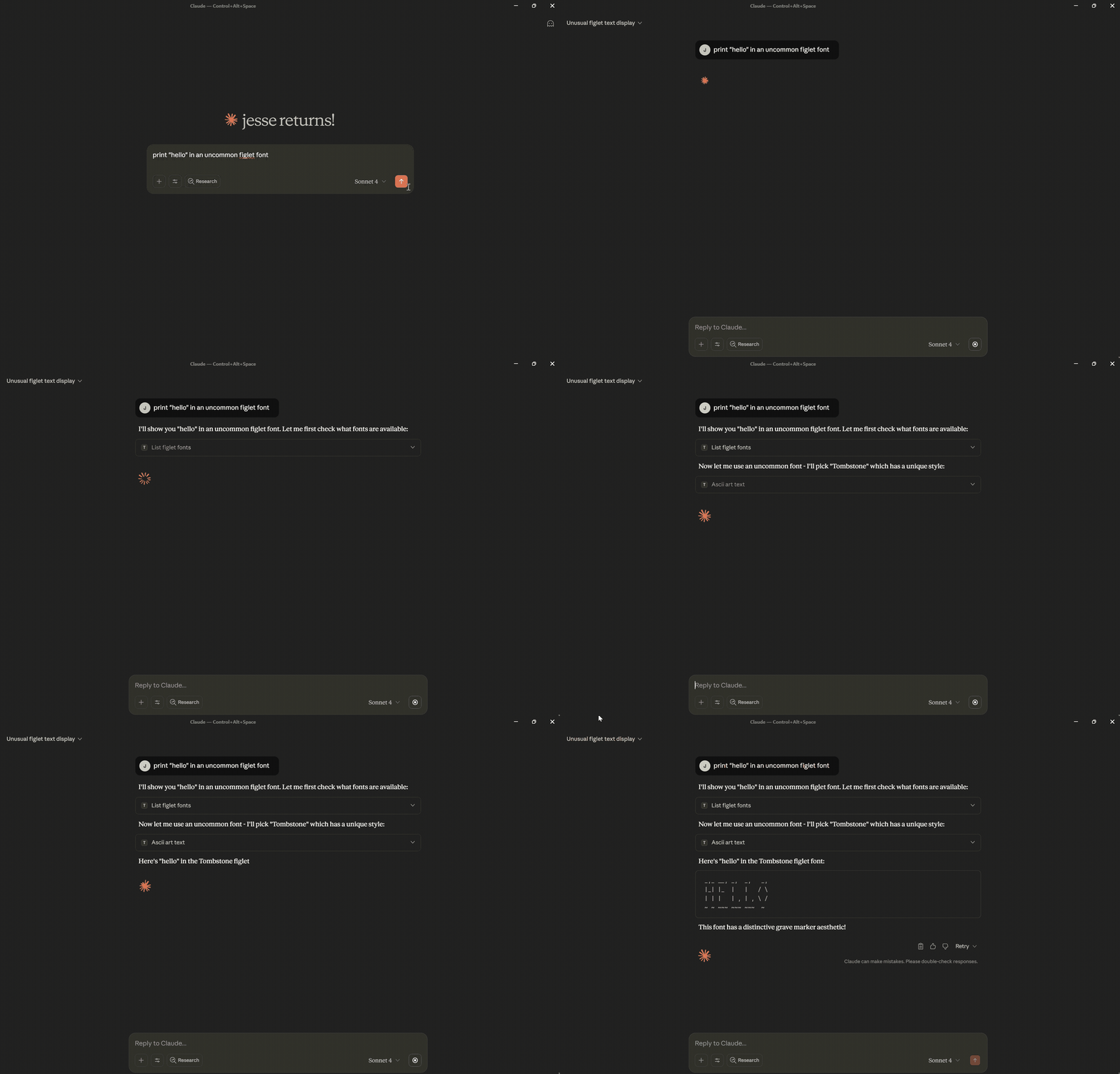
✨ Features
- 23 Unicode Text Styles - Transform text to 𝗯𝗼𝗹𝗱, 𝘪𝘵𝘢𝘭𝘪𝘤, 𝒸𝓊𝓇𝓈𝒾𝓋𝓮, 𝔣𝔯𝔞𝔨𝔱𝔲𝔯, and more
- 322+ ASCII Art Fonts - Create stylized text banners for headers and decorations
- No Authentication - Public server ready to use immediately
- Global Performance - Deployed on Cloudflare Workers edge network
- Rate Limited - 100 requests per minute with burst protection
- Secure - Input validation, XSS prevention, and comprehensive security headers
🚀 Quick Start
Install with Claude Desktop
-
Install the MCP remote proxy:
npm install -g @anthropic/mcp-remote -
Add to your Claude Desktop config (
claude_desktop_config.json):{ "mcpServers": { "textarttools": { "command": "mcp-server", "args": ["https://mcp.textarttools.com/sse"] } } } -
Restart Claude Desktop and start using text styling tools!
💡 Example Usage
Try the live API directly:
# Transform text to bold Unicode style
curl -X POST https://mcp.textarttools.com/sse \
  -H "Content-Type: application/json" \
  -d '{
    "jsonrpc": "2.0",
    "id": 1,
    "method": "tools/call",
    "params": {
      "name": "unicode_style_text",
      "arguments": {
        "text": "Hello World",
        "style": "bold"
      }
    }
  }'

# Create ASCII art banner
curl -X POST https://mcp.textarttools.com/sse \
  -H "Content-Type: application/json" \
  -d '{
    "jsonrpc": "2.0",
    "id": 2,
    "method": "tools/call",
    "params": {
      "name": "ascii_art_text",
      "arguments": {
        "text": "Hello",
        "font": "Big"
      }
    }
  }'
🛠️ Available Tools
The server provides 7 MCP tools:
Unicode Text Styling:
unicode_style_text- Transform text with any of 23 Unicode styleslist_available_styles- Get all available styles with examplespreview_styles- Preview text in multiple stylesget_style_info- Get detailed style information and compatibility
ASCII Art Banners:
ascii_art_text- Generate stylized text banners with 322+ fontslist_figlet_fonts- Get all available fonts from R2 storagepreview_figlet_fonts- Preview text in multiple fonts
Visit https://mcp.textarttools.com/ for complete API documentation.
🏗️ Local Development
Want to run your own instance or contribute?
# Clone the repository
git clone https://github.com/humanjesse/textarttools-mcp.git
cd textarttools-mcp

# Install dependencies
npm install

# Create local environment file
cp .dev.vars.example .dev.vars
# Edit .dev.vars with your development values

# Start development server
npm run dev

# Test locally (server runs at http://localhost:8788)
curl -X POST http://localhost:8788/sse \
  -H "Content-Type: application/json" \
  -d '{"jsonrpc":"2.0","id":1,"method":"tools/list"}'
Development Commands
npm run dev        # Start development server
npm run build      # Build for production
npm run deploy     # Deploy to Cloudflare Workers (requires auth)
npm run lint       # Check code quality
npm run typecheck  # Validate TypeScript
📖 Documentation
- Live Server: https://mcp.textarttools.com
- API Documentation: https://mcp.textarttools.com/ (AI-friendly)
- Health Check: https://mcp.textarttools.com/health
- MCP Protocol: Model Context Protocol Spec
🤝 Contributing
Contributions are welcome! Please see CONTRIBUTING.md for guidelines.
📝 License
MIT License - see LICENSE file for details.
Built with Model Context Protocol • Deployed on Cloudflare Workers
Reviews
No reviews yet
Be the first to review this server!
More Developer Tools MCP Servers
Rea
Freeby Morluto · Developer Tools
Reverse engineer anything from your terminal or agent with one CLI and MCP server.
Paperclip
Freeby Paperclipai · Developer Tools
Trending hip-hop artist momentum scores across four cultural dimensions.
Scrapling
Freeby D4Vinci · Developer Tools
Web scraping with stealth HTTP, real browsers, and Cloudflare bypass. CSS selectors supported.
Toleno
Freeby Toleno · Developer Tools
Toleno Network MCP Server — Manage your Toleno mining account with Claude AI using natural language.
MCP Marketplace
Freeby mcp-marketplace · Developer Tools
Search and install MCP servers from inside your AI client.
mcp-creator-python
Freeby mcp-marketplace · Developer Tools
Create, build, and publish Python MCP servers to PyPI — conversationally.