
Server data from the Official MCP Registry
Shared app-testing runbook: read the plan, record results per platform, raise and fix issues.
About
Shared app-testing runbook: read the plan, record results per platform, raise and fix issues.
Remote endpoints: streamable-http: https://qarunbook.com/api/mcp
Security Report
Valid MCP server (1 strong, 1 medium validity signals). No known CVEs in dependencies. Imported from the Official MCP Registry.
Endpoint verified · Requires authentication · 1 issue found
Security scores are indicators to help you make informed decisions, not guarantees. Always review permissions before connecting any MCP server.
Permissions Found in Source Code
Found by scanning the linked source code. This listing connects to a hosted endpoint, so none of this runs on your machine: it describes what the server software does where it is hosted.
What You'll Need
Set these up before or after installing:
How to Connect
Remote Plugin
No local installation needed. Your AI client connects to the remote endpoint directly.
Add this to your MCP configuration to connect:
{
  "mcpServers": {
    "io-github-ifeanyiejindu-qarunbook": {
      "url": "https://qarunbook.com/api/mcp"
    }
  }
}Documentation
View on GitHubFrom the project's GitHub README.
qarunbook
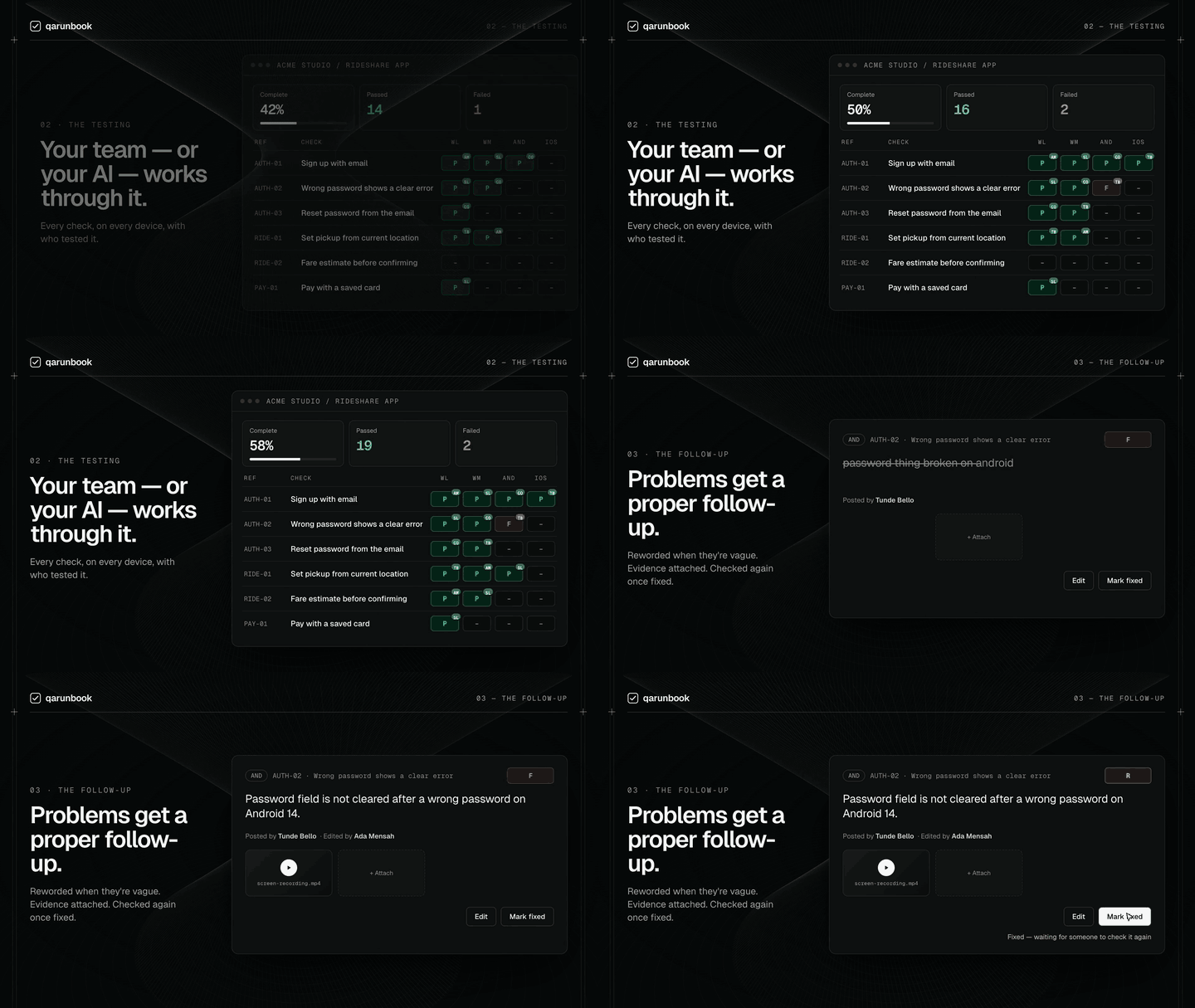
Work out what needs testing, then actually get it tested.
Most teams know they should test before a release. What stops them is not discipline — it is that nobody wants to sit down and write out three hundred things to check, and once somebody has, there is nowhere sensible to record what happened to each one.
qarunbook does both halves:
- Itemise. Point an AI assistant at your codebase and it works out every module, feature and user journey worth testing, across each platform you ship on, and writes them as checks a non-technical person can follow. Or write them yourself, or upload a plan you already have.
- Test and track. Testers work top to bottom, marking each check passed or failed and raising what breaks. You can see how far along the release is at any moment, and what is in the way.
It is built for user acceptance testing — the pass a human makes over a real build before it ships. Not unit tests, not CI. The kind of testing where somebody opens the app, signs up, and tries to actually use it.
https://qarunbook.com — free to use.
Why an MCP server
Because the loop usually breaks at the hand-off. A tester finds a bug, writes it in a spreadsheet or a WhatsApp message, and it is now somebody's job to read that, understand it, fix it, and remember to tell the tester it is done.
qarunbook exposes the runbook over MCP, so your coding assistant is on the other end of that loop directly:
list_issues            what did the testers actually find (and what they attached)
list_checks failing    what is broken right now
edit_issue             that report was vague — here is what actually happens
resolve_issue          I fixed it
Testers can attach screenshots, screen recordings and logs to an issue in the web app. Videos stream straight in the page, so a bug is something you watch rather than something you read about.
When an issue is marked fixed, the check does not silently go back to passing. It reads R — retest, because the person who last passed it was looking at a build without the fix in it. It clears when somebody actually looks again. Status is derived from marks and issues rather than stored, so the runbook can never quietly disagree with itself.
Install
Pick your assistant. For Claude Code, Cursor and Codex the repo is a plugin marketplace, so one install brings the MCP connection and both skills; the only thing you add by hand is your token, from your qarunbook home page under Connect your AI. The token is yours, not the workspace's. It acts as you, with your role, and removing you revokes exactly it.
Claude Code
/plugin marketplace add Ifeanyiejindu/qarunbook
/plugin install qarunbook@qarunbook
(or from a terminal: claude plugin marketplace add Ifeanyiejindu/qarunbook then
claude plugin install qarunbook@qarunbook)
Then set your token:
export QARUNBOOK_TOKEN="qarb_…"
Cursor
Cursor installs plugins, not loose skill folders, so the repo carries a
.cursor-plugin marketplace manifest. In Cursor:
- Open Customize in the sidebar and choose From GitHub Repository (or Plugins → Add Marketplace).
- Paste
https://github.com/Ifeanyiejindu/qarunbook. - Install qarunbook.
- Under Plugins → Configure, set
QARUNBOOK_TOKENto your token.
That is the whole install: the qa-runbook MCP server and both skills arrive
together.
Codex
The repo is also a Codex plugin marketplace (.agents/plugins/marketplace.json).
In the shell that launches Codex:
export QARUNBOOK_TOKEN="qarb_…"
codex plugin marketplace add Ifeanyiejindu/qarunbook
Then inside Codex run /plugins, find qarunbook and install it. Codex reads
the token from the environment when it connects and sends it as a bearer token.
Update later with codex plugin marketplace upgrade.
Other agents — Gemini CLI, OpenCode, Cline, …
Two parts: the skills, and the MCP connection.
Anything that reads SKILL.md files can take the skills with the
skills CLI:
npx skills add Ifeanyiejindu/qarunbook --global
Update them later with npx skills update -g. Then connect the MCP server by
hand: it is a Streamable HTTP server at https://qarunbook.com/api/mcp,
authenticated with Authorization: Bearer <your token>.
Connecting without the plugin
If you only want the MCP connection — no skills — add the server directly.
Claude Code:
claude mcp add qa-runbook --transport http https://qarunbook.com/api/mcp \
  --header "Authorization: Bearer qarb_…"
Codex — ~/.codex/config.toml:
[mcp_servers.qa-runbook]
url = "https://qarunbook.com/api/mcp"
bearer_token_env_var = "QARUNBOOK_TOKEN"
Cursor — ~/.cursor/mcp.json:
{
  "mcpServers": {
    "qa-runbook": {
      "url": "https://qarunbook.com/api/mcp",
      "headers": { "Authorization": "Bearer qarb_…" }
    }
  }
}
Updates
Claude Code: open /plugin, choose Marketplaces, select qarunbook, and
turn on auto-update — Claude Code checks when it starts. Or by hand:
/plugin marketplace update qarunbook
/plugin update qarunbook@qarunbook
/reload-plugins
Cursor updates marketplace plugins from its Plugins panel. Codex:
codex plugin marketplace upgrade.
Layout, for the curious
One plugin directory, plugins/qarunbook/, read three ways:
| tool | manifest | MCP config |
|---|---|---|
| Claude Code | .claude-plugin/plugin.json | inline in the manifest |
| Cursor | .cursor-plugin/plugin.json | mcp.json (token from the plugin variable) |
| Codex | .codex-plugin/plugin.json | .codex-plugin/mcp.json (bearer_token_env_var) |
The skills themselves live once, in plugins/qarunbook/skills/, and follow the
Agent Skills format, so any agent that reads
SKILL.md can use them unchanged.
The two skills
/test-checklist | Reads the app's code and works out what is worth testing — every module, feature and journey, on each platform it ships on. Writes them as steps a non-technical tester can follow, and creates the app in your runbook with the checks already in it. |
/qa-runbook | Runs the testing. Establishes what is under test, creates real accounts, drives web and mobile, records each result with evidence, and verifies fixes. |
Neither is required. You can write the plan by hand, upload a markdown file, or add checks one at a time — the skills just make the tedious part fast.
Working with other people
A workspace holds your apps. People join it and get a role:
- tester — record results, raise issues
- admin — the above, plus edit the plan, import, resolve issues, invite
- owner — the above, plus manage owners and the workspace
Roles are enforced on the web app and on the MCP tools alike — a tester's token cannot edit the plan.
You can also choose which apps somebody sees: all of them, or the ones you pick. Someone brought in to test one product does not get a list of everything else you are working on.
Everyone gets their own MCP token, so an assistant acting through it acts as that person — its writes carry their name, and removing them revokes exactly their access.
The tools
Read: list_apps · progress · list_checks · get_check · list_issues
Write: set_result · add_issue · edit_issue · resolve_issue · update_check ·
add_check · add_section · create_app · import_plan
import_plan takes a whole markdown test plan and builds the app from it in
one call, which is how a real runbook gets in — a plan runs to hundreds of
checks and adding them one at a time is not the way.
Self-hosting
The server is a small Next.js app over MongoDB. Set QA_MONGO_URI and
QA_SESSION_SECRET, deploy, and point QARUNBOOK_URL at your own instance.
Email (invitations, password reset) is optional — without a provider
configured, accounts verify themselves rather than locking anyone out.
Licence
MIT — see LICENSE. The hosted service at qarunbook.com is free while it is new.
Status
In use, and moving. Free while it is new. If something is broken or missing, open an issue.
Reviews
No reviews yet
Be the first to review this server!
More Developer Tools MCP Servers
Git
Freeby Modelcontextprotocol · Developer Tools
Read, search, and manipulate Git repositories programmatically
Fetch
Freeby Modelcontextprotocol · Developer Tools
Web content fetching and conversion for efficient LLM usage
Worldmonitor
Freeby Koala73 · Developer Tools
Live markets, conflicts, country risk, chokepoints, energy, and China decision signals. 89 tools.
Paperclip
Freeby Paperclipai · Developer Tools
Trending hip-hop artist momentum scores across four cultural dimensions.
Toleno
Freeby Toleno · Developer Tools
Toleno Network MCP Server — Manage your Toleno mining account with Claude AI using natural language.
mcp-creator-python
Freeby mcp-marketplace · Developer Tools
Create, build, and publish Python MCP servers to PyPI — conversationally.