
Server data from the Official MCP Registry
Hands your real, logged-in browser to your agent: an AI side panel extension, also over MCP.
About
Hands your real, logged-in browser to your agent: an AI side panel extension, also over MCP.
Security Report
Valid MCP server (1 strong, 1 medium validity signals). No known CVEs in dependencies. Package registry verified. Imported from the Official MCP Registry.
9 files analyzed · 1 issue found
Security scores are indicators to help you make informed decisions, not guarantees. Always review permissions before connecting any MCP server.
Permissions Required
This plugin requests these system permissions. Most are normal for its category.
How to Install
Add this to your MCP configuration file:
{
  "mcpServers": {
    "io-github-imshaikot-browsentic": {
      "args": [
        "-y",
        "browsentic"
      ],
      "command": "npx"
    }
  }
}Documentation
View on GitHubFrom the project's GitHub README.
https://github.com/user-attachments/assets/e9f146d3-cb14-416e-b8d7-68c4e81cbd0d
Browsentic – a completely integrated agentic browser extension
No account · No auth · No API key · No cloud · No telemetry · Local first
Your real, logged-in browser, driven from an AI side panel by the agent CLI you already have. Also an optional MCP server, so any MCP client can drive the same browser.
Quick Start
Any platform — with Node.js 20 or newer (Windows is experimental):
npx browsentic setup
macOS — one line installs Browsentic.app, which brings Node and everything else:
curl -fsSL https://browsentic.com/install.sh | sh
Windows — one line in PowerShell installs the Windows app, which brings Node and everything else (experimental):
irm https://browsentic.com/install.ps1 | iex
Full install and setup guide, Firefox included: browsentic.com/docs/guide/install
Key Capabilities
How It Works
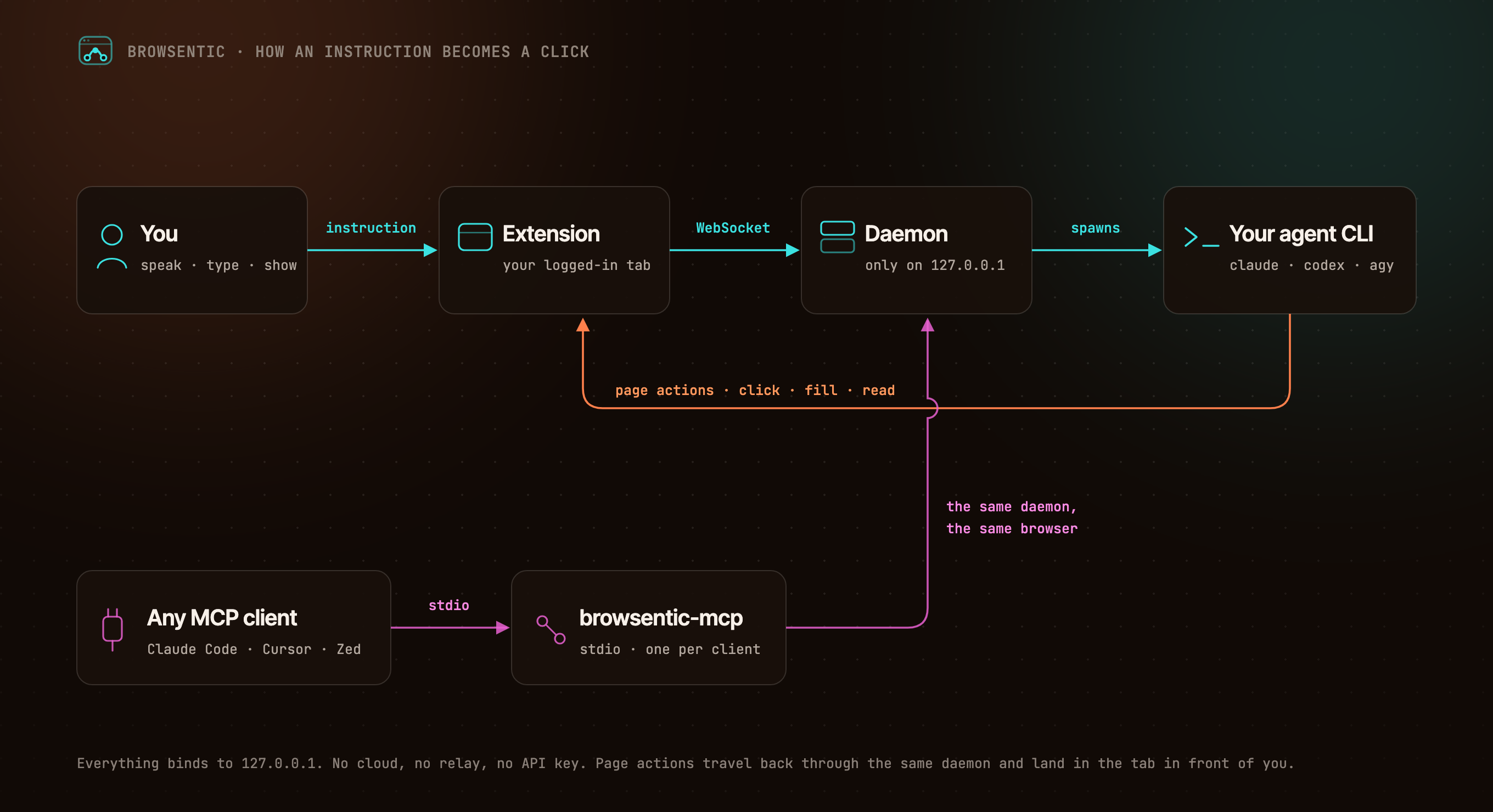
You ──speak or type──> Extension ──local WebSocket──> Daemon ──spawns──> your agent CLI
                            ▲                              (claude │ codex │ agy │ vibe │ grok)
                            └──────────────── page actions ─────────────────────┘

Any MCP client ──stdio──> browsentic mcp ──> the same daemon ──> the same browser
The extension dials out to the daemon, because a Manifest V3 service worker cannot listen for connections. One daemon owns the browser link, so several MCP clients can share one browser. Everything binds to 127.0.0.1.
Resources
- 📚 Documentation
- 🚀 Install and Pair
- ✨ Features
- 🧰 All 52 Page Tools
- 🔌 Optional: Drive It From Claude Code, Cursor or Zed Over MCP
- 🛡️ Approvals and Guardrails
- 🏗️ Architecture
- 🩺 Troubleshooting
Privacy and Security
Nothing connects until you pair, both ends prove themselves, consequential actions ask first, and credentials on a page are sealed before the agent sees them. The full model is in SECURITY.md, and what it does not cover is in Limits.
Contributing
Bugs and ideas are welcome — start at CONTRIBUTING.md.
License
Browsentic is MIT licensed.
- Source Available: Always visible source code
- Local First: No cloud component, no telemetry, no account
- Extensible: Add your own page capabilities, skills and agent runners
What does Browsentic mean?
Short answer: "Browse" + "agentic".
Long answer: Most browser automation asks you to hand the work to a different browser — a headless one, in a container, logged in to nothing. Browsentic is the other way round: the agentic part happens in the browser you are already looking at, with the sessions you are already signed in to. The name is the thesis — browsing, made agentic, where you already browse.
Reviews
No reviews yet
Be the first to review this server!
More Developer Tools MCP Servers
Fetch
Freeby Modelcontextprotocol · Developer Tools
Web content fetching and conversion for efficient LLM usage
Git
Freeby Modelcontextprotocol · Developer Tools
Read, search, and manipulate Git repositories programmatically
Paperclip
Freeby Paperclipai · Developer Tools
Trending hip-hop artist momentum scores across four cultural dimensions.
Toleno
Freeby Toleno · Developer Tools
Toleno Network MCP Server — Manage your Toleno mining account with Claude AI using natural language.
mcp-creator-python
Freeby mcp-marketplace · Developer Tools
Create, build, and publish Python MCP servers to PyPI — conversationally.
MCP Marketplace
Freeby mcp-marketplace · Developer Tools
Search and install MCP servers from inside your AI client.