
Server data from the Official MCP Registry
Goal-driven Playwright browser sessions for LLMs, with full action traces and aria-snapshots.
About
Goal-driven Playwright browser sessions for LLMs, with full action traces and aria-snapshots.
Security Report
A well-structured MCP server for browser automation with Playwright. The codebase is clean, input validation is present via Zod, and permissions align with the stated purpose. The primary concern is the use of `page.evaluate()` for arbitrary JavaScript execution, which is inherent to the tool's design but creates a risk if the LLM passes untrusted code. No authentication is implemented, but this is appropriate for a local development tool that assumes a trusted user context. Supply chain analysis found 3 known vulnerabilities in dependencies (0 critical, 3 high severity). Package verification found 1 issue.
5 files analyzed · 8 issues found
Security scores are indicators to help you make informed decisions, not guarantees. Always review permissions before connecting any MCP server.
Permissions Required
This plugin requests these system permissions. Most are normal for its category.
What You'll Need
Set these up before or after installing:
Environment variable: COWORK_QA_HEADED
Environment variable: COWORK_QA_DATA
How to Install
Add this to your MCP configuration file:
{
  "mcpServers": {
    "io-github-insideos-designs-cowork-qa": {
      "env": {
        "COWORK_QA_DATA": "your-cowork-qa-data-here",
        "COWORK_QA_HEADED": "your-cowork-qa-headed-here"
      },
      "args": [
        "-y",
        "cowork-qa-mcp"
      ],
      "command": "npx"
    }
  }
}Documentation
View on GitHubFrom the project's GitHub README.
cowork-qa-mcp
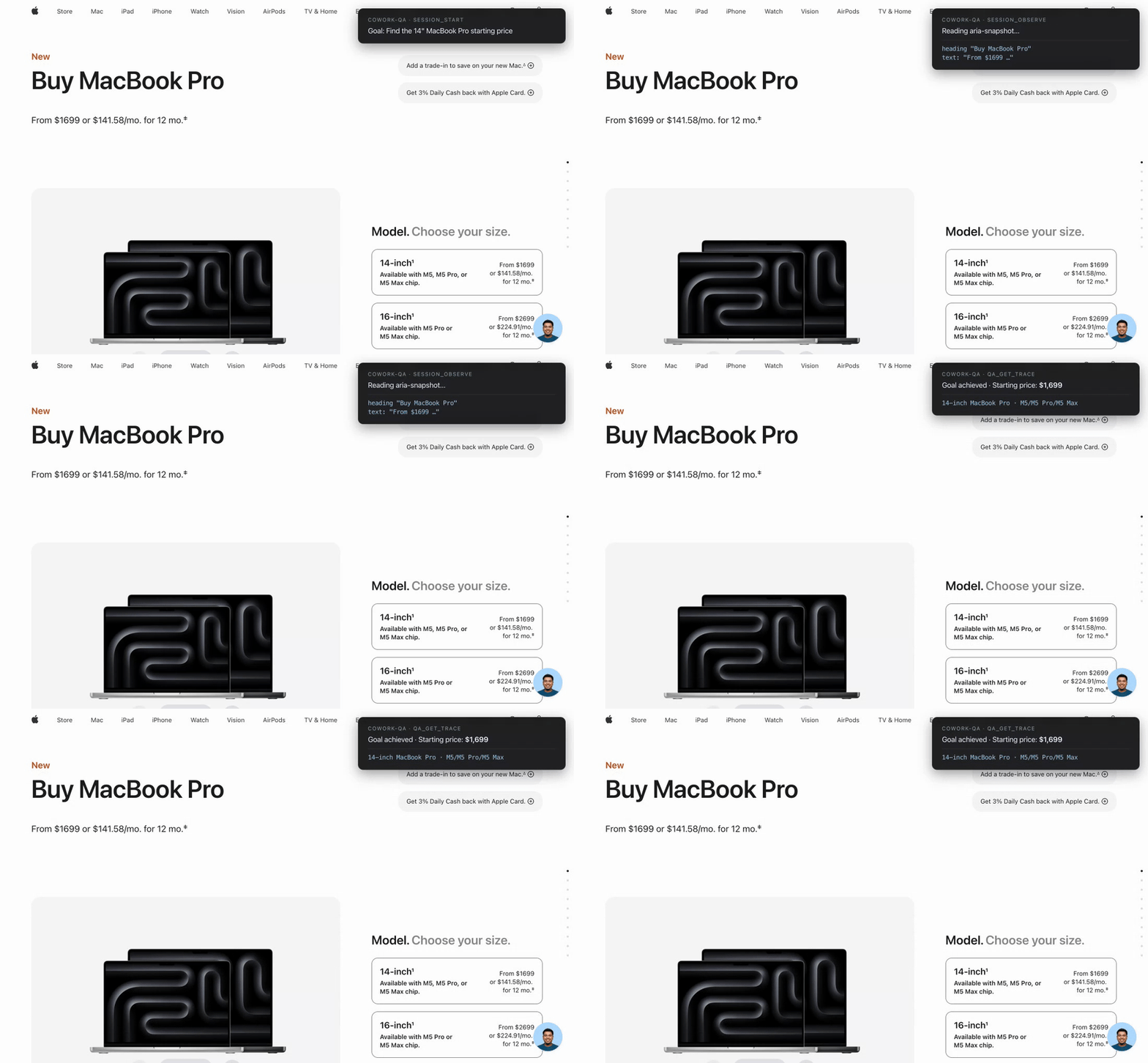
A Model Context Protocol server that gives an LLM a real Chromium browser, records every action it takes toward a stated goal, and hands back a structured trace so the LLM (or a second LLM) can decide whether the goal was actually achieved.
Built on Playwright. Five tools, one binary, no cloud dependency.
Why
Most browser-tool MCP servers are stateless — the LLM clicks, gets HTML back, repeats. There's no record of what happened, no way to grade the run after the fact, and no goal context.
cowork-qa-mcp flips that:
- Every session starts with a goal in plain English.
- Every action (
goto,click,fill,press,eval) is recorded with timestamps, the URL after, and the page's aria-snapshot. - When the session ends, a JSON trace is persisted to disk and exposed via a single
qa_get_tracecall.
The orchestrating LLM can then reason over the trace ("did this run actually fulfill the goal, or did it click the wrong button?") instead of trusting the run-time chatter.
Tools
| Tool | What it does |
|---|---|
session_start | Open a fresh tab, optional starting URL, return a session id |
session_act | Run one of: goto, click, fill, press, eval. Records the step. |
session_observe | Return current URL + full aria-snapshot of the page |
session_end | Close the tab, persist the trace to disk, return the file path |
qa_get_trace | Return the goal, every step, final URL, and final aria-snapshot — formatted for an LLM to read |
Install
Requires Node 20+. The package is on npm — no clone needed.
# Try it once, no install
npx cowork-qa-mcp

# Or install globally
npm install -g cowork-qa-mcp
The first install pulls Chromium via Playwright's postinstall (~150 MB).
Wire into your MCP-compatible client
Claude Code
claude mcp add cowork-qa --scope user -- npx -y cowork-qa-mcp
To watch the browser instead of running headless:
claude mcp add cowork-qa --scope user \
  -e COWORK_QA_HEADED=1 \
  -- npx -y cowork-qa-mcp
Verify with /mcp inside a fresh claude session — you should see cowork-qa ✓ connected and 5 tools.
Claude Desktop
Add to ~/Library/Application Support/Claude/claude_desktop_config.json (macOS) or %APPDATA%\Claude\claude_desktop_config.json (Windows):
{
  "mcpServers": {
    "cowork-qa": {
      "command": "npx",
      "args": ["-y", "cowork-qa-mcp"]
    }
  }
}
Cursor / Windsurf / other MCP clients
Any client that speaks the MCP stdio transport works. Point its server config at npx -y cowork-qa-mcp.
From source (for development)
git clone https://github.com/inSideos-designs/cowork-qa-mcp.git
cd cowork-qa-mcp
npm install
npm run build
node dist/server.js   # stdio server, expects an MCP client
MCP Registry
This server is also published on the official MCP Server Registry as io.github.inSideos-designs/cowork-qa — clients that auto-discover from the registry will find it without any manual config.
Environment variables
| Variable | Default | Purpose |
|---|---|---|
COWORK_QA_HEADED | unset (headless) | Set to 1 to launch Chromium with a visible window |
COWORK_QA_DATA | <cwd>/.cowork-qa | Directory where <session-id>.json traces are written |
Usage example
A typical end-to-end loop the orchestrating LLM runs:
session_start({ goal: "find the cheapest 14\" MacBook Pro on apple.com",
                url: "https://www.apple.com/shop/buy-mac/macbook-pro" })
  → { session_id: "abc-123" }

session_observe({ session_id: "abc-123" })
  → URL + aria-snapshot

session_act({ session_id: "abc-123", action: "click",
              target: "button:has-text('Continue')" })

# ... more acts / observes ...

session_end({ session_id: "abc-123" })
  → { steps: 7, trace_path: "~/.cowork-qa/abc-123.json" }

qa_get_trace({ session_id: "abc-123" })
  → Goal: ...
    Steps (7 total): ...
    Final URL: ...
    Final aria-snapshot: ...
Trace format
Each trace is a JSON file:
{
  "session_id": "abc-123",
  "goal": "...",
  "steps": [
    {
      "t": 142,
      "action": "click",
      "args": { "target": "...", "value": null },
      "url_after": "...",
      "aria_after": "..."
    }
  ],
  "final": { "url": "...", "aria": "..." },
  "path": "/.../abc-123.json"
}
Limitations / known quirks
session_observecalls don't show up in the trace's step count — onlysession_actcalls do. The final aria-snapshot is captured atsession_end.evalruns the JS expression but doesn't return the value to the caller — only side effects on the page are observable.- One Chromium process is shared across all sessions in a server instance; each session gets its own context (cookies, etc. are isolated).
- Selectors are passed straight to Playwright. CSS, text-selectors (
button:has-text("Send")), androle=selectors all work.
License
MIT — see LICENSE.
Contributing
PRs welcome. Keep it small: this is meant to stay a thin, auditable server.
Reviews
No reviews yet
Be the first to review this server!
More Developer Tools MCP Servers
Fetch
Freeby Modelcontextprotocol · Developer Tools
Web content fetching and conversion for efficient LLM usage
Paperclip
Freeby Paperclipai · Developer Tools
Trending hip-hop artist momentum scores across four cultural dimensions.
Netdata
Freeby Netdata · Developer Tools
Real-time infrastructure monitoring with metrics, logs, alerts, and ML-based anomaly detection.
Toleno
Freeby Toleno · Developer Tools
Toleno Network MCP Server — Manage your Toleno mining account with Claude AI using natural language.
mcp-creator-python
Freeby mcp-marketplace · Developer Tools
Create, build, and publish Python MCP servers to PyPI — conversationally.
MCP Marketplace
Freeby mcp-marketplace · Developer Tools
Search and install MCP servers from inside your AI client.