
Server data from the Official MCP Registry
WHOIS domain MCP server that query the WHOIS information using IP2WHOIS API.
About
WHOIS domain MCP server that query the WHOIS information using IP2WHOIS API.
Security Report
Valid MCP server (1 strong, 4 medium validity signals). No known CVEs in dependencies. Imported from the Official MCP Registry. 1 finding(s) downgraded by scanner intelligence.
6 files analyzed · 1 issue found
Security scores are indicators to help you make informed decisions, not guarantees. Always review permissions before connecting any MCP server.
Permissions Required
This plugin requests these system permissions. Most are normal for its category.
What You'll Need
Set these up before or after installing:
Environment variable: IP2WHOIS_API_KEY
How to Install
Add this to your MCP configuration file:
{
  "mcpServers": {
    "io-github-ip2whois-mcp-ip2whois": {
      "env": {
        "IP2WHOIS_API_KEY": "your-ip2whois-api-key-here"
      },
      "args": [
        "mcp-ip2whois"
      ],
      "command": "uvx"
    }
  }
}Documentation
View on GitHubFrom the project's GitHub README.
IP2WHOIS MCP Server

A Model Context Protocol (MCP) server that provides comprehensive WHOIS lookup capabilities using the IP2WHOIS API. This server allows AI agents to query domain registration details, including expiry dates, registrar information, and registrant data. This server also supports query on hosted domains by IP address.
Features
-
Domain Lookup: Retrieve detailed WHOIS data for any domain name.
-
Hosted Domains Lookup: Retrieve hosted domains data for any IP address.
-
Comprehensive Data: Includes domain age, nameservers, registrar info, and administrative/billing contact details.
-
FastMCP Framework: Built using the high-performance FastMCP Python framework.
Requirement
This MCP server requires an API key to work. You can sign up for a free API key and enjoy up to 500 queries per month.
The setup also use uv, which can be install by following the guide.
Setup
Follow the steps to use this MCP server with Claude Desktop:
- Setup the
uvpackage manager, you can once again refer to the guide to do so. - Make sure you have installed the Claude Desktop, if you haven't, kindly download from here for Windows and MacOS users, or follow this guide for Linux user.
- Open the
claude_desktop_config.jsonin your choice of editor, if you do not having one yet, follow this guide to create one. - Add the following to your
claude_desktop_config.json:
{
  "mcpServers": {
    "ip2whois": {
      "command": "uvx",
      "args": ["mcp-ip2whois"],
      "env": {
        "IP2WHOIS_API_KEY": "<YOUR API key HERE>"
      }
    }
  }
}
- To get your API key, just login to your dashboard and get it from there. Replaced the
<YOUR API key HERE>in above with your actual API key. - Restart the Claude Desktop after save the changes, and you should see it appear in the
Search and toolsmenu.
Usage
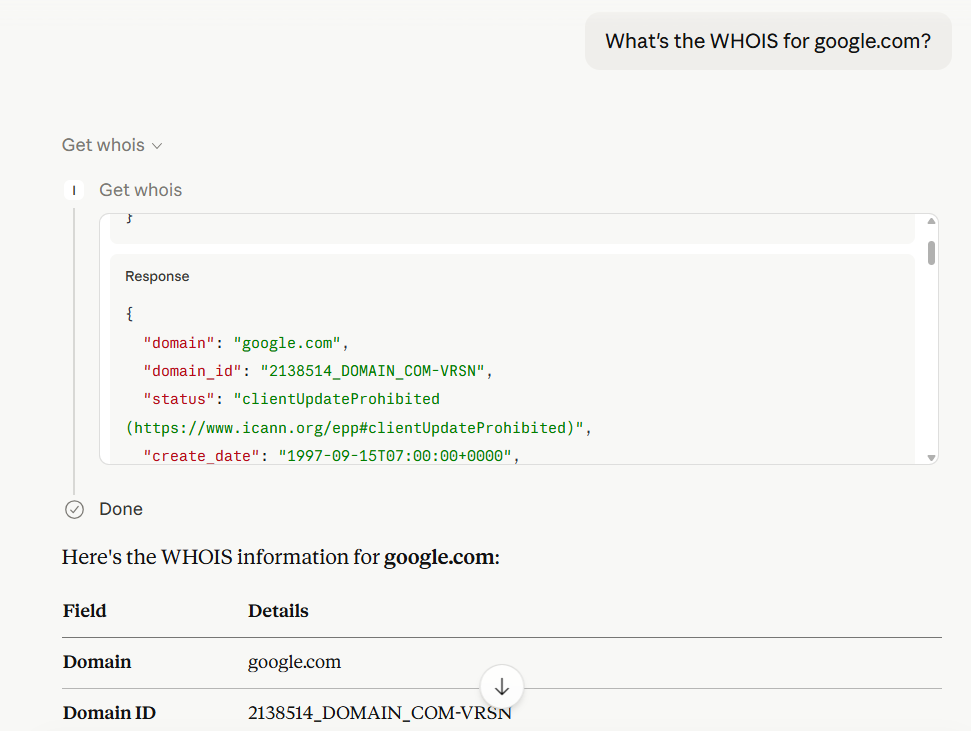
To query the WHOIS information, just enter your query about the domain in a chat in Claude Desktop. Some of the example query will be:
- Who is the registrar of the (domain)?
- Who is the owner of (domain)?
- What is the WHOIS for (domain)?
For instance, below is the result of the domain google.com:
To query for the hosted domains by IP address, just enter your query about the IP in a chat in Claude Desktop. Some of the example query will be:
- What domains did (IP) have?
- What are the domains in (IP)?
- What's the domain owned by (IP)?
In Claude Desktop, the model will automatically generate the output based on the result returned by IP2WHOIS MCP server.
Environment Variable
IP2WHOIS_API_KEY
The IP2WHOIS API key, which allows you to query up to 500 per month for free and more details of the IP address. You can sign up for a free API key, or subscribe to a plan to enjoy more benefits.
Tools
get_whois
Look up WHOIS data for a domain name.
-
Arguments:
domain(string): The domain name to look up (e.g.,google.com).
-
Output: Returns a JSON object containing:
-
domain_id,status,domain_age -
create_date,update_date,expire_date -
registrar(name, url, etc.) -
registrant(name, organization, country) -
nameservers
-
get_hosted_domains
Query for the list of hosted domain names by IP address.
-
Arguments:
ip(string): The IP address (IPv4 or IPv6) to look up.
-
Output: Returns a JSON object containing the domains hosted on the ip address, and the total number of hosted domains found
License
See the LICENSE file.
Reviews
No reviews yet
Be the first to review this server!
More Developer Tools MCP Servers
Git
Freeby Modelcontextprotocol · Developer Tools
Read, search, and manipulate Git repositories programmatically
Fetch
Freeby Modelcontextprotocol · Developer Tools
Web content fetching and conversion for efficient LLM usage
Worldmonitor
Freeby Koala73 · Developer Tools
Live markets, conflicts, country risk, chokepoints, energy, and China decision signals. 89 tools.
Paperclip
Freeby Paperclipai · Developer Tools
Trending hip-hop artist momentum scores across four cultural dimensions.
Toleno
Freeby Toleno · Developer Tools
Toleno Network MCP Server — Manage your Toleno mining account with Claude AI using natural language.
mcp-creator-python
Freeby mcp-marketplace · Developer Tools
Create, build, and publish Python MCP servers to PyPI — conversationally.