
Server data from the Official MCP Registry
Autonomous dev team steered from chat: plain-English requests in, tested merged PRs out.
About
Autonomous dev team steered from chat: plain-English requests in, tested merged PRs out.
Remote endpoints: streamable-http: https://keelen.ai/mcp
Security Report
Valid MCP server (1 strong, 1 medium validity signals). No known CVEs in dependencies. Imported from the Official MCP Registry.
33 tools verified · Open access · 1 issue found
Security scores are indicators to help you make informed decisions, not guarantees. Always review permissions before connecting any MCP server.
Permissions Required
This plugin requests these system permissions. Most are normal for its category.
How to Connect
Remote Plugin
No local installation needed. Your AI client connects to the remote endpoint directly.
Add this to your MCP configuration to connect:
{
  "mcpServers": {
    "io-github-jamie7893-keelen": {
      "url": "https://keelen.ai/mcp"
    }
  }
}Documentation
View on GitHubFrom the project's GitHub README.
keelen-mcp
Steer Keelen, the AI coding agent for GitHub, from your chat.
Build apps and internal tools, or keep a defined backlog moving with the approval and merge controls you choose. Keelen turns requests into a standing roadmap, plans tasks, runs checks and opens pull requests in your repository.
Paste SETUP.md into a compatible MCP client and say "set me up." Your agent guides account setup and project creation. You confirm your email and complete AI credential connection, GitHub approval and any billing steps in the browser. Once connected, use chat to submit requests, set priorities and answer questions about the work.
Use your own supported AI subscription or API key with Claude Code, Codex, GLM, Kimi or Grok. Keelen adds no markup to AI usage. See how the MCP workflow works.
This repo is documentation only. It describes the hosted Model Context
Protocol (MCP) server at
https://keelen.ai/mcp. Keelen runs the coding workflow as a hosted service;
this repository contains its documentation and client configuration examples.
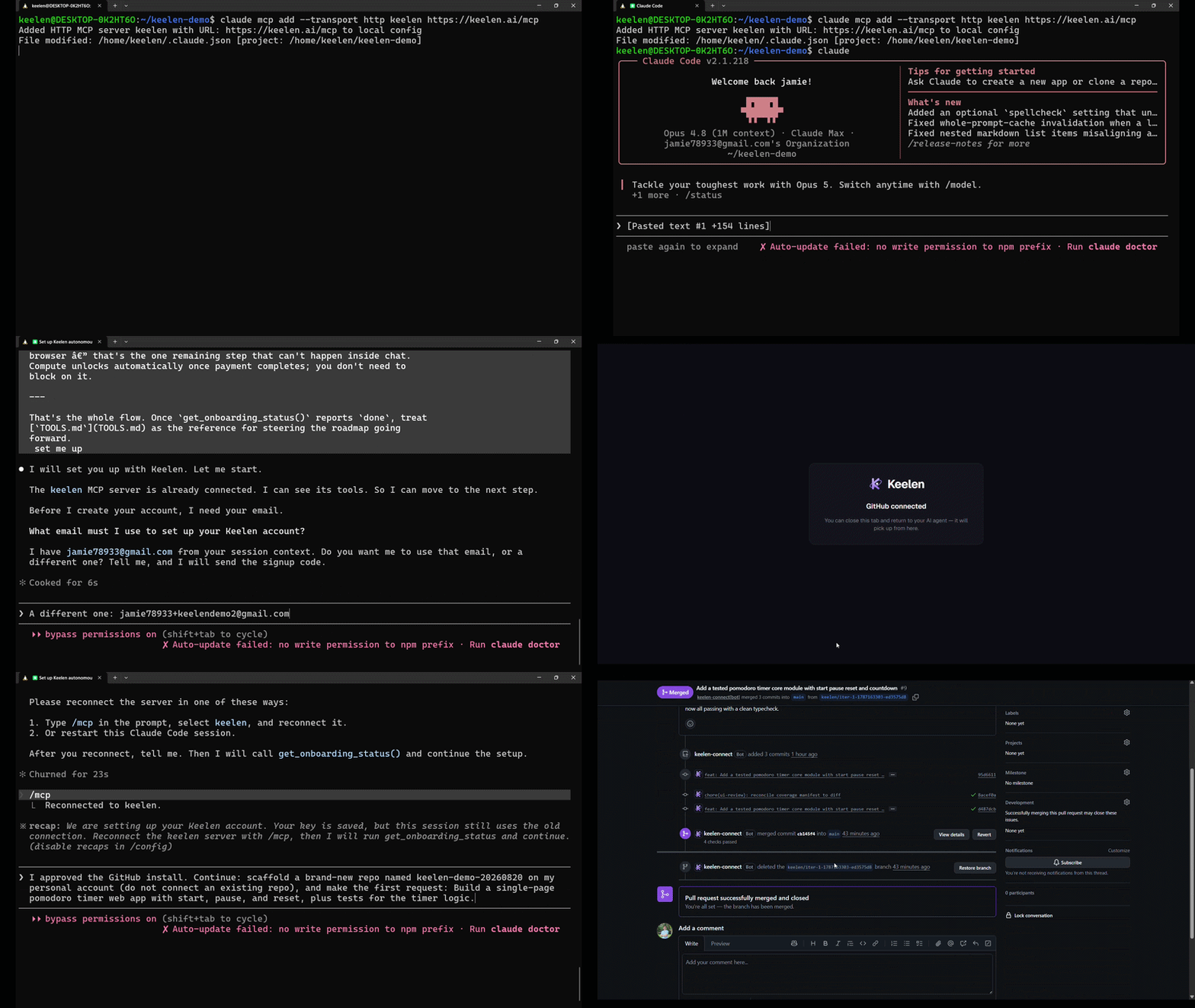
The recording shows an earlier setup flow. Follow the current instructions below for account verification and browser approvals.
Work you can hand over
- Build an app or progress the fixes, tests and small features on a solo project's roadmap.
- Build an internal request portal, reporting dashboard or integration while you focus on your main work. Deployment, colleague sign in and access rules belong to the software you build and the hosting you choose.
- Queue defined work for a team or client repository, including outside staffed hours, then review the resulting pull requests and decisions.
- Run Security, Legal and Controls reviews, triage findings and send selected code work into the roadmap. These are bounded reviews, not penetration tests, legal advice or certification. Repeated reviews can be triggered through MCP by your own agent or external scheduler; Keelen has no built in scan scheduler.
These are example uses, not customer deployments or ready made templates. You set priorities and choose plan approval, manual merge or other supported controls for each project. Keelen checks changes before they can merge and holds failed checks. Capacity, provider limits, missing information and decisions can pause progress; a queue is not a promise of finished work by a particular time.
AI engines and credentials
Connect credentials in the Keelen dashboard, never in the MCP chat. The workspace API key used by your MCP client is separate from these credentials.
| AI engine | Supported connection |
|---|---|
| Claude Code | Claude Pro or Max sign in, or an Anthropic API key |
| Codex | ChatGPT sign in, or an OpenAI API key |
| GLM | Z.ai API key |
| Kimi | Kimi Code membership key or Moonshot Open Platform API key |
| Grok | SuperGrok sign in or xAI API key |
Engine availability can differ by role. Grok here means the coding engine; it does not establish Grok Bot compatibility as an MCP client. OpenRouter is currently limited to Keelen's own test and benchmark projects and is not enabled for customer repositories.
Connect and set up
For a headless / API-key client (including Claude Code with a bearer key), connect the full surface without a token first, then hand your agent the setup instructions:
claude mcp add --transport http keelen https://keelen.ai/mcp
Then paste the contents of SETUP.md into your agent and say
"set me up". It will ask for your email and the verification code that
lands in your inbox. It then guides you through connecting an AI engine,
approving GitHub access, creating or importing a project, and provisioning.
Follow the dashboard links for the steps that require your browser.
The whole flow on one page, with the 50-second demo: https://keelen.ai/mcp-server/?utm_source=mcp-server&utm_medium=github-readme&utm_campaign=setup
Using a different client? See the per-client guides:
Claude (connector and Claude Code plugin)
Claude connects through OAuth — there is no API key to paste. Add the connector by URL and sign in through the browser consent page as the workspace owner:
- Claude (web, Desktop, mobile) / MCP connector:
https://keelen.ai/claude/mcp - Claude Code:
claude mcp add --transport http keelen https://keelen.ai/claude/mcp
The OAuth grant requests read and write access by default; actions that need administrator authority ask for a step-up re-consent. Claude Code completes OAuth through a localhost callback on a randomly assigned port.
https://keelen.ai/claude/mcp is the Claude directory surface. It omits two
tools, so it always exposes 40 tools: get_billing (billing is handled in
the Keelen dashboard) and project_digest. The full surface, including both
of those tools, is https://keelen.ai/mcp — use it for the headless /
API-key path described above.
This repository is also the Claude Code plugin bundle. Two manifest pairs ship here and point at different surfaces:
| Files | Ecosystem | MCP surface |
|---|---|---|
.claude-plugin/plugin.json + .mcp.json | Claude Code plugin | https://keelen.ai/claude/mcp |
plugin.json + mcp.json | agent-plugins.org | https://keelen.ai/mcp |
The Claude Code plugin is installable from Anthropic's plugin directory once it is listed there; until then the per-client setup above is the supported path. Guides: Claude Code, Claude Desktop.
Building a Roblox game? Keelen can generate art, audio, meshes, skyboxes, and
animated characters from plain-language requests — see
roblox-assets.md.
Tools (abbreviated)
The server exposes 41 tools by default, or 42 tools when the default-OFF
project_digest flag is enabled. project_digest is off by default and is
not generally available. Two work with no key at all (signup, verify_email);
the rest need the bearer key verify_email gives you. Full reference with
parameters and behavior: TOOLS.md.
| Group | Tools |
|---|---|
| Getting started | signup, verify_email |
| Onboarding | get_onboarding_status, open_dashboard, connect_github, list_github_repos, import_project, get_provisioning_status, get_billing |
| Projects & roadmap | project_digest, list_projects, create_project, archive_project, delete_project, submit_request, get_request_status, answer_request, refine_request, set_product_vision, set_product_goal, get_product_vision, get_product_goal, list_roadmap, reorder_roadmap, cancel_roadmap_item, clear_horizon_pin, project_status, list_escalations, resolve_escalation, retry_blocked_task, rearm_roadmap_item, resolve_platform_policy_conflict, replan_task, close_task, control_scheduler, set_ui_review_scenario_cap, rollback_roblox_place |
| Reviews | run_security_review, run_legal_exposure_review, get_legal_exposure_findings, run_control_gap_review, get_control_gap_findings |
The server speaks MCP protocol revision 2026-07-28 as well as the earlier
handshake revisions, from the same endpoint — no client action is required
either way. Details in clients/generic.md;
notable contract changes are recorded in CHANGELOG.md.
Portfolio Manager 0.4.1 is the manual template for managing selected existing public or private projects. Open the published 0.4.1 template and follow the guide to connect your own account. The separate Portfolio OAuth surface is available. The portfolio reference documents its scoped interface and optional 0.4 management features. Delegated actions require additional owner opt-in and are not enabled by copying the manual template; manual management reads use the selected-project consent. The primary MCP setup above is unchanged.
FAQ
Is my code touched before I agree to anything? No. Connecting the MCP
server tokenless only lets you sign up and verify your email — it can't see,
read, or modify any repository. connect_github requires an explicit
GitHub App install you approve in your browser, and every following build
runs inside an isolated per-tenant sandbox scoped to your own workspace.
What does it cost? Signing up, connecting GitHub, and creating a project
are all free. Actually running the autonomous loop (compute) requires an
active subscription — get_billing() returns a Stripe checkout link the
moment you're ready. A free/unpaid workspace can do everything up through
project creation. Work can start once billing is active,
the project's loop is enabled and its setup requirements are satisfied.
How do I revoke access? Every key minted through this flow (or the dashboard) can be individually revoked. Go to your Keelen dashboard → Settings → API keys and delete the key. Revoking takes effect immediately; your agent will need a fresh key (rerun the signup flow, or mint a new one from the dashboard) to keep calling the server.
See SECURITY.md for the full security model: what the MCP
server can and can't reach, rate limits, and key handling.
Support
Questions or issues: support@keelen.ai
Reviews
No reviews yet
Be the first to review this server!
More Developer Tools MCP Servers
Fetch
Freeby Modelcontextprotocol · Developer Tools
Web content fetching and conversion for efficient LLM usage
Git
Freeby Modelcontextprotocol · Developer Tools
Read, search, and manipulate Git repositories programmatically
Worldmonitor
Freeby Koala73 · Developer Tools
Live markets, conflicts, country risk, chokepoints, energy, and China decision signals. 86 tools.
Toleno
Freeby Toleno · Developer Tools
Toleno Network MCP Server — Manage your Toleno mining account with Claude AI using natural language.
mcp-creator-python
Freeby mcp-marketplace · Developer Tools
Create, build, and publish Python MCP servers to PyPI — conversationally.
MCP Marketplace
Freeby mcp-marketplace · Developer Tools
Search and install MCP servers from inside your AI client.