
Server data from the Official MCP Registry
A Codex stdio MCP server that generates repo-local tldraw diagrams and detects code graph drift.
About
A Codex stdio MCP server that generates repo-local tldraw diagrams and detects code graph drift.
Security Report
Valid MCP server (2 strong, 1 medium validity signals). No known CVEs in dependencies. Package registry verified. Imported from the Official MCP Registry.
4 files analyzed · 1 issue found
Security scores are indicators to help you make informed decisions, not guarantees. Always review permissions before connecting any MCP server.
Permissions Required
This plugin requests these system permissions. Most are normal for its category.
What You'll Need
Set these up before or after installing:
Environment variable: TLDRAW_MCP_ALLOWED_ROOTS
How to Install
Add this to your MCP configuration file:
{
  "mcpServers": {
    "io-github-jananadiw-codex-tldraw-mcp": {
      "env": {
        "TLDRAW_MCP_ALLOWED_ROOTS": "your-tldraw-mcp-allowed-roots-here"
      },
      "args": [
        "-y",
        "codex-tldraw-mcp"
      ],
      "command": "npx"
    }
  }
}Documentation
View on GitHubFrom the project's GitHub README.
codex-tldraw-mcp


A stdio MCP server that generates editable repo-local tldraw diagrams, portable SVG previews, and trackable code graphs with drift detection.
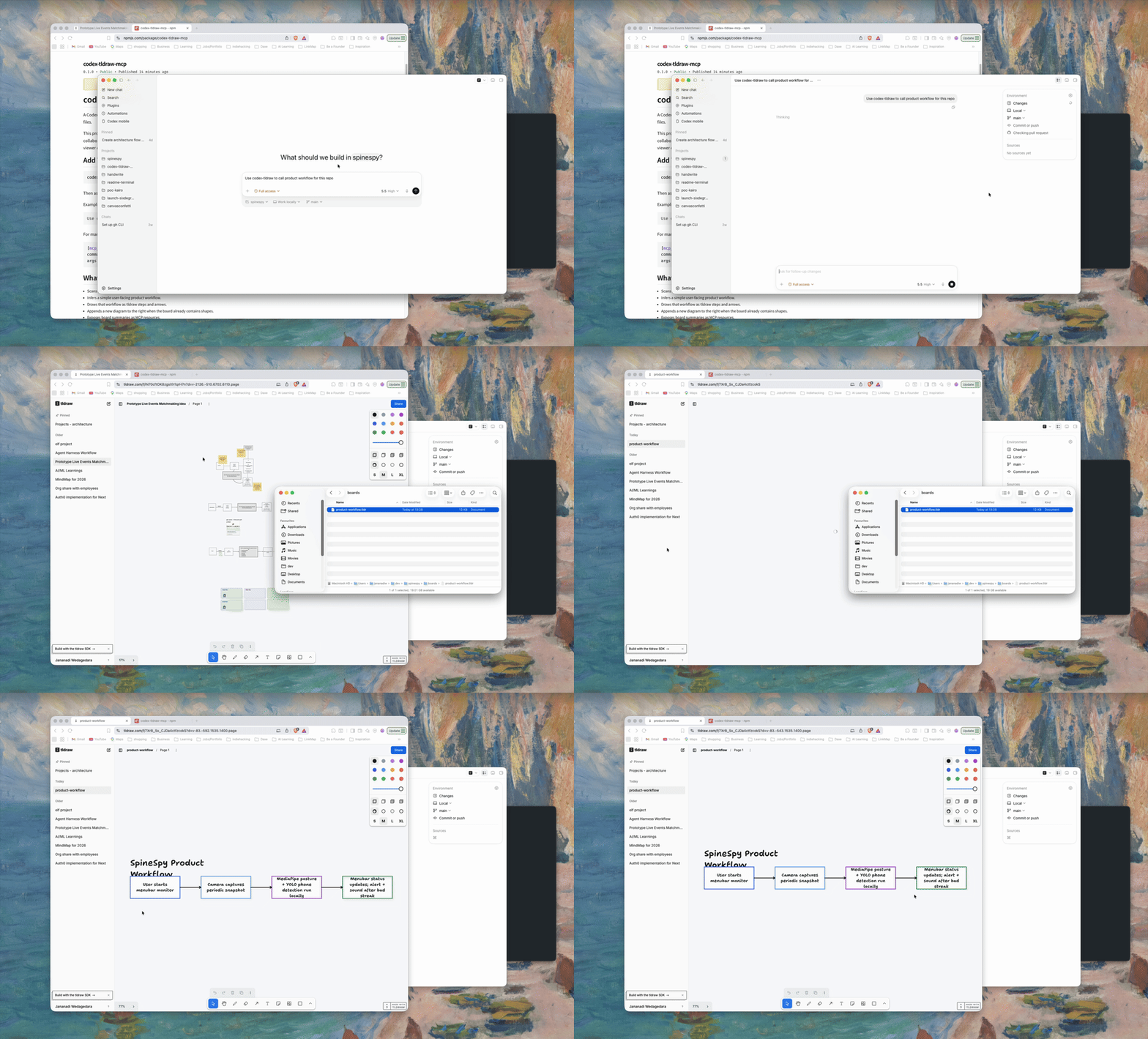
Quick Start
Add the server to Codex:
codex mcp add codex-tldraw -- npx -y codex-tldraw-mcp
Then ask Codex to diagram the current repo:
Use codex-tldraw to diagram this repo.
Reverse-engineer its runtime architecture:
Use codex-tldraw to show how this repo works across its main components.
Show the main flow first, keep short errors inside components, and label each interaction once.
Or ask for a diagram directly:
Use codex-tldraw to draw a password reset state machine.
Create a trackable JavaScript or TypeScript module graph:
Use codex-tldraw to create a code graph for this repo.
After the code changes, compare it with the saved graph:
Use codex-tldraw to preview code graph drift, then mark stale elements.
The default outputs are:
<repo>/boards/main.tldr
<repo>/boards/main.svg
Open the .tldr board in a tldraw-compatible viewer to edit it. Any MCP host, browser, documentation system, or code review can display the .svg preview directly.
See the v0.7.1 release notes for plugin fixes and verification details.
Codex Plugin
This repository also packages the server as a Codex plugin. The existing MCP tools still write .tldr and .svg files; the plugin adds a .tldr file handler that opens the editable board in an embedded React/tldraw app.
Two paths open the same editor:
Diagram tool panel — After draw_canvas, diagram_repo, or similar tools run, the inline MCP App loads the board from the repository-scoped server resource tldraw://repos/<encoded-repo-path>/boards/<name>/file and saves through the app-only save_board tool.
.tldr file entrypoint — When Codex opens a repo file directly, the app uses the host file resource API (open_tldraw_file). Writable files save with ETag conflict protection.
Build the server and its single-file app:
bun install
bun run build
Install the published plugin from npm (recommended):
npm install -g codex-tldraw-mcp
codex plugin marketplace add "$(npm root -g)/codex-tldraw-mcp"
codex plugin add codex-tldraw@codex-tldraw-mcp
Or install from GitHub:
codex plugin marketplace add jananadiw/codex-tldraw-mcp
codex plugin add codex-tldraw@codex-tldraw-mcp
The plugin requires Node.js 20.11 or later and npm on PATH. A GitHub plugin download does not build source or install dependencies. The launcher uses a built local copy when available; otherwise it runs the matching published npm version through npx. The first fallback launch needs registry access. No Bun installation is needed to use the plugin.
For development from this checkout:
bun run build
codex plugin marketplace add .
codex plugin add codex-tldraw@codex-tldraw-mcp
The marketplace descriptor is .agents/plugins/marketplace.json, the plugin manifest is .codex-plugin/plugin.json, its MCP configuration is .mcp.json, and the bundled app is dist/app.html. MCP hosts without app support continue to use the existing text results, .tldr resources, and SVG previews.
What You Get
- A repo-local
.tldrboard that stays with the project it explains, plus a portable.svgpreview. - A user-facing product workflow inferred from package metadata and source text.
- A prompt-driven offline canvas API for drawing workflows, state machines, plans, and architecture sketches that are not tied to repo scanning.
- Simple architecture diagrams showing the main flow first, with supporting services below it.
- A trackable JavaScript and TypeScript module/import graph with drift detection.
- Red markers for stale nodes and edges, orange markers for changed modules, and a report of new elements.
- tldraw steps and arrows laid out left to right.
- Non-destructive updates: existing boards get the next diagram appended to the right.
- MCP resources for listing boards and reading board summaries.
For a handwriting font app, the workflow may be inferred as:
User writes alphabet on paper -> User takes a photo of the paper -> User uploads the image -> AI generates a font -> User downloads a .ttf file
Manual Configuration
If you prefer editing Codex MCP config directly:
[mcp_servers.codex-tldraw]
command = "npx"
args = ["-y", "codex-tldraw-mcp"]
Tools
diagram_repo: scans a repo and appends a product workflow diagram to<repo>/boards/<boardName>.tldr.draw_canvas: appends a prompt-provided workflow, state machine, architecture sketch, or plan to<repo>/boards/<boardName>.tldr.draw_architecture: appends a simple codebase architecture view with a main flow, supporting components, actions, calls, and errors.diagram_code_graph: scans repository-local JavaScript and TypeScript modules and appends a trackable import graph.compare_code_graph: previews drift or marks changed and stale elements on an existing trackable code graph.list_boards: lists boards under a repo'sboards/directory.read_board_summary: summarizes generated diagrams and shape counts and returns both artifact paths.
When using the plugin, pass the absolute path of the repository as repoPath on every repository tool call. The plugin runs from its installation directory, not the chat workspace. Missing or relative paths are rejected to prevent diagrams being written to the plugin cache. For a remote repository URL, clone it locally first, then use the checkout path.
Standalone MCP tools accept an optional repoPath. Relative paths resolve from the MCP server working directory.
Every diagram-writing tool saves both artifacts and returns boardPath and svgPath in structured output. Tool content also includes MCP resource links for the editable board and SVG preview. The SVG renderer covers the text, rectangle, and arrow shapes generated by this server and needs no browser runtime.
New board resource links carry the encoded absolute repository path. They keep working after a server restart or a tool call for another repository, including when both repositories use the same board name. Resource reads still enforce TLDRAW_MCP_ALLOWED_ROOTS.
Legacy tldraw://boards/<name>/... resources remain available for older standalone clients and use the last selected repository. Re-run a diagram tool to replace older editor links with repository-scoped links.
The editor checks the loaded board's ETag before saving, blocks stale saves, and offers Discard and reload after a conflict. Invalid board data is rejected before replacing files. Diagram writes use a per-board filesystem lock so simultaneous calls from different server processes preserve both appends.
Code Graph Drift
diagram_code_graph stores stable repository-relative identities and fingerprints in MCP-owned shape metadata. Each source module becomes a node. Static imports, dynamic imports, re-exports, and CommonJS require calls between repository modules become edges.
Run compare_code_graph after the repository changes. Preview mode is the default and does not write the board:
Compare the current code with the newest code graph on boards/main.tldr.
To update the board, ask Codex to apply the drift markers or pass applyMarkers: true. The comparison uses four states:
unchanged: the stored identity and fingerprint still match.changed: the module still exists, but its exports or local import relationships changed.stale: the board contains an element that no longer exists in the current code graph.new: the current graph contains an element that is absent from the board.
Stale elements become red and dashed. Changed modules become orange and dashed. New elements appear in the tool result; v0.4.0 does not insert or rearrange them. Re-running the comparison restores the original generated style when code matches again.
The comparison changes only MCP-generated graph styling and metadata. It preserves positions, sizes, labels, manual shapes, and other diagrams on the board, and it restores each element's prior color when drift clears. Boards created by diagram_repo, draw_canvas, or an older release do not contain trackable code-graph metadata; create a graph with diagram_code_graph before comparing drift.
The v0.4.0 scanner supports .js, .jsx, .mjs, .cjs, .ts, .tsx, .mts, and .cts modules. It reports unresolved relative imports and counts external imports without drawing external packages. It models module/import relationships, not runtime call graphs.
Prompt-Driven Diagrams
draw_canvas does not scan source files. The current repository is only the storage location for the generated board.
Example prompts:
Use codex-tldraw to draw the auth flow:
Visitor opens login -> chooses email or SSO -> completes MFA -> lands in dashboard.
Use codex-tldraw to make a state machine for password reset:
Idle -> Reset requested -> Email sent -> Token verified -> Password updated.
Use codex-tldraw to append an architecture diagram for this plan:
Web app calls API gateway, API gateway calls worker queue, worker writes generated files to object storage.
Simple Architecture
draw_architecture helps a new reader understand how work moves across a codebase. Codex inspects the code first, then sends the renderer a small model:
- The main user flow becomes a straight row of boxes.
- Supporting services sit below the component that calls them.
- Each component shows at most three important actions and two short errors.
- Each interaction gets one concise arrow; request and response share that arrow.
- Source evidence is optional metadata and does not clutter the diagram.
Keep libraries and helper modules inside component actions. For example, "validate the response with Zod" belongs inside the API component rather than becoming a separate Zod component. Meaningful arrows have bindings to both endpoint shapes.
See Architecture Diagrams for the analysis contract and input model.
Feedback
This project is early and feedback is useful. Please open an issue if:
- The generated workflow misses the real product flow.
- A board does not open in your tldraw-compatible viewer.
- Code graph drift reports an incorrect module or import relationship.
- You have a messy repo where a PM and engineer need a clearer shared map.
Use the GitHub issue templates for bugs, feature requests, and real-world examples.
Why This Exists
This project is snapshot-only. It does not control a live browser canvas or provide live collaboration. It writes board files to the repository being diagrammed so a tldraw-compatible viewer can open them later.
The official tldraw MCP App is designed for hosts that can render an interactive tldraw canvas inside the chat context. In Codex Desktop, tool discovery worked in testing, and the tldraw search tool returned Editor API details, shape types, and helpers. The live exec path did not work: every call timed out after 30 seconds, including a read-only call to count the current page shapes.
That failure mode motivated the original file-based fallback. The v0.7.0 plugin now includes its own embedded MCP App editor, while generated SVG previews remain usable in hosts without app support.
This server started as a Codex-first fallback. Instead of trying to drive a live canvas, it generates .tldr snapshots on disk through a normal stdio MCP tool call. Its stdio transport and SVG previews now make the same output usable in any MCP-compatible host, while Codex remains the primary documented setup.
Security
This is a local filesystem tool. It reads source files from repoPath and writes .tldr and .svg files under repoPath/boards.
To restrict access to specific directories, set TLDRAW_MCP_ALLOWED_ROOTS to a path-delimited allowlist:
[mcp_servers.codex-tldraw]
command = "npx"
args = ["-y", "codex-tldraw-mcp"]
env = { TLDRAW_MCP_ALLOWED_ROOTS = "/Users/me/dev:/Users/me/work" }
When the allowlist is set, repoPath must resolve inside one of those roots.
Generated .tldr files do not store absolute local repository paths in shape metadata. Trackable code graphs store repository-relative source paths.
Local Development
This repo uses Bun for development:
bun install
bun run build
bun run smoke
Run the server from source:
bun run dev
Use a local build in Codex:
[mcp_servers.codex-tldraw]
command = "node"
args = ["/absolute/path/to/codex-tldraw-mcp/dist/index.js"]
Publish
Build, test, and inspect the package contents:
bun install --frozen-lockfile
bun run build
bun run smoke
bun run check:package
bun run check:plugin
Publishing is handled by .github/workflows/publish-npm.yml when a GitHub Release is published. The npm trusted publisher must allow jananadiw/codex-tldraw-mcp, workflow publish-npm.yml, with no GitHub environment and the publish action enabled. The workflow uses GitHub OIDC and does not require an npm token.
Use the workflow's dry_run dispatch option to validate a release without publishing it.
The package includes MCP Registry metadata:
package.jsondeclaresmcpName.server.jsondescribes the npm stdio package.
After the workflow publishes and the npm package version is available, authenticate and publish the registry metadata:
mcp-publisher login github
mcp-publisher publish
Verify the registry entry:
curl "https://registry.modelcontextprotocol.io/v0.1/servers?search=io.github.jananadiw/codex-tldraw-mcp"
Reviews
No reviews yet
Be the first to review this server!
More Developer Tools MCP Servers
Fetch
Freeby Modelcontextprotocol · Developer Tools
Web content fetching and conversion for efficient LLM usage
Git
Freeby Modelcontextprotocol · Developer Tools
Read, search, and manipulate Git repositories programmatically
Toleno
Freeby Toleno · Developer Tools
Toleno Network MCP Server — Manage your Toleno mining account with Claude AI using natural language.
MCP Marketplace
Freeby mcp-marketplace · Developer Tools
Search and install MCP servers from inside your AI client.
mcp-creator-python
Freeby mcp-marketplace · Developer Tools
Create, build, and publish Python MCP servers to PyPI — conversationally.
FinAgent
Freeby mcp-marketplace · Finance
Free stock data and market news for any MCP-compatible AI assistant.