
Server data from the Official MCP Registry
Cloudflare Worker remote backend for context-keeper (D1). MCP 2026-07-28, dual-era.
About
Cloudflare Worker remote backend for context-keeper (D1). MCP 2026-07-28, dual-era.
Remote endpoints: streamable-http: https://context-keeper-remote.{account}.workers.dev/mcp/{token}
Security Report
Valid MCP server (1 strong, 1 medium validity signals). No known CVEs in dependencies. Imported from the Official MCP Registry. 1 finding(s) downgraded by scanner intelligence.
Endpoint verified · Open access · 1 issue found
Security scores are indicators to help you make informed decisions, not guarantees. Always review permissions before connecting any MCP server.
Permissions Found in Source Code
Found by scanning the linked source code. This listing connects to a hosted endpoint, so none of this runs on your machine: it describes what the server software does where it is hosted.
How to Connect
Remote Plugin
No local installation needed. Your AI client connects to the remote endpoint directly.
Add this to your MCP configuration to connect:
{
  "mcpServers": {
    "io-github-jarmstrong158-context-keeper-remote": {
      "url": "https://context-keeper-remote.{account}.workers.dev/mcp/{token}"
    }
  }
}Documentation
View on GitHubFrom the project's GitHub README.
context-keeper-remote
Part of the xylem stack.
A remote MCP server on Cloudflare Workers that exposes context-keeper's rationale store (decisions, pipelines, constraints) over Streamable HTTP. It works as a claude.ai custom connector, including on mobile, so your project's decisions and constraints are available from any Claude session — no PC left running, no tunnel.
It also serves a phone app for reading that store yourself: install it to your home screen once and it opens with no login and no token in the URL. Tabs for recent activity, per-project counts, cambium knowledge, and store health — and tapping any entry gives you the full rationale, not just its title. Optional, opt-in, and on its own read-only credential.
Self-host your own copy in a few clicks with the button above — Cloudflare copies this repo into your GitHub account, creates a fresh D1 database for you, and deploys the Worker. Then you add one secret and paste a URL into Claude. Full walkthrough below; every step is a click, no command line anywhere.
The maintainer's own instance runs at
https://context-keeper-remote.jarmstrong158.workers.dev. Yours will be at your own subdomain after you deploy.
Why it's built this way
- Worker, not tunnel — no "PC must be on" dependency.
- D1, not KV — row-level writes and
WHEREqueries; two writers (desktop + mobile) don't clobber each other the way whole-file JSON read-modify-write does. - Stateless handler, no Durable Objects — the tools are stateless RPCs against D1, so the Worker runs on the Cloudflare free plan.
- Secret-path auth — claude.ai custom connectors don't reliably send custom bearer headers, so the token is the last path segment of the URL. The URL is the credential.
- Self-migrating — the Worker creates its own D1 schema at runtime, so a brand-new empty database needs no manual SQL (verified by a cold-start test).
Self-host it (one-click, no command line)
Step 1 — Click "Deploy to Cloudflare"
Click the Deploy to Cloudflare button at the top of this page. Cloudflare will:
- Ask you to authorize GitHub and pick an account — it copies this repo into your GitHub account (you get your own repo).
- Automatically create a new D1 database in your Cloudflare account and bind it to the Worker. (This works because the Worker's config declares the database binding without a hard-coded id, so Cloudflare provisions a fresh one for you.)
- Set up Workers Builds so every push to your new repo redeploys automatically.
- Build and deploy the Worker.
When it finishes, your Worker is live at
https://context-keeper-remote.<your-subdomain>.workers.dev. Note that URL — you'll
need it in Step 3. (You can always find it under Workers & Pages in the
dashboard.)
Nothing to configure in the repo, and no SQL to run — the database starts empty and the Worker creates its tables on the first request.
Step 2 — Add the AUTH_TOKEN secret (Cloudflare dashboard)
The Worker refuses every request until it has an auth token, so set one:
- Cloudflare dashboard → Workers & Pages → your context-keeper-remote Worker.
- Settings → Variables and Secrets → Add.
- Type: Secret. Name:
AUTH_TOKEN. Value: a long random string (32+ characters — treat it like a password). Save/Deploy.
That value is your connector's password. Keep it somewhere safe; you'll paste it in the next step.
agentsync-remote uses the same AUTH_TOKEN scheme, and additionally needs, in
its Worker's Variables and Secrets:
- a Secret named
GH_PAT— a GitHub personal access token, and - a Variable named
REPO— set to theowner/repoit should sync.
Those two do not apply to context-keeper-remote (this repo) — it only needs
AUTH_TOKEN. See the agentsync-remote README for its specifics.
Step 3 — Add the custom connector in claude.ai
-
claude.ai → Settings → Connectors → Add custom connector.
-
Paste your Worker URL with the token as the final path segment:
https://context-keeper-remote.<your-subdomain>.workers.dev/mcp/<AUTH_TOKEN>Replace
<your-subdomain>with your Worker's subdomain (Step 1) and<AUTH_TOKEN>with the exact value you set (Step 2). -
Save. The tools (
record_entry,get_context,query_entries, …) are now available in your Claude sessions.
Check it works: ask Claude to call get_project_summary. If it answers, the
whole chain (deploy → auto-provisioned D1 → auto-migration → auth) is working.
Step 4 — Migrate existing local data (optional)
If you already run local context-keeper, ask Claude (with the connector enabled) to
call import_entries, pasting each file's contents:
decisions.json→import_entries(project, kind="decision", entries=[...])pipelines.json→import_entries(project, kind="pipeline", entries=[...])constraints.json→import_entries(project, kind="constraint", entries=[...])
Incoming ids are preserved; existing ids are reported, never overwritten.
Step 5 — Install the phone view (optional)
Everything above is the MCP connector, which is for Claude to read. Step 5 is for you to read it, from your phone. It needs a clone of this repo and Node 22+, which is the only part of the setup that touches a command line — the connector itself never does.
See the phone view below.
The phone view
/view is a read-only, server-rendered page of every project's decisions and
constraints. Install it to your home screen and it opens like an app: no login,
no token in the URL, nothing to remember.
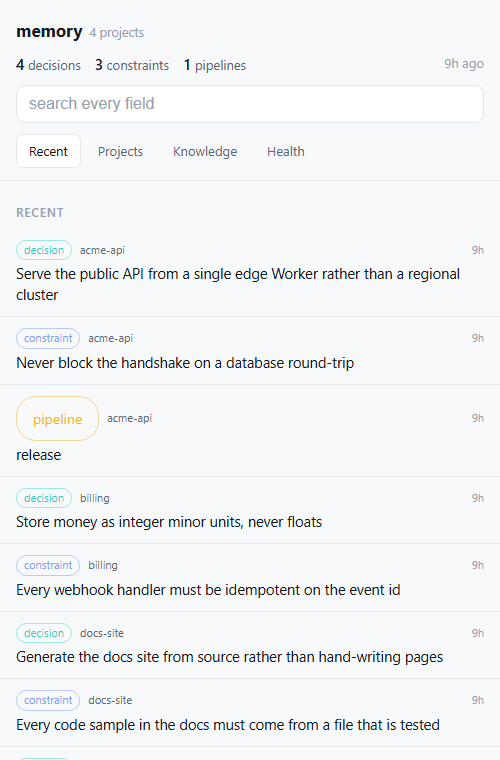 | 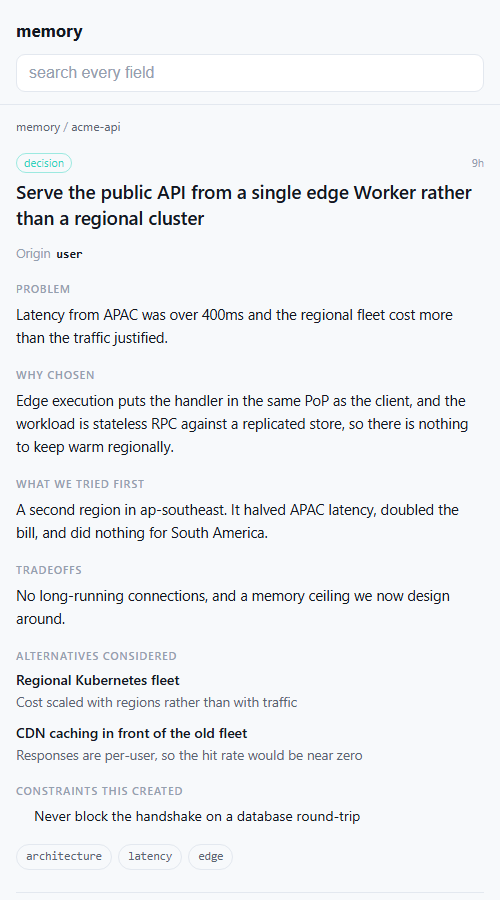 |
| Recent — what changed, across every project | Any entry — the reasoning, not just the title |
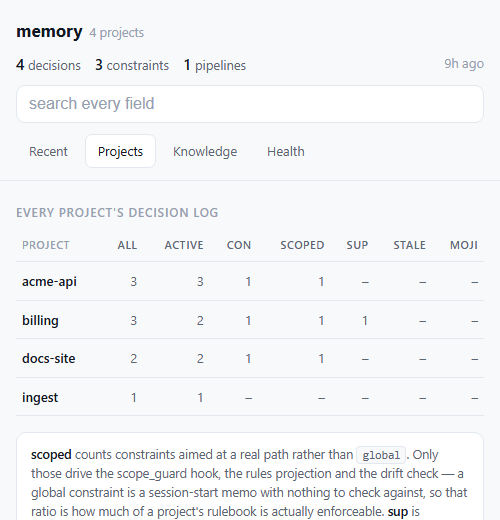 | 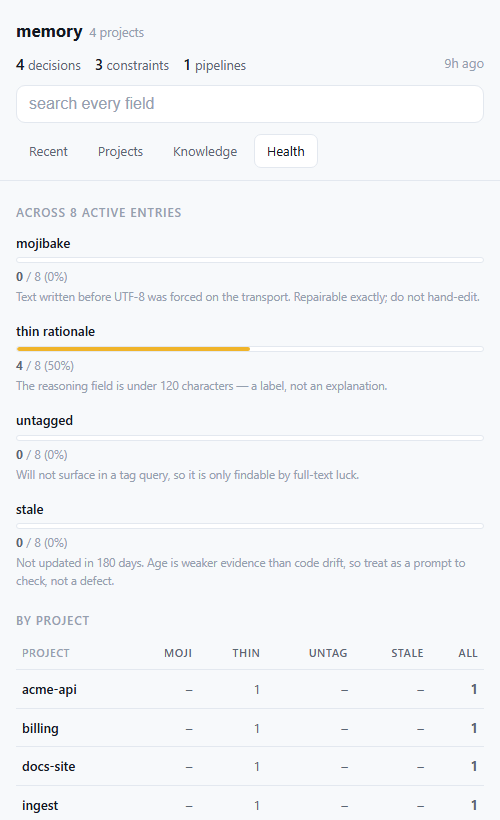 |
| Projects — counts per project, including how much of each rulebook is enforceable | Health — mojibake, thin rationale, untagged, stale |
Synthetic data. Every project and entry above is invented — see docs/screenshots for the dataset and how to regenerate these.
It has four tabs, matching the desktop dashboard:
| tab | what it answers |
|---|---|
| Recent | what changed lately, across every project |
| Projects | per-project counts: entries, active, constraints, scoped, supersession links, stale, mojibake |
| Knowledge | cambium's team/org counts, if wired (see below) |
| Health | mojibake, thin rationale, untagged, stale — as proportions and a per-project ranking |
Tap any row for the full entry: problem, why it was chosen, what was tried first, tradeoffs, alternatives with the reason each was rejected, and — for constraints — scope, hardness, and what enforces it. Search covers every field, including the reasoning, which is usually where the answer is. Superseded entries stay reachable, and each entry links to what it replaced and what replaced it.
Install
1. Create the credential. Double-click scripts/set-view-token.cmd
(macOS/Linux: scripts/set-view-token.sh). From a terminal use the absolute path
— not npm run, which needs the repo as your current directory:
powershell -NoProfile -ExecutionPolicy Bypass -File "/full/path/to/context-keeper-remote/scripts/set-view-token.ps1"
One run generates the token, installs it, waits for the route to answer 200,
copies the URL, opens it in your browser, and prints a QR code.
2. Scan the QR with your phone, then install it:
- Android / Chrome — a banner offers Install, or use ⋮ → Install app. If the menu only says Add to Home screen, the manifest is failing Chrome's install criteria; the usual cause is a missing 192x192 icon, which makes Chrome degrade silently to a plain shortcut that opens in a browser tab.
- iPhone — must be Safari (Chrome on iOS cannot install web apps). Share → Add to Home Screen.
Then tap through Recent, Projects, Knowledge and Health once while you have signal — the offline cache only fills for pages you have actually opened.
Add -DryRun to run everything except the install, which is the fastest way to
check your setup before touching anything.
It works offline, and a tap is instant
A service worker caches every page you open, cache-first with a background revalidate. Measured on the live instance:
| served from cache | 1 ms |
| forced to the network | 278–383 ms |
So it opens with no signal, and switching tabs is instant rather than a round-trip. A decision log is not a live feed — showing yesterday's answer immediately and correcting it a moment later beats showing nothing for 300ms, and the header carries an "8h ago" stamp so stale data is never presented as current.
Only 200s are cached. A 404 is what this Worker returns for an
unauthenticated or rotated credential, and caching one would mean a device that
rotated its token keeps being told it is signed out — from its own disk, with no
network involved and no obvious way to clear it. Verified in both directions.
The token still never reaches JavaScript. The cookie is HttpOnly, so the
service worker cannot read it; it only issues same-origin requests the browser
attaches it to. What was given up is "no client-side JS at all", not the
credential isolation. The CSP gains script-src 'self' and deliberately not
'unsafe-inline' — the registration lives in its own file so an inline
allowance, which would apply to the whole document including anything a recorded
entry smuggled past the escaper, is never needed.
How it stays logged in
The token URL is an enrolment step, not a daily one. Visiting it sets a
long-lived HttpOnly cookie, and from then on the bare /view path works from
that device — which is what the home-screen icon opens.
- Nothing is widened. The cookie carries the same secret the path did and is
compared the same way, so rotating
VIEW_TOKENstill revokes every device at once. There is one revocation path, no session table, and no expiry to track. - Its own credential. The view never accepts
AUTH_TOKEN, and/mcpnever acceptsVIEW_TOKEN. A leaked view URL discloses decision summaries; it cannot write, deprecate, or delete. - Unset means gone. With no
VIEW_TOKEN,/view/<anything>returns a bare404, indistinguishable from a route that was never deployed.
npm run view reopens it later (the URL is saved to .view-url, gitignored).
npm run view -- --qr enrols another device without rotating the token —
re-running setup would mint a new one and silently drop every device already
added.
Connect the Knowledge tab to cambium-remote (optional)
Only relevant if you also run cambium-remote.
scripts/connect-cambium.cmd
It generates a status-only credential, installs it on cambium-remote as
STATUS_TOKEN, verifies the route answers with real counts, and only then sets
CAMBIUM_STATUS_URL here. Nothing to look up or paste.
Why a second credential rather than cambium's connector URL: that URL is
cambium-remote's AUTH_TOKEN, which grants recall over every promoted item —
on the Worker whose team scope reaches every repo under TEAM_OWNER, including
private ones. Copying it here to render three integers would mean a leak of this
Worker discloses cambium's entire reach. STATUS_TOKEN reads the counts and
nothing else. It is also generatable, which is what makes the setup automatic;
AUTH_TOKEN can only ever be re-typed by hand, since Cloudflare stores secrets
write-only.
Self-hosters must add a service binding. A Worker cannot reach another
Worker by fetching its workers.dev hostname — Cloudflare's edge answers 404
and the target never runs, which looks exactly like a rejected token. Add to your
wrangler.toml:
[[services]]
binding = "CAMBIUM"
service = "cambium-remote"
This repo declares it only under [env.production], deliberately: a service
binding names its target, so declaring it at the top level would break the
one-click deploy for anyone whose account has no cambium-remote.
The panel fails soft. If cambium is slow (10s budget), down, or unwired, the page still renders and says so. Only the Knowledge tab makes that call, so the other tabs never pay for it.
Deploy on push, with no API token
git push can deploy the Worker directly, using the wrangler login you already
have — no Cloudflare API token, no GitHub secret, no dashboard:
scripts/install-deploy-hook.cmd
It installs a git pre-push hook. Deploy first, push second: if the deploy
fails the push is aborted, so origin never receives a commit that could not be
deployed. That is the inverse of the failure it replaces — cambium-remote's CI
was accepting every merge and deploying none of them, with main drifting ahead
of the running Worker and nothing to show it.
Main only, skips branch deletes, git push --no-verify skips it once, -Remove
uninstalls.
It refuses to install without -Env in a repo that has named environments,
and that refusal is load-bearing rather than fussy. A bare wrangler deploy uses
the top-level profile — which in this repo is the self-host profile, and that
one deliberately omits database_id so Cloudflare provisions a fresh empty
database. A hook installed without -Env here would bind the live Worker to an
empty D1 on the next push. So:
# cambium-remote -- no named environments, bare deploy is correct
scripts/install-deploy-hook.cmd

# a repo whose real deploy lives under [env.production]
scripts/install-deploy-hook.cmd -Env production
This repo does not need the hook at all — its GitHub Actions deploy works, and a hook would deploy twice per push.
Why not just fix the CI? Because that step genuinely cannot be automated.
GitHub Actions needs CLOUDFLARE_API_TOKEN, and minting a Cloudflare API token
through the API requires an existing token carrying User API Tokens: Edit.
Wrangler's OAuth login does not have it — its 29 scopes are workers/d1/pages/
queues operations plus account:read, with nothing token-management related. No
credential on your machine can create that credential. The paste is Cloudflare's
permission model, not a gap in the tooling. Deploying locally sidesteps the
question entirely.
If you want GitHub Actions CI anyway
connect-cambium deploys cambium-remote itself when it finds the status route
missing, using the wrangler login you already have — so you do not need its
GitHub Actions deploy working for the Knowledge tab to work.
You only need it if you want cambium-remote to auto-deploy on every push. Its workflow needs two Cloudflare secrets, and an empty one fails silently: every merge looks green and deploys nothing.
scripts/fix-cambium-ci.cmd
CLOUDFLARE_ACCOUNT_ID is read from wrangler whoami and set automatically — it
is an identifier, not a credential; it is in every dashboard URL.
CLOUDFLARE_API_TOKEN you paste once, and that step is genuinely irreducible:
creating a Cloudflare API token requires an existing token with
User API Tokens: Edit, and wrangler's OAuth login is not one. No credential on
your machine can mint that credential. Everything around it is automated — the
browser opens on the right page, the token is read without echoing, it is
verified against Cloudflare's API before being stored, both secrets go over
stdin rather than argv, and the previously failed run is re-triggered so you watch
it go green instead of taking the script's word for it.
Set your Worker URL (self-hosters)
No wrangler command reports the workers.dev host — not whoami,
deployments list, versions list, or deployments status — so it lives in
package.json:
node -e "const p=require('./package.json');p.contextKeeper.workerUrl='https://<worker>.<account>.workers.dev';require('fs').writeFileSync('package.json',JSON.stringify(p,null,2)+'
')"
The setup script reads it before installing anything and refuses to run without it. That ordering is deliberate: a token installed with no URL to put it in is unrecoverable, since Cloudflare cannot read a secret back.
Platform support, honestly
| script | Windows | macOS / Linux |
|---|---|---|
set-view-token | .cmd / .ps1 | .sh |
connect-cambium | .cmd / .ps1 | not ported — see below |
install-deploy-hook | .cmd / .ps1 | not ported — see below |
fix-cambium-ci | .cmd / .ps1 | not ported — see below |
The three that aren't ported are thin wrappers around a handful of commands, so the manual equivalents are short. Connect cambium:
TOKEN=$(head -c 32 /dev/urandom | base64 | tr '+/' '-_' | tr -d '=
')
printf '%s' "$TOKEN" | (cd ../cambium-remote && npx wrangler secret put STATUS_TOKEN)
# wait ~60s for the new version to roll out, then check it answers with counts:
curl -s "https://cambium-remote.<account>.workers.dev/status/$TOKEN" | head -c 200
printf '%s' "https://cambium-remote.<account>.workers.dev/status/$TOKEN"   | npx wrangler secret put CAMBIUM_STATUS_URL --env production
Deploy on push — write .git/hooks/pre-push in the target repo, LF endings,
chmod +x, running npx wrangler deploy (add --env <name> if that repo has
named environments — a bare deploy there targets the self-host profile and will
bind your live Worker to a fresh empty database).
Fix the CI — gh secret set CLOUDFLARE_ACCOUNT_ID and
gh secret set CLOUDFLARE_API_TOKEN against the repo, reading each from stdin.
Editing the setup scripts
They target Windows PowerShell 5.1 — the version that ships with Windows and
the one .cmd launches. Five things there are load-bearing and look like they
could be modernised:
RNGCryptoServiceProvider, notRandomNumberGenerator::Fill— the latter is .NET Core only and throws.- Manual
WebExceptionstatus extraction, not-SkipHttpErrorCheck— PowerShell 7 only. - No
??,?., or ternaries — all PowerShell 7 only, and a parse error here. - Every wrangler call goes through
Invoke-Wrangler. On 5.1,2>&1on a native command wraps each stderr line in an ErrorRecord, and under$ErrorActionPreference = 'Stop'the first is terminating — so an ordinary wrangler notice kills the run. - Confirmations gate on
[Console]::IsInputRedirected, never[Environment]::UserInteractive(which is always true), and castRead-Hostto[string]before matching —$null -notmatch '...'evaluates to empty, not$true, so the obvious guard fails open.
Every run writes a scrubbed log (.view-setup.log, .cambium-setup.log) with the
token masked, so a failure can be read after the window closes.
⚠️ Security: the connector URL is a credential
The URL you paste into Claude embeds AUTH_TOKEN as its last path segment.
Anyone who has the full …/mcp/<AUTH_TOKEN> URL can read and write your entire
store. Treat it exactly like a password:
- Don't share it, screenshot it, or paste it anywhere it could be logged.
- Requests to any other path, or with the wrong token, get a bare
404with no detail (a valid token used with a non-POST method gets405). - To rotate: change
AUTH_TOKENin the Cloudflare dashboard (Step 2). This immediately invalidates every old URL — any connector using the previous token starts getting404s until you update it in claude.ai (Step 3) with the new value.
Everything in this section applies to the view URL too, with one difference in
your favour: VIEW_TOKEN can only read. A leaked view URL exposes every decision
summary in every project on the instance, which may well be the more sensitive half
— but it cannot write, deprecate, or delete anything. That is the entire reason the
two are separate credentials rather than one.
Why the token is in the URL path, and what that costs you
This is a deliberate design choice, not an oversight. claude.ai custom
connectors do not reliably send custom headers, so an Authorization: header —
the obvious alternative — cannot be depended on. Putting the credential in the
path is what makes the connector work at all.
Be clear about the price, because it is not the same as a header:
- URLs get recorded in places request bodies never do. Browser history, shell history, proxy and CDN access logs, crash reports, bug reports, screenshots, "copy link" buttons, and agent session transcripts. During the audit that produced this section, the connector URLs for these Workers were found in ~54 occurrences across 13 local session transcripts on a single machine — none of them pasted deliberately; they were simply part of the tool configuration an agent echoed back.
- The Worker itself does not log it. Every log line records the route as
/mcp/***. The leak surface is everything around the Worker, which is exactly what you cannot audit. - A leaked token is full access, with no second factor and no per-caller identity. There is nothing to revoke except the token itself, and no log that will tell you who used it.
Practical guidance:
- Rotate on a schedule, not just on suspicion — assume the URL has been
recorded somewhere you don't control. Rotation is cheap: change
AUTH_TOKEN, update the connector. - Rotate immediately if you've shared a terminal recording, a transcript, a screen capture, or a bug report from a machine where the connector is configured.
- Use a long random token (32+ bytes, e.g.
openssl rand -hex 32). The comparison is constant-time in both content and length, so length is not observable — but entropy is still your only defence against guessing. - If you ever get the chance to use a header or OAuth instead, take it. This tradeoff is forced by the client, not preferred.
Tools
Every tool takes an optional project; if omitted it falls back to the configured
default_project (set it once with config — op='set', key default_project).
The unified tools (config, record_entry) are the current surface; the older
per-operation tools remain as deprecated aliases so existing callers keep
working. New work should prefer the unified tools.
| Tool | Purpose |
|---|---|
config | Read or write config: op='get' reads a key, op='set' writes it (value required). Use key default_project (global scope, no project) to pick the project used when a call omits project. |
set_config / get_config | Deprecated aliases for config(op='set') / config(op='get'). |
record_entry | Unified write: record a decision, constraint, or pipeline. Required field depends on kind — decision needs summary, constraint needs rule, pipeline needs name. |
record_decision | Deprecated alias for record_entry(kind='decision'): summary, problem, why_chosen, what_we_tried, tradeoffs, tags. |
record_constraint | Deprecated alias for record_entry(kind='constraint'): a rule that must hold — rule, reason, tags. |
record_pipeline | Deprecated alias for record_entry(kind='pipeline'): a reusable process — name, purpose, steps (extra fields kept verbatim). |
get_context | Relevance-ranked retrieval for a query (keyword scoring; excludes deprecated unless include_deprecated). An entry that superseded something carries a one-line predecessor -- what the prior entry said and why it changed -- byte-identical to the local server's, so history reads the same over either transport. |
query_entries | Structured filters: id, kind, tags (all must match), status (active/deprecated/all), free text, and limit. |
get_project_summary | One-call orientation: entry counts by kind and status, the ids present, the active constraints (compact), and the most recent decisions. |
list_projects | The org registry: every project with entries, plus per-project active counts (decisions/constraints/pipelines), active/deprecated totals, and last-updated time. Enumerates the whole org in one call — discover exact, case-sensitive project names instead of guessing. |
update_entry | Merge patch fields into an entry's payload; optionally change status. |
deprecate_entry | Mark deprecated, optionally linking superseded_by and recording a reason (the reason is what the predecessor line quotes). |
reload_constraints | Compact list of the active constraints. |
prune_stale | Delete old deprecated entries (dry run by default; pass dry_run=false). |
verify_quality | Flag entries missing rationale-bearing fields. |
export_markdown | Render entries as a DECISIONS.md-style document. |
import_entries | Bulk import from the local JSON store format (preserves ids and lifecycle status including superseded, reports collisions, never overwrites). |
upsert_entries | Bulk upsert in the local store format — the mirror-sync path. New ids are inserted; an existing id is replaced only when the incoming updated_at is strictly newer (last-writer-wins by timestamp), else skipped. Carries edits and deprecations between mirrored stores; never deletes. |
Entry conventions
- Decisions use
summary,problem,why_chosen,what_we_tried,tradeoffs,tags. The deprecatedrationalefield is accepted on input and mapped towhy_chosenwhenwhy_chosenis absent. - Constraints use
rule,reason,tags. - Pipelines use
name,purpose,steps, plus any extra fields you pass. - ids are per project+kind:
dec-001,pipe-003,con-012. Because the same id recurs across projects, the D1 primary key is composite(project, id).
For maintainers / contributors
Everything above is for self-hosters. This section is for working on the code itself.
Config layout: how one repo serves both the button and CI
wrangler.toml has two profiles:
- Default (top level) — the D1 binding is declared without a
database_id. This is what the Deploy button,wrangler dev, and the local test suite use. With no id, Cloudflare auto-provisions a fresh database for each self-hoster. [env.production]— pins the maintainer's realdatabase_idand the Workername. The maintainer's CI deploys withwrangler deploy --env productionso it keeps hitting the same database and the same URL. Self-hosters never touch this env.
The cambium service binding lives only in [env.production], and that split is
load-bearing rather than tidy. A service binding names its target Worker, so a
top-level [[services]] service = "cambium-remote" would make the one-click deploy
fail in any account that has no such Worker — which is every account but the
maintainer's. Anything that names another Worker, another database by id, or
another account belongs in the named env for the same reason.
Named environments inherit nothing. Every binding the production deploy needs
has to be repeated under [env.production.*], including [observability]. A
binding that exists only at the top level is silently absent from the env CI
actually deploys.
Deploy pipeline (maintainer only)
.github/workflows/deploy.yml runs on push to main, and is gated with
if: github.repository == 'jarmstrong158/context-keeper-remote' so forks (which
deploy via Workers Builds instead) don't run failing Actions. Steps: checkout →
Node 22 (Wrangler needs ≥ 22) → npm ci → npm test → wrangler deploy --env production. Tests gate the deploy. It reads two GitHub repo secrets,
CLOUDFLARE_API_TOKEN (needs Workers Scripts: Edit) and CLOUDFLARE_ACCOUNT_ID
— distinct from the Worker's own AUTH_TOKEN.
Local development
No network and no Cloudflare credentials required — tests run against a local
workerd D1 via @cloudflare/vitest-pool-workers. Requires Node ≥ 22.
npm install
npm test          # vitest: migrations, cold-start, CRUD, id sequencing, auth, import, ...
npm run typecheck # tsc --noEmit
Live smoke test
After a deploy, from any machine with network access:
WORKER_URL="https://context-keeper-remote.<subdomain>.workers.dev/mcp/<AUTH_TOKEN>" \
  node scripts/smoke-test.mjs
Runs initialize → tools/list → record_decision → query_entries against the live
worker.
Layout
src/index.ts             fetch handler: token check -> MCP dispatch (schema ensured lazily on first tools/call, not on the handshake)
src/mcp.ts               stateless Streamable HTTP MCP server (createMcpHandler)
src/db.ts                D1 access + runtime migration runner + id generation
src/entries.ts           payload normalization, insert-with-retry, keyword scoring
src/tools/*.ts           one module per tool group
src/view.ts              the phone view: shell, tabs, knowledge panel, dispatch on ?e/?p/?q/?t
src/detail.ts            entry detail, project drill-down, search, supersession trail
src/health.ts            quality flags + the Projects and Health tables
src/install.ts           enrolment cookie, web app manifest, home-screen icon
src/icon-data.ts         GENERATED by scripts/make-icon.mjs -- do not hand-edit
schema.sql               reference copy of the DDL the migration runner embeds
wrangler.toml            default (auto-provision) + [env.production] (pinned) config
.github/workflows/deploy.yml   test-then-deploy on push to main (maintainer repo)
scripts/smoke-test.mjs   live JSON-RPC round-trip check
scripts/set-view-token.*  create VIEW_TOKEN, verify, QR, save the URL  (.cmd = double-click)
scripts/connect-cambium.* generate STATUS_TOKEN on cambium-remote and wire it here
scripts/make-icon.mjs     regenerate the home-screen PNG (npm run make-icon)
test/                    vitest suite (local workerd D1, no network)
Troubleshooting the maintainer deploy
| Symptom in the Actions log | Cause | Fix |
|---|---|---|
Wrangler requires at least Node.js v22.0.0 | Node < 22 | Already set to Node 22 in deploy.yml. |
it's necessary to set a CLOUDFLARE_API_TOKEN environment variable | Deploy secrets missing | Add both GitHub repo secrets. |
No route for that URI [code: 7000] / object identifier is invalid [code: 7003] | API token lacks Workers permission, or wrong CLOUDFLARE_ACCOUNT_ID | Use an "Edit Cloudflare Workers" token; confirm the account id. |
Deploys succeed but every call returns 404 | Worker AUTH_TOKEN not set, or the URL's token doesn't match it | Set/verify AUTH_TOKEN in the Cloudflare dashboard. |
Related
- context-keeper — the local stdio original this Worker hosts as a remote transport.
- xylem — the stack this is part of.
Reviews
No reviews yet
Be the first to review this server!
More Developer Tools MCP Servers
Git
Freeby Modelcontextprotocol · Developer Tools
Read, search, and manipulate Git repositories programmatically
Fetch
Freeby Modelcontextprotocol · Developer Tools
Web content fetching and conversion for efficient LLM usage
Worldmonitor
Freeby Koala73 · Developer Tools
Live markets, conflicts, country risk, chokepoints, energy, and China decision signals. 90 tools.
Paperclip
Freeby Paperclipai · Developer Tools
Trending hip-hop artist momentum scores across four cultural dimensions.
Toleno
Freeby Toleno · Developer Tools
Toleno Network MCP Server — Manage your Toleno mining account with Claude AI using natural language.
mcp-creator-python
Freeby mcp-marketplace · Developer Tools
Create, build, and publish Python MCP servers to PyPI — conversationally.