
Server data from the Official MCP Registry
Generate and edit images with gpt-image-2, including masks and transparency.
About
Generate and edit images with gpt-image-2, including masks and transparency.
Security Report
The server is a well-scoped Codex Images MCP that needs network access and file I/O for its purpose, and its HTTP mode has bearer auth and refuses public binding without a token. The main concerns are that the installer can persistently rewrite Codex AGENTS.md instructions (including non-interactively via --all), that the read-only reuse of the Codex CLI's OAuth token is a sensitive credential access, and that a malformed client config can be silently overwritten. No code execution, exfiltration, or hardcoded secrets were found in the reviewed code. Supply chain analysis found 12 known vulnerabilities in dependencies (0 critical, 6 high severity). Package verification found 1 issue.
7 files analyzed · 19 issues found
Security scores are indicators to help you make informed decisions, not guarantees. Always review permissions before connecting any MCP server.
Permissions Required
This plugin requests these system permissions. Most are normal for its category.
What You'll Need
Set these up before or after installing:
Environment variable: CODEX_IMAGES_HTTP_TOKEN
How to Install
Add this to your MCP configuration file:
{
  "mcpServers": {
    "codex-images-mcp": {
      "command": "uvx",
      "args": [
        "codex-images-mcp==0.1.1"
      ]
    }
  }
}
Some servers take additional arguments. See the repository for details.
Documentation
View on GitHubFrom the project's GitHub README.
codex-images-mcp
Generate and edit images from any MCP client with gpt-image-2 on the ChatGPT plan you already pay for. No OpenAI API key, no per-image bill.
codex-images-mcp is an MCP server for the Codex Images endpoint. It runs locally over stdio, or as a self-hosted HTTP server that your laptop, your VPS agents and your Pi / Gentle Shell sessions can share. Every image comes back as a verifiable artifact: SHA-256, byte count, MIME type and real dimensions.
Unofficial. Not affiliated with or endorsed by OpenAI. It signs in with your own ChatGPT account and uses the same endpoint as the Codex CLI. You are bound by OpenAI's terms for your account, and image generation counts against your plan's limits.
What you get
- Two tools:
codex_images(generate/edit) andcodex_images_artifact(fetch an image by URI, inline or through a short-lived signed download). - Batches:
parallel,variants,chainandbranded-parallel(every image references a shared anchor for brand-consistent sets). - Edits with references and masks: up to five references per request, HTTPS URLs or inline images.
- Native transparency: real alpha PNGs from the model, with a warning when a result comes back opaque.
- Exact output sizes:
native,exact,fitorcoverpost-processing, so a 1200×630 card is 1200×630. - Prompts sent verbatim: no hidden rewriting model in between.
- Optional API-key engine: set
CODEX_IMAGES_ENGINE=apiwith anOPENAI_API_KEYto choose the model yourself (Images 2.6gpt-image-2.6-sunburst/-flare), with quality up tomaxand complexity control. This engine is billed to your API account. On the default ChatGPT plan route OpenAI chooses the model, and the API selectors (model,quality,complexity) are ignored. - Self-hosting that is safe by default: built-in bearer auth, refuses to listen publicly without a token, SSRF-hardened URL fetching (HTTPS, public addresses only, pinned IP, no redirects), no server paths in results.
- Its own ChatGPT session:
codex-images-mcp loginuses a device code and keeps a separate session, so it never rotates (and breaks) your Codex app's sign-in.
Quick start (local, stdio)
uvx --from codex-images-mcp codex-images-mcp login     # sign in once (device code)
uvx --from codex-images-mcp codex-images-mcp setup     # register in Claude Code, Claude Desktop, Codex, Cursor, OpenCode
Or try it from the terminal:
uvx --from codex-images-mcp codex-images-mcp generate "a ceramic mug, studio light" --transparent --pretty
Already signed in to the Codex CLI? codex-images-mcp can use that login read-only until its token expires. It never refreshes it; run login for a session of its own.
Example output
Example outputs from gpt-image-2 via this server. The pictures are resized for this page. A transparent generate, and an edit that sends a reference plus a mask, are written up in docs/examples.md.
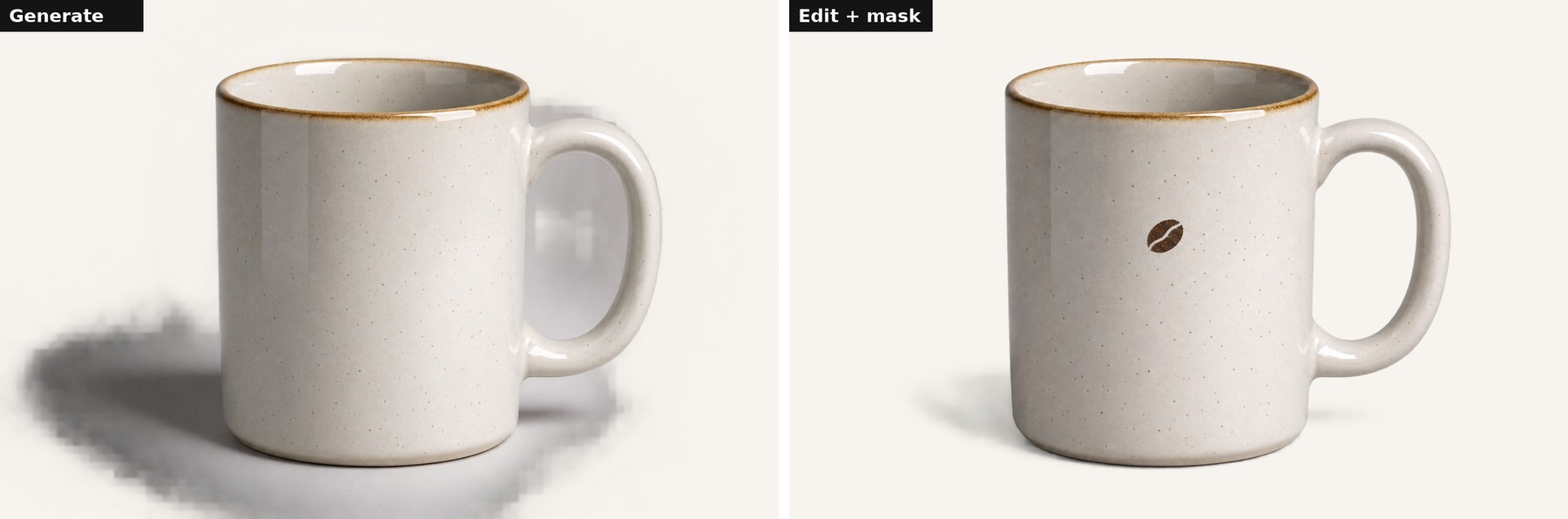
The generate on the left used the prompt a ceramic mug, studio light with transparent set. The model returned a 1536×1024 PNG, 1,745,462 bytes, sha256 e0d0338218529ca36e0d64e92eb2737c6794b392343f1a5ab32884a49dab48ba. The edit sent that mug as the reference, with a mask over the front, and asked for a small dark brown stamped coffee bean. It returned a 1536×1024 PNG, sha256 7c5b28d4950f5207c111f875ef9d19349e06be3da43ce1200d2d8d2c678b9ba5. The camera angle shifted slightly. A mask is a hint, and the model may adjust the whole frame.
The generate result is a PNG with a real alpha channel. The checkerboard is only a backdrop, so the transparent background is visible:

Also in this folder: an off-white generate, the edit on a checkerboard, and 1200px transparent PNGs of the generate and the edit.
Self-hosted (HTTP)
export CODEX_IMAGES_HTTP_TOKEN=$(openssl rand -hex 32)
docker compose up -d
docker compose run --rm codex-images codex-images-mcp login
Then point your clients at https://your-host/mcp/ with Authorization: Bearer $CODEX_IMAGES_HTTP_TOKEN. See docs/self-hosting.md for the reverse proxy, signed downloads and every setting.
Pi and Gentle Shell
pi-codex-images is a Pi extension for a self-hosted server. It reads the local files you authorize, sends them inline, and writes verified results atomically into your project:
pi install npm:pi-codex-images
Documentation
- MCP tools reference: inputs, results, error codes.
- CLI:
generate,login,logout,setup,status,uninstall. - Self-hosting: Docker, reverse proxy, configuration, security model.
- Examples: batches, edits, masks, transparency, exact sizes.
- Comparison: how this differs from similar projects.
Credits
codex-images-mcp started as a fork of VelmoAI/codex-imagen by wauwa. The installer and much of the original structure come from there. The OAuth token handling derives from codex-image-gen by Small Turtle 2. The generation engine was replaced with the native Codex Images endpoint, and the prompt-rewriting and chroma-key layers were removed.
License
Reviews
No reviews yet
Be the first to review this server!
More Developer Tools MCP Servers
Rea
Freeby Morluto · Developer Tools
Reverse engineer anything from your terminal or agent with one CLI and MCP server.
Paperclip
Freeby Paperclipai · Developer Tools
Trending hip-hop artist momentum scores across four cultural dimensions.
Scrapling
Freeby D4Vinci · Developer Tools
Web scraping with stealth HTTP, real browsers, and Cloudflare bypass. CSS selectors supported.
Git
Freeby Modelcontextprotocol · Developer Tools
Read, search, and manipulate Git repositories programmatically
Toleno
Freeby Toleno · Developer Tools
Toleno Network MCP Server — Manage your Toleno mining account with Claude AI using natural language.
MCP Marketplace
Freeby mcp-marketplace · Developer Tools
Search and install MCP servers from inside your AI client.