
Server data from the Official MCP Registry
Agent-first analytics: stats, events, sessions, funnels, ingest, websites & billing.
About
Agent-first analytics: stats, events, sessions, funnels, ingest, websites & billing.
Remote endpoints: sse: https://mcp.analyga.com/sse
Security Report
Valid MCP server (1 strong, 1 medium validity signals). No known CVEs in dependencies. Package registry verified. Imported from the Official MCP Registry. 1 finding(s) downgraded by scanner intelligence.
Endpoint verified · Open access · 2 issues found
Security scores are indicators to help you make informed decisions, not guarantees. Always review permissions before connecting any MCP server.
Permissions Required
This plugin requests these system permissions. Most are normal for its category.
What You'll Need
Set these up before or after installing:
Environment variable: ANALYGA_KEY
How to Install & Connect
Available as Local & Remote
This plugin can run on your machine or connect to a hosted endpoint. during install.
Documentation
View on GitHubFrom the project's GitHub README.
analyga



Agent-first analytics for MCP + web traffic — query, instrument and configure from a terminal or an MCP client. No browser, no dashboard.
A dashboard for humans.
tgafor your agents.
One analytics surface for both halves of modern traffic: the web visits your site still gets, and the agent/MCP calls that increasingly drive it. Analytics tools assume a human staring at a chart — but increasingly the thing that needs the numbers is an agent: it fired the events, it wants to know whether they landed, and it wants five numbers back, not a dashboard to render. analyga is the surface the agent drives itself: one install, and it queries stats and funnels across web and MCP, sends server-side events, and reads its own schema — all as structured JSON, none of it screen-scraped.
Works with: Claude Code · Cursor · Cline · Windsurf · Aider · Codex · any MCP client
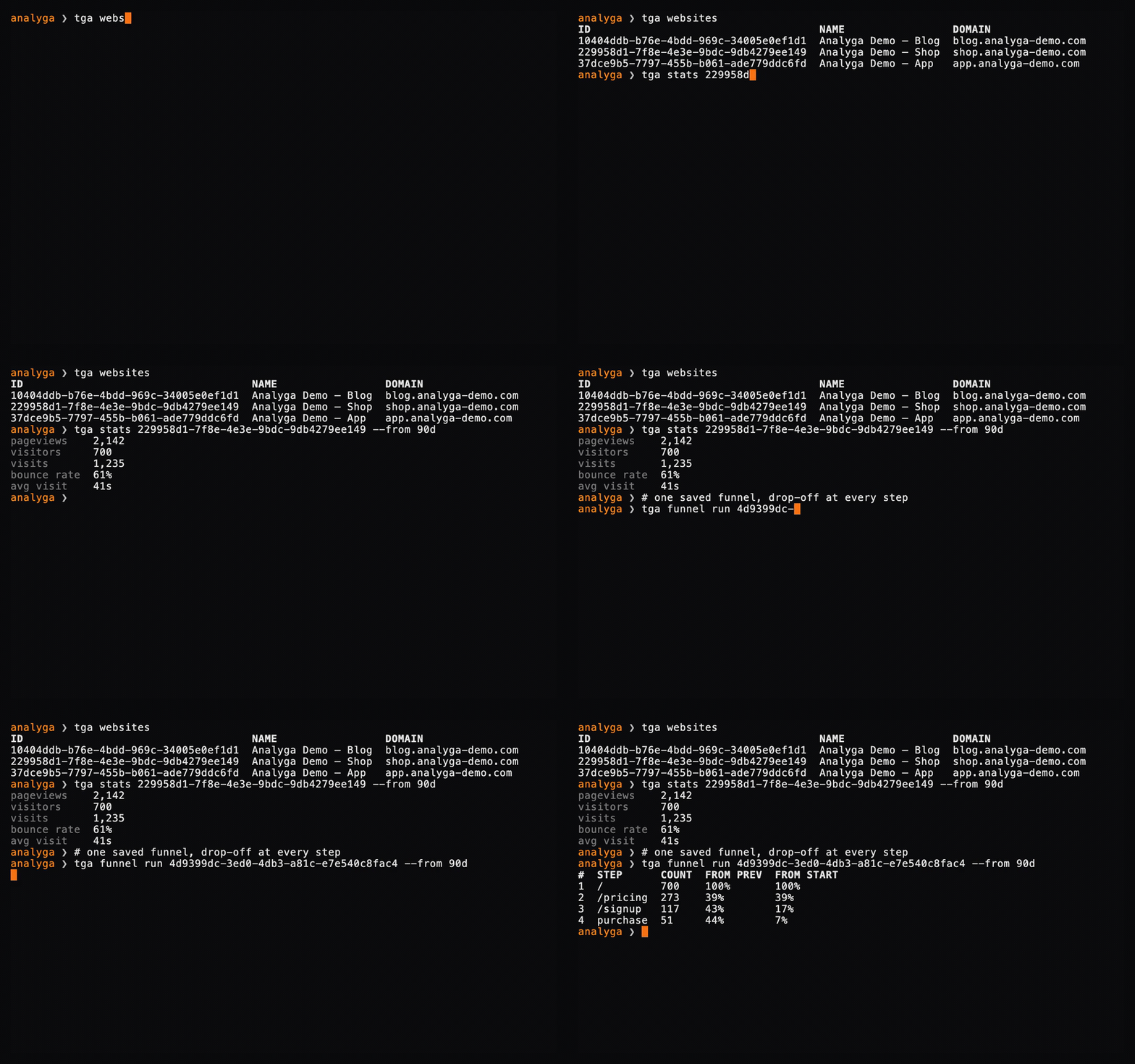
One agent, one terminal — query to funnel in 60 seconds. Watch the full demo.
See it in action
No mockups — every clip is a live tga session against a seeded tenant. Click any GIF for the full-res video.
| Query → funnel | Agent self-signup | Server-side ingest |
|---|---|---|
|  |  |
| One agent, one terminal, 60s | Keyless bootstrap — no admin in the loop | Send events with a stable --id |
| MCP client | The human dashboard |
|---|---|
 | 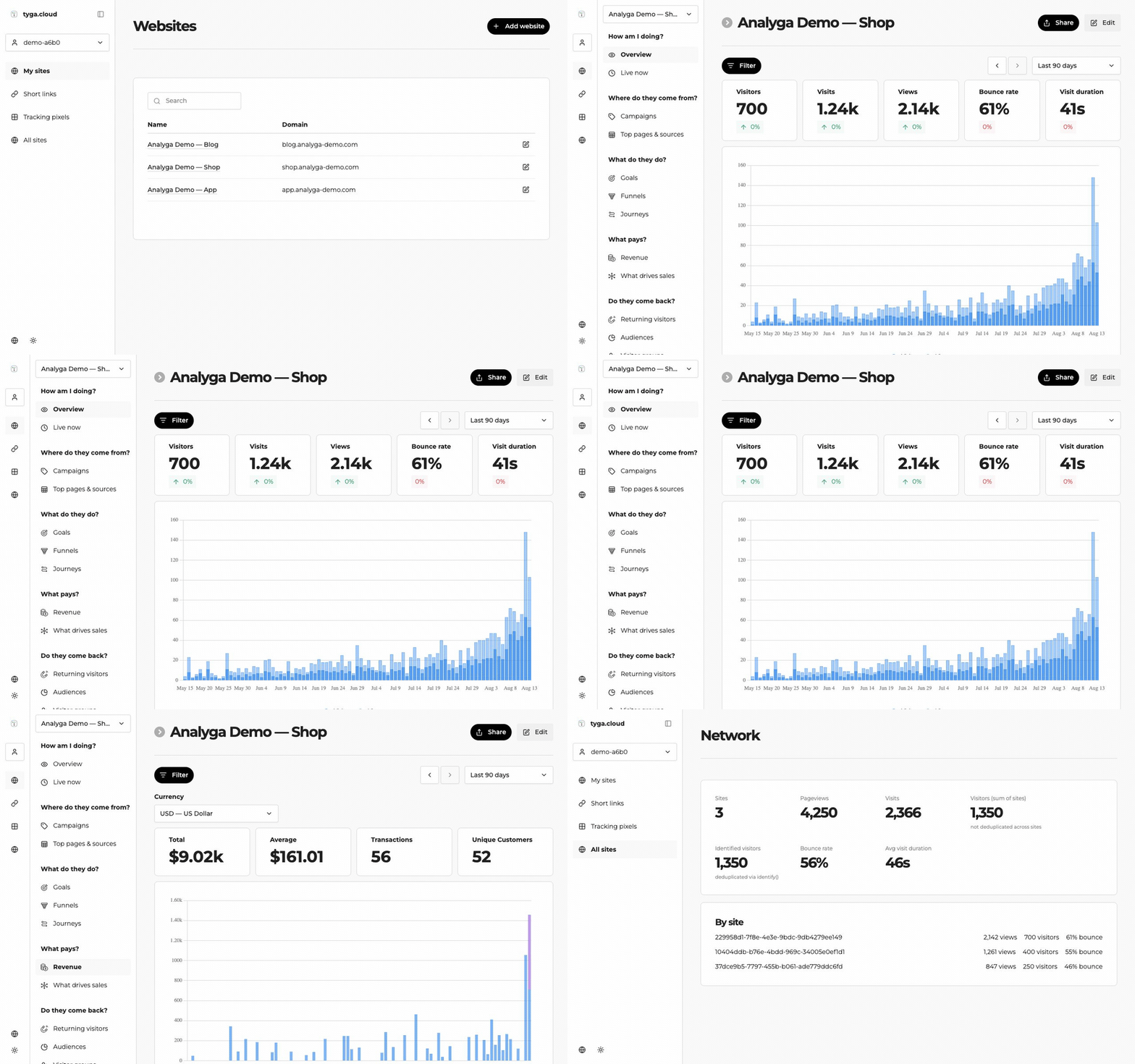 |
| 13 native tools in Claude Code / Cursor | Everything the agent captures, in one real-time UI |
Install
npm install -g analyga
The npm package is analyga; the command is tga.
Quick Start
# No account yet? Create a tenant and its first key — no card, no admin in the loop
tga signup --slug acme --name "Acme" --username you --password <8+ chars>

# Point at a tenant
tga login --key <your-api-key>     # or set ANALYGA_KEY

# Confirm WHICH tenant you are about to write to (shows tenant + key scope for a tga_ key)
tga whoami

# What can this credential see?
tga websites

# Five numbers, not a dashboard
tga stats <websiteId> --from 7d

# Full reference
tga --help
Every command takes --json — the machine surface is a first-class citizen, not an afterthought:
tga stats <websiteId> --from 7d --json
Read the contract, don't guess flags
tga agent-schema --json
That returns every command, argument, flag, type, whether it is read-only, and the full list of error codes — generated from the same table that drives the parser, the help text and the MCP tools, so it cannot drift from what the CLI actually does. If it is not in the schema, it does not exist.
Query — stats, events, funnels
Ask the questions an agent actually asks after it ships: did the events land, and did anyone make it through the flow?
# Traffic and top-line stats for a window
tga stats <websiteId> --from 7d
tga events <websiteId> --from 24h

# Define a funnel once, then run it whenever
tga funnel define <websiteId> --name signup --steps "/,/pricing,/signup"
tga funnel list <websiteId>
tga funnel run <funnelId> --from 30d

# Cross-site rollup for a team
tga network <teamId> --from 7d
All read-only, all --json-able — an agent branches on the numbers instead of parsing a chart.
Identity — pass --id or your agents collapse into one visitor
Anonymous identity is derived from IP and user-agent. Agent traffic shares both — one CLI version means one user-agent, and agents often share an egress IP — so without a stable id every agent behind that IP collapses into a single visitor. It cannot be backfilled.
tga send <websiteId> --name cli_signup --id <stable-user-id> --data '{"source":"cli"}'
Sending events server-side
# Mint a per-website ingest key first (shown ONCE; regenerating rotates it)
tga ingest-key create <websiteId>

tga send <websiteId> --name cli_signup --id <stable-user-id> \
  --ingest-key <per-site-key> --data '{"plan":"pro"}'

tga ingest health <websiteId> --from 24h    # did anything actually land?

tga ingest-key revoke <websiteId>           # kill server-side ingest for this site
A discarded event still answers HTTP 200. The ingest endpoint returns {"beep":"boop"} when it drops an event as a bot. This CLI treats that as a hard failure with a hint rather than reporting success — so an agent never believes a dropped event succeeded.
Server-side ingest uses a separate per-website key (ANALYGA_INGEST_KEY or --ingest-key), scoped to one website so it can only ever write that site's traffic. Mint one with tga ingest-key create <websiteId> and revoke it with tga ingest-key revoke <websiteId> — the plaintext is shown once and only its hash is stored.
Billing — hand a human a checkout URL
An agent authenticates with its tenant key, names a plan, and gets back a Stripe Checkout URL to pass to a human who completes payment:
tga billing checkout --plan pro
The tenant is pinned server-side from the key. The free plan (and any plan without a configured price) is not purchasable, and internal sister-stack tenants are never billed.
MCP Server
Prefer tools over a CLI? analyga ships an MCP server. Point Claude Code (or any MCP client) at it and your agent gets 13 native tools covering stats, events, funnels, websites, identity, server-side ingest (including minting/revoking ingest keys) and billing checkout.
tga mcp-serve # stdio, for Claude Code / Cursor / Cline / Windsurf
For clients that use a JSON config, pass your key via ANALYGA_KEY. The MCP server runs outside your project directory, so it will not pick up .analyga/config.json:
{
  "mcpServers": {
    "analyga": {
      "command": "tga",
      "args": ["mcp-serve"],
      "env": { "ANALYGA_KEY": "your-key" }
    }
  }
}
Read-only tools are flagged, so a client will not prompt a human to confirm a read. Every tool declares an outputSchema, so an agent never parses prose or guesses field names — and a tool result and --json output are the same bytes, one client across two surfaces. A session with no key sees only the onboarding surface — how to connect, plus analyga_signup to bootstrap its own tenant — rather than the full toolset.
Error codes
Failures carry a stable code and a distinct exit code, so an agent can branch on the outcome instead of string-matching a message.
| Exit | Meaning | What to do |
|---|---|---|
| 2 | usage | fix the call, do not retry |
| 3 | auth | fix the credential |
| 4 | permission | do not retry, escalate |
| 5 | not found | check the id |
| 6 | validation | fix the payload |
| 7 | rate limited | back off and retry |
| 8 | network | retry is reasonable |
| 9 | server | retry once, then report |
Exit 1 is reserved for unhandled crashes, so a classified failure is never ambiguous. Where the server can say what to do next, it comes back as a hint on its own line.
Configuration
Resolved highest-priority first:
--keyflagANALYGA_KEYenvironment variable.analyga/config.jsonin the current directory
tga whoami reports which of these won. On a multi-tenant platform, "which tenant am I about to write to" is the question that matters most. .analyga/ holds a live credential — keep it out of version control.
Features
- Self-serve signup —
tga signupcreates a tenant and its first API key with no card and no admin in the loop; keyless, so it works before you have a credential - Tenant-aware identity —
tga whoamishows the pinned tenant and key scope for atga_key, or the user and teams for a session login - Stats & events — top-line traffic and event counts over any window, all read-only, all
--json - Funnels — define once, run anytime; step-by-step conversion for a site
- Network rollup — cross-site stats for a whole team
- Server-side ingest —
tga sendwith a scoped per-site key; mint/rotate/revoke keys withtga ingest-key create|revoke; dropped-as-bot events fail loudly instead of faking a 200 - Billing checkout —
tga billing checkout --plan <id>returns a Stripe URL to hand to a human - Stable identity —
--idkeeps agents from collapsing into one anonymous visitor - agent-schema — one command emits the full contract (commands, flags, types, error codes) so agents never guess
- MCP server — 13 tools (
tga mcp-serve) for Claude Code, Cursor, Cline, Windsurf, any MCP client - Classified errors — stable
code+ distinct exit code per failure class, with actionablehints
Agent Integration
Add to your CLAUDE.md, .cursorrules, .clinerules, .windsurfrules, or AGENTS.md:
## Analyga
This project uses Analyga for analytics. Use the `tga` CLI.
Config is in .analyga/config.json (auto-loaded), or set ANALYGA_KEY.
If not configured: tga login --key YOUR_KEY

Run `tga agent-schema --json` — it returns every command + valid flags + error codes.
This is the single source of truth: if it is not in the schema, do not use it.
Always pass --id on `tga send`, or agent traffic collapses into one visitor.
Why this exists
Every analytics tool I reached for assumed a human looking at a chart — but the thing that needed the numbers was the agent that fired the events. So the CLI and the MCP server are the primary interface here, not a wrapper bolted onto a REST API. It's early and iterating fast: if something's rough or missing, open an issue.
Documentation
For now, tga --help and tga agent-schema --json are the authoritative reference.
Status
Early. Published for dogfooding by the Tyga sister stacks. Interfaces may change; error codes will not be reworded once published, because agents branch on them.
License
Proprietary — Tyga.Cloud Ltd. See LICENSE.
Reviews
No reviews yet
Be the first to review this server!
More Developer Tools MCP Servers
Fetch
Freeby Modelcontextprotocol · Developer Tools
Web content fetching and conversion for efficient LLM usage
Git
Freeby Modelcontextprotocol · Developer Tools
Read, search, and manipulate Git repositories programmatically
Paperclip
Freeby Paperclipai · Developer Tools
Trending hip-hop artist momentum scores across four cultural dimensions.
Toleno
Freeby Toleno · Developer Tools
Toleno Network MCP Server — Manage your Toleno mining account with Claude AI using natural language.
mcp-creator-python
Freeby mcp-marketplace · Developer Tools
Create, build, and publish Python MCP servers to PyPI — conversationally.
MCP Marketplace
Freeby mcp-marketplace · Developer Tools
Search and install MCP servers from inside your AI client.