
Self-hosted gallery for AI-generated mockups. MCP interface; token-efficient curl uploads.
About
Self-hosted gallery for AI-generated mockups. MCP interface; token-efficient curl uploads.
Remote endpoints: streamable-http: https://{host}/mcp sse: https://{host}/mcp/sse
Security Report
Mockups MPC is a well-designed gallery server with thoughtful architecture and generally clean code. The server explicitly documents that it has no built-in authentication and is designed for trusted networks or behind a reverse proxy — this is a clear design choice, not a hidden vulnerability. Minor issues include broad exception handling in a few places and some input validation that could be slightly more explicit, but these are low-severity code quality concerns that do not materially affect security given the server's stated trust model. Supply chain analysis found 13 known vulnerabilities in dependencies (1 critical, 3 high severity).
8 files analyzed · 17 issues found
Security scores are indicators to help you make informed decisions, not guarantees. Always review permissions before connecting any MCP server.
Permissions Required
This plugin requests these system permissions. Most are normal for its category.
How to Install & Connect
Available as Local & Remote
This plugin can run on your machine or connect to a hosted endpoint. during install.
Documentation
View on GitHubFrom the project's GitHub README.
Mockups MPC


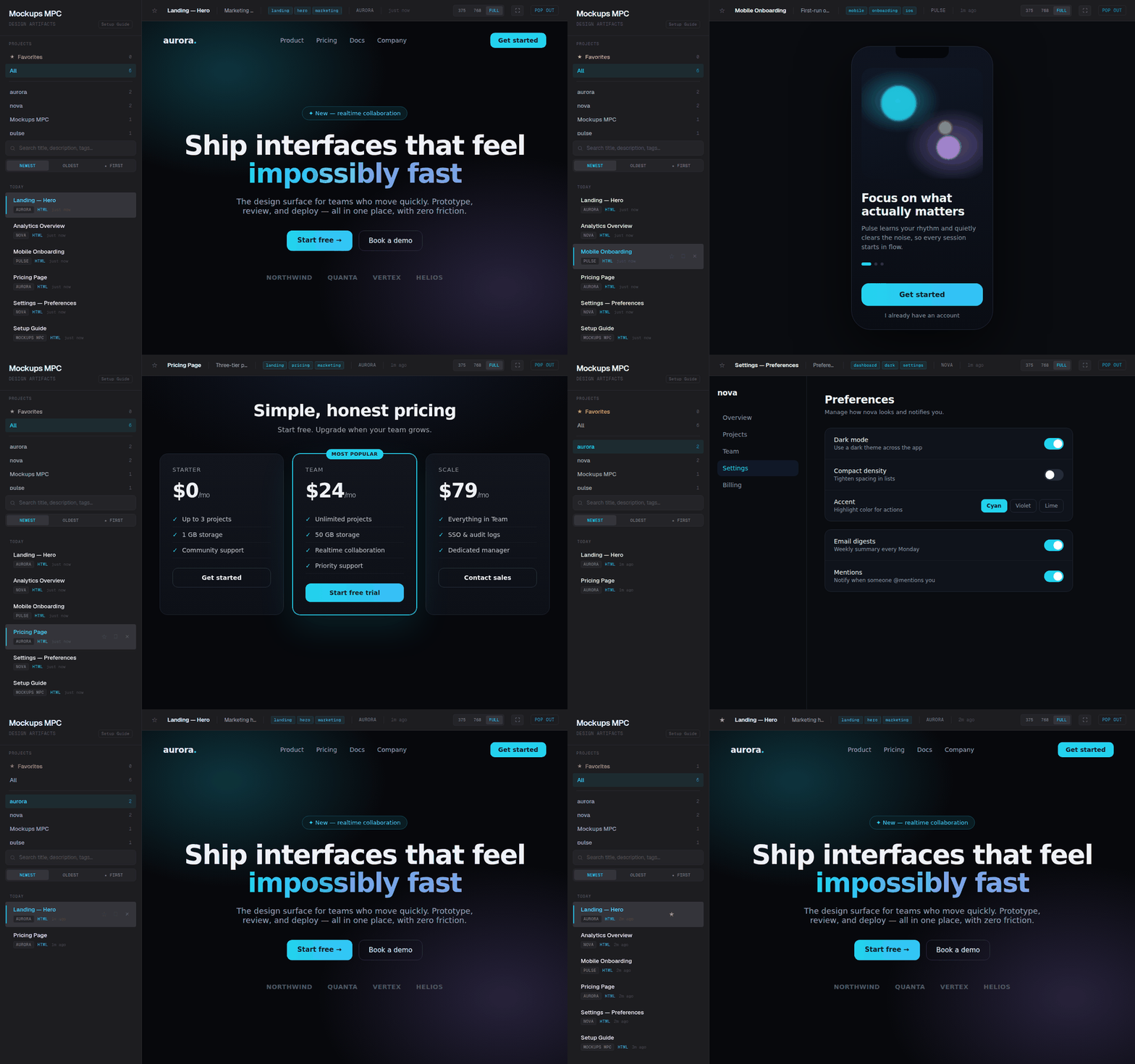
A self-hosted gallery for AI-generated mockups — with an MCP interface. Instead of cluttering your repo, mockups get a permanent home and a clean web gallery you can browse. AI tools upload them over a direct curl call; MCP handles only the lightweight coordination — listing, metadata, tagging, and retrieval.
Token-efficient by design. MCP tool parameters flow through the model context, so sending a large HTML file via a tool call wastes tokens. Mockups MPC provides an HTTP upload endpoint (POST /api/upload) — the AI writes the file locally and curls it to the server, keeping file content entirely out of the model context. MCP tools handle lightweight operations only: listing, metadata, tagging, and deletion.
Prerequisites
- Docker (for deployment) or Python 3.12+ (for local development)
- An MCP-compatible AI client (Claude Code, Claude Desktop, etc.)
- Optional: Traefik reverse proxy (for production with TLS)
Why
Every time an AI tool generates a mockup, there's no consistent place for it to go — so they pile up in your repo or get scattered across temp dirs, sessions lose track of them, and there's no history. Mockups MPC gives them a permanent home instead: the AI pushes the mockup to the gallery, you browse it there, and the local file gets cleaned up. One place for everything, nothing cluttering your project.
Architecture
┌─────────────────┐     MCP (HTTP/SSE)     ┌──────────────────────┐
│  Claude Code /  │ ◄───────────────────── │                      │
│  Claude Desktop │  send/list/get/update  │    Mockups MPC       │
│  Any MCP Client │  delete/tag            │    (FastAPI)         │
└─────────────────┘                        │                      │
                                           │  ┌────────────────┐  │
       Browser                             │  │  MCP Server    │  │
    ┌──────────┐      GET /                │  │  (fastmcp)     │  │
    │ Gallery  │ ◄──────────────────────── │  └────────────────┘  │
    │ Viewer   │                           │  ┌────────────────┐  │
    └──────────┘                           │  │  JSON API      │  │
                                           │  │  /api/*        │  │
                                           │  └────────────────┘  │
                                           │  ┌────────────────┐  │
                                           │  │  SQLite (WAL)  │  │
                                           │  │  + Filesystem  │  │
                                           │  └────────────────┘  │
                                           └──────────────────────┘
Single Docker container running a FastAPI app that serves two roles:
- MCP Server — mounted at
/mcp/(HTTP transport) and/mcp/sse(SSE transport). AI tools connect here to send and manage mockups. - Web Gallery — served at
/. Sidebar with project list and chronological feed, main viewer with iframe/image display.
Data Layer
- SQLite in WAL mode — metadata catalog (project, title, description, tags, content type, timestamps)
- Filesystem — mockup files stored in
data/{project_slug}/{uuid}.{ext} - Storage is a bind-mounted
data/directory next to the compose file
Tech Stack
- Python 3.12
- FastAPI + uvicorn
- fastmcp v3.x (standalone)
- SQLite via aiosqlite
- Jinja2 templates + vanilla JS
- Docker + Traefik
Security
There is no built-in authentication. All API endpoints and MCP tools are open to anyone who can reach the server. This is designed for trusted networks (LAN, VPN, Tailscale) or behind a reverse proxy that handles auth. If you deploy this on a public network, add authentication at the proxy layer.
MCP Tools
| Tool | Description |
|---|---|
send_mockup | Send HTML/SVG (raw string) or PNG/JPG (base64) to the gallery. Returns a gallery URL. |
list_mockups | List mockups reverse-chronologically, optionally filtered by project. |
get_mockup | Get a specific mockup by UUID with view and gallery URLs. Curl the view_url to read the file content. |
update_mockup | Update metadata (title, description, tags) or replace content. |
delete_mockup | Delete a mockup — removes both the DB record and file on disk. |
tag_mockup | Add or remove tags on an existing mockup. |
The server stores all content permanently. AI clients can clean up local files when they're no longer needed, or retrieve content later via get_mockup.
API Routes
| Route | Purpose |
|---|---|
GET / | Gallery UI |
GET /view/{id} | Raw mockup (HTML rendered, images served with correct MIME type) |
GET /api/mockups | JSON listing with limit, offset, project filter |
GET /api/mockups/{id} | Single mockup metadata |
GET /api/projects | Project list with counts |
POST /api/upload | Upload a mockup file (multipart form: file, project, title, description?, tags?) |
GET /health | Health check |
Setup
1. Clone and configure
git clone https://github.com/kgNatx/mockups-mpc.git
cd mockups-mpc
2. Deploy
Quick start (pre-built image):
docker compose -f docker-compose.local.yml up -d
# Gallery available at http://localhost:8000
Build from source:
docker compose -f docker-compose.local.yml up -d --build
Production (with Traefik):
cp .env.example .env
# Edit .env with your domain and Traefik network name
docker compose up -d --build
3. Verify
curl http://localhost:8000/health
# {"status":"ok"}
4. Connect Claude Code
claude mcp add-json mockups-gallery '{"type":"http","url":"https://your-domain.com/mcp"}'
Or add to .mcp.json (project-level) or ~/.claude/.mcp.json (global):
{
  "mcpServers": {
    "mockups-gallery": {
      "type": "http",
      "url": "https://your-domain.com/mcp"
    }
  }
}
5. Connect Claude Desktop
Add to your Claude Desktop config file:
- macOS:
~/Library/Application Support/Claude/claude_desktop_config.json - Windows:
%APPDATA%\Claude\claude_desktop_config.json - Linux:
~/.config/Claude/claude_desktop_config.json
{
  "mcpServers": {
    "mockups-gallery": {
      "type": "sse",
      "url": "https://your-domain.com/mcp/sse"
    }
  }
}
6. Tell your AI to use it
Add instructions to your CLAUDE.md (or equivalent) so your AI uploads mockups via curl instead of passing file content through the model context:
# Mockups

When generating UI mockups, design concepts, or visual prototypes,
write the file locally then upload it to the Mockups MPC gallery via curl:

    curl -s -X POST https://your-domain.com/api/upload \
      -F file=@/path/to/file.html -F project=name -F title=name \
      [-F description=text] [-F "tags=a,b,c"]

To read a mockup's content later, use `get_mockup` to get its
`view_url`, then curl it.
Add to ~/.claude/CLAUDE.md for all projects, or a project's CLAUDE.md for specific ones.
Gallery UI
The gallery auto-seeds a Setup Guide as the first entry on fresh installs. The guide covers all configuration methods with copy-able code blocks.
Layout: Sidebar (project list + chronological feed with title filter + infinite scroll) + main viewer (iframe for HTML, img for images/SVG) + metadata bar + pop-out link.
Theme: Techno Chic Minimalist — Space Grotesk, cyan accents, zinc/neutral dark backgrounds.
Project Structure
app/
├── main.py          # FastAPI app, lifespan, MCP mount, router includes
├── config.py        # Settings (DATA_DIR, DB_PATH, BASE_URL from env)
├── db.py            # SQLite init + CRUD (WAL mode, aiosqlite)
├── models.py        # Pydantic models
├── storage.py       # Slug generation, file write/read/delete, 25MB limit
├── mcp_server.py    # FastMCP instance, tool logic, tool wrappers
├── seed.py          # Auto-seed setup guide on empty DB
├── routes/
│   ├── api.py       # JSON API endpoints
│   └── gallery.py   # Gallery page + raw mockup serving
├── templates/
│   └── gallery.html # Jinja2 gallery template
└── static/
    ├── style.css         # Gallery theme
    └── setup-guide.html  # Self-contained setup guide page
Development
python -m venv .venv
source .venv/bin/activate
pip install -r requirements.txt
pytest tests/ -v
uvicorn app.main:app --reload
The test suite covers storage, database, MCP tools, API routes, upload, and gallery.
License
MIT — see LICENSE.
Reviews
No reviews yet
Be the first to review this server!
More Developer Tools MCP Servers
Paperclip
Freeby Paperclipai · Developer Tools
Trending hip-hop artist momentum scores across four cultural dimensions.
Netdata
Freeby Netdata · Developer Tools
Real-time infrastructure monitoring with metrics, logs, alerts, and ML-based anomaly detection.
Git
Freeby Modelcontextprotocol · Developer Tools
Read, search, and manipulate Git repositories programmatically
Toleno
Freeby Toleno · Developer Tools
Toleno Network MCP Server — Manage your Toleno mining account with Claude AI using natural language.
mcp-creator-python
Freeby mcp-marketplace · Developer Tools
Create, build, and publish Python MCP servers to PyPI — conversationally.
MCP Marketplace
Freeby mcp-marketplace · Developer Tools
Search and install MCP servers from inside your AI client.