
Server data from the Official MCP Registry
Search Raindrop.io bookmarks and review tag and collection plans. Read-only MCP by default.
About
Search Raindrop.io bookmarks and review tag and collection plans. Read-only MCP by default.
Security Report
Valid MCP server (7 strong, 1 medium validity signals). No known CVEs in dependencies. ⚠️ Package registry links to a different repository than scanned source. Imported from the Official MCP Registry. 1 finding(s) downgraded by scanner intelligence.
12 files analyzed · 1 issue found
Security scores are indicators to help you make informed decisions, not guarantees. Always review permissions before connecting any MCP server.
Permissions Required
This plugin requests these system permissions. Most are normal for its category.
What You'll Need
Set these up before or after installing:
Environment variable: RAINDROP_TOKEN
How to Install
Add this to your MCP configuration file:
{
  "mcpServers": {
    "io-github-kingpsychopath-raindrop-cli": {
      "env": {
        "RAINDROP_TOKEN": "your-raindrop-token-here"
      },
      "args": [
        "-y",
        "@machineyearn/raindrop-cli"
      ],
      "command": "npx"
    }
  }
}Documentation
View on GitHubFrom the project's GitHub README.
rdrop for Raindrop.io
Find, review and organize your saved links. Keep your tags. Bring your own AI.


Turn a growing Raindrop.io library into something easier to use. Search saved links, inspect collections, find cleanup opportunities and review suggestions before making changes. Use it from your terminal or let your favorite agent do the reading and planning.
A Raindrop.io CLI, MCP server and reviewed bookmark organizer from Machineyearn, built as an independent integration.
- Your organization stays yours. Start with the tags and collections you already created; preserve existing tags when applying a plan.
- Changes you can inspect. See exact bookmarks, proposed tags and destinations, then dry-run the plan before applying it.
- AI that fits your workflow. Connect Codex or Claude, use a hosted tool-capable model, or run local Qwen and Laya.
- A useful CLI without AI. Search, edit, export, manage highlights and collections, and build shell pipelines.
Get started
1. Install
brew install machineyearningengineer/tap/rdrop
# Or Node 22+, with optional dependencies enabled:
npm install --global @machineyearn/raindrop-cli@0.2.1
rdrop version
Prefer no global install? Use npx --yes @machineyearn/raindrop-cli@0.2.1 COMMAND. Native downloads cover macOS, Linux and Windows on Intel/AMD and ARM. Builds and checksums.
2. Connect Raindrop
Create a token in your Raindrop integration settings. Add it to the private file ~/.config/rdrop/env:
RAINDROP_TOKEN=your_token_here
Give the directory permissions 700 and the file 600, then run rdrop doctor. Keep the token out of chat and Git. Setup and troubleshooting.
3. Ask your agent
Copy this into Codex, Claude or your preferred coding agent. It can help with setup too:
Set up https://github.com/machineyearningengineer/raindrop-cli so you can help
manage my Raindrop library. Use its plugin/MCP when available, otherwise
use the CLI. Check installation and authentication; have me add the token
privately. Use the existing model and configured services first.

Start with a cleanup report and a small sample. Use my existing tags and
collections. Choose useful tools for search, content, classification and
planning; connect extra model providers, Executor or ACP only if needed.
Show the exact proposed changes and a dry-run. Preserve my tags and notes,
flag uncertain suggestions, and apply only the exact plan I approve.
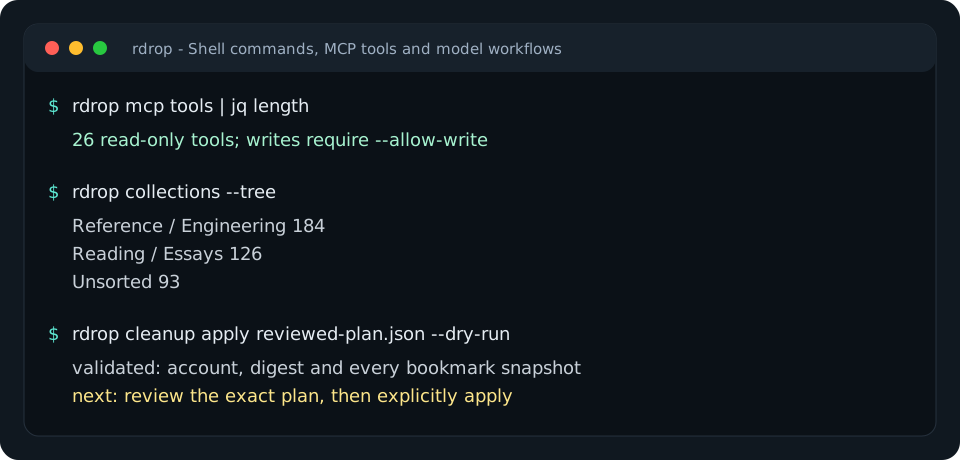
Connect an agent, or start in your shell with rdrop collections --tree, rdrop search 'type:article #go' --json and rdrop cleanup report --json.
Choose your workflow
| You want to… | Start here |
|---|---|
| Find links, manage collections or export your library | Shell commands |
| Use Codex, Claude or another MCP client | Client setup and plugins |
| Ask a model to inspect your library and propose changes | Run a model directly |
| Use Raindrop's semantic search and AI-assisted reads | Official MCP tools |
| Classify selected bookmarks with Jev, Laya or Clef | Decision providers |
| Run portable Raindrop tools in Executor | Executor setup |
Organize with a plan
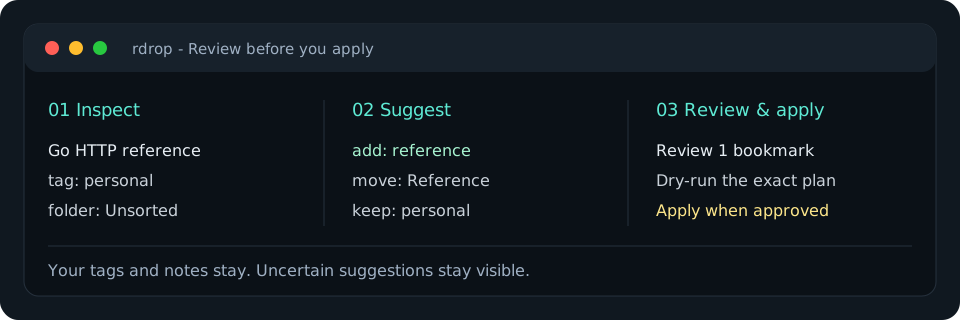
Begin with a report and select the exact bookmarks you want to review:
rdrop cleanup report --json > cleanup-report.json
rdrop context --ids 101,102 > library-context.json
jq 'del(.snapshots)' library-context.json > model-context.json
The model view contains your existing tag names, collection paths and bookmark metadata. Keep the original context private: its snapshots are used to detect edits before applying. Ask any model or rule engine for the proposal format, then validate it:
rdrop organize plan --context library-context.json --proposal proposal.json > organization.json
jq '.plan // error("No accepted changes")' organization.json > reviewed-plan.json
# Review accepted changes, needsReview and unmentioned items.
rdrop cleanup apply reviewed-plan.json --dry-run
rdrop cleanup apply reviewed-plan.json --yes
Plans keep existing tags and can combine new tags with a collection move. Unknown names and destinations fail validation; new tags need explicit naming rules. Account, digest and snapshots are checked before writing. Concurrent edits or partial failures need inspection and a fresh plan. Organizing and recovery.
Use your agent
The Codex and Claude plugin bundles a shared organizing skill and a read-only MCP connection. Install instructions also cover direct setup for other local clients.
rdrop connect mcp                         # client configuration, without tokens
rdrop mcp serve                           # read-only tools over stdio
rdrop mcp tools --search 'organize tags'   # discover relevant schemas offline
rdrop mcp tools --name raindrop_context    # inspect one exact schema
rdrop mcp serve --official                # also include Raindrop's hosted AI reads
Default tools read and plan. Enable writes only for an authorized host that enforces review. The official extension imports documented read tools; its plan limits and service availability still apply. Coverage and comparison with the official server.
You can also run a model directly:
# With your model API key in a private environment:
rdrop agent --model your-tool-capable-model --json \
  'Review the first page of untagged bookmarks. Use existing tags and propose a plan.' > agent-result.json
The model receives actual tool results and returns a response plus exact generated plans. Step, call and time limits bound the run. Local Chat Completions servers and hosted Responses APIs are supported. Jev, Laya and Cloudflare Clef provide typed category decisions; uncertainty stays visible. Model setup and exact commands.
Verified and maintained
A real Qwen/Laya loop classified bookmarks, generated a plan and applied it to a disposable test library while preserving existing tags and notes. The local Executor deployment passed connected-account health and live read checks. Repeat the verification, including its limits: this smoke check is not an accuracy benchmark, and Jev/Clef live inference requires provider credentials.
The product focuses on Raindrop. Model providers and proposal formats are agnostic; Obsidian and other note sources remain future options.
For developers
The public name is rdrop for Raindrop.io. Stable technical identifiers are the raindrop-cli repository, @machineyearn/raindrop-cli npm package, rdrop command and raindrop@machineyearn plugin. Storage support currently focuses on Raindrop.io; model and agent connections are provider-neutral.
A native Go CLI, local MCP server and direct model loop share the command implementation. The REST client, model clients and planning code use the standard library; MCP uses the official Go SDK. ACP configuration supplies this server to an existing ACP agent. Executor offers a smaller portable REST adapter. Docker is available as a packaging option.
make check               # Go checks, build and generated-doc parity
make check-integrations  # npm, Executor and Laya contracts
make assets              # regenerate the terminal graphic
Reviews
No reviews yet
Be the first to review this server!
More Developer Tools MCP Servers
Fetch
Freeby Modelcontextprotocol · Developer Tools
Web content fetching and conversion for efficient LLM usage
Git
Freeby Modelcontextprotocol · Developer Tools
Read, search, and manipulate Git repositories programmatically
Worldmonitor
Freeby Koala73 · Developer Tools
Live markets, conflicts, country risk, chokepoints, energy, and China decision signals. 93 tools.
Toleno
Freeby Toleno · Developer Tools
Toleno Network MCP Server — Manage your Toleno mining account with Claude AI using natural language.
MCP Marketplace
Freeby mcp-marketplace · Developer Tools
Search and install MCP servers from inside your AI client.
mcp-creator-python
Freeby mcp-marketplace · Developer Tools
Create, build, and publish Python MCP servers to PyPI — conversationally.