
Server data from the Official MCP Registry
Assistant editor for Premiere Pro and DaVinci Resolve: logs, transcribes, rough cuts, subtitles, QC
About
Assistant editor for Premiere Pro and DaVinci Resolve: logs, transcribes, rough cuts, subtitles, QC
Security Report
The MCP server is a legitimate developer tool for video editing automation in Premiere Pro and DaVinci Resolve. The codebase shows reasonable security practices with proper use of environment variables for API keys and no obvious malicious patterns. However, moderate concerns exist around the broad capabilities granted to Claude (arbitrary ExtendScript execution, filesystem access), the reliance on external Python dependencies without pinned versions, and potential path traversal risks in file operations. The project is actively maintained with a clear security-conscious author, but users should be aware of the privileged access model. Supply chain analysis found 14 known vulnerabilities in dependencies (0 critical, 12 high severity).
4 files analyzed · 21 issues found
Security scores are indicators to help you make informed decisions, not guarantees. Always review permissions before connecting any MCP server.
Permissions Required
This plugin requests these system permissions. Most are normal for its category.
What You'll Need
Set these up before or after installing:
Environment variable: PREMIERE_BRIDGE_PORT
How to Install
Add this to your MCP configuration file:
{
  "mcpServers": {
    "io-github-koptsev63-premiere-claude-bridge": {
      "env": {
        "PREMIERE_BRIDGE_PORT": "your-premiere-bridge-port-here"
      },
      "args": [
        "-y",
        "premiere-claude-bridge"
      ],
      "command": "npx"
    }
  }
}Documentation
View on GitHubFrom the project's GitHub README.
AI assistant editor for Premiere Pro and DaVinci Resolve
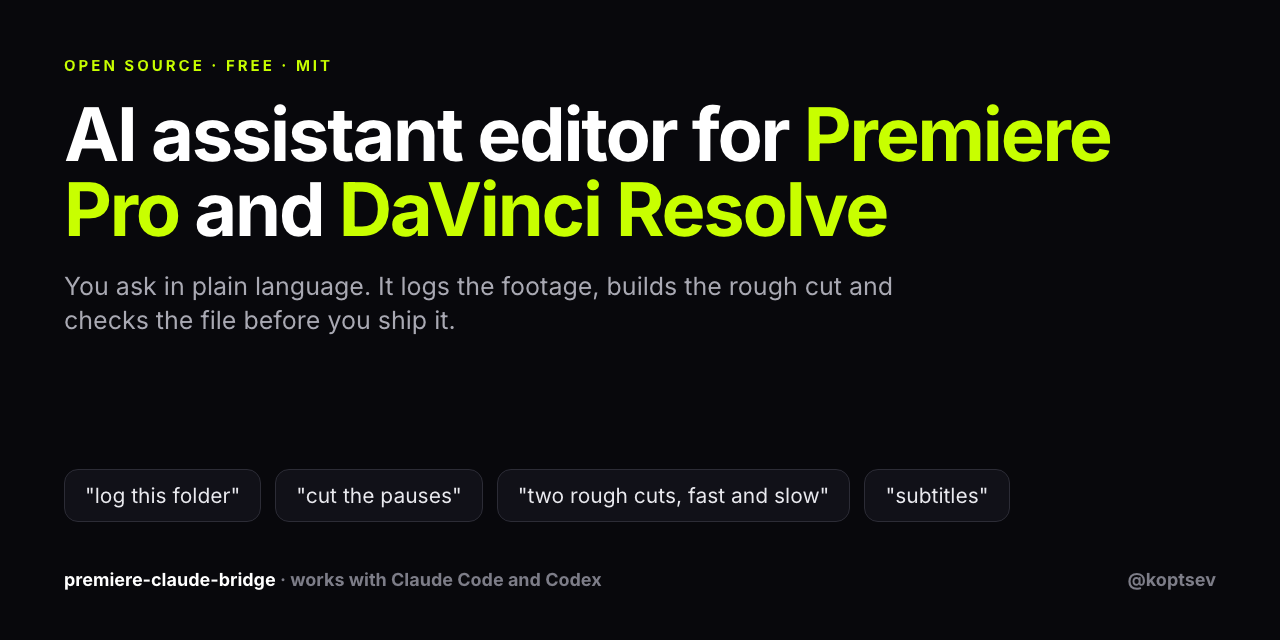
premiere-claude-bridge is a free, open-source MCP server that lets Claude Code or Codex do the assistant editor's work inside your own project. You ask in plain language. It logs the footage, transcribes the speech, lays out a rough cut on your timeline and checks the result before you ship it.




Install in one sentence
Open Claude Code (the Code tab of the Claude desktop app works) and send it this:
Install premiere-claude-bridge from github.com/koptsev63/premiere-claude-bridge following its README, and take me to the green "Connected" label in Premiere.
Claude clones the repo, sets everything up and tells you when to restart Premiere. Then:
- In Premiere open Window → Extensions → Claude Bridge. The panel should say "Connected to Claude".
- Start a new chat and ask: "Check the connection to Premiere."
- Keep that Claude session open while you edit.
On DaVinci Resolve Studio there is no panel. Set Preferences → System → General → External scripting using to Local, restart Resolve, and ask Claude to set the project up for Resolve.
You need Premiere Pro 2024 or newer, or DaVinci Resolve Studio, and a Claude or Codex subscription. Tested on macOS. Windows has install steps but nobody has confirmed them yet. Prefer to do it by hand? See Manual install.
What you can ask it to do
Sort the footage
- Watch a whole folder of rushes and write a log: what is in the shot, where the motion and the sound are, which clips are shaky or tilted. You get one page with a frame strip per clip.
- Transcribe speech offline, in Russian, English, Hungarian and other languages, then flag the words it probably misheard.
- Find material by words: a character's lines, a topic, "the long monologue at night".
Build the cut
- Put takes on the timeline in order and mark the story beats.
- Cut out pauses and dead air.
- Pick the strongest moments of a long recording for a short version.
- Build two contrasting rough cuts from the same material so you choose.
- Make variants of a cut you built by hand: drop a scene, insert a block, keep every other frame where it was.
Sound and subtitles
- Duck music under speech and level the takes against each other.
- Deliver subtitles as SRT and burned in.
Check before delivery
- Refuse a grade with blown highlights or red skin, and a grade nobody can see.
- Refuse a file with wrong proportions, shaky edges or no sound.
Follow your hands. Move the cuts, retype a caption, save the project. It reads your saved .prproj and works from your version from then on.
It has no taste. Decisions stay with you; it takes the logging, sorting and checking.
What an editor said
"Все установилось по твоей инструкции без проблем, единственный затык, который случился - это настройка первого коннекта."
"Я пока попробовал использовать помощника только для базовой организации файлов на таймлайне, типа расставить в хронологическом порядке дубли, срезать пустые фазы и т.д. С этим он справился отлично, все вполне интуитивно."
Andrey, film editor, October 2026
In English: "Everything installed by your instruction with no problems. The only snag was setting up the first connection." And: "So far I have used the assistant only for basic organisation of files on the timeline, like putting takes in chronological order and cutting the empty phases. It handled that very well, it is all quite intuitive."
The snag he hit is now step 2 above.
Demo
You:    "Open Premiere. Import all .MTS from ~/Desktop/Footage/.
        Create a 1080p25 sequence called 'Rough'. Place clips
        00118 (1-6s), 00149 (4-9s), 00130 (1-5s) on V1 in order.
        Add markers at every emotional beat per Murch's hierarchy."

Claude: ✓ Imported 108 clips into bin '01_Source_MTS'
        ✓ Created Rough — 1920x1080, 25fps, 3 V / 6 A tracks
        ✓ Placed 3 clips on V1, total 14 sec
        ✓ Marked 5 emotional beats: HOOK @0s, COMEDY @5s,
          PIT @8s, BREATH @11s, PAYOFF @13s
→ Real output from this exact prompt. See examples/grave-stakes-teaser/cutlist_v3.json for the full 12-clip cutlist that built the case-study teaser.
How this compares to other Premiere and Resolve MCP servers
There are about fifteen Premiere MCP servers on GitHub now, and several for Resolve. The big ones are good at something this project is not, so here is the honest split (checked October 2026).
Where the others are ahead
- Typed timeline tools. hetpatel-11/Adobe_Premiere_Pro_MCP and leancoderkavy/premiere-pro-mcp ship hundreds of typed tools for effects, keyframes, transitions and multicam. Here those go through
pr_eval_jsx. - Install. They have npm packages and installers. This repo is a clone and a symlink.
- UXP. Both have a UXP preview. This panel is CEP only.
- Resolve depth. samuelgursky/davinci-resolve-mcp covers Fusion, Fairlight and the free edition. This project needs Resolve Studio and is tested on macOS.
What this project does that their READMEs do not mention
| Your edits come back | Reads the saved .prproj and conforms every later render to what you changed by hand |
| Gates that refuse | Colour, loudness and delivery checks raise an error instead of shipping a bad file |
| Work before the timeline | Auto-log of raw footage, offline transcript, dead-air removal, two rough-cut variants, subtitles |
| An editing method | Walter Murch's Rule of Six as decision rules in skills/film-editing/SKILL.md |
| One brain, two editors | The same cut list goes to Premiere or Resolve |
| Small surface | Ten tools and one escape hatch, so the model does not need a tool search to find its way |
If you need an agent that can reach every button in Premiere, pick one of the big servers. If you want an assistant editor for documentary material that checks its own output and follows your manual changes, this one is for you.
Why I built this
I'm a film director (festival shorts, currently developing two features in screenplay labs — Doukhobors in TFL Next, Grave Stakes in Cinéfondation). I monkey with Adobe Premiere all the time, and I burn 4-6 hours per teaser on the same boring assistant-editor work: watching all the dailies, writing notes in Excel, dragging selects to a timeline, trimming, re-timing.
I tried Adobe's own AI tools. Their official Creative Cloud connector advertises "Premiere capabilities" but the actual surface is four cloud video tools that have nothing to do with the desktop app. The Adobe docs themselves say: for trim by timestamp, use Adobe Premiere. So I made the thing that actually does that.
The non-obvious bit: I didn't want a chatbot that randomly clicks buttons. I wanted one that thinks like an editor. So the core of this repo is skills/film-editing/SKILL.md — Walter Murch's In the Blink of an Eye compressed into machine-actionable decision rules. Every cut my AI assistant proposes ranks Emotion > Story > Rhythm > Eye-trace > 2D > 3D, and I can override per shot.
It worked on my actual Grave Stakes teaser. I wanted other directors and editors to have the same thing without re-implementing the bridge from scratch.
Honest limitations
The bridge gives Claude full programmatic control of Premiere. With the watch skill bundled, the previous "stop-frames only" limitation is largely closed. What remains:
- Sub-frame timing intuition. Murch-level "trim 8 frames" calls still need a human editor.
- Micro-expression nuance. Frames + transcript get you 80% of the way; the last 20% is taste.
- Dramaturgy from nothing. Structure must be specified — the skill won't invent the through-line.
Position it as: senior assistant editor + automation, not director's editor.
For developers
Manual install
Prerequisites
You pick one agent and one NLE — the bridge connects them:
- Agent: Claude Code or OpenAI Codex (both speak MCP) — or any MCP-compatible client
- NLE: Adobe Premiere Pro 2024+ or DaVinci Resolve Studio (the paid Studio — the free edition has no scripting API or stabilizer). Premiere runs on macOS/Windows; the Resolve path is tested on macOS.
- Node.js 20+ for the MCP server
- Python 3.11+ + ffmpeg for the analysis tools (camera-shake + horizon need OpenCV:
pip install opencv-python-headless)
You drive it by talking in plain language — no commands to memorize. The terminal is only for the one-time install.
1. Clone and install
git clone https://github.com/koptsev63/premiere-claude-bridge.git
cd premiere-claude-bridge
cd mcp-server && npm install && cd ..
2. Register the MCP server
Add to your ~/.claude.json (Claude Code) or your client's MCP config:
{
  "mcpServers": {
    "premiere": {
      "command": "node",
      "args": ["/absolute/path/to/premiere-claude-bridge/mcp-server/server.js"]
    }
  }
}
3. Install the CEP panel into Premiere
macOS:
defaults write com.adobe.CSXS.11 PlayerDebugMode 1
defaults write com.adobe.CSXS.12 PlayerDebugMode 1
ln -sf "$(pwd)/cep-extension" \
  ~/Library/Application\ Support/Adobe/CEP/extensions/com.koptsev.claude-bridge
Windows (PowerShell admin):
New-ItemProperty -Path "HKCU:\Software\Adobe\CSXS.11" -Name PlayerDebugMode -Value 1 -PropertyType String -Force
New-ItemProperty -Path "HKCU:\Software\Adobe\CSXS.12" -Name PlayerDebugMode -Value 1 -PropertyType String -Force
mklink /D "$env:APPDATA\Adobe\CEP\extensions\com.koptsev.claude-bridge" "$(Get-Location)\cep-extension"
Restart Premiere → Window → Extensions → Claude Bridge → green "Connected to Claude".
First connection (where people get stuck)
- Keep a Claude Code session open. The MCP server is a child process of your Claude session. Close the session (or the Code tab in the desktop app) and the panel drops to "Disconnected".
- Start a new chat after installing. A session only loads MCP servers when it starts, so the chat you installed from does not see the bridge yet.
- Ask for a health check first: "Use
pr_statusto check the bridge." A reply with your Premiere version and project name means everything is wired up.
4. (Optional) Enable the analysis tools
pip install -U pillow opencv-python-headless openai-whisper
brew install yt-dlp ffmpeg          # macOS
# Linux: sudo apt install ffmpeg && pip install yt-dlp
openai-whisper is the offline transcription backend for /watch — no API key needed, works on Hungarian/Russian/etc. far better than the cloud whisper-1.
→ Detailed install + troubleshooting: docs/install.md
Tools (MCP commands Claude can call)
| Tool | What it does |
|---|---|
pr_status | Bridge health check + Premiere version + active project info |
pr_get_project_info | List all bins + project items (with nodeId for reference) |
pr_get_active_sequence | Sequence dimensions, fps, track count |
pr_list_timeline | Full track-by-track clip dump (in/out, start/end, duration) |
pr_get_selected | Currently selected clips on timeline |
pr_get_playhead / pr_set_playhead | CTI control |
pr_add_marker | Place marker at given time with name + comment |
pr_export_ame | Queue export to Adobe Media Encoder with .epr preset |
pr_eval_jsx | Escape hatch — run any ExtendScript code |
→ Full tool reference + ExtendScript recipes: docs/tools.md
Direct path when several Claude sessions fight for the port
The MCP server owns one WebSocket port (9876) and the panel connects to
whichever server instance got there first. With two or three Claude Code
windows open there are two or three servers, and every one but the winner
answers panel not connected while Premiere is perfectly fine.
mcp-server/pk.js does not use that port. It attaches to
the panel's own Chromium debug endpoint (port 8088, declared in
cep-extension/.debug and already enabled by the PlayerDebugMode install
step) and calls evalScript the same way the panel does. Any number of
sessions can use it at once.
node mcp-server/pk.js info                       # version, project, active sequence
node mcp-server/pk.js eval 'app.project.name'    # one ExtendScript expression
node mcp-server/pk.js file build_sequence.jsx    # a whole script
echo 'app.version' | node mcp-server/pk.js eval -
Node 22+ needs no packages for it; older Node uses the ws that npm install
already put in mcp-server/. Premiere must be running with the Claude Bridge
panel open. The result is the string evalScript returns, so have your script
return JSON.stringify(...). Tell your agent: "if pr_status says the panel
is not connected, use node mcp-server/pk.js".
The Resolve side has the same kind of hatch, plus eyes on the timeline:
python -m core.adapters.resolve_run exec script.py runs your Python with
resolve, project, timeline and mp preloaded, and still / grab
return composited timeline frames as PNG.
The delivery loop (what actually ships a cut)
A render is not a delivery. The editor has to be able to open the work, disagree with it, and move a cut — so the loop closes back on the machine:
cutlist → sequences in the editor's own project → he edits and saves →
core.prproj reads his version → renders + grade conform to it →
core.colorgate passes it or sends it back
| Module | What it is for |
|---|---|
core/prproj.py | Reads a saved .prproj: sequences, caption cues, picture cuts. Razor halves are stitched back together against the cut list; untouched lines resolve from the sidecar by order, never by overlap (transcript time and cut time are different clocks) |
core/colorgate.py | Two-sided colour gate. Upper: clipping, oversaturation, skin Cr and saturation against the base. Lower: mean CIE ΔE, so a look nobody can see fails too. assert_ok() raises instead of shipping |
core/qc.py | Geometry and residual-shake gate on the rendered file, plus delivery integrity: decodes clean, promised size and rate, has sound |
core/loudness.py | Levels the shots against each other, then one static gain and a true-peak limiter to the delivery target. Gate: integrated LUFS, true peak, spread between shots |
core/screen_comp.py | Screen replacement: a clip composited into a phone, monitor or TV in the plate, riding an ECC camera track, with colour-exact Rec.709 I/O. Gate: the plate outside the screen must come back unchanged |
core/adapters/resolve_run.py | Resolve from a shell: timeline dump, composited frames as PNG (still, grab), and exec for your own script |
core/ | The rest of the pipeline: cutlist IR, adapters, subtitles, ducking, denoise, highlights, beats |
# does this grade burn the picture — or is it invisible?
python -m core.colorgate base.mov graded.mp4 --frames 8 --upto 60

# what did the human actually approve in there?
python -m core.prproj "reel.prproj" --srt subs.srt

# even out the takes, hit -14 LUFS / -1 dBTP, and prove it (exit 1 = do not ship)
python -m core.loudness master.mov deliver.mp4 --shots 0,5.6,11.2

# put a clip inside the TV in the shot
python -m core.screen_comp plate.mp4 content.mp4 out.mp4 --config screen.json
Skills
film-editing/
Walter Murch's editing operating system as Claude decision rules:
- Rule of Six (Emotion 51% > Story 23% > Rhythm 10% > Eye-trace 7% > 2D 5% > 3D 4%)
- Blink theory, misdirection, idea cuts, dreaming in pairs, decisive moment
- Pacing tables for trailers/teasers/montage/interview/title cards
- Russian↔English terminology mapping
Plus tooling:
tools/analyze_clips.py— folder → HTML contact sheet (motion + audio + horizon + strips)tools/horizon_detect.py— sky-ground segmentation + Hough fallback for tilt detection
watch/ (vendored from bradautomates/claude-video, MIT)
Lets Claude actually watch a clip. Extracts 30-100 frames + transcript via three Whisper backends:
local(openai-whisper, no key, offline, free) — recommended- Groq
whisper-large-v3(cloud, fastest, ~$0.0002/min) - OpenAI
whisper-1(cloud, slowest, ~$0.006/min)
See skills/watch/ATTRIBUTION.md for credit and skills/film-editing/SKILL.md §XIV for integrated workflow.
Architecture
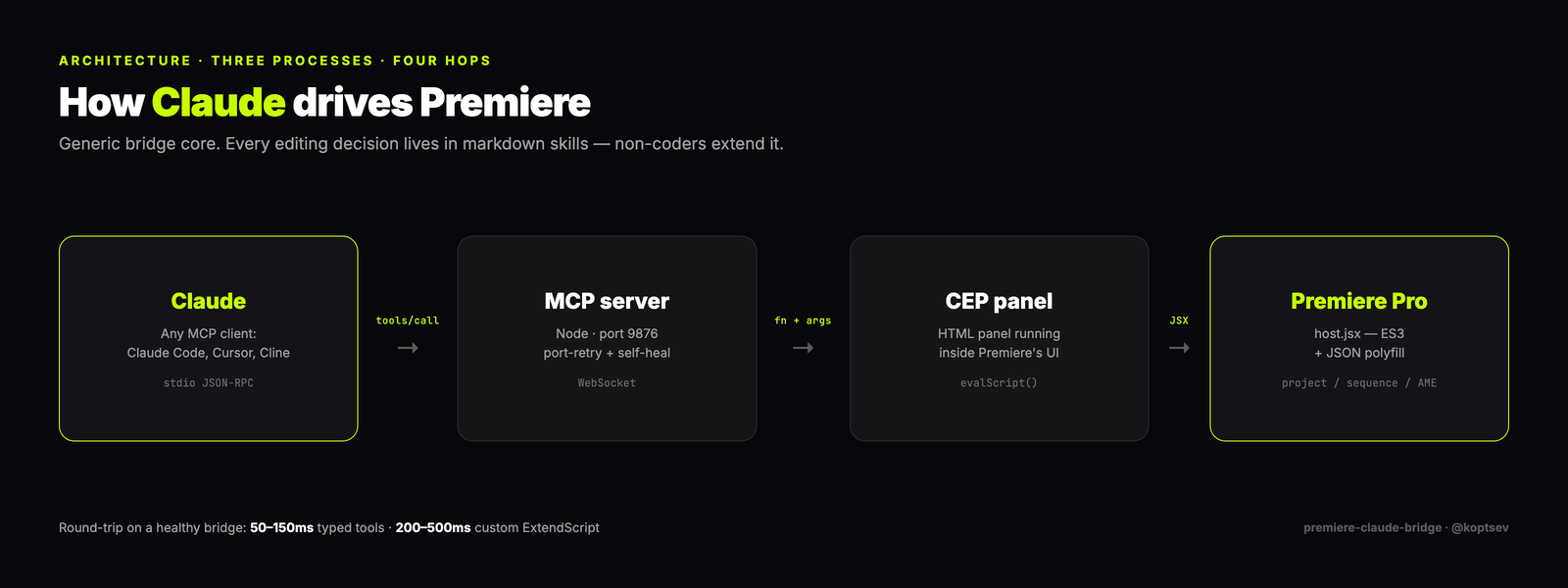
See docs/architecture.md. Notable design choices:
- Multi-instance-safe WS server - if a previous Claude session holds port 9876, new instances retry every 3s until the holder dies. Without this, multiple Claude sessions silently break. While they wait,
mcp-server/pk.jsreaches the panel through its debug port instead (direct path). - ExtendScript JSON polyfill — Adobe never shipped JSON in their ES3 engine. Without the polyfill, every typed tool fails on
JSON.stringify. - Self-healing socket lookup — adopts live
wss.clients[0]if the cachedpanelSocketgoes stale after a CEP panel reload.
These were all real bugs found during the Grave Stakes case study. See CHANGELOG.md.
Roadmap
- v0.1 — MCP bridge + film-editing skill + analyze_clips
- v0.2 —
/watchskill bundled, local Whisper, horizon detection v2 - v0.3 —
trailer-bridgeskill pack — 7 genre-specific recipes (action, drama, comedy, horror, doc, thriller, romance) + LUT presets + auto-rendering - v0.4 — multicam audio sync — match camera angles by audio waveform xcorr, build multicam clips programmatically
- v0.5 — face/sentiment detection — mediapipe pass per clip → "where is the actor's most emotional moment in this take?"
- v0.6 — MCP Registry publish — official listing + GitHub Action for auto-release
- [~] v1.0 - universal NLE core - editing brain decoupled from Premiere via an OpenTimelineIO cutlist; Premiere, DaVinci Resolve (Studio Python API), and Final Cut (FCPXML) become interchangeable backends (#6). Foundation landed in
core/: cutlist IR + lossless OTIO round-trip, capability matrix, all three adapters, NLE-neutral review loop, 672 tests green. Resolve adapter verified end-to-end on Resolve Studio 21. Remaining: conform/proxy relink, capability-probe.
→ Want to claim one? Open an issue with claim label.
Why "universal NLE core" is not "the same bridge for every editor"
The three editors integrate in fundamentally different ways, so v1.0 is an adapter design, not a copy of the Premiere bridge (epic #6):
- The editing brain stays NLE-agnostic.
skills/film-editing/(Murch's Rule of Six) and the/watchperception layer reason about footage and cuts, not about Premiere. They don't change. - One cutlist, expressed in OpenTimelineIO. A cut is decided once as an OTIO timeline (the
cutlist_*.jsonin the Grave Stakes example, formalized). OTIO is the industry interchange standard — Resolve reads/writes it natively, FCPXML has OTIO adapters, Premiere goes through this bridge. - Thin per-NLE drivers, same verb set. Premiere = the existing CEP/ExtendScript bridge. DaVinci Resolve = direct Python via the official scripting API (requires Resolve Studio — external scripting is disabled in the free version). Final Cut = FCPXML round-trip (file exchange, not live control).
Net: a decision made once renders into any editor. Raw "AI controls Resolve" is already crowded (several MCP servers exist); the differentiator here is the editing operating system on top, not the driver underneath.
Contributing
PRs, issues, and skill packs are welcome — see CONTRIBUTING.md for the short guide.
Easiest ways to help:
- 🐛 Open an issue if anything in the install steps doesn't work on your OS
- 🎬 Submit a
SKILL.mdfor a genre you know (music videos, podcasts, sports, weddings) - 📺 Record a 60-second screencast of your own use case → I'll pin it in the README
- 🌐 Translate the
film-editingSKILL.md to your language
Look for good first issue and help wanted labels.
License
MIT — see LICENSE. The vendored skills/watch/ is also MIT, copyright Bradley Bonanno — see skills/watch/ATTRIBUTION.md.
Status
🟡 Beta v0.3. Tested end-to-end on real festival-bound documentary footage (Grave Stakes, 108 raw .MTS clips, 4.4 GB), then on a second production job start to finish — a vertical announcement reel cut in Premiere, conformed and graded through DaVinci Resolve, with the delivery loop above running on the director's own project file (August 2026). Three outside editors have it so far; the first one installed it on his own in October 2026.
Stuck on install or found a bug? Open an issue or a discussion here. News goes to the Telegram channel @koptsev_AI (in Russian).
Author: Vladimir Koptsev — film director, Barcelona. TG @koptsev_AI · koptsev63@gmail.com
Reviews
No reviews yet
Be the first to review this server!
More Developer Tools MCP Servers
Git
Freeby Modelcontextprotocol · Developer Tools
Read, search, and manipulate Git repositories programmatically
Fetch
Freeby Modelcontextprotocol · Developer Tools
Web content fetching and conversion for efficient LLM usage
Worldmonitor
Freeby Koala73 · Developer Tools
Live markets, conflicts, country risk, chokepoints, energy, and China decision signals. 89 tools.
Paperclip
Freeby Paperclipai · Developer Tools
Trending hip-hop artist momentum scores across four cultural dimensions.
Toleno
Freeby Toleno · Developer Tools
Toleno Network MCP Server — Manage your Toleno mining account with Claude AI using natural language.
mcp-creator-python
Freeby mcp-marketplace · Developer Tools
Create, build, and publish Python MCP servers to PyPI — conversationally.