
Server data from the Official MCP Registry
Memory for AI coding agents — markdown in your own git, not a vendor database. Apache-2.0.
About
Memory for AI coding agents — markdown in your own git, not a vendor database. Apache-2.0.
Security Report
Krimto is a well-structured open-source MCP server for AI agent memory management with appropriate auth, reasonable permissions, and generally sound code practices. Minor code quality concerns around broad error handling and input validation exist, but do not pose significant security risks. The server's permissions align well with its stated purpose of managing local git-backed markdown files with optional team sync. Supply chain analysis found 3 known vulnerabilities in dependencies (2 critical, 0 high severity). Package verification found 1 issue.
3 files analyzed · 9 issues found
Security scores are indicators to help you make informed decisions, not guarantees. Always review permissions before connecting any MCP server.
Permissions Required
This plugin requests these system permissions. Most are normal for its category.
How to Install
Add this to your MCP configuration file:
{
  "mcpServers": {
    "io-github-krimto-labs-krimto": {
      "args": [
        "-y",
        "@krimto-labs/krimto"
      ],
      "command": "npx"
    }
  }
}Documentation
View on GitHubFrom the project's GitHub README.
Krimto
Open-source memory for AI coding agents you own in git — governed by a real user→team→org hierarchy, not a vendor database. Solo to team. Apache-2.0.



Your agent's memory, as markdown in your own git — synced across every editor and machine. Tell your agent "remember X" in any editor and it saves a durable, attributable fact; ask later — in a new chat, a different editor, or on another machine — and it recalls the right answer. One command, no account, no vendor database: your memory follows you.
You own it: every fact is a plain markdown file in a git repo you control — readable, reviewable in a
PR, and yours. When a teammate joins, that same memory becomes a shared team brain governed by a real
user → team → org hierarchy (the most specific scope wins at recall) — the one primitive no other
memory tool ships. Solo is free; the governance is what you grow into.
See it
One npx command sets it up; then your agent saves a fact in Claude Code and recalls it in Cursor —
no account, no database:
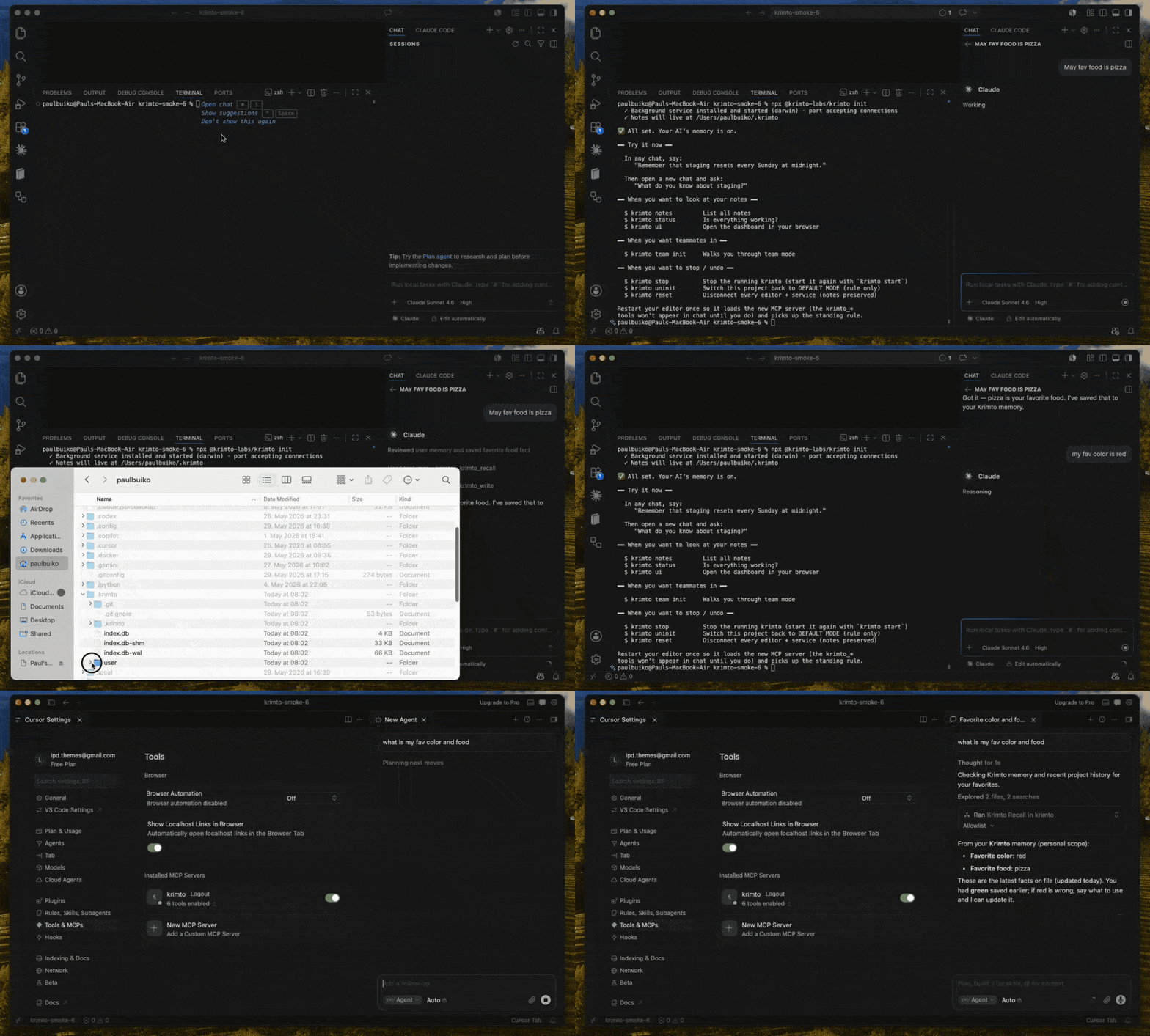
Three short demos — solo (remember in Claude Code, recall in Cursor), cross-machine (write,
git push, recall on another laptop), and team (a teammate's fact reaches you; your personal notes
stay yours).
Because every memory is just a file in your git, you can read it yourself — no API, no dashboard needed:
$ cat ~/.krimto/user/you@example.com/favorite-color.md
---
id: fct_01KT3BDSYY1KK80SG3S7KBEV58
scope: user/you@example.com
title: Favorite color
author: you@example.com
created: 2026-06-02T05:03:14Z
updated: 2026-06-02T05:03:14Z
tags:
  - personal
source: claude-code
---

User's favorite color is red.

$ git -C ~/.krimto log --oneline -1
8bc5b86 krimto: write batch — 1 fact
That's the whole bet: your agent's memory is plain markdown in a git repo you own — not rows in someone else's database.
Why Krimto
- You own it, in your git. Every fact is a markdown file in a git repo you control —
git logthe audit trail, edit it in any editor, review it in a pull request. No vendor database, no lock-in. - Governed
user → team → orghierarchy. Knowledge is scoped to a person, a team, or the whole company, and the most specific scope wins at recall — a server-enforced primitive no other memory tool ships for free. - Follows you everywhere — cross-vendor, Apache-2.0. One MCP server syncs the same memory across Claude Code, Cursor, Codex, Gemini CLI and more — every editor and machine. Fully open source, with no managed-service restriction.
Try it in 2 minutes (solo, no account)
npx @krimto-labs/krimto init
The setup wizard detects your editor, wires it up, and turns on automatic memory. Then, in any chat:
"Remember that our staging DB resets every Sunday."
Open a new chat and ask:
"What do you know about staging?" → it remembers.
See your notes with krimto notes (terminal) or krimto ui (browser dashboard). Your data lives in
~/.krimto — the same folder no matter which project you're working in.
Connect your agent
krimto init wires supported editors for you. What auto-connects vs. needs one copy-paste step:
| Editor | Setup |
|---|---|
| Cursor | auto-connects |
| Claude Code | auto-connects |
| Codex | manual snippet |
| Gemini CLI | manual snippet |
To connect any MCP client manually, point it at Krimto over stdio:
claude mcp add krimto -- npx -y @krimto-labs/krimto
…or the config-file form (Cursor, Codex, Gemini CLI, etc. use the same shape):
{ "mcpServers": { "krimto": { "command": "npx", "args": ["-y", "@krimto-labs/krimto"] } } }
By default an agent uses Krimto only when you ask. Running krimto init once in your project drops a
standing rule so it uses Krimto on its own.
Install as a Claude Code plugin
Prefer Claude Code's plugin system? Add Krimto's marketplace and install it directly:
/plugin marketplace add krimto-labs/krimto
/plugin install krimto@krimto
This bundles the MCP server together with Krimto's skills, the /krimto-status command, and the
memory hooks — no separate krimto init needed.
How it works
Three layers, one source of truth:
- Storage — facts are markdown files in a git repository (the source of truth; git is the audit log).
- Index — a SQLite + sqlite-vec hybrid index (keyword + vector) for fast retrieval, with scope precedence applied at ranking time.
- Access — an API server enforces who can read and write each scope (
user/team/org).
Team mode
When you're ready to share memory with teammates:
npx @krimto-labs/krimto team init
This walks you through an admin email, your org/team name, an optional shared git remote, and teammate invites — then prints a join command for each teammate:
krimto join --server <url> --key <key>
Teammates can connect to one shared server, or each run their own Krimto synced over a shared git
remote. Personal and team notes live together and sync as a unit. Step back to solo any time with
krimto team disband (your notes are preserved).
Self-host
Krimto runs anywhere Node 20+ runs.
# HTTP server + browser dashboard at http://localhost:8080
npx @krimto-labs/krimto serve

# or Docker
docker run -d -p 8080:8080 -v ~/.krimto:/data ghcr.io/krimto-labs/krimto:latest
Run npx @krimto-labs/krimto --help for the full command surface.
Roadmap
v0.2 (current) ships the memory core, teams, the web dashboard, and the cross-vendor MCP server. Next: OAuth sign-in and a pull-request approval flow (v0.3), then a hosted Krimto Cloud (v1.0). See ROADMAP.md.
Contributing & license
Contributions welcome — see CONTRIBUTING.md and our Code of Conduct. Security reports: SECURITY.md.
Licensed under Apache-2.0. The same code is self-hostable by a solo developer or an enterprise — no tier walls.
Reviews
No reviews yet
Be the first to review this server!
More Developer Tools MCP Servers
Fetch
Freeby Modelcontextprotocol · Developer Tools
Web content fetching and conversion for efficient LLM usage
Git
Freeby Modelcontextprotocol · Developer Tools
Read, search, and manipulate Git repositories programmatically
Toleno
Freeby Toleno · Developer Tools
Toleno Network MCP Server — Manage your Toleno mining account with Claude AI using natural language.
MCP Marketplace
Freeby mcp-marketplace · Developer Tools
Search and install MCP servers from inside your AI client.
mcp-creator-python
Freeby mcp-marketplace · Developer Tools
Create, build, and publish Python MCP servers to PyPI — conversationally.
FinAgent
Freeby mcp-marketplace · Finance
Free stock data and market news for any MCP-compatible AI assistant.