
Server data from the Official MCP Registry
Inspect Rive files for artboards, animations, state machines, and inputs.
About
Inspect Rive files for artboards, animations, state machines, and inputs.
Security Report
Valid MCP server (2 strong, 3 medium validity signals). No known CVEs in dependencies. ⚠️ Package registry links to a different repository than scanned source. Imported from the Official MCP Registry. 1 finding(s) downgraded by scanner intelligence.
9 files analyzed · 1 issue found
Security scores are indicators to help you make informed decisions, not guarantees. Always review permissions before connecting any MCP server.
Permissions Required
This plugin requests these system permissions. Most are normal for its category.
What You'll Need
Set these up before or after installing:
Environment variable: RIVE_MCP_ROOT
How to Install
Add this to your MCP configuration file:
{
  "mcpServers": {
    "rive-vscode-mcp-server": {
      "command": "npx",
      "args": [
        "-y",
        "rive-vscode-mcp-server"
      ],
      "env": {
        "RIVE_MCP_ROOT": "your-rive-mcp-root-here"
      }
    }
  }
}
Some servers take additional arguments. See the repository for details.
Documentation
View on GitHubFrom the project's GitHub README.
Rive VS Code MCP
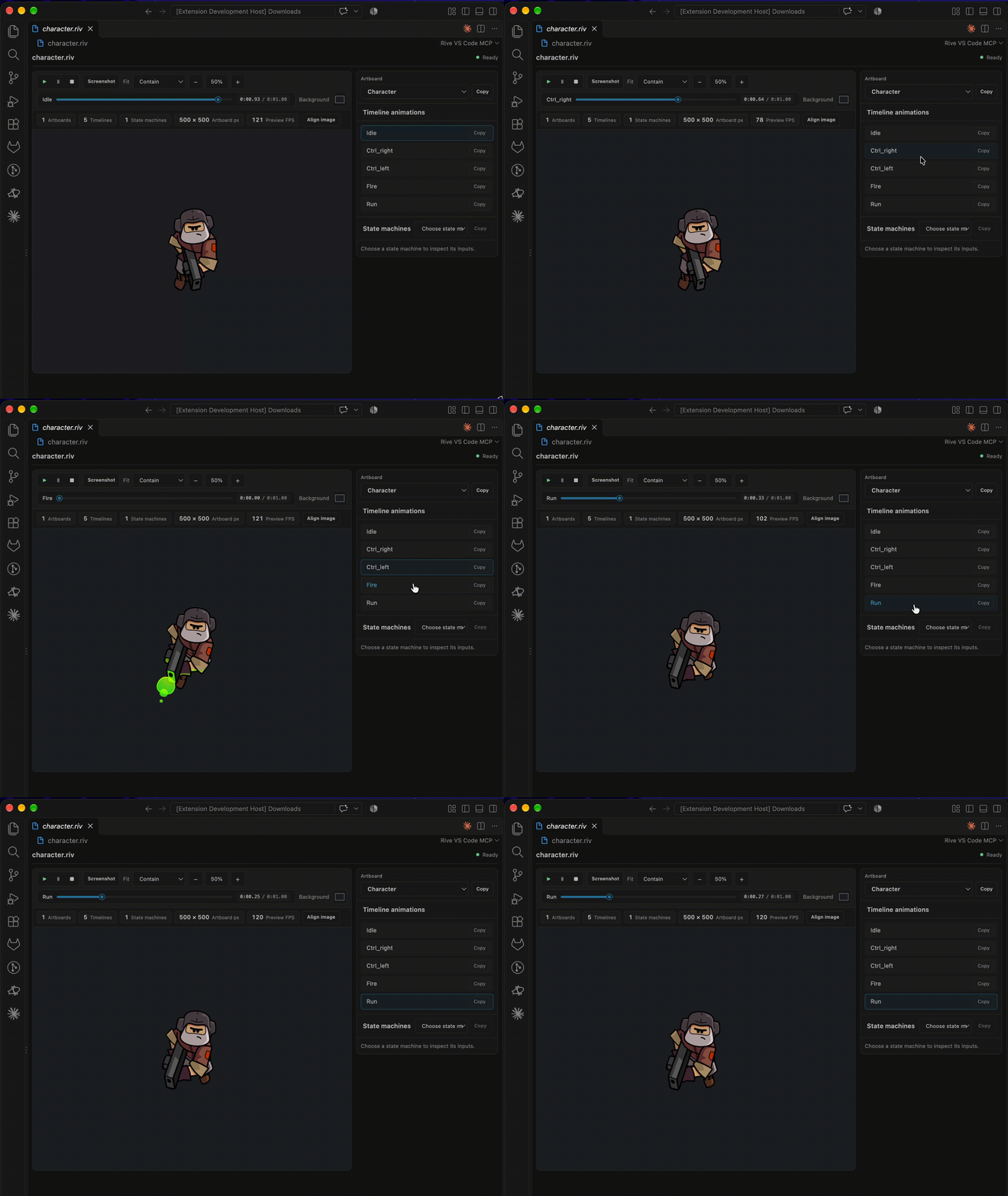
Preview and inspect Rive .riv files without leaving Visual Studio Code.
Features
- Preview Rive artboards with timeline animations and state machines.
- Select artboards and animations, play or pause playback, and scrub timelines.
- Inspect state-machine inputs and interact with supported inputs.
- Adjust fit, zoom, and preview background.
- Align an artboard over a temporary background image and copy its top-left
x/ycoordinates and scale. - Optionally inspect Rive file metadata through the
inspect_rive_fileMCP tool.
Use the preview
- Install Rive VS Code MCP from the Visual Studio Code Marketplace.
- Open a
.rivfile. If prompted, choose Rive VS Code MCP as its editor. - Use the side panel to choose an artboard or inspect animations and state machines.
- Use the preview toolbar for playback, timeline scrubbing, fit, zoom, background color and opacity, and screenshot export.
MCP server in VS Code
The extension contributes one local stdio MCP server, discovered automatically by VS Code across workspaces. Use MCP: List Servers to manage Rive MCP. The inspect_rive_file tool returns artboard dimensions, animation names and timing, state-machine names, and input names and types. Optional arguments artboardName, summary, includeAnimations, and includeStateMachines reduce payload size; full results are in structuredContent.
Enable in Cursor or another MCP client
- Run Rive VS Code MCP: Copy Global MCP Configuration from the Command Palette once.
- Paste the copied
rive-vscode-mcpentry into your MCP client's user-level/global configuration. For Cursor, use~/.cursor/mcp.json. This works across projects under your home directory.
Requirements
- Visual Studio Code 1.101 or later.
- Node.js 18 or later to run the MCP server from another client outside VS Code.
Development
npm install
npm run compile
"/Applications/Visual Studio Code.app/Contents/Resources/app/bin/code" --new-window --extensionDevelopmentPath="$PWD" "/absolute/path/to/sample.riv"
The compile command builds the preview stylesheet and TypeScript extension code.
Standalone MCP server
The extension bundles the same MCP server for automatic VS Code discovery. It is also published independently as rive-vscode-mcp-server. Run this in a terminal to add it to global MCP configs for VS Code, Cursor, Claude Code, and Claude Desktop:
npx -y rive-vscode-mcp-server
License
Reviews
No reviews yet
Be the first to review this server!
More Developer Tools MCP Servers
Rea
Freeby Morluto · Developer Tools
Reverse engineer anything from your terminal or agent with one CLI and MCP server.
Paperclip
Freeby Paperclipai · Developer Tools
Trending hip-hop artist momentum scores across four cultural dimensions.
Scrapling
Freeby D4Vinci · Developer Tools
Web scraping with stealth HTTP, real browsers, and Cloudflare bypass. CSS selectors supported.
Git
Freeby Modelcontextprotocol · Developer Tools
Read, search, and manipulate Git repositories programmatically
Toleno
Freeby Toleno · Developer Tools
Toleno Network MCP Server — Manage your Toleno mining account with Claude AI using natural language.
MCP Marketplace
Freeby mcp-marketplace · Developer Tools
Search and install MCP servers from inside your AI client.