
Server data from the Official MCP Registry
Zero-model recall over your docs: the section that answers a question, in about a millisecond.
About
Zero-model recall over your docs: the section that answers a question, in about a millisecond.
Security Report
Laika Orbit is a well-structured, open-source developer tool with no critical security vulnerabilities. The MCP server component uses standard authentication patterns and the codebase demonstrates careful attention to security practices (no hardcoded credentials, proper scoping of permissions). Minor code quality concerns around error handling and input validation in the sessions module do not materially affect the overall security posture. Supply chain analysis found 2 known vulnerabilities in dependencies (1 critical, 0 high severity). Package verification found 1 issue (1 critical, 0 high severity).
4 files analyzed · 7 issues found
Security scores are indicators to help you make informed decisions, not guarantees. Always review permissions before connecting any MCP server.
Permissions Required
This plugin requests these system permissions. Most are normal for its category.
Unverified package source
We couldn't verify that the installable package matches the reviewed source code. Proceed with caution.
What You'll Need
Set these up before or after installing:
Environment variable: BRAIN_ROOT
How to Install
Add this to your MCP configuration file:
{
  "mcpServers": {
    "io-github-laika-dynamics-ltd-laikaorbit": {
      "env": {
        "BRAIN_ROOT": "your-brain-root-here"
      },
      "args": [
        "-y",
        "laika-orbit"
      ],
      "command": "npx"
    }
  }
}Documentation
View on GitHubFrom the project's GitHub README.
Laika Orbit
A cockpit for your coding agents. Run many Claude Code chats at once. Orbit keeps them moving, puts what needs you first, and sits beside the editor you already use. Open source, and it all runs on your own Mac.
Status: macOS preview. Built and used daily on macOS, and built with itself (how). The recall engine, CLI and MCP server run anywhere Node runs; the desktop app is macOS first, Linux best effort, Windows untested.
What it does
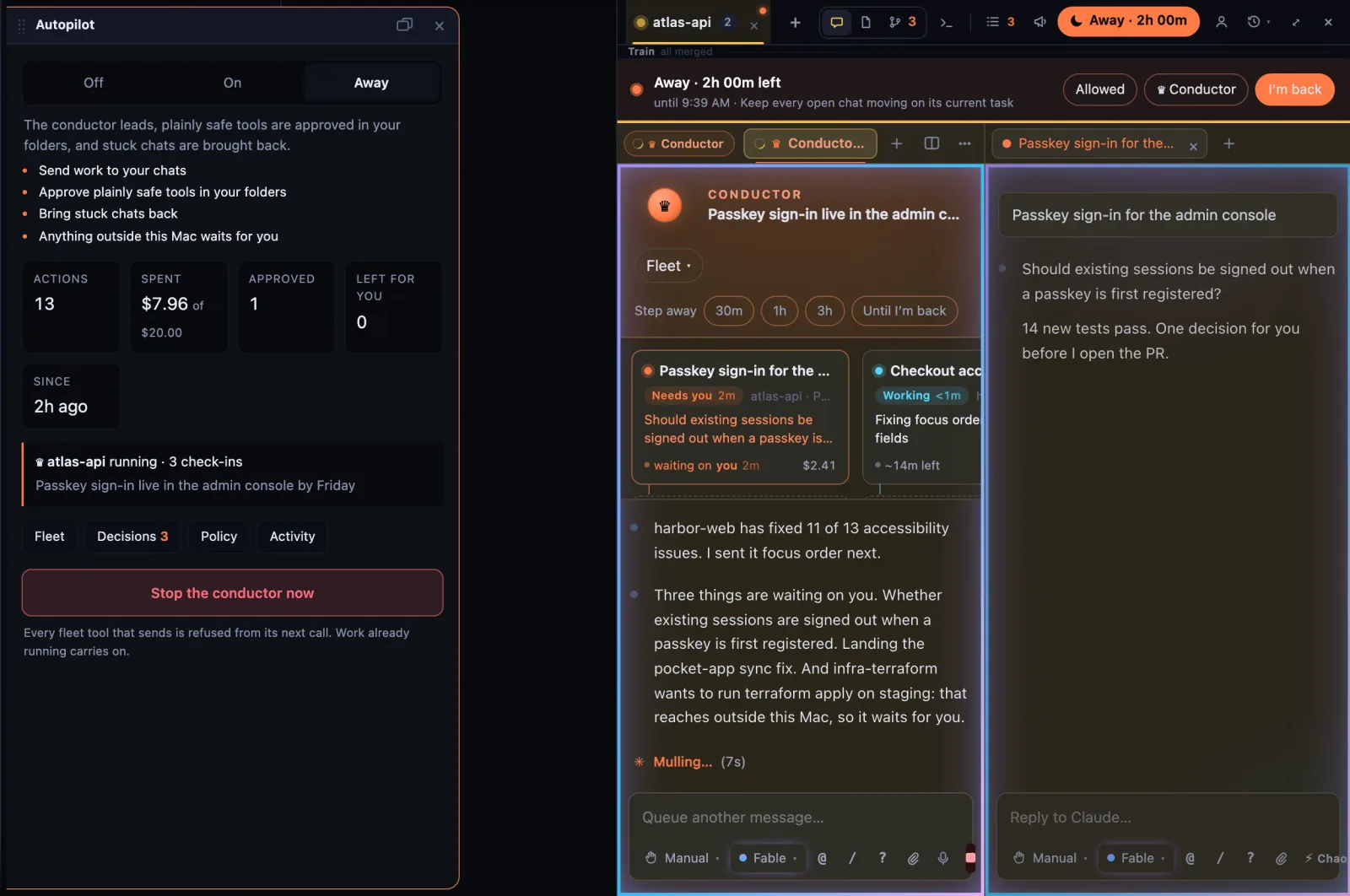
Give it a goal. It runs the fleet. A conductor chat sends each of your chats its next step. Switch to Away and it keeps them going: plainly safe steps are approved, stuck chats are brought back, and anything that reaches outside your Mac waits for you. Come back to one summary card. Away mode.
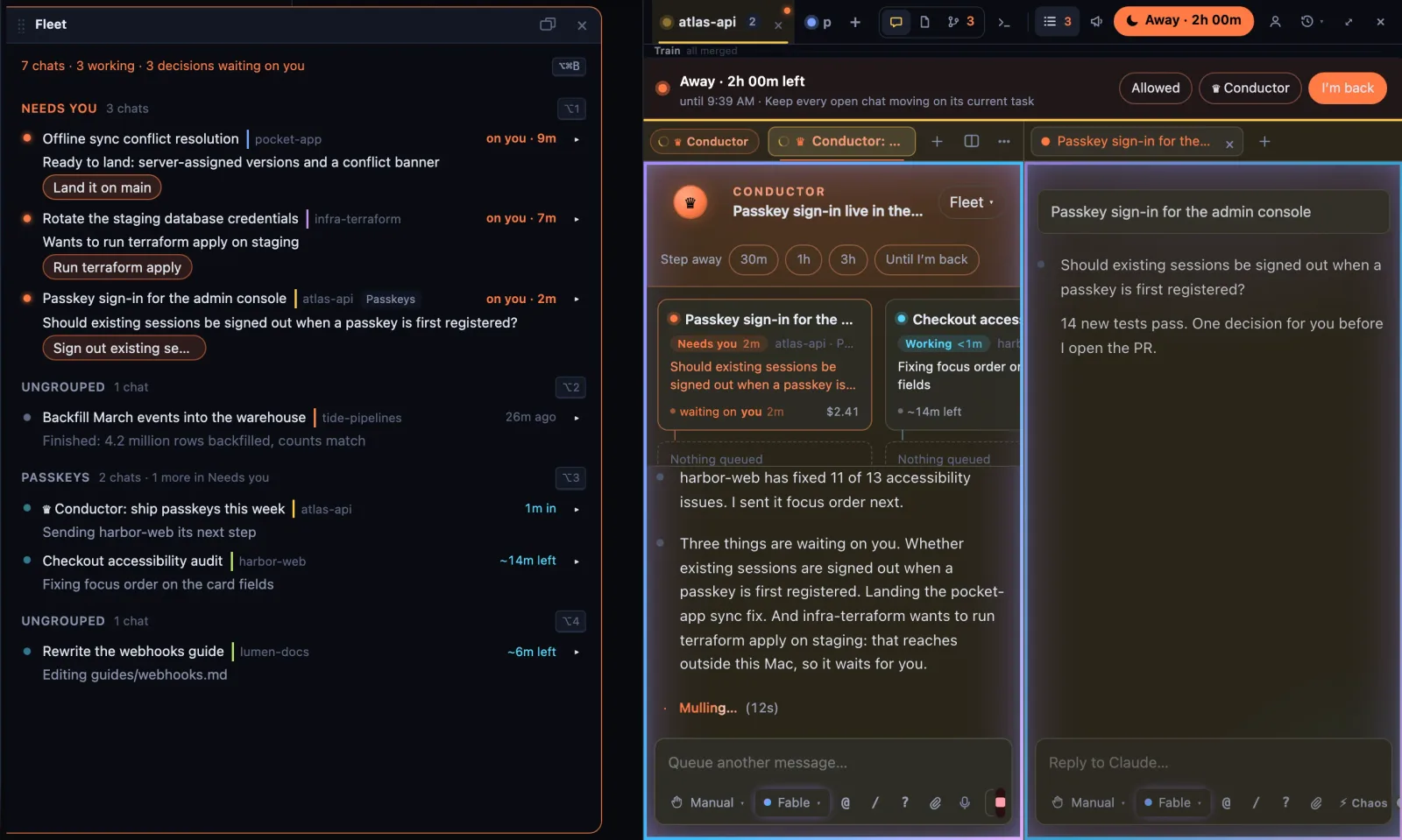
Every chat, and what each one needs. Chats run side by side, one per task, on any of your Claude accounts, and come back after a restart or a crash. The fleet board puts the ones waiting on you at the top.
Long jobs report themselves. Builds, test runs and batch jobs share one runs page, with progress, an ETA, and before/after compares. A job that goes quiet is flagged as stalled.
Work that waits its turn. A queue of next tasks that survives restarts. With autopilot on, the next item starts by itself when a chat frees up.
Heavy work goes to your other machines. Tests, builds and captures run on a Linux box under the desk and the files come back (below). Windows PCs for GPU work are in testing.
And the rest of your day in the same window: panels you dock and lay out, a real Chromium browser with a profile per account, inbox and calendar widgets, and a live map of everything you know. Hidden panels stop drawing: idle, the app went from 41% of one CPU core to 11%, and to 5.5% while you're in another window.
Finished work folds itself into main (new). Each chat shows its branch, its commits and its uncommitted files. Mark a chat's work ready and the merge train lands it on your local main once the repo's own check passes. If the check goes red, it finds which chat's work broke it, lands the rest, and sends that chat the failing output. Pushing stays with you.
Laika Orbit recall
Underneath is Laika Orbit recall, a retrieval engine that answers questions about your files
without calling a model: the exact section and the file it came from, in about a millisecond, with
97.8% fewer tokens than an agent grepping and reading whole files
(bench/RESULTS.md). It works in any Claude Code session on its own:
claude mcp add laikaorbit -- npx -y laikaorbit mcp
Requirements
- Node 22.18 or newer (runs TypeScript directly) and pnpm 10.
mise installsets up both. - macOS for the desktop app.
pdftotextfor PDF indexing:brew install poppler. - Your own Claude account for chats. Sign in from the Claude panel; it runs Claude Code's own login, and Laika Orbit never sees or stores your credentials. Until then, a demo agent runs offline so you can try the panel.
Quick start
git clone https://github.com/Laika-Dynamics-Ltd/laika-orbit.git && cd laika-orbit
mise install && pnpm install

cd packages/app && node server.mjs    # the app at http://localhost:5200
pnpm shell                            # (from the root) the same app in its own window, with real browser tabs
The first run indexes this folder only. Add your own folders (notes, projects, documents) from
the index settings (i); nothing outside the repo is read until you add it.
The engine on its own
node packages/cli/src/index.ts index                          # build the index
node packages/cli/src/index.ts recall "which TTS voice do we use"
node packages/cli/src/index.ts lint                           # router-file diagnostics
Claude Code picks up the MCP server from .mcp.json when you open this folder.
BRAIN_ROOT points any of it at another corpus:
cd packages/app && BRAIN_ROOT="$HOME/Documents" PORT=5201 node server.mjs
Configuration
Everything is optional. Copy .env.example to .env.local for the feeds:
| Calendar | CALENDAR_ICS_URLS: your calendar's secret iCal address. Several: comma-separated. |
| Inbox | GOOGLE_CLIENT_ID and GOOGLE_CLIENT_SECRET from your own Google Cloud OAuth client, then connect from the widget. The refresh token goes in the macOS Keychain. |
| Claude accounts | Added from the Claude panel, listed in brain/agents.local.json. |
| Connectors | The Claude connectors your accounts have, for the settings panel and the map: brain/connectors.local.json, as [{ "id", "name", "via", "live" }]. |
Files ending .local.json, .env.local, and the settings the app writes as you use it are
gitignored, so pulling updates never conflicts with your setup.
Privacy and security
- Local only. The server listens on
127.0.0.1and refuses requests with any otherHost, and cross-site requests that would change something are refused. There is no login, so don't expose the port. - What leaves your machine: chats go to Anthropic through Claude Code under your account; the
inbox and calendar widgets fetch from Google with the credentials you configure. After each
chat turn a short summary is written by a small model on the same account;
LAIKA_BRIEFS=0turns that off. - Chats ask before acting. New chats start in Claude Code's default permission mode; you choose when to allow more.
- Usage reporting is opt-in and anonymous. Off until you turn it on, and declining never
creates an identifier. It sends daily counts of coarse actions (
recall_run: 40) and never a path, query, file, prompt, URL or IP. Turning it off destroys the id and the queue. PRIVACY.md lists the whole payload.
Found a vulnerability? See SECURITY.md.
Other machines
Claude sessions and terminals can run on other machines on your network, so their builds and
tests don't load your Mac. pnpm node:bundle builds one archive per platform (Linux x64 and arm64
by default; darwin-arm64 and darwin-x64 on request) in tools/node-bundle/dist/. Copy one to
the machine, then tar -xzf it and run ./install.sh as the user the sessions should run as. It
bundles Node and Claude Code, installs the agent host as a user service listening on loopback only,
and lets this Mac's Laika Orbit key (~/.laika/node/) open an SSH tunnel to it and nothing else.
See tools/node-bundle/README.txt.
packages/app/offload.mjs sends a command to the least busy machine as if it ran here: it
copies the project over (rsync, without Unity's Library), runs the command there, streams the
output back, brings its result files home and exits with its code. For Unity,
offload unity -- -nographics -runTests -testResults out/tests.xml runs the project's own Unity
version and brings the results back. offload add user@host adds a machine, offload machines
shows them, offload discover lists the ones announcing themselves on the network.
How recall works
Seven steps, each a pure function with its own tests, none of them a model call:
tokenise: lowercase, strip punctuation, drop a stop list, matched on word boundaries soeveryoneandmilestonesurvive.score: sum weights across the inverted index. No file is opened yet.select: top 5 with a confidence margin; two sources come back when the result is ambiguous, and say so.read: open only the winner.sliceOf: keep the##section whose heading matches, or a window around the densest line.hop: follow at most one pointer out of that slice. Hard cap, enforced by test.buildAsk: question, evidence, one instruction. 9KB cap.
Recall quality is bounded by your router files, not the engine. brain/routers/ holds typed
pointer files that act as a curated index:
- Skills:    script-writing — full script generation
- Files:     shared/projects/C-*/script.md — in-progress scripts
- Rules:     brain/rules/feedback_au_english.md — AU spelling always
Write descriptions the way a question is phrased. Pointed at a folder with no routers, recall is a very fast filename and content search; with them, it answers.
Packages
core | The engine: indexer and the seven-step recall path. Zero runtime dependencies. |
cli | laikaorbit index · status · lint · recall · ask |
mcp | Three tools over stdio for Claude Code. |
app | The Laika Orbit app: one Node server with Vite, the core API, the Claude chat host and the feeds. |
shell | The Electron desktop app, with native browser tabs. pnpm shell; pnpm shell:app builds a macOS app into /Applications and adds it to the Dock. |
graph | The renderer's scratch package. Not shipped. |
tools/pulse-ingest | The /pulse ingest endpoint: a Cloudflare Worker and D1 schema. The only server-side piece, and optional. |
Development
pnpm typecheck && pnpm test && pnpm lint      # the gates CI runs
pnpm test:e2e                                 # browser suite (npx playwright install chromium first)
node bench/scoring.bench.mjs                  # scoring throughput
node bench/token-delta.mjs                    # the token-saving claim
See CONTRIBUTING.md. Plan and gates: PLAN.md, STACK.md;
still open: BACKLOG.md.
Licence
MIT © Laika Dynamics Limited. See LICENSE and THIRD-PARTY-NOTICES.md: the Chrome extension support uses a GPL-3.0 library, and chats run Anthropic's Claude Agent SDK under Anthropic's terms.
Laika Orbit runs Claude Code. It is not made by, affiliated with, or endorsed by Anthropic.
Reviews
No reviews yet
Be the first to review this server!
More Developer Tools MCP Servers
Git
Freeby Modelcontextprotocol · Developer Tools
Read, search, and manipulate Git repositories programmatically
Fetch
Freeby Modelcontextprotocol · Developer Tools
Web content fetching and conversion for efficient LLM usage
Paperclip
Freeby Paperclipai · Developer Tools
Trending hip-hop artist momentum scores across four cultural dimensions.
Toleno
Freeby Toleno · Developer Tools
Toleno Network MCP Server — Manage your Toleno mining account with Claude AI using natural language.
mcp-creator-python
Freeby mcp-marketplace · Developer Tools
Create, build, and publish Python MCP servers to PyPI — conversationally.
MCP Marketplace
Freeby mcp-marketplace · Developer Tools
Search and install MCP servers from inside your AI client.