
Server data from the Official MCP Registry
Selenium MCP: plan, generate and heal tests; pytest by default, any language; Selenium Grid
About
Selenium MCP: plan, generate and heal tests; pytest by default, any language; Selenium Grid
Security Report
Valid MCP server (1 strong, 1 medium validity signals). 1 known CVE in dependencies Package registry verified. Imported from the Official MCP Registry.
12 files analyzed · 2 issues found
Security scores are indicators to help you make informed decisions, not guarantees. Always review permissions before connecting any MCP server.
Permissions Required
This plugin requests these system permissions. Most are normal for its category.
What You'll Need
Set these up before or after installing:
Environment variable: SELENIUM_HEADLESS
Environment variable: SELENIUM_MCP_TOOLSETS
Environment variable: SELENIUM_GRID_URL
Environment variable: SELENIUM_ATTACH_CDP
Environment variable: SELENIUM_MCP_OUTPUT_MODE
How to Install
Add this to your MCP configuration file:
{
  "mcpServers": {
    "selenium-ai-agent": {
      "command": "npx",
      "args": [
        "-y",
        "selenium-ai-agent@3.5.0"
      ],
      "env": {
        "SELENIUM_GRID_URL": "your-selenium-grid-url-here",
        "SELENIUM_HEADLESS": "your-selenium-headless-here",
        "SELENIUM_ATTACH_CDP": "your-selenium-attach-cdp-here",
        "SELENIUM_MCP_TOOLSETS": "your-selenium-mcp-toolsets-here",
        "SELENIUM_MCP_OUTPUT_MODE": "your-selenium-mcp-output-mode-here"
      }
    }
  }
}
Some servers take additional arguments. See the repository for details.
Documentation
View on GitHubFrom the project's GitHub README.
Selenium AI Agent




AI test agents for Selenium, like Playwright's: plan, generate and heal tests from a prompt.
Selenium AI Agent (selenium-ai-agent on npm) is an MCP server that lets your AI assistant drive a real browser through Selenium WebDriver and build a test suite for you.
- Test agents: a planner explores your app and writes a structured test plan, a generator turns it into tests checked live in the browser, and a healer runs and repairs them.
- Python + pytest by default, and any other language on request: Java, C#, JavaScript/TypeScript, WebdriverIO, Robot Framework.
- Works in your AI client: Claude Code, Claude Desktop, VS Code (GitHub Copilot) and Cursor.
- Built in Node.js: run it with
npx -y selenium-ai-agent; the matching browser driver is downloaded for you. - Scales with Selenium Grid: parallel sessions on Chrome, Firefox and Edge.


Contents
- Video tutorials
- Quick start
- How the test agents work
- Example prompts
- Languages and frameworks
- Parallel testing with Selenium Grid
- Configuration
- Tools
- Documentation
- Contributing
Video Tutorials
Short demos with a voice-over, on YouTube:
| Planner: from one prompt to a test plan | Generator: from the plan to running pytest tests |
|---|---|
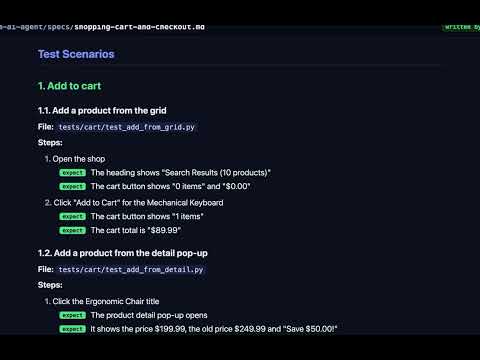 | 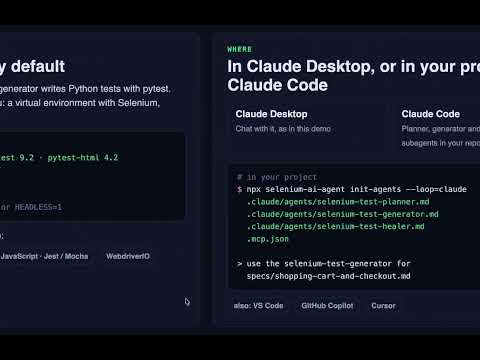 |
The planner explores a web shop and writes specs/shopping-cart-and-checkout.md: 2 suites, 8 tests, 16 steps. (2:09) | The generator writes one pytest file per plan test, runs them, and shows the HTML report, including a real bug it found. (1:44) |
More tutorials: youtube.com/@ralphvanderhorst5193 · Practice site used in the demos: practiceautomatedtesting.com
Quick Start
You need Node.js 18+ and a browser (Chrome, Firefox or Edge).
1. Add the server to your AI client
Claude Code:
claude mcp add selenium-mcp -- npx -y selenium-ai-agent
Claude Desktop, Cursor, Windsurf or Junie in IntelliJ IDEA / PyCharm (writes the config for you):
npx selenium-ai-agent install claude-desktop # or: cursor, windsurf, junie
Claude Desktop (~/Library/Application Support/Claude/claude_desktop_config.json) and Cursor (.cursor/mcp.json):
{
  "mcpServers": {
    "selenium-mcp": {
      "command": "npx",
      "args": ["-y", "selenium-ai-agent"]
    }
  }
}
VS Code / GitHub Copilot (.vscode/mcp.json):
{
  "servers": {
    "selenium-mcp": {
      "command": "npx",
      "args": ["-y", "selenium-ai-agent"],
      "type": "stdio"
    }
  }
}
IntelliJ IDEA / PyCharm with AI Assistant: Settings → Tools → AI Assistant → Model Context Protocol (MCP) → Add → As JSON, and paste the mcpServers JSON above. With GitHub Copilot in a JetBrains IDE: Settings → Tools → GitHub Copilot → Model Context Protocol (MCP) → Configure, and add the servers JSON above.
See MCP Client Setup and the package README for all clients, including Cline and Windsurf.
2. Install the test agents in your project (optional)
npx selenium-ai-agent init-agents --loop=claude    # Claude Code subagents
npx selenium-ai-agent init-agents --loop=vscode    # VS Code chat modes
npx selenium-ai-agent init-agents --loop=copilot   # GitHub Copilot coding agent
npx selenium-ai-agent init-agents --loop=cursor    # Cursor rules
Add --with-rules to also put Selenium's rules for AI agents in your project's CLAUDE.md, .cursor/rules/selenium.mdc or .github/copilot-instructions.md, so every AI tool you use writes modern Selenium code.
3. Ask for tests
Explore the shopping section of https://practiceautomatedtesting.com and create a test plan
for the shopping cart and checkout.
Then:
Generate Selenium tests from specs/shopping-cart-and-checkout.md, run them, and show me the test report.
Something not starting? Run npx selenium-ai-agent doctor.
How the Test Agents Work
┌─────────────────┐    ┌─────────────┐    ┌─────────────┐    ┌────────────┐
│    Analyzer     │───▶│   Planner   │───▶│  Generator  │───▶│   Healer   │
│  (risk profile) │    │ (test plan) │    │ (test code) │    │(fix tests) │
└─────────────────┘    └─────────────┘    └─────────────┘    └────────────┘
                             │                  │
                        human review       human review
| Agent | What it does | Output |
|---|---|---|
| Analyzer (optional) | Scans the product and builds a risk profile, so testing starts where it matters most. | Risk profile |
| Planner | Explores the app in a real browser, takes an inventory of every page and pop-up, and writes a plan in the same structure as Playwright's planner: suites → tests → steps with expect. It adds the elements found (with stable locators) and the gaps. | specs/<feature>.md |
| Generator | Writes one test file per plan test, with an assertion for every expect, after checking each value live in the browser. Sets up the project (for Python: a virtual environment with Selenium and pytest) if needed. | Test files, a run command |
| Healer | Runs the tests, debugs failures, inspects the page and fixes broken locators or waits, then runs them again. | Passing tests, or a clear bug report |
| Migrator | Upgrades an existing suite to current Selenium 4: scans it for Selenium 3 patterns, sleeps and mixed waits (selenium_rules_check), runs it as a baseline, rewrites one file at a time and proves each still passes. | Migrated tests, before/after results per file |
The generator and healer follow Selenium's guide for AI agents (and WebdriverIO's for WebdriverIO): they read the current docs from llms.txt with get_selenium_docs, and refuse to write a test with a sleep, a driver path, DesiredCapabilities or a Selenium 3 API.
You review the plan before code is generated, and the code before it is committed. The Agent Workflow guide covers each stage in detail.
Example Prompts
| Goal | Prompt |
|---|---|
| Try it | Go to https://practiceautomatedtesting.com and take a screenshot |
| Test plan | Explore the checkout flow at https://practiceautomatedtesting.com and create a test plan |
| Python tests (default) | Generate tests from specs/checkout-flow.md |
| Another language | Generate WebdriverIO tests for the login flow at https://practiceautomatedtesting.com |
| Fix failures | Run my tests and fix any failures |
| Parallel (Grid) | Explore https://practiceautomatedtesting.com in parallel using 4 browsers |
Example Chats shows each prompt with the tools it calls and the result, including generated code for pytest, WebdriverIO, Playwright and Robot Framework.
Languages and Frameworks
If you don't name one, the generator uses your project's own stack: Java with JUnit 5 or TestNG (from pom.xml or build.gradle), Python with pytest or unittest (requirements.txt, pyproject.toml, pytest.ini), C# with NUnit, xUnit or MSTest (*.csproj), JavaScript/TypeScript (package.json) or Robot Framework (*.robot). In an empty project it uses Python with pytest.
| Language | Frameworks (framework value) |
|---|---|
| Python | pytest (selenium-python-pytest, default), unittest (selenium-python-unittest), Playwright (playwright-python), Robot Framework (robot-framework) |
| Java | Maven (selenium-java-maven), Gradle (selenium-java-gradle) |
| C# | NUnit (selenium-csharp-nunit), MSTest (selenium-csharp-mstest), xUnit (selenium-csharp-xunit) |
| JavaScript / TypeScript | WebdriverIO (webdriverio-ts, webdriverio-js), Mocha (selenium-js-mocha), Jest (selenium-js-jest), Playwright (playwright-js) |
Conventions per framework are in Framework Standards.
Parallel Testing with Selenium Grid
Everything above works with a local browser. Selenium Grid adds parallel sessions: explore or test many parts of an application at once, across Chrome, Firefox and Edge.
| Playwright MCP | Selenium AI Agent | |
|---|---|---|
| Parallelism | Single browser, shared context | Many sessions on Grid nodes |
| Scaling | Limited by one browser | Add nodes as needed |
| Isolation | Shared state between clients | Full isolation per session |
| Multi-browser | One at a time | Chrome, Firefox and Edge at the same time |
1. Start the Grid
git clone https://github.com/learn-automated-testing/selenium_agent.git
cd selenium_agent/selenium-grid
docker-compose up -d          # Grid console: http://localhost:4444

docker-compose up -d --scale chrome-node=10   # scale up any time
The included docker-compose.yml starts a hub, 4 Chrome nodes and 1 Firefox node.
2. Point the server at it
{
  "mcpServers": {
    "selenium-mcp": {
      "command": "npx",
      "args": ["-y", "selenium-ai-agent"],
      "env": { "SELENIUM_GRID_URL": "http://localhost:4444" }
    }
  }
}
3. Explore in parallel
Explore https://practiceautomatedtesting.com in parallel: the homepage, products, cart and checkout at the same time.
parallel_explore starts one session per section, exploration_merge combines the results into one site map, and planner_generate_plan writes the test plan.
Configuration
| Variable | Default | Description |
|---|---|---|
SELENIUM_GRID_URL | — | Grid hub URL; enables the parallel tools |
SELENIUM_HEADLESS | false | Run the browser headless |
SELENIUM_MCP_TOOLSETS | all | Tool groups to load, e.g. core,generator,healer |
SELENIUM_STEALTH | false | Mask basic automation flags (does not get past advanced bot protection) |
SE_AVOID_STATS | — | true disables Selenium usage statistics |
All variables, CLI flags, driver and proxy setup, and troubleshooting are in the package README.
Tools
77 tools, 63 without Grid.
Test agents
| Agent | Tools |
|---|---|
| Planner | planner_setup_page, planner_explore_page, planner_save_plan |
| Generator | generator_setup_page, generator_read_log, generator_write_test, generator_write_seed, generator_save_spec, generator_read_spec |
| Healer | healer_run_tests, healer_debug_test, healer_fix_test, healer_inspect_page, browser_generate_locator, selenium_rules_check |
| Analyzer | analyzer_setup, analyzer_import_context, analyzer_scan_product, analyzer_build_risk_profile, analyzer_save_profile, analyzer_generate_documentation |
Browser
| Group | Tools |
|---|---|
| Navigation | navigate_to · go_back · go_forward · refresh_page |
| Page analysis | capture_page · take_screenshot |
| Elements | click_element · hover_element · select_option · drag_drop |
| Input | input_text · key_press · file_upload |
| Mouse | mouse_move · mouse_click · mouse_drag |
| Verification | verify_element_visible · verify_text_visible · verify_value · verify_list_visible |
| Browser | wait_for · execute_javascript · dialog_handle · console_logs · network_monitor · resize_window · pdf_generate |
| Tabs | tab_list · tab_select · tab_new · tab_close |
| Session | close_browser · reset_session · set_stealth_mode |
| Recording | start_recording · stop_recording · recording_status · clear_recording |
| Batch | batch_execute |
| Docs | get_selenium_docs (current Selenium / WebdriverIO docs from their llms.txt) |
Grid and parallel execution
| Tool | Description |
|---|---|
grid_status | Check Grid health, nodes and capacity |
grid_start / grid_stop | Start or stop the Docker Compose Grid |
grid_scale | Scale Grid nodes up or down |
session_create / session_select / session_list | Create, switch and list browser sessions on the Grid |
session_destroy / session_destroy_all | Clean up one or all sessions |
parallel_explore | Explore several URLs at the same time |
parallel_execute | Run tasks in parallel across sessions |
exploration_merge / exploration_diff | Combine or compare exploration results |
planner_generate_plan | Generate a test plan from an exploration |
Documentation
- Video tutorials: planner and generator demos on YouTube
- MCP Client Setup: Claude Code, Claude Desktop, Cursor, Copilot, Cline, Windsurf
- Example Chats: prompts with the tools they call and the results
- Agent Workflow: the end-to-end testing pipeline
- Framework Standards: code generation conventions
- Deployment Guide: production deployment
- Package README: all tools, options and troubleshooting
selenium_agent/
├── selenium-mcp-server/     # TypeScript MCP server (npm: selenium-ai-agent)
│   └── src/
│       ├── server.ts        # MCP protocol handler
│       ├── context.ts       # Browser session management
│       ├── grid/            # Selenium Grid integration
│       └── tools/           # navigation, elements, grid, agents, analyzer
├── selenium-grid/
│   └── docker-compose.yml   # Selenium Grid setup
├── agents/                  # Agent prompt definitions
└── docs/                    # Guides and diagrams
Contributing
Contributions are welcome:
- Fork the repository
- Create a feature branch (
git checkout -b feature/amazing-feature) - Commit your changes (
git commit -m 'Add amazing feature') - Push the branch (
git push origin feature/amazing-feature) - Open a pull request
License
MIT — see LICENSE.
Acknowledgments
- Selenium: the browser automation framework
- Model Context Protocol: the AI agent communication standard
- Anthropic: for Claude and the MCP specification
- Playwright: whose test agents inspired the planner, generator and healer
Reviews
No reviews yet
Be the first to review this server!
More Search & Web MCP Servers
Browser Use
Freeby Browser Use · Search & Web
Browser agents and stealth cloud browsers for AI: run web tasks, fill forms, extract data.
Toleno
Freeby Toleno · Developer Tools
Toleno Network MCP Server — Manage your Toleno mining account with Claude AI using natural language.
MCP Marketplace
Freeby mcp-marketplace · Developer Tools
Search and install MCP servers from inside your AI client.
mcp-creator-python
Freeby mcp-marketplace · Developer Tools
Create, build, and publish Python MCP servers to PyPI — conversationally.
by Lharries · Communication
Read, search, and send WhatsApp messages through your AI assistant
FinAgent
Freeby mcp-marketplace · Finance
Free stock data and market news for any MCP-compatible AI assistant.